
Overview
Siemens 6ES7131-1BL01-0XB0 Migration-Ready DI for ET200L: Legacy System Retrofit & Compatibility Upgrade
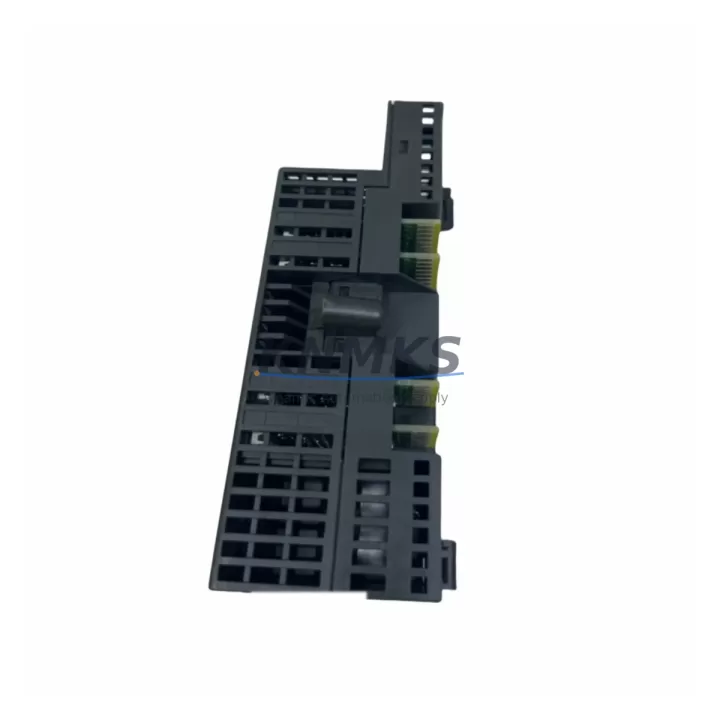
The Siemens 6ES7131-1BL01-0XB0 is a 16-channel 24 VDC digital input module designed for the ET 200L distributed I/O system. As legacy ET 200L installations approach end-of-life and spare parts become increasingly scarce, this module serves as a critical migration-ready replacement for aging control architectures. Whether you are maintaining an existing ET 200L rack or planning a phased upgrade toward a modern SIMATIC ET 200SP or ET 200S platform, the 6ES7131-1BL01-0XB0 provides a reliable, wiring-compatible bridge that minimizes engineering rework and reduces total retrofit cost.
In retrofit projects, engineers frequently encounter the challenge of sourcing discontinued modules without disrupting active production lines. The 6ES7131-1BL01-0XB0 addresses this directly: its terminal block layout and 24 VDC signal compatibility allow direct substitution into existing ET 200L backplane slots without rewiring field cables. Before installation, technicians should verify the power supply module — typically a 6ES7138-1AA00-0XB0 or equivalent — can sustain the additional current draw when all 16 channels are simultaneously active. Confirming available backplane current budget is a mandatory pre-commissioning step that is often overlooked during rapid replacement scenarios.
When integrating this module into a SIMATIC S7-300 or S7-400 controlled system via PROFIBUS DP, the module address assignment must be reconfigured in STEP 7 or TIA Portal to match the slot position within the ET 200L station. If the original hardware configuration file is unavailable, engineers should perform a hardware scan and compare the GSD file version to ensure the DP master recognizes the new module correctly. Mismatched GSD entries are a common source of commissioning delays in legacy system replacements.
For installations where the ET 200L communicates through a CP 342-5 PROFIBUS communications processor or a similar DP interface module, verifying the baud rate setting and bus termination resistor status at both ends of the PROFIBUS segment is essential before powering up the replacement module. In multi-drop PROFIBUS topologies, an incorrectly terminated segment can cause intermittent communication faults that are difficult to diagnose without a bus analyzer.
Panel space is another practical consideration. The 6ES7131-1BL01-0XB0 occupies a standard ET 200L slot width. If the control cabinet has been modified since original installation — for example, to accommodate an additional 6ES7132-1BL01-0XB0 digital output module or a 6ES7134-1GB01-0XB0 analog input module — the available rail space should be measured before ordering to confirm the replacement fits without requiring DIN rail extension or cabinet modification.
HMI screen updates are frequently required after a module swap. If the existing SIMATIC HMI panel references specific I/O addresses tied to the original module’s slot configuration, those tag addresses must be updated in WinCC or ProTool before the system is returned to automatic mode. Failing to synchronize HMI tags with the updated hardware configuration is a leading cause of post-retrofit alarm floods and operator confusion.
Firmware compatibility should also be confirmed. While the 6ES7131-1BL01-0XB0 does not carry user-programmable firmware in the traditional sense, the ET 200L interface module — such as the 6ES7151-1AA02-0AB0 — must be running a firmware version that supports the specific module combination in use. Older interface module firmware versions may not correctly enumerate all module types in a mixed-generation ET 200L station.
All units supplied by KNMKS are tested prior to shipment using a dedicated I/O verification bench that simulates live 24 VDC field signals across all 16 input channels. Each module is verified for correct LED status indication, channel isolation integrity, and PROFIBUS DP communication handshake before packaging. Stock is maintained to support urgent replacement orders, and standard lead times are confirmed at the time of inquiry.
Migration Compatibility Table
| Parameter | 6ES7131-1BL01-0XB0 (This Module) | Retrofit Notes |
|---|---|---|
| Input Channels | 16 × 24 VDC Digital Input | Direct replacement for same-channel-count legacy DI modules in ET 200L |
| Backplane Interface | ET 200L internal bus | Slot-compatible with standard ET 200L rack; verify slot position before address assignment |
| Communication Protocol | PROFIBUS DP (via ET 200L IM) | Confirm GSD file version in STEP 7 / TIA Portal matches installed IM firmware |
| Terminal Wiring | Screw-type terminal block, 0.5–1.5 mm² | Existing field wiring can be reused; no rewiring required for standard 24 VDC sensors |
| Power Consumption | Refer to datasheet (typ. <100 mA at 5 VDC backplane) | Verify PS module current budget before installation, especially in fully populated racks |
| Installation Space | Standard ET 200L slot width | Measure available DIN rail space if cabinet has been modified since original build |
| Firmware Dependency | None (module-level); IM firmware must be compatible | Update ET 200L interface module firmware if running pre-2010 versions |
| Replacement Path | ET 200L → ET 200SP (long-term migration) | For full platform migration, pair with SIMATIC ET 200SP BaseUnit and new I/O modules |
| Support terms | support terms confirmed by quotation — all units pre-tested before shipment | |
Retrofit Planning for Existing Automation Systems
A successful retrofit begins with a complete audit of the existing ET 200L station. Document every module currently installed — including any 6ES7132-1BL01-0XB0 digital output modules, 6ES7134-1GB01-0XB0 analog input modules, and the interface module model and firmware version. This inventory forms the baseline for your hardware configuration file in STEP 7 or TIA Portal and prevents address conflicts when the replacement 6ES7131-1BL01-0XB0 is inserted.
Power distribution within the control cabinet deserves particular attention. If the cabinet houses both the ET 200L station and a SIMATIC S7-300 CPU rack sharing a common 24 VDC power supply, the additional load from newly activated input channels must be factored into the supply’s derating curve — especially in high-ambient-temperature environments. In some cases, adding a dedicated 6EP1332-1SH52 SITOP power supply for the ET 200L station is the most reliable way to isolate field-side power from the CPU rack.
Signal isolation is another consideration when replacing modules in mixed-voltage environments. If some field devices operate at 120 VAC or 230 VAC and signal isolators are used to interface them to the 24 VDC ET 200L inputs, verify that the isolator output characteristics — particularly response time and leakage current — remain within the input filter time settings configured for the 6ES7131-1BL01-0XB0. Mismatched filter times can cause missed pulses on high-frequency digital signals such as encoder outputs or flow meter pulses.
For systems where a SIMATIC programming cable (such as a PC Adapter USB or CP 5611 card) is used to connect the engineering workstation to the PROFIBUS segment, ensure the cable driver version is compatible with the operating system on the retrofit engineering laptop. Driver incompatibilities between legacy programming cables and modern Windows environments are a frequently underestimated source of commissioning delays.
Downtime Control During System Migration
Minimizing production downtime during a module replacement requires a structured approach. Before removing the original module, export the current hardware configuration from STEP 7 or TIA Portal and save a timestamped backup of the CPU program, including all data blocks, function blocks, and organization blocks. This backup is your recovery baseline if the replacement module triggers unexpected diagnostic faults during initial power-up.
Where possible, perform the physical module swap during a planned maintenance window rather than during an emergency breakdown. Pre-stage the replacement 6ES7131-1BL01-0XB0 alongside the updated hardware configuration file so that the engineering workstation is ready to download immediately after the module is seated and the rack is powered. This preparation typically reduces the actual control system downtime to under 30 minutes for a single-module replacement in a well-documented ET 200L station.
After the download, perform a systematic I/O force test: force each of the 16 input channels individually from the STEP 7 variable table and confirm the corresponding field device response and HMI tag update. This channel-by-channel verification catches wiring transpositions and address mapping errors before the system is released to automatic operation. Document the test results and retain them as part of the retrofit completion record.
If the system cannot be taken fully offline, consider a partial migration strategy: replace the module during a shift changeover, keep the CPU in STOP mode for the minimum time required to download the updated configuration, and use the CPU’s warm restart capability to resume program execution from a defined safe state. Coordinate with the process control team to ensure that any interlocks dependent on the affected input channels are manually supervised during the transition period.
Retrofit Support FAQ
Q: Is the 6ES7131-1BL01-0XB0 a direct drop-in replacement for other ET 200L 16-channel DI modules?
A: Yes, for modules with the same channel count and 24 VDC input specification within the ET 200L family. Always verify the hardware configuration in STEP 7 or TIA Portal after replacement to confirm the module is correctly recognized at its assigned slot address.
Q: Do I need to rewire the terminal block when replacing the module?
A: In most cases, no. The 6ES7131-1BL01-0XB0 uses the same screw-type terminal block layout as other ET 200L DI modules. Existing 24 VDC field wiring can typically be reused without modification. However, always verify terminal assignments against the original wiring diagram before powering up.
Q: What pre-shipment testing does KNMKS perform on this module?
A: Every unit is tested on a dedicated I/O verification bench that applies live 24 VDC signals to all 16 input channels, confirms correct LED indication, verifies channel isolation, and validates PROFIBUS DP communication handshake. A support terms confirmed by quotation is included with every unit.
Q: Can this module be used in a TIA Portal project targeting an ET 200SP migration?
A: The 6ES7131-1BL01-0XB0 is an ET 200L module and is not directly compatible with ET 200SP hardware. However, it can be used as an interim replacement to maintain the existing ET 200L station while a phased migration to ET 200SP is planned. KNMKS can advise on equivalent ET 200SP I/O modules for the long-term upgrade path.
© 2026 KNMKS. All rights reserved.
Original Source: https://knmks.com
Contact: admin@knmks.com | +86 18359268345
Product Identification
- Brand / Ecosystem
-
Siemens
Siemens - Model / Series
-
6ES7131-1BL01-0XB0
SIMATIC Series - Product Family
- PLCs & Controllers
- Availability Status
- Available on request after model and quantity confirmation
- Inquiry Type
- B2B RFQ, replacement inquiry and project spare-part request
- Pre-Quote Check
- Exact SKU, brand, series, quantity, nameplate photos and destination country are checked before quotation
System Path
Where this product fits in the KNMKS automation structure.
Specification & Inquiry Focus
- Control platform
- PLC, PAC and modular controllers
- Common needs
- CPU, rack, power and I/O expansion
- Project support
- Replacement, cabinet build and maintenance
Buyer Confirmation
Information KNMKS checks before replying.
- Exact model
- 6ES7131-1BL01-0XB0
- Brand / ecosystem
- Siemens
- Product family
- PLCs & Controllers
- Application note
- Replacement, maintenance, project build or spare-part list
- Useful photos
- Nameplate, installed unit, cabinet layout or connector side
- Delivery details
- Quantity, destination country and target schedule
Document Support
Files and notes can be confirmed during quotation.
- Product photos or nameplate confirmation when available
- Packing and delivery notes before quotation confirmation
- Support scope and delivery terms confirmed per inquiry
- Export document coordination for qualified B2B requests
Inquiry Support
- Model cross-checking before quotation
- CPU, power, rack and expansion module matching
- Support for replacement and project inquiry
What to Send Us
- Brand and exact model number: Siemens 6ES7131-1BL01-0XB0
- Quantity and required delivery time
- Application, replacement requirement or nameplate photo
- Destination country and shipping preference
RFQ Preparation
This is a product inquiry page built for RFQ communication.
Fast Model Check
Send this model to KNMKS for confirmation.
Include quantity, destination country and photos if this is a maintenance replacement. The inquiry will be saved with a reference number after submission.
Brand & Compatibility Note
KNMKS displays automation product information for well-known industrial brand ecosystems and compatible replacement references. Brand names are used for product identification and compatibility reference only; final availability and commercial terms are confirmed per quotation.
 Manufacturing
 Machine Tools
 Packaging
 Energy & Power



 HMI & Displays
 Servo Systems
 Variable Frequency Drives
 Sensors