
Overview
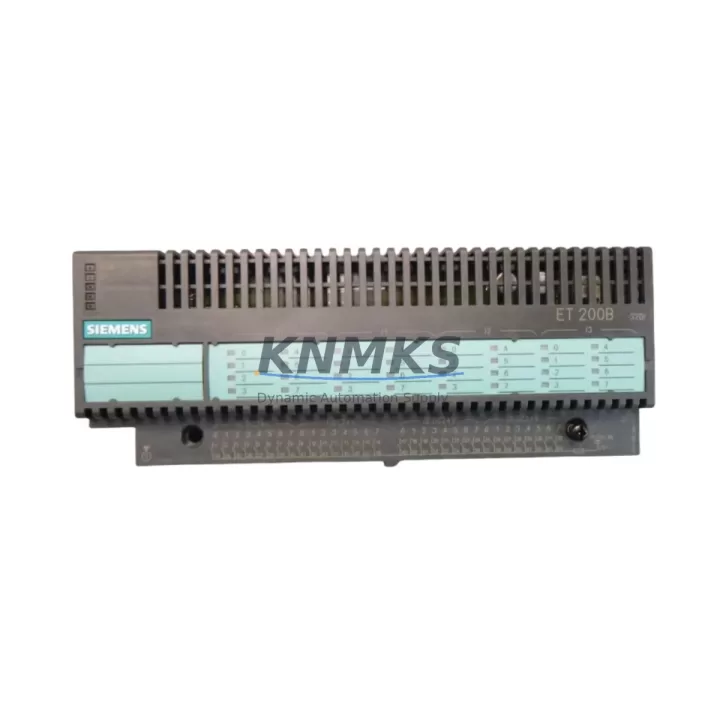
Siemens 6ES7131-0BL00-0XB0 Maintenance-Proven Spare Part for Factory Uptime
The Siemens 6ES7131-0BL00-0XB0 is a 32-channel 24 VDC digital input module designed for the SIMATIC ET 200L distributed I/O system. As a field-proven component in process automation, discrete manufacturing, and utility control environments, this module serves as a critical interface between field sensors and the SIMATIC S7 PLC backbone. Maintaining a verified stock of the 6ES7131-0BL00-0XB0 is a fundamental requirement for any maintenance team operating ET 200L-based control cabinets — particularly in facilities where unplanned downtime carries significant production and safety costs.
Every unit supplied is sourced as an original Siemens spare, subjected to pre-shipment functional testing, and dispatched with a support terms confirmed by quotation. Multi-region stock availability supports emergency replacement timelines, ensuring that a confirmed order can be fulfilled and shipped within the same business day where stock permits.
Spare Maintenance Table
| SKU / Part Number | 6ES7131-0BL00-0XB0 |
| Brand | Siemens |
| Series | SIMATIC ET 200L |
| Module Type | Digital Input Module |
| Number of Channels | 32 DI |
| Input Voltage | 24 VDC |
| Signal Standard | IEC 61131-2 Type 1 / Type 3 |
| Backplane Interface | ET 200L terminal block / bus connector |
| Compatible Controllers | SIMATIC S7-300, S7-400 (via IM 151 interface module) |
| Operating Temperature | 0 °C to +60 °C |
| Protection Rating | IP20 |
| Mounting | DIN rail, ET 200L terminal block assembly |
| Country of Origin | Germany |
| Condition | Original Siemens — New or Tested Refurbished |
| Pre-Shipment Testing | Yes — functional verification before dispatch |
| Support terms | 12 Months |
| Dispatch | Global — same-day or next-business-day where stock confirmed |
Maintenance Planning for Continuous Operation
When a 6ES7131-0BL00-0XB0 digital input module is flagged during a routine control cabinet inspection or fault isolation procedure, the replacement scope rarely ends with the module itself. Maintenance engineers working on ET 200L stations should treat the module swap as an opportunity to audit the surrounding electrical circuit and associated components.
Begin with the 24 VDC field power supply feeding the input channels. A degraded or undersized power supply — such as a Siemens SITOP PSU100S or equivalent 24 VDC regulated rail — can cause intermittent input signal loss that mimics module failure. Verify output voltage stability under load before condemning the 6ES7131-0BL00-0XB0.
Inspect the terminal block assembly and field wiring connected to the 32 input channels. Loose terminations, corroded contacts, or damaged cable shields on sensor cables are a frequent root cause of false input states. The ET 200L terminal block is an integrated assembly; if the terminal block shows mechanical wear or burn marks, plan for a combined replacement of the terminal block alongside the input module.
Review the IM 151 interface module that connects the ET 200L station to the PROFIBUS DP or MPI network. A failing IM 151 can generate diagnostic alarms that are incorrectly attributed to the input module. Confirm that the interface module’s bus connector is seated correctly and that PROFIBUS termination resistors are properly configured at both ends of the segment.
For facilities running mixed ET 200L and ET 200M stations in the same control cabinet, cross-check the 6ES7138-4CA01-0AA0 power module supplying the ET 200L bus. An overloaded or failing power module will cause cascading faults across multiple I/O modules. Fuse integrity on the 24 VDC distribution rail should also be verified — blown or weakened fuses are a common finding during annual shutdown inspections.
Where the ET 200L station interfaces with proximity sensors, photoelectric sensors, or limit switches, confirm that sensor output current ratings are within the module’s input current sink specification. Sensors drawing excessive current or exhibiting leakage current above the module’s OFF-state threshold will generate persistent false input signals. Signal isolators or input signal conditioners may be required in high-noise environments or where long cable runs are involved.
Procurement engineers should note that the 6ES7131-0BL00-0XB0 is a legacy ET 200L component. Establishing a minimum stock level of two to four units per active ET 200L station is a recognized best practice for facilities that cannot tolerate extended lead times from standard distribution channels. Pairing this stock with a spare IM 151 interface module and a set of ET 200L terminal block connectors provides a complete emergency replacement kit for the station.
Site Replacement Workflow
Step 1 — Isolate and de-energize. Switch the ET 200L station to STOP mode via the SIMATIC S7 CPU or engineering station. De-energize the 24 VDC field power supply feeding the input module’s terminal block. Confirm zero voltage at the terminal block before proceeding.
Step 2 — Document current configuration. Record the existing module slot position, channel assignments, and any diagnostic data from the STEP 7 or TIA Portal hardware configuration. Photograph the terminal block wiring layout before disconnection.
Step 3 — Remove the faulty module. Disconnect the terminal block from the ET 200L bus assembly. Remove the 6ES7131-0BL00-0XB0 from the terminal block by releasing the module locking mechanism. Inspect the bus connector pins for damage or contamination.
Step 4 — Install the replacement module. Seat the new 6ES7131-0BL00-0XB0 onto the terminal block assembly, ensuring the bus connector is fully engaged. Reconnect field wiring per the documented channel layout. Verify termination torque on all screw terminals.
Step 5 — Restore power and verify. Re-energize the 24 VDC supply and switch the CPU back to RUN mode. Monitor the STEP 7 or TIA Portal diagnostics for the ET 200L station. Confirm that all 32 input channels report correct signal states against known field conditions. Clear any residual diagnostic alarms.
Step 6 — Update maintenance records. Log the replacement date, module serial number, and technician ID in the plant maintenance system. Schedule a follow-up inspection of the replaced station within 30 days to confirm stable operation.
Spare Parts Support FAQ
Q: Is the 6ES7131-0BL00-0XB0 still available as a new original Siemens part?
A: The ET 200L series has reached end-of-production status with Siemens. However, original new-in-box and fully tested refurbished units remain available through specialist industrial spare parts suppliers. Each unit is verified for authenticity and functionality before dispatch. Customers requiring long-term supply continuity are advised to establish a standing stock agreement to avoid future availability gaps.
Q: What is the recommended spare stock level for facilities running multiple ET 200L stations?
A: Industry maintenance practice recommends holding a minimum of one spare 6ES7131-0BL00-0XB0 per two to three active ET 200L stations, with a floor of two units per facility. For critical process lines where a single station failure would halt production, a dedicated hot-spare unit stored in the control room is strongly advised. Annual stock reviews should account for module age, operating environment severity, and historical failure rates.
Q: Can the 6ES7131-0BL00-0XB0 be replaced with a newer Siemens ET 200 module?
A: Direct physical and electrical substitution requires careful compatibility verification. The ET 200L uses a proprietary terminal block and bus connector system that is not mechanically compatible with ET 200S, ET 200M, or ET 200SP modules. Migration to a newer platform requires hardware reconfiguration, updated STEP 7 or TIA Portal project files, and potentially new terminal block assemblies. For facilities seeking to extend the life of existing ET 200L installations without a full migration, like-for-like replacement with the 6ES7131-0BL00-0XB0 remains the lowest-risk and fastest-recovery option.
Q: What pre-shipment testing is performed on each unit?
A: Every 6ES7131-0BL00-0XB0 dispatched undergoes functional verification including channel-by-channel input signal testing, bus communication integrity check, and visual inspection for physical damage or counterfeit indicators. Test records are retained and available upon request. All units are dispatched with a support terms confirmed by quotation covering manufacturing defects and functional failures under normal operating conditions.
© 2026 KNMKS. All rights reserved.
Original Source: https://knmks.com
Contact: admin@knmks.com | +86 18359268345
Product Identification
- Brand / Ecosystem
-
Siemens
Siemens - Model / Series
-
6ES7131-0BL00-0XB0
SIMATIC Series - Product Family
- PLCs & Controllers
- Availability Status
- Available on request after model and quantity confirmation
- Inquiry Type
- B2B RFQ, replacement inquiry and project spare-part request
- Pre-Quote Check
- Exact SKU, brand, series, quantity, nameplate photos and destination country are checked before quotation
System Path
Where this product fits in the KNMKS automation structure.
Specification & Inquiry Focus
- Control platform
- PLC, PAC and modular controllers
- Common needs
- CPU, rack, power and I/O expansion
- Project support
- Replacement, cabinet build and maintenance
Buyer Confirmation
Information KNMKS checks before replying.
- Exact model
- 6ES7131-0BL00-0XB0
- Brand / ecosystem
- Siemens
- Product family
- PLCs & Controllers
- Application note
- Replacement, maintenance, project build or spare-part list
- Useful photos
- Nameplate, installed unit, cabinet layout or connector side
- Delivery details
- Quantity, destination country and target schedule
Document Support
Files and notes can be confirmed during quotation.
- Product photos or nameplate confirmation when available
- Packing and delivery notes before quotation confirmation
- Support scope and delivery terms confirmed per inquiry
- Export document coordination for qualified B2B requests
Inquiry Support
- Model cross-checking before quotation
- CPU, power, rack and expansion module matching
- Support for replacement and project inquiry
What to Send Us
- Brand and exact model number: Siemens 6ES7131-0BL00-0XB0
- Quantity and required delivery time
- Application, replacement requirement or nameplate photo
- Destination country and shipping preference
RFQ Preparation
This is a product inquiry page built for RFQ communication.
Fast Model Check
Send this model to KNMKS for confirmation.
Include quantity, destination country and photos if this is a maintenance replacement. The inquiry will be saved with a reference number after submission.
Brand & Compatibility Note
KNMKS displays automation product information for well-known industrial brand ecosystems and compatible replacement references. Brand names are used for product identification and compatibility reference only; final availability and commercial terms are confirmed per quotation.
 Manufacturing
 Machine Tools
 Packaging
 Energy & Power



 HMI & Displays
 Servo Systems
 Variable Frequency Drives
 Sensors