
Overview
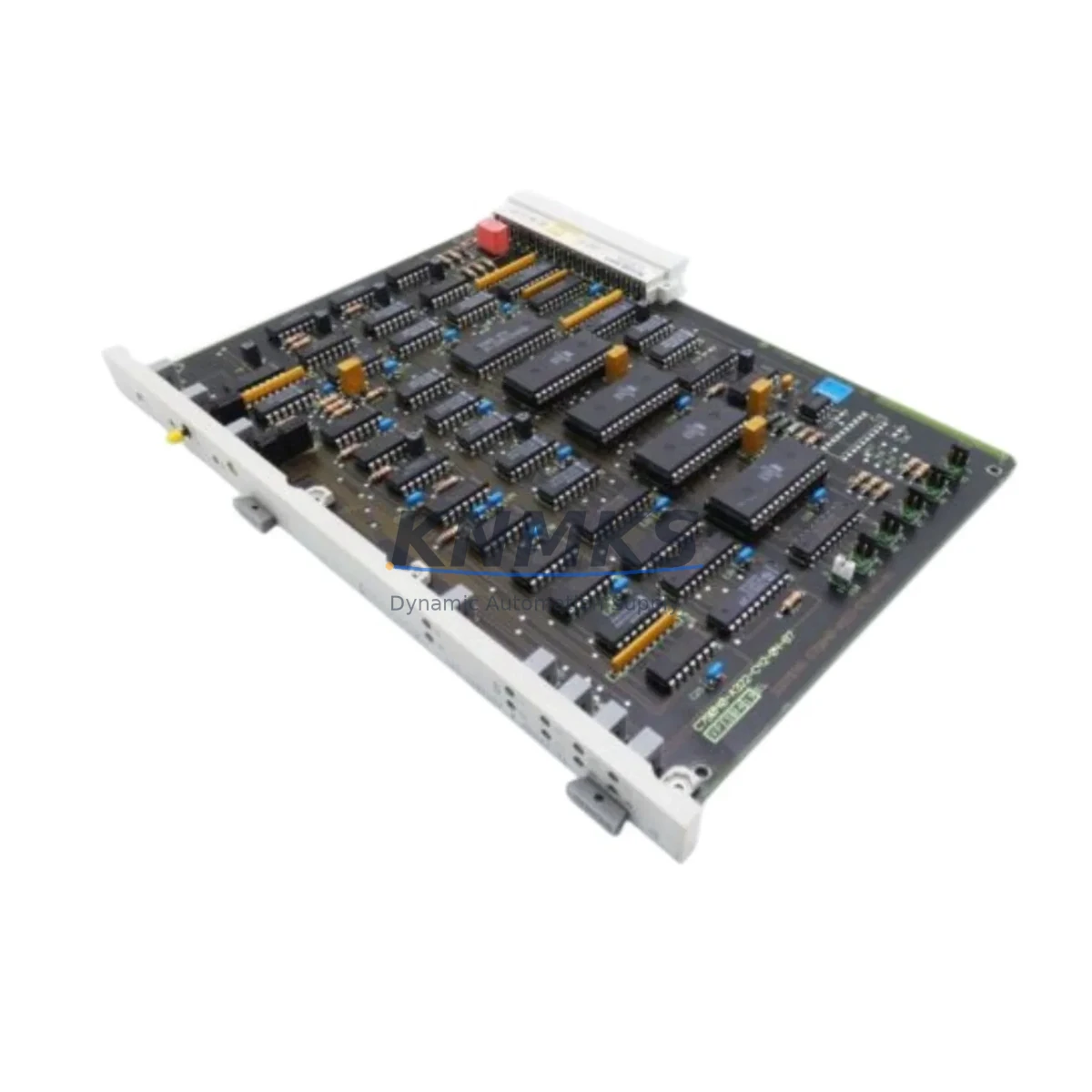
Siemens 6DS1832-8AA Migration-Ready CPU Memory for Legacy DCS Systems
The Siemens 6DS1832-8AA is an EEPROM-based CPU memory module designed for the TELEPERM M distributed control system (DCS) platform — one of Siemens’ most widely deployed process automation architectures in the chemical, petrochemical, power generation, and water treatment industries. As TELEPERM M has reached end-of-life and official Siemens support has been discontinued, the 6DS1832-8AA has become a critical spare part for plants operating legacy control infrastructure that cannot yet justify a full platform migration.
This module serves as a direct retrofit replacement for failed or degraded CPU memory in existing TELEPERM M racks. Each unit supplied by KNMKS is sourced from verified industrial channels, subjected to functional power-on testing, and shipped with a support terms confirmed by quotation covering defects in materials and workmanship.
Migration Compatibility Table
| Parameter | Details |
|---|---|
| Part Number | 6DS1832-8AA |
| Platform | Siemens TELEPERM M DCS |
| Module Type | EEPROM CPU Memory Module |
| Backplane Interface | TELEPERM M standard rack bus (compatible with AS 230, AS 235, AS 488 series) |
| Installation | Direct slot insertion into TELEPERM M rack; no mechanical modification required |
| Communication Compatibility | SINEC H1 / Industrial Ethernet (legacy); TELEPERM M internal bus |
| Replacement Recommendation | Verify firmware revision on host CPU before swapping; retain original program backup |
| Commissioning Notes | Reload user program via ES 100 / ES 680 engineering station after installation |
| Support terms | 12 months from date of shipment |
| Condition | Tested, functional, original Siemens hardware |
Retrofit Planning for Existing Automation Systems
Replacing the 6DS1832-8AA in a live TELEPERM M installation requires careful pre-migration planning across several interdependent system layers. Before removing the failed memory module, engineers should confirm that the AS 235 or AS 488 automation station hosting the module has been safely placed in STOP mode and that all process interlocks have been transferred to manual or redundant control paths.
Power supply capacity is the first checkpoint. The TELEPERM M rack relies on dedicated 6DS1703-8AA or 6DS1704-8AA power supply modules to maintain stable backplane voltage. A degraded PSU can cause intermittent memory errors that mimic CPU memory failure — always verify rail voltages before condemning the 6DS1832-8AA. If the power supply shows ripple or voltage sag, replace it concurrently to avoid repeat failures after the memory module swap.
Terminal wiring and I/O mapping must be documented before any module is removed. TELEPERM M installations typically use 6DS1600-series analog input modules and 6DS1610-series digital I/O modules wired to field marshalling cabinets. These modules retain their hardware addresses independently of the CPU memory, but the program logic stored on the 6DS1832-8AA maps directly to those addresses. If the replacement module is loaded with a program image from a different revision, address conflicts can cause unexpected output states at startup — a critical risk in continuous-process environments.
Communication link integrity is equally important. Many TELEPERM M systems interface with SIMATIC WinCC or TELEPERM XP SCADA/HMI platforms via SINEC H1 Ethernet or legacy coaxial bus. After the memory module is replaced and the program reloaded, verify that all OPC or DDE data tags are resolving correctly and that HMI faceplates are receiving live process values before returning the loop to automatic control. In some installations, a CP 1430 TF communications processor handles the network interface; confirm its configuration file is intact and that the node address has not been reset by the memory swap.
For plants considering a longer-term migration path from TELEPERM M to SIMATIC PCS 7, the 6DS1832-8AA replacement buys operational continuity while the migration project is scoped. PCS 7 migration typically involves replacing the AS 235/488 stations with SIMATIC S7-400H controllers, re-engineering function blocks in CFC/SFC, and migrating HMI graphics to WinCC. The 6DS1832-8AA keeps the legacy system running reliably during that transition window.
Downtime Control During System Migration
Minimizing unplanned downtime during a TELEPERM M CPU memory replacement depends on preparation, not speed. The following protocol is recommended for plants where continuous operation is critical:
1. Pre-outage backup: Use the ES 100 or ES 680 engineering station to perform a full program upload from the 6DS1832-8AA before the module is removed. Store the binary image and source code on an isolated engineering workstation. Confirm the backup is readable and complete — do not proceed without a verified backup.
2. Parallel verification: If a spare TELEPERM M rack is available in the workshop, bench-test the replacement 6DS1832-8AA by loading the backed-up program and verifying that all function blocks initialize correctly. This eliminates the risk of discovering a compatibility issue during the live outage window.
3. Controlled shutdown sequence: Place the affected AS station in STOP, transfer control of critical loops to the DCS redundancy layer or to manual stations, and notify the control room before pulling the module. Document the slot position and any jumper or DIP switch settings on the original module before removal.
4. Rapid swap and reload: Insert the replacement 6DS1832-8AA, power up the rack, and reload the program from the engineering station. Monitor the CPU diagnostic LEDs during initialization. A clean startup typically completes within 2–5 minutes for standard TELEPERM M configurations.
5. Loop checkout: Before returning to automatic, perform a point-by-point I/O check on all loops served by the affected AS station. Confirm analog input scaling, digital output states, and alarm setpoints match the pre-outage baseline. Only then transfer control back to automatic and close out the work permit.
Following this sequence, most TELEPERM M CPU memory replacements can be completed within a planned 2–4 hour maintenance window, with zero impact on adjacent control loops or plant-wide DCS communications.
Retrofit Support FAQ
Q1: Is the 6DS1832-8AA a direct drop-in replacement for all TELEPERM M CPU memory variants?
The 6DS1832-8AA is compatible with the standard TELEPERM M rack bus used in AS 230, AS 235, and AS 488 automation stations. However, some early-generation racks may use a different memory module variant. Always cross-reference the module label on the failed unit against the rack’s hardware configuration list before ordering. KNMKS can assist with cross-referencing if you provide the full rack part number and firmware revision.
Q2: What commissioning steps are required after installing the replacement module?
After physical installation, the replacement 6DS1832-8AA must be loaded with the user program via the ES 100 or ES 680 engineering station. The module does not retain the previous program after replacement. Confirm the CPU transitions from STOP to RUN without fault LEDs, verify all I/O addresses are responding, and perform a communications check with the HMI/SCADA layer before returning to automatic control.
Q3: Has the unit been tested before shipment?
Yes. Every 6DS1832-8AA supplied by KNMKS undergoes functional power-on testing prior to shipment. Units are inspected for physical damage, connector integrity, and basic initialization. A support terms confirmed by quotation cover defects in materials and workmanship from the date of shipment. Support requests are supported by our technical team at admin@knmks.com.
Q4: What is the typical lead time and stock availability?
KNMKS maintains inventory of the 6DS1832-8AA to support urgent maintenance and planned retrofit projects. Standard orders ship within 3–5 business days. For urgent requirements, expedited shipping options are available. Contact our sales team to confirm current stock levels and lead time for your specific quantity requirement.
© 2026 KNMKS. All rights reserved.
Original Source: https://knmks.com
Contact: admin@knmks.com | +86 18359268345
Product Identification
- Brand / Ecosystem
-
Siemens
Siemens - Model / Series
-
6DS1832-8AA
Legacy Series - Product Family
- PLCs & Controllers
- Availability Status
- Available on request after model and quantity confirmation
- Inquiry Type
- B2B RFQ, replacement inquiry and project spare-part request
- Pre-Quote Check
- Exact SKU, brand, series, quantity, nameplate photos and destination country are checked before quotation
System Path
Where this product fits in the KNMKS automation structure.
Specification & Inquiry Focus
- Control platform
- PLC, PAC and modular controllers
- Common needs
- CPU, rack, power and I/O expansion
- Project support
- Replacement, cabinet build and maintenance
Buyer Confirmation
Information KNMKS checks before replying.
- Exact model
- 6DS1832-8AA
- Brand / ecosystem
- Siemens
- Product family
- PLCs & Controllers
- Application note
- Replacement, maintenance, project build or spare-part list
- Useful photos
- Nameplate, installed unit, cabinet layout or connector side
- Delivery details
- Quantity, destination country and target schedule
Document Support
Files and notes can be confirmed during quotation.
- Product photos or nameplate confirmation when available
- Packing and delivery notes before quotation confirmation
- Support scope and delivery terms confirmed per inquiry
- Export document coordination for qualified B2B requests
Inquiry Support
- Model cross-checking before quotation
- CPU, power, rack and expansion module matching
- Support for replacement and project inquiry
What to Send Us
- Brand and exact model number: Siemens 6DS1832-8AA
- Quantity and required delivery time
- Application, replacement requirement or nameplate photo
- Destination country and shipping preference
RFQ Preparation
This is a product inquiry page built for RFQ communication.
Fast Model Check
Send this model to KNMKS for confirmation.
Include quantity, destination country and photos if this is a maintenance replacement. The inquiry will be saved with a reference number after submission.
Brand & Compatibility Note
KNMKS displays automation product information for well-known industrial brand ecosystems and compatible replacement references. Brand names are used for product identification and compatibility reference only; final availability and commercial terms are confirmed per quotation.
 Manufacturing
 Machine Tools
 Packaging
 Energy & Power



 HMI & Displays
 Servo Systems
 Variable Frequency Drives
 Sensors