
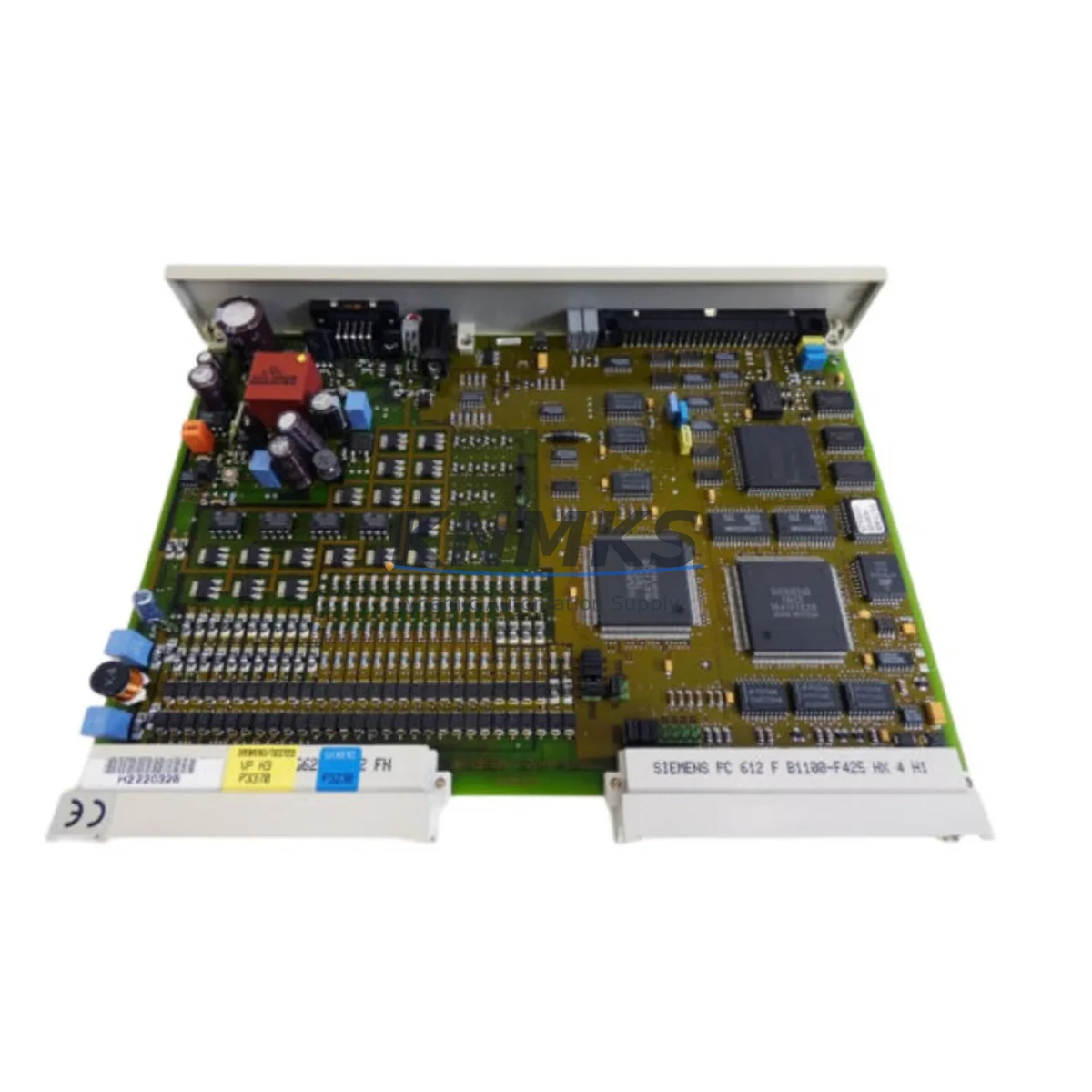
Overview
Siemens 6DS1717-8RR Migration-Ready Binary Calc for Legacy Control Systems
The Siemens 6DS1717-8RR is a Binary Calculation Module designed for the TELEPERM M Distributed Control System (DCS) platform — one of Siemens’ most widely deployed process automation architectures in the chemical, petrochemical, power generation, and heavy manufacturing industries. As TELEPERM M has reached end-of-life and spare parts availability has become increasingly constrained, the 6DS1717-8RR has become a critical component for engineers managing legacy system continuity, planned retrofit programs, and emergency replacement scenarios.
At KNMKS, every 6DS1717-8RR unit is sourced from verified industrial channels, subjected to functional testing prior to dispatch, and backed by a support terms confirmed by quotation. We maintain in-stock inventory to support both planned maintenance windows and unplanned downtime events, with global delivery details confirmed by RFQ to minimize production disruption.
Migration Compatibility Table
| Parameter | Details |
|---|---|
| Module Type | Binary Calculation Module |
| Compatible Platform | Siemens TELEPERM M DCS |
| Product Series | 6DS Series (TELEPERM M) |
| Backplane Interface | TELEPERM M standard subrack bus connector |
| Installation Requirement | Standard TELEPERM M subrack (e.g. 6DS1900 series rack); no mechanical modification required |
| Communication Compatibility | Compatible with TELEPERM M internal bus; not directly interoperable with PROFIBUS or PROFINET without gateway |
| Replacement Recommendation | Direct drop-in replacement for failed or end-of-life 6DS1717-8RR units in existing TELEPERM M installations |
| Commissioning Notes | Verify module address configuration, firmware revision, and terminal wiring before power-up; retain original program logic |
| Firmware Compatibility | Confirm TELEPERM M OS version compatibility with site engineering team prior to installation |
| Support terms | 12 months from date of shipment |
Retrofit Planning for Existing Automation Systems
Replacing the 6DS1717-8RR within an active TELEPERM M installation requires careful pre-migration planning across several engineering disciplines. Before the replacement module is installed, the site team should audit the existing subrack configuration — including the 6DS1900-series rack assembly — to confirm available slot positions, backplane bus integrity, and power supply headroom. The TELEPERM M power supply modules (typically from the 6DS1600 series) must be verified to support the current draw of the replacement module alongside all co-installed cards.
Terminal wiring is a frequent source of commissioning delays. Engineers should document all field wiring connections to the existing 6DS1717-8RR before removal, cross-referencing the original loop drawings and I/O assignment tables. If the installation includes analog or digital I/O modules such as the 6DS1310 or 6DS1410 series, their signal routing through the binary calculation logic must be traced and preserved in the replacement configuration.
For sites that are simultaneously upgrading communication infrastructure — for example, migrating from the legacy TELEPERM M internal bus to a PROFIBUS DP backbone — a communication gateway or protocol converter will be required. In such hybrid migration scenarios, the 6DS1717-8RR continues to serve its original binary calculation role while the communication layer is upgraded in parallel, reducing the scope of any single cutover event.
HMI screen mappings tied to binary status outputs from the 6DS1717-8RR should be reviewed and validated against the replacement module’s output register assignments. Where SIMATIC WinCC or legacy COROS LS-B operator stations are in use, tag database consistency must be confirmed before the new module is brought online. Programming cables and configuration tools compatible with the TELEPERM M engineering system should be on-site during commissioning to allow real-time parameter verification and adjustment.
Signal isolators installed upstream of the 6DS1717-8RR inputs — commonly used in high-noise industrial environments — should be inspected and tested as part of the retrofit scope. Replacing a calculation module without verifying the integrity of upstream signal conditioning can introduce measurement errors that are difficult to diagnose after the system is returned to service.
Downtime Control During System Migration
Minimizing unplanned downtime is the primary operational concern when replacing a binary calculation module in a live DCS environment. The recommended approach is to complete all pre-installation verification steps — module address confirmation, terminal wiring documentation, firmware version check, and spare subrack slot identification — during a scheduled maintenance window or planned production pause, rather than under emergency conditions.
Where process continuity is critical, consider a staged replacement strategy: install the 6DS1717-8RR replacement module in a spare slot, configure and verify its parameters offline, then perform a hot-swap or controlled switchover during the shortest available process interruption. This approach preserves the original program logic in the TELEPERM M controller and allows the engineering team to validate binary calculation outputs against expected values before committing to the cutover.
Backup copies of the TELEPERM M application program, including all function block configurations and inter-module communication assignments, should be archived before any hardware change is made. If the site uses a SIMATIC S5 or early S7 controller in a hybrid architecture alongside the TELEPERM M DCS, ensure that cross-system interlocks referencing the binary calculation module outputs are suspended or bypassed during the replacement window to prevent spurious trips or process shutdowns.
Post-installation, a structured commissioning checklist should cover: power-up sequence, module self-test status, binary input signal verification, calculation output validation against known reference values, HMI display confirmation, and alarm system re-enablement. KNMKS recommends retaining the replaced module for a minimum of 30 days post-commissioning as a contingency spare, pending full operational validation.
Retrofit Support FAQ
Q1: Is the 6DS1717-8RR a direct replacement for the original module in my TELEPERM M system?
Yes. The 6DS1717-8RR is a direct form-fit-function replacement for the original Siemens TELEPERM M Binary Calculation Module of the same part number. No mechanical modification to the subrack or backplane is required. Module address switches and terminal wiring should be configured to match the original installation before power-up.
Q2: What pre-shipment testing does KNMKS perform on the 6DS1717-8RR?
Each unit undergoes functional verification testing prior to dispatch, including power-on self-test confirmation and basic I/O signal integrity checks. Units are shipped with a support terms confirmed by quotation covering manufacturing defects and functional failures under normal operating conditions. Test records are available upon request for critical infrastructure applications.
Q3: Can the 6DS1717-8RR be used in a system that is being partially migrated to PROFIBUS or PROFINET?
The 6DS1717-8RR operates on the native TELEPERM M internal bus and does not natively support PROFIBUS DP or PROFINET. In partial migration architectures, a protocol gateway is required to bridge the TELEPERM M bus segment containing the 6DS1717-8RR to the new communication backbone. KNMKS can advise on compatible gateway options based on your specific migration architecture.
Q4: What is the typical lead time and do you maintain stock?
KNMKS maintains in-stock inventory of the 6DS1717-8RR to support both planned maintenance and emergency replacement requirements. Standard orders ship within 1–3 business days. For large-quantity or project-based procurement, contact our sales team at admin@knmks.com to confirm availability and arrange priority allocation.
© 2026 KNMKS. All rights reserved.
Original Source: https://knmks.com
Contact: admin@knmks.com | +86 18359268345
Product Identification
- Brand / Ecosystem
-
Siemens
Siemens - Model / Series
-
6DS1717-8RR
Legacy Series - Product Family
- PLCs & Controllers
- Availability Status
- Available on request after model and quantity confirmation
- Inquiry Type
- B2B RFQ, replacement inquiry and project spare-part request
- Pre-Quote Check
- Exact SKU, brand, series, quantity, nameplate photos and destination country are checked before quotation
System Path
Where this product fits in the KNMKS automation structure.
Specification & Inquiry Focus
- Control platform
- PLC, PAC and modular controllers
- Common needs
- CPU, rack, power and I/O expansion
- Project support
- Replacement, cabinet build and maintenance
Buyer Confirmation
Information KNMKS checks before replying.
- Exact model
- 6DS1717-8RR
- Brand / ecosystem
- Siemens
- Product family
- PLCs & Controllers
- Application note
- Replacement, maintenance, project build or spare-part list
- Useful photos
- Nameplate, installed unit, cabinet layout or connector side
- Delivery details
- Quantity, destination country and target schedule
Document Support
Files and notes can be confirmed during quotation.
- Product photos or nameplate confirmation when available
- Packing and delivery notes before quotation confirmation
- Support scope and delivery terms confirmed per inquiry
- Export document coordination for qualified B2B requests
Inquiry Support
- Model cross-checking before quotation
- CPU, power, rack and expansion module matching
- Support for replacement and project inquiry
What to Send Us
- Brand and exact model number: Siemens 6DS1717-8RR
- Quantity and required delivery time
- Application, replacement requirement or nameplate photo
- Destination country and shipping preference
RFQ Preparation
This is a product inquiry page built for RFQ communication.
Fast Model Check
Send this model to KNMKS for confirmation.
Include quantity, destination country and photos if this is a maintenance replacement. The inquiry will be saved with a reference number after submission.
Brand & Compatibility Note
KNMKS displays automation product information for well-known industrial brand ecosystems and compatible replacement references. Brand names are used for product identification and compatibility reference only; final availability and commercial terms are confirmed per quotation.
 Manufacturing
 Machine Tools
 Packaging
 Energy & Power



 HMI & Displays
 Servo Systems
 Variable Frequency Drives
 Sensors