
Overview
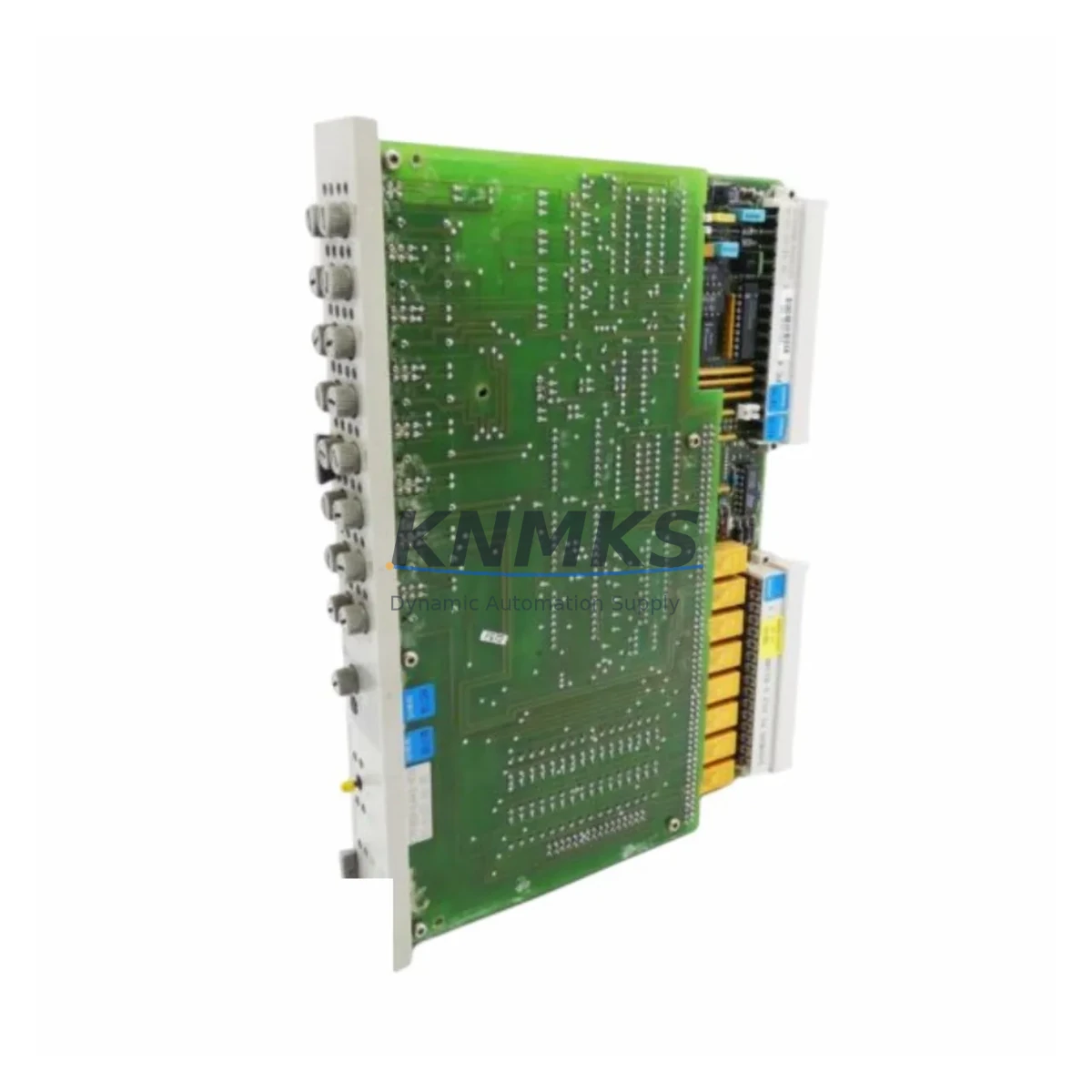
Siemens 6DS1606-8BA Migration-Ready Binary Output for Legacy Control Systems
The Siemens 6DS1606-8BA is a 16-channel binary output module engineered for the Teleperm M distributed control system (DCS) platform. As Teleperm M hardware reaches end-of-life and spare parts become increasingly scarce, the 6DS1606-8BA remains one of the most sought-after components for engineers managing legacy control infrastructure in power generation, chemical processing, and heavy industrial facilities. Whether you are executing a phased migration, extending the operational life of an existing control cabinet, or sourcing a verified drop-in replacement for a failed unit, this module delivers the electrical and functional compatibility required to maintain process continuity without forcing a full system overhaul.
Each unit supplied by KNMKS undergoes pre-shipment functional verification, including output channel integrity checks, backplane connector inspection, and firmware revision confirmation. Stock is drawn from controlled storage environments to preserve component condition, and every module ships with a support terms confirmed by quotation covering manufacturing defects and functional failure under normal operating conditions.
Migration Compatibility Table
| Parameter | Specification / Retrofit Note |
|---|---|
| Module Type | 16-Channel Binary Output, Teleperm M DCS |
| SKU / Part Number | 6DS1606-8BA |
| Series | Teleperm M (6DS Series) |
| Output Signal | 24 V DC binary output, relay-compatible |
| Backplane Interface | Teleperm M standard rack bus — direct slot replacement |
| Installation | Fits standard Teleperm M subrack; confirm slot address before insertion |
| Communication Compatibility | Compatible with Teleperm M internal bus; no protocol conversion required for like-for-like swap |
| Replacement Recommendation | Direct replacement for failed or end-of-life 6DS1606-8BA units; verify terminal wiring map before swap |
| Commissioning Focus | Confirm module address, output channel assignment, and HMI tag mapping post-installation |
| Firmware | Verify firmware revision matches existing rack configuration; contact KNMKS for revision-specific stock |
| Support terms | 12 months from shipment date, covering functional failure under normal operating conditions |
Retrofit Planning for Existing Automation Systems
Successful integration of the 6DS1606-8BA into an existing Teleperm M installation requires systematic pre-work across several engineering disciplines. Before removing the failed module, document the terminal wiring layout using the existing as-built drawings or perform a field survey if documentation is unavailable. The 16 output channels must be mapped against the current I/O list to confirm that field device assignments are preserved after the swap.
Power budget verification is a critical step that is frequently overlooked during emergency replacements. The Teleperm M subrack power supply — typically a 6DS1700-series power module — must have sufficient headroom to support the 6DS1606-8BA’s output load. If the existing power module is already operating near capacity due to accumulated I/O expansion over the years, a power audit should precede the module swap to avoid nuisance trips or supply degradation after restart.
For sites that have partially migrated to newer Siemens platforms such as the SIMATIC S7-400 or PCS 7, the 6DS1606-8BA often serves as a bridging component, keeping legacy Teleperm M output loops operational while the migration project proceeds rack by rack. In these hybrid environments, the communication link between the Teleperm M bus and the newer PROFIBUS DP or PROFINET segments must be carefully managed through a dedicated gateway or coupler module. Engineers should confirm that the binary output signals driven by the 6DS1606-8BA are correctly reflected in the SIMATIC engineering station’s hardware configuration and that the corresponding function blocks in the control program reference the correct physical addresses.
Terminal block compatibility is another area requiring attention. The 6DS1606-8BA uses the standard Teleperm M front connector system. If the existing front connector shows signs of wear, corrosion, or damaged locking tabs, replacing it during the module swap eliminates a common source of intermittent faults post-commissioning. Similarly, the subrack’s backplane connectors should be inspected for bent pins or contamination before the new module is seated.
For facilities managing a broader I/O expansion or signal isolation requirement alongside the binary output replacement, components such as the 6DS1606-8AA (binary input module) and 6DS1612-series analog output modules are commonly sourced in parallel to complete a rack-level restoration. Signal isolators and loop-powered barriers may also be required where field wiring runs exceed recommended lengths or where intrinsic safety zoning applies to the output circuits.
Programming compatibility should be confirmed with the Teleperm M engineering system before the replacement module is commissioned. The module address set via the hardware configuration must match the address assigned in the control program. If the original module’s address was set using physical DIP switches or jumpers, replicate the same configuration on the replacement unit before installation. HMI screen elements tied to the binary output channels should be tested in simulation mode where possible before live process restart to confirm that status displays and alarm logic respond correctly.
Downtime Control During System Migration
Minimizing unplanned downtime during a Teleperm M binary output module replacement requires a structured approach that begins well before the maintenance window opens. The most effective strategy is to prepare the replacement 6DS1606-8BA fully before taking the process offline: confirm the module address configuration, inspect the front connector, and have the wiring documentation at hand so that the physical swap can be completed within the shortest possible window.
Where process conditions allow, a hot-standby or partial shutdown approach can be used to isolate the affected output channels without taking the entire control cabinet offline. This is particularly relevant in multi-rack Teleperm M installations where the binary output function can be temporarily reassigned to a spare channel on an adjacent 6DS1606-8BA or equivalent module while the failed unit is replaced.
After the replacement module is seated and the front connector is secured, a structured commissioning sequence should be followed: power up the subrack, confirm the module’s self-test LED status, verify communication on the Teleperm M bus, and then perform a channel-by-channel output test against the field device list before returning the loop to automatic control. This sequence protects the original program logic from unintended modifications and ensures that the control system’s historical data continuity is maintained through the transition.
For sites with strict change management requirements, all steps should be documented in a field change record, including the pre-swap module serial number, the replacement unit’s serial number and firmware revision, the wiring verification sign-off, and the post-commissioning test results. KNMKS can provide a pre-shipment test certificate upon request to support this documentation requirement.
Retrofit Support FAQ
Q: Is the 6DS1606-8BA a direct drop-in replacement for the existing module in my Teleperm M rack?
A: Yes, provided the replacement unit carries the same hardware revision and the module address configuration matches the original. KNMKS can advise on revision compatibility based on your existing rack configuration — contact our technical team with your current module’s nameplate data before ordering if revision matching is a concern.
Q: What pre-commissioning checks are required after installing the replacement module?
A: Confirm the module address matches the Teleperm M hardware configuration, verify the front connector wiring against the as-built terminal diagram, check the subrack power supply load, and perform a channel-by-channel output test before returning the loop to automatic control. KNMKS provides a pre-shipment functional test certificate that can be used as a baseline reference during site commissioning.
Q: Can this module be used in a hybrid system where Teleperm M coexists with a SIMATIC S7 or PCS 7 platform?
A: Yes. The 6DS1606-8BA operates independently on the Teleperm M bus and does not require modification for use in hybrid environments. Integration with SIMATIC or PCS 7 segments is managed at the gateway or coupler level, not at the individual I/O module level. Confirm that the binary output addresses are correctly mapped in both the Teleperm M and the SIMATIC engineering configurations.
Q: What support terms and inventory availability does KNMKS offer for the 6DS1606-8BA?
A: Every 6DS1606-8BA supplied by KNMKS carries a support terms confirmed by quotation from the shipment date. Stock is maintained in controlled storage and subject to pre-shipment functional verification. For volume requirements or urgent replacement needs, contact our sales team for lead time and availability confirmation.
© 2026 KNMKS. All rights reserved.
Original Source: https://knmks.com
Contact: admin@knmks.com | +86 18359268345
Product Identification
- Brand / Ecosystem
-
Siemens
Siemens - Model / Series
-
6DS1606-8BA
Legacy Control Series - Product Family
- PLCs & Controllers
- Availability Status
- Available on request after model and quantity confirmation
- Inquiry Type
- B2B RFQ, replacement inquiry and project spare-part request
- Pre-Quote Check
- Exact SKU, brand, series, quantity, nameplate photos and destination country are checked before quotation
System Path
Where this product fits in the KNMKS automation structure.
Specification & Inquiry Focus
- Control platform
- PLC, PAC and modular controllers
- Common needs
- CPU, rack, power and I/O expansion
- Project support
- Replacement, cabinet build and maintenance
Buyer Confirmation
Information KNMKS checks before replying.
- Exact model
- 6DS1606-8BA
- Brand / ecosystem
- Siemens
- Product family
- PLCs & Controllers
- Application note
- Replacement, maintenance, project build or spare-part list
- Useful photos
- Nameplate, installed unit, cabinet layout or connector side
- Delivery details
- Quantity, destination country and target schedule
Document Support
Files and notes can be confirmed during quotation.
- Product photos or nameplate confirmation when available
- Packing and delivery notes before quotation confirmation
- Support scope and delivery terms confirmed per inquiry
- Export document coordination for qualified B2B requests
Inquiry Support
- Model cross-checking before quotation
- CPU, power, rack and expansion module matching
- Support for replacement and project inquiry
What to Send Us
- Brand and exact model number: Siemens 6DS1606-8BA
- Quantity and required delivery time
- Application, replacement requirement or nameplate photo
- Destination country and shipping preference
RFQ Preparation
This is a product inquiry page built for RFQ communication.
Fast Model Check
Send this model to KNMKS for confirmation.
Include quantity, destination country and photos if this is a maintenance replacement. The inquiry will be saved with a reference number after submission.
Brand & Compatibility Note
KNMKS displays automation product information for well-known industrial brand ecosystems and compatible replacement references. Brand names are used for product identification and compatibility reference only; final availability and commercial terms are confirmed per quotation.
 Manufacturing
 Machine Tools
 Packaging
 Energy & Power
 HMI & Displays
 Servo Systems
 Variable Frequency Drives
 Sensors