
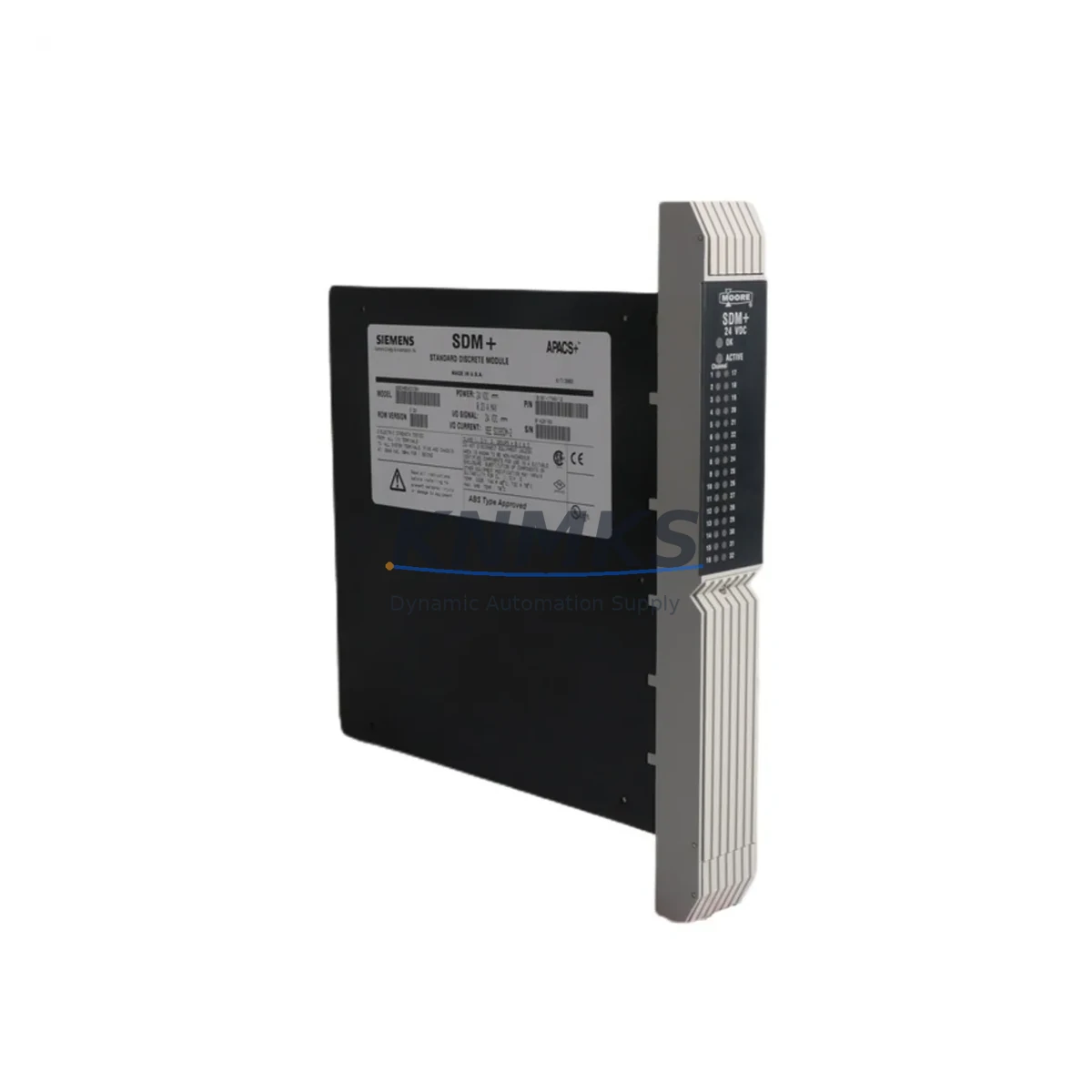
Overview
SIEMENS 39SDM024DCCBN Migration-Ready I/O for Legacy Control Systems
The SIEMENS 39SDM024DCCBN (part number 16101-174/12) is a discrete I/O module engineered for the TELEPERM DCS platform — one of Siemens’ legacy distributed control system families widely deployed across process industries including chemical, petrochemical, power generation, and water treatment. As original TELEPERM hardware reaches end-of-life and spare part availability tightens, the 39SDM024DCCBN has become a critical migration-ready replacement for facilities managing aging control infrastructure.
This module supports direct drop-in installation into existing TELEPERM backplane racks, preserving original terminal wiring layouts and minimizing the need for panel re-engineering. For retrofit engineers and maintenance teams, this means significantly reduced downtime during scheduled turnarounds or emergency replacements. The 39SDM024DCCBN is fully tested prior to shipment, covered by a support terms confirmed by quotation, and available from verified stock — making it a reliable choice for both planned upgrades and unplanned outages.
Migration Compatibility Table
| Parameter | Details |
|---|---|
| Part Number | 39SDM024DCCBN / 16101-174/12 |
| Brand | SIEMENS |
| Series | TELEPERM DCS |
| Module Type | Discrete I/O Module |
| Backplane Interface | TELEPERM-compatible rack bus |
| Installation | Direct slot replacement; no backplane modification required |
| Terminal Wiring | Compatible with original TELEPERM field terminal assignments |
| Communication | TELEPERM internal bus protocol |
| Replacement Scope | Drop-in for discontinued 39SDM-series I/O modules |
| Firmware | Verify firmware revision with system coordinator before installation |
| Retrofit Recommendation | Confirm power budget on existing PSU before adding modules |
| Commissioning Note | Re-validate I/O addresses and HMI tag mapping post-swap |
| Support terms | 12 Months |
| Origin | Germany |
| Pre-shipment Test | Full functional test performed on every unit |
Retrofit Planning for Existing Automation Systems
Successful integration of the 39SDM024DCCBN into a legacy TELEPERM installation requires a structured pre-retrofit assessment. The first priority is confirming that the existing TELEPERM power supply module (typically a 24 VDC rail-mounted PSU within the control cabinet) can support the additional current draw of the replacement I/O module. Overloaded power rails are a common cause of intermittent faults after module swaps and must be ruled out before commissioning.
Next, engineers should audit the TELEPERM backplane rack slot assignments. The 39SDM024DCCBN occupies a standard I/O slot and communicates over the TELEPERM internal bus. If the rack also houses a TELEPERM communication processor or gateway module linking the DCS to a supervisory SCADA layer, the communication link must be verified to remain stable after the I/O module replacement — particularly if the system uses a proprietary Siemens fieldbus or serial protocol bridge.
For facilities that have partially migrated toward modern platforms, the 39SDM024DCCBN can serve as a bridging component while the broader control architecture transitions. In mixed environments where a SIMATIC S7-300 or S7-400 PLC has been introduced alongside legacy TELEPERM nodes, careful attention must be paid to I/O address mapping and inter-system signal routing. Signal isolators or marshalling panels may be required to interface TELEPERM field wiring with newer I/O systems during phased migration.
Terminal block compatibility is another critical checkpoint. The original TELEPERM field terminal strips must be inspected for corrosion, loose connections, and correct labeling before the new module is seated. In many aging installations, terminal documentation has drifted from as-built drawings, making a physical point-to-point verification essential. Where TELEPERM I/O sub-modules or signal conditioning cards are installed in the same cabinet, their wiring should be documented and preserved during the swap.
HMI screen validation is often overlooked in I/O module replacements. If the plant uses a SIEMENS WinCC or SIMATIC HMI panel connected to the TELEPERM DCS, tag addresses linked to the replaced module’s I/O points must be re-confirmed after the swap. Any discrepancy between the physical I/O channel and the HMI tag database can result in incorrect process displays or alarm suppression — a safety-critical issue in regulated industries.
Finally, for sites managing long-term spare part lifecycle planning, stocking a secondary 39SDM024DCCBN alongside compatible TELEPERM processor modules and communication cards is strongly recommended. As Siemens has discontinued active production of TELEPERM hardware, securing verified replacement stock now reduces exposure to extended lead times during future unplanned outages.
Downtime Control During System Migration
Minimizing production downtime during a TELEPERM I/O module replacement requires preparation that begins well before the maintenance window opens. The most effective approach is to perform a full backup of the existing DCS configuration — including I/O channel assignments, function block parameters, loop tuning values, and alarm setpoints — using the original TELEPERM engineering workstation software. This backup serves as both a recovery baseline and a commissioning reference after the new 39SDM024DCCBN is installed.
During the physical swap, the control system should be placed in manual mode for all loops associated with the affected I/O module. Field operators must be stationed at critical control points to maintain process continuity while the module is offline. The replacement module should be pre-configured and bench-tested against the documented I/O channel list before being brought to the panel, reducing the time the rack slot remains empty.
After seating the 39SDM024DCCBN, the commissioning sequence should follow a structured channel-by-channel verification: confirm each digital input and output against the field device, validate signal levels, check for correct LED status indication on the module face, and verify that the TELEPERM controller recognizes the module at the correct rack address. Only after all channels are confirmed should the system be returned to automatic control mode.
For facilities with strict change management requirements, a pre-approved retrofit procedure document — including risk assessment, rollback plan, and sign-off checklist — should accompany every module replacement. The 39SDM024DCCBN’s drop-in compatibility with the original TELEPERM rack and terminal layout significantly reduces the variables in this process, supporting a controlled, auditable migration with minimal exposure to unplanned extended downtime.
Retrofit Support FAQ
Q1: Is the 39SDM024DCCBN a direct replacement for the original TELEPERM discrete I/O module in the same rack slot?
Yes. The 39SDM024DCCBN (16101-174/12) is designed for direct slot replacement within the TELEPERM backplane rack. No backplane modification or additional adapter hardware is required. Terminal wiring from the original installation can be retained, subject to a point-to-point verification against current as-built documentation.
Q2: What commissioning steps are required after installing the 39SDM024DCCBN?
After physical installation, verify the module address recognized by the TELEPERM controller matches the original slot assignment. Perform a channel-by-channel I/O check against field devices. Confirm HMI tag mapping for all associated I/O points. Validate communication link integrity if a gateway or communication processor is present in the same rack. Return affected control loops to automatic mode only after all checks are complete.
Q3: How is the 39SDM024DCCBN tested before shipment, and what support terms is provided?
Every unit undergoes a full functional test prior to shipment, verifying I/O channel operation, bus communication, and module identification. The 39SDM024DCCBN is covered by a support terms confirmed by quotation from the date of shipment. Units are dispatched from verified stock and can typically be shipped within 1–3 business days of order confirmation.
Q4: What should be checked if the TELEPERM system does not recognize the replacement module after installation?
First, confirm the module is fully seated in the backplane slot and the rack bus connector is secure. Check that the firmware revision of the 39SDM024DCCBN is compatible with the TELEPERM controller version in use — firmware mismatches can prevent module recognition. Verify the slot address configuration matches the original module’s rack position. If the issue persists, consult the TELEPERM system documentation or contact our technical support team at admin@knmks.com for pre-installation compatibility verification.
© 2026 KNMKS. All rights reserved.
Original Source: https://knmks.com
Contact: admin@knmks.com | +86 18359268345
Product Identification
- Brand / Ecosystem
-
SIEMENS
Siemens - Model / Series
-
39SDM024DCCBN 16101-174/12
Legacy Series - Product Family
- PLCs & Controllers
- Availability Status
- Available on request after model and quantity confirmation
- Inquiry Type
- B2B RFQ, replacement inquiry and project spare-part request
- Pre-Quote Check
- Exact SKU, brand, series, quantity, nameplate photos and destination country are checked before quotation
System Path
Where this product fits in the KNMKS automation structure.
Specification & Inquiry Focus
- Control platform
- PLC, PAC and modular controllers
- Common needs
- CPU, rack, power and I/O expansion
- Project support
- Replacement, cabinet build and maintenance
Buyer Confirmation
Information KNMKS checks before replying.
- Exact model
- 39SDM024DCCBN 16101-174/12
- Brand / ecosystem
- SIEMENS
- Product family
- PLCs & Controllers
- Application note
- Replacement, maintenance, project build or spare-part list
- Useful photos
- Nameplate, installed unit, cabinet layout or connector side
- Delivery details
- Quantity, destination country and target schedule
Document Support
Files and notes can be confirmed during quotation.
- Product photos or nameplate confirmation when available
- Packing and delivery notes before quotation confirmation
- Support scope and delivery terms confirmed per inquiry
- Export document coordination for qualified B2B requests
Inquiry Support
- Model cross-checking before quotation
- CPU, power, rack and expansion module matching
- Support for replacement and project inquiry
What to Send Us
- Brand and exact model number: SIEMENS 39SDM024DCCBN 16101-174/12
- Quantity and required delivery time
- Application, replacement requirement or nameplate photo
- Destination country and shipping preference
RFQ Preparation
This is a product inquiry page built for RFQ communication.
Fast Model Check
Send this model to KNMKS for confirmation.
Include quantity, destination country and photos if this is a maintenance replacement. The inquiry will be saved with a reference number after submission.
Brand & Compatibility Note
KNMKS displays automation product information for well-known industrial brand ecosystems and compatible replacement references. Brand names are used for product identification and compatibility reference only; final availability and commercial terms are confirmed per quotation.
 Manufacturing
 Machine Tools
 Packaging
 Energy & Power



 HMI & Displays
 Servo Systems
 Variable Frequency Drives
 Sensors