
Overview
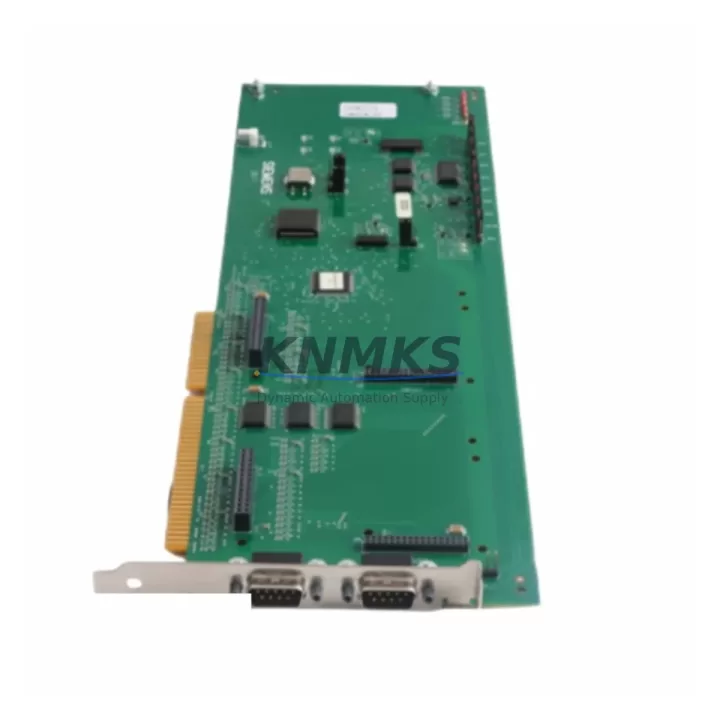
ROBICON A5E03407403 Maintenance-Proven Spare Part for Factory Uptime
The ROBICON A5E03407403 is an original communications board designed for the Perfect Harmony medium-voltage (MV) drive series. In industrial facilities where continuous motor control is critical — pumps, compressors, fans, conveyors, and extruders — a failed communications board can halt production within seconds. Sourcing a verified, pre-tested replacement is the fastest path to restoring uptime and protecting process continuity.
This board manages the data exchange layer between the drive’s control unit and external supervisory systems, including DCS, SCADA, and PLC networks. When the A5E03407403 fails, symptoms typically include loss of fieldbus communication, drive fault codes related to serial link errors, inability to issue remote start/stop commands, and loss of speed reference signals from the control room. Maintenance engineers familiar with Perfect Harmony architecture will recognize these fault patterns immediately.
Each unit supplied is sourced from verified industrial channels, inspected for physical integrity, and subjected to pre-shipment functional testing. A support terms confirmed by quotation is included as standard, covering manufacturing defects and functional failures under normal operating conditions. Long-term supply commitment is available for facilities managing multi-year maintenance contracts or planned outages.
Spare Maintenance Table
| SKU / Part Number | A5E03407403 |
| Brand | ROBICON (Siemens Perfect Harmony) |
| Series | Perfect Harmony MV Drive |
| Component Type | Communications Board |
| Country of Origin | Germany (DE) |
| Typical Application | MV drive fieldbus / serial communication interface |
| Compatible Drive Voltage | Medium Voltage (2.3 kV – 13.8 kV range, drive-dependent) |
| Interface | Serial / Fieldbus communication (drive-series specific) |
| Installation Environment | Indoor MCC / drive cabinet, controlled environment |
| Weight | Approx. 220 g |
| Compatibility Verification | Confirm drive firmware version and cabinet revision before installation |
| Pre-Shipment Testing | Yes — functional inspection performed before dispatch |
| Support terms | 12 Months — manufacturing defects and functional failures |
| Long-Term Supply | Available — suitable for multi-year maintenance contracts |
Maintenance Planning for Continuous Operation
When replacing the A5E03407403 communications board during a scheduled or emergency outage, maintenance engineers should treat the intervention as an opportunity to inspect the surrounding electrical environment. The communications board does not operate in isolation — its reliability depends on the integrity of the entire drive control architecture.
Begin by verifying the 24 VDC control power supply feeding the drive’s control section. A degraded or unstable control power source is a common root cause of premature board failure and communication faults. Inspect the associated power supply module and confirm output voltage is within specification before installing the replacement board.
Check all signal cables and fieldbus wiring connected to the communications board. Loose or corroded terminal connections on the drive’s I/O terminal strip can introduce noise that mimics board failure. Inspect the fiber optic links or shielded twisted-pair cables used for DCS/SCADA communication and replace any damaged segments.
The drive’s control backplane and cell bypass boards should also be inspected during the same maintenance window. In Perfect Harmony architecture, the cell bypass boards manage individual power cell operation, and a fault in one cell can generate communication errors that appear to originate from the communications board. Confirm all cell bypass boards are seated correctly and free of fault indicators.
For facilities running Profibus DP or Modbus RTU networks, verify that the network termination resistors are correctly installed at both ends of the bus segment. Incorrect termination is a frequent cause of intermittent communication faults in aging MV drive installations. If the drive communicates via an HMI panel or operator interface, confirm the HMI firmware is compatible with the replacement board revision.
Fuse and protection components within the drive cabinet should be checked as part of any board replacement procedure. Blown control fuses or tripped miniature circuit breakers (MCBs) protecting the control power circuit can prevent the new board from initializing correctly. Inspect the fuse holders and MCBs in the control section before energizing the drive.
Finally, review the drive’s fault history log before clearing alarms and restarting. Persistent communication fault codes that predate the board failure may indicate an upstream issue — such as a failing PLC output card, a degraded signal isolator, or a deteriorating cable shield — that will cause the replacement board to fail prematurely if not addressed.
Site Replacement Workflow
1. Isolate and de-energize. Follow site LOTO (Lockout/Tagout) procedures. Confirm MV and LV isolation at the drive input breaker and control power source. Allow sufficient discharge time for DC bus capacitors before opening the cabinet.
2. Document existing configuration. Before removing the faulty A5E03407403, photograph the board orientation, connector positions, and any DIP switch or jumper settings. Record the drive’s parameter set if accessible via the HMI or engineering tool.
3. Remove the faulty board. Disconnect all connectors in sequence. Handle the board by its edges to avoid ESD damage. Place the removed board in an anti-static bag for return or disposal.
4. Inspect the slot and connectors. Check the board slot on the control backplane for bent pins, corrosion, or debris. Clean with dry compressed air if necessary. Inspect mating connectors on the cable harness for damage.
5. Install the replacement board. Seat the A5E03407403 firmly into the control backplane slot. Reconnect all cables and fieldbus connectors in the documented sequence. Confirm DIP switch and jumper settings match the original configuration.
6. Restore power and verify communication. Re-energize the control power supply first. Confirm the board initializes without fault codes. Restore fieldbus communication and verify the drive responds to remote commands from the DCS or SCADA system. Perform a no-load test run before returning the drive to full production load.
7. Update maintenance records. Log the replacement date, board serial number, and post-installation test results. Schedule the next inspection interval based on site maintenance policy.
Spare Parts Support FAQ
Q1: Is the A5E03407403 compatible with all Perfect Harmony drive variants?
The A5E03407403 is designed for the ROBICON Perfect Harmony MV drive series. Compatibility depends on the specific drive model, cabinet revision, and firmware version. Before ordering, confirm your drive’s nameplate data and control board revision with your maintenance documentation or the drive’s engineering manual. Our team can assist with compatibility verification prior to shipment.
Q2: What pre-shipment testing is performed on each unit?
Each A5E03407403 unit undergoes a functional inspection before dispatch, including visual examination for physical damage, connector integrity checks, and basic operational verification. Units that do not pass inspection are not shipped. A support terms confirmed by quotation covering manufacturing defects and functional failures is included with every unit.
Q3: Can you support long-term or multi-unit procurement for planned maintenance programs?
Yes. Long-term supply agreements are available for facilities managing annual overhaul schedules, multi-year maintenance contracts, or strategic spare parts inventory programs. Contact our sales team to discuss volume pricing, lead times, and reserved stock arrangements for the A5E03407403 and related Perfect Harmony components.
Q4: What should I do if the replacement board does not resolve the communication fault?
If installing the A5E03407403 does not clear the communication fault, the root cause may lie outside the board itself — common candidates include a degraded fieldbus cable, incorrect network termination, a faulty PLC output card, or a control power supply issue. Review the drive’s fault log for persistent or recurring codes and inspect the upstream communication infrastructure before concluding the board is defective. Our technical support team is available to assist with fault diagnosis.
© 2026 KNMKS. All rights reserved.
Original Source: https://knmks.com
Contact: admin@knmks.com | +86 18359268345
Product Identification
- Brand / Ecosystem
-
Other Brands
Assorted Brands - Model / Series
-
A5E03407403
Assorted Series - Product Family
- Variable Frequency Drives
- Availability Status
- Available on request after model and quantity confirmation
- Inquiry Type
- B2B RFQ, replacement inquiry and project spare-part request
- Pre-Quote Check
- Exact SKU, brand, series, quantity, nameplate photos and destination country are checked before quotation
System Path
Where this product fits in the KNMKS automation structure.
Specification & Inquiry Focus
- Drive range
- AC drives, VFDs and accessories
- Common needs
- Voltage, kW/HP and load type
- Project support
- Motor control, energy saving and spares
Buyer Confirmation
Information KNMKS checks before replying.
- Exact model
- A5E03407403
- Brand / ecosystem
- Other Brands
- Product family
- Variable Frequency Drives
- Application note
- Replacement, maintenance, project build or spare-part list
- Useful photos
- Nameplate, installed unit, cabinet layout or connector side
- Delivery details
- Quantity, destination country and target schedule
Document Support
Files and notes can be confirmed during quotation.
- Product photos or nameplate confirmation when available
- Packing and delivery notes before quotation confirmation
- Support scope and delivery terms confirmed per inquiry
- Export document coordination for qualified B2B requests
Inquiry Support
- Input/output voltage and kW/HP confirmation
- Energy-saving motor control inquiry
- Accessory and spare-unit support
What to Send Us
- Brand and exact model number: Other Brands A5E03407403
- Quantity and required delivery time
- Application, replacement requirement or nameplate photo
- Destination country and shipping preference
RFQ Preparation
This is a product inquiry page built for RFQ communication.
Fast Model Check
Send this model to KNMKS for confirmation.
Include quantity, destination country and photos if this is a maintenance replacement. The inquiry will be saved with a reference number after submission.
Brand & Compatibility Note
KNMKS displays automation product information for well-known industrial brand ecosystems and compatible replacement references. Brand names are used for product identification and compatibility reference only; final availability and commercial terms are confirmed per quotation.
 Manufacturing
 Machine Tools
 Packaging
 Energy & Power
 PLCs & Controllers
 HMI & Displays
 Servo Systems
 Sensors