
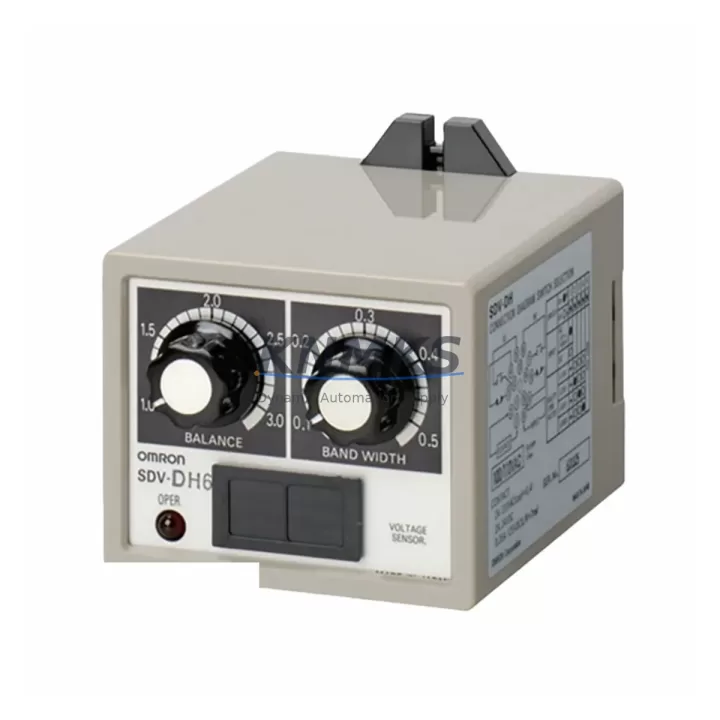
Overview
OMRON SDV-DH7 Migration-Ready Voltage Sensing Relay for Legacy Control Systems
The OMRON SDV-DH7 is a migration-ready voltage sensing relay engineered for direct replacement within legacy SDV-DH Series control panels and aging automation architectures. As industrial facilities accelerate the retirement of end-of-life monitoring equipment, the SDV-DH7 provides a verified drop-in solution that preserves existing wiring layouts, terminal assignments, and relay output logic — eliminating the need for panel redesign or PLC program modification during retrofit operations.
Designed for demanding industrial environments, the SDV-DH7 monitors AC/DC voltage levels and triggers protective relay outputs when voltage deviates beyond configurable thresholds. Its compact DIN-rail-compatible housing fits directly into existing control cabinet slots previously occupied by legacy SDV-DH variants, making it a preferred choice for maintenance engineers managing brownfield upgrades across motor control centers, distribution panels, and process automation cabinets.
When integrating the SDV-DH7 into an existing control system, engineers must verify power supply capacity at the relay bus — particularly when the legacy panel also hosts OMRON G7SA safety relays or MY4 general-purpose relays sharing the same 24 VDC or 100–240 VAC rail. Terminal block compatibility should be confirmed against existing wiring harnesses; in most SDV-DH Series installations, the SDV-DH7 accepts the same screw-terminal pitch, allowing direct reconnection without re-crimping. Backplane slot dimensions and DIN-rail mounting depth must also be measured if the control cabinet incorporates a modular relay base such as the OMRON P7SA or PYF series socket.
For systems where the SDV-DH7 interfaces with a programmable logic controller, engineers should confirm that the relay output signal — typically a normally open (NO) or normally closed (NC) dry contact — maps correctly to the existing digital input (DI) module address in the PLC rack. No firmware update is required on the controller side, as the SDV-DH7 outputs a standard contact closure compatible with OMRON CJ-series and CS-series DI modules. HMI screen alarm tags referencing the legacy relay status bit do not require modification, provided the PLC input address is preserved during rewiring.
Communication link integrity is maintained throughout the migration: the SDV-DH7 does not introduce any fieldbus dependency, making it compatible with installations running SYSMAC, DeviceNet, or Modbus-based supervisory systems. Signal isolation between the voltage sensing circuit and the relay output ensures that transient noise from adjacent variable frequency drives (VFDs) or motor starters does not corrupt the relay switching logic — a critical consideration in cabinets housing OMRON 3G3MX2 or 3G3RX inverter series alongside protective relays.
Installation space confirmation is straightforward: the SDV-DH7 occupies the same panel footprint as predecessor SDV-DH models, and no additional clearance is required for ventilation or wiring access. Pre-shipment functional testing is performed on every unit prior to dispatch, covering voltage threshold calibration, output contact resistance verification, and dielectric withstand testing — ensuring the relay arrives ready for immediate field installation without bench testing delays.
Migration Compatibility Table
| Parameter | Legacy SDV-DH Series | OMRON SDV-DH7 (Replacement) | Migration Notes |
|---|---|---|---|
| Mounting Type | DIN Rail / Panel Mount | DIN Rail / Panel Mount | Direct fit; no bracket modification required |
| Terminal Wiring | Screw Terminal (SDV-DH pitch) | Screw Terminal (matched pitch) | Reconnect existing wires directly; no re-crimping |
| Supply Voltage | 100–240 VAC / 24 VDC | 100–240 VAC / 24 VDC | Verify rail capacity when sharing with G7SA / MY4 relays |
| Output Contact | NO / NC Dry Contact | NO / NC Dry Contact | PLC DI address preserved; no program change needed |
| Communication Protocol | None (hardwired) | None (hardwired) | Compatible with SYSMAC, DeviceNet, Modbus supervisory systems |
| HMI Alarm Tags | Mapped to legacy relay bit | Same bit address retained | No HMI screen modification required |
| Installation Space | Standard SDV-DH footprint | Identical footprint | No additional clearance needed |
| Firmware Dependency | None | None | No controller firmware update required |
| Pre-Shipment Testing | Varies by supplier | 100% tested before dispatch | Threshold calibration + contact resistance verified |
| Support terms | Varies | support terms confirmed by quotation | Covers manufacturing defects from date of dispatch |
Retrofit Planning for Existing Automation Systems
Effective retrofit planning for an SDV-DH7 installation begins with a full audit of the control cabinet’s relay population. In a typical motor control center or process automation panel, the SDV-DH7 operates alongside complementary components including OMRON G7SA safety relays for emergency stop circuits, MY4 general-purpose relays for auxiliary control logic, and OMRON S8VS or S8VK-series power supply modules providing regulated 24 VDC to the relay bus. Engineers should calculate total relay coil current draw to confirm the power supply module can sustain the additional load without triggering overcurrent protection.
For panels incorporating OMRON CJ1W-series or CS1W-series I/O modules, the SDV-DH7 output contact connects directly to a digital input channel. The module address and channel assignment should be documented before disconnecting the legacy relay to ensure the replacement is wired to the identical terminal. In installations where the control system uses an OMRON NT-series or NB-series HMI, alarm display pages referencing the voltage relay status bit require no modification — the SDV-DH7 preserves the same contact logic as its predecessor.
Where the cabinet also houses variable frequency drives such as the OMRON 3G3MX2 series, signal isolation between the VFD output stage and the SDV-DH7 sensing circuit must be confirmed. Installing a signal isolator or surge suppressor on the voltage sensing input line is recommended when the monitored voltage rail is shared with high-frequency switching loads. This precaution protects the SDV-DH7’s internal sensing circuit and extends service life in electrically noisy environments.
Spare part lifecycle planning should account for the SDV-DH7’s role as a long-term stocking item. Maintaining a minimum buffer of two to three units per control cabinet reduces emergency procurement lead times and supports rapid swap-out during unplanned shutdowns. Our multi-region inventory ensures same-week dispatch for most destinations, with stock held across Asia-Pacific and European distribution points.
Downtime Control During System Migration
Minimizing control system downtime during an SDV-DH7 swap-out requires a structured pre-migration checklist. Before de-energizing the panel, engineers should capture a full screenshot or printout of the HMI alarm summary page and record the current PLC I/O status for all channels associated with the voltage relay circuit. This baseline documentation allows rapid verification that the replacement relay is functioning correctly before the system is returned to automatic mode.
The physical replacement procedure is straightforward: isolate the relay supply voltage, photograph the existing terminal wiring for reference, disconnect and remove the legacy SDV-DH unit, install the SDV-DH7 into the same DIN-rail slot, and reconnect terminals in the documented sequence. Because the SDV-DH7 shares the same terminal pitch and contact configuration as its predecessor, the entire swap can typically be completed within 15 to 30 minutes by a qualified technician — without requiring PLC program download, HMI project upload, or communication network reconfiguration.
After reconnection, energize the relay supply and verify that the SDV-DH7 output contact state matches the expected PLC input status on the HMI. Perform a manual voltage threshold test by temporarily adjusting the monitored voltage to confirm that the relay trips and resets at the configured setpoints. Log the commissioning result in the plant maintenance record before returning the system to full automatic operation. This structured approach protects original program logic, maintains field control continuity, and reduces retrofit risk to the minimum achievable level.
Retrofit Support FAQ
Q1: Is the OMRON SDV-DH7 a direct drop-in replacement for all SDV-DH Series variants?
The SDV-DH7 is designed as a direct replacement for SDV-DH Series voltage sensing relays sharing the same terminal pitch, supply voltage range, and output contact configuration. Engineers should verify the specific SDV-DH variant installed in their panel against the SDV-DH7 datasheet to confirm threshold range and time delay settings match operational requirements before installation.
Q2: Does replacing the SDV-DH7 require any PLC program modification or HMI update?
No program modification is required. The SDV-DH7 outputs a standard dry contact signal that maps directly to the existing PLC digital input address. HMI alarm tags referencing the relay status bit remain valid without any project upload or screen modification, provided terminal wiring is reconnected to the same channel.
Q3: What pre-shipment testing is performed on each SDV-DH7 unit?
Every SDV-DH7 unit undergoes 100% pre-shipment functional testing covering voltage threshold calibration accuracy, output contact resistance measurement, and dielectric withstand verification. Test records are available upon request. Each unit is dispatched with a support terms confirmed by quotation covering manufacturing defects from the date of shipment.
Q4: What is the typical lead time and stock availability for the SDV-DH7?
The SDV-DH7 is maintained in multi-region stock with same-week dispatch capability for most destinations. Emergency replacement orders are prioritized. Contact our sales team to confirm current inventory levels and expedited shipping options for your location.
© 2026 KNMKS. All rights reserved.
Original Source: https://knmks.com
Contact: admin@knmks.com | +86 18359268345
Product Identification
- Brand / Ecosystem
-
OMRON
Assorted Brands - Model / Series
-
SDV-DH7/SDV-DH
Legacy Series - Product Family
- PLCs & Controllers
- Availability Status
- Available on request after model and quantity confirmation
- Inquiry Type
- B2B RFQ, replacement inquiry and project spare-part request
- Pre-Quote Check
- Exact SKU, brand, series, quantity, nameplate photos and destination country are checked before quotation
System Path
Where this product fits in the KNMKS automation structure.
Specification & Inquiry Focus
- Control platform
- PLC, PAC and modular controllers
- Common needs
- CPU, rack, power and I/O expansion
- Project support
- Replacement, cabinet build and maintenance
Buyer Confirmation
Information KNMKS checks before replying.
- Exact model
- SDV-DH7/SDV-DH
- Brand / ecosystem
- OMRON
- Product family
- PLCs & Controllers
- Application note
- Replacement, maintenance, project build or spare-part list
- Useful photos
- Nameplate, installed unit, cabinet layout or connector side
- Delivery details
- Quantity, destination country and target schedule
Document Support
Files and notes can be confirmed during quotation.
- Product photos or nameplate confirmation when available
- Packing and delivery notes before quotation confirmation
- Support scope and delivery terms confirmed per inquiry
- Export document coordination for qualified B2B requests
Inquiry Support
- Model cross-checking before quotation
- CPU, power, rack and expansion module matching
- Support for replacement and project inquiry
What to Send Us
- Brand and exact model number: OMRON SDV-DH7/SDV-DH
- Quantity and required delivery time
- Application, replacement requirement or nameplate photo
- Destination country and shipping preference
RFQ Preparation
This is a product inquiry page built for RFQ communication.
Fast Model Check
Send this model to KNMKS for confirmation.
Include quantity, destination country and photos if this is a maintenance replacement. The inquiry will be saved with a reference number after submission.
Brand & Compatibility Note
KNMKS displays automation product information for well-known industrial brand ecosystems and compatible replacement references. Brand names are used for product identification and compatibility reference only; final availability and commercial terms are confirmed per quotation.
 Manufacturing
 Machine Tools
 Packaging
 Energy & Power



 HMI & Displays
 Servo Systems
 Variable Frequency Drives
 Sensors