
Overview
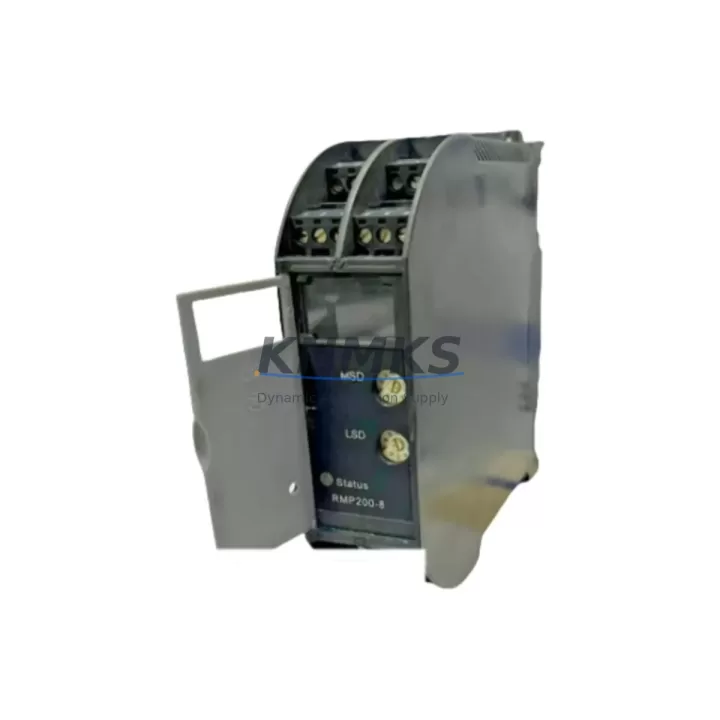
KONGSBERG RMP200-8 Migration-Ready I/O Module for Legacy Control Systems
The KONGSBERG RMP200-8 is an 8-channel I/O module engineered for direct integration into RMP200 Series control architectures. As legacy maritime and industrial automation platforms approach end-of-life, the RMP200-8 serves as a verified migration-ready replacement that preserves existing wiring topology, backplane addressing, and program logic — dramatically reducing retrofit risk and unplanned downtime. Whether you are upgrading a vessel automation system, a process control cabinet, or a distributed I/O network built on the RMP200 platform, the RMP200-8 delivers the channel density, signal compatibility, and mechanical form factor required for a controlled, low-disruption cutover.
For engineers managing spare-part lifecycle planning, the RMP200-8 is a critical stocking item. KONGSBERG RMP200 Series components have entered restricted availability through OEM channels, making third-party verified stock an essential part of any maintenance strategy. Each unit shipped from our inventory undergoes functional verification and is covered by a support terms confirmed by quotation, ensuring confidence in both immediate deployment and long-term shelf readiness.
Migration Compatibility Table
| Parameter | RMP200-8 Specification | Retrofit Notes |
|---|---|---|
| Channel Count | 8 I/O Channels | Matches legacy RMP200 Series slot density; no re-addressing required in standard configurations |
| Backplane Interface | RMP200 Series backplane connector | Verify backplane revision before installation; RMP200-4 and RMP200-16 backplanes may require adapter confirmation |
| Power Supply Compatibility | 24 VDC nominal (RMP200 rack PSU) | Confirm PSU capacity when replacing multiple modules simultaneously; RMP-PSU24 or equivalent required |
| Terminal Wiring | Screw-terminal, field-side removable | Existing field wiring can be retained; verify terminal torque spec per KONGSBERG installation manual |
| Communication Protocol | Proprietary RMP200 internal bus | No protocol conversion required within RMP200 rack; external gateway (e.g., RMP-GW-MODBUS) needed for Modbus RTU integration |
| Module Address | DIP-switch configurable (slot-based) | Match address setting to original module before power-up; document existing DIP configuration prior to removal |
| Firmware Compatibility | Compatible with RMP200 firmware v2.x and v3.x | Confirm rack controller firmware version; v1.x racks may require firmware update before module recognition |
| Physical Dimensions | Standard RMP200 single-slot form factor | Direct mechanical drop-in; no panel modification required |
| Installation Space | 1 rack slot (RMP200 chassis) | Verify available slot count when expanding I/O; RMP200-RACK8 and RMP200-RACK16 chassis both supported |
| Outgoing Test | Functional I/O verification pre-shipment | Each unit tested for channel continuity, signal integrity, and backplane communication prior to dispatch |
| Support terms | 12 Months | Covers manufacturing defects and functional failure under normal operating conditions |
Retrofit Planning for Existing Automation Systems
A successful RMP200-8 retrofit begins well before the module arrives on site. Engineers should start by auditing the existing RMP200 rack configuration — documenting each occupied slot, the DIP-switch address of every installed module, and the current firmware version running on the RMP200 rack controller. This baseline is essential for ensuring the replacement module is recognized immediately upon insertion without requiring a full system restart or program re-download.
Power budget verification is a frequently overlooked step. When multiple I/O modules are being replaced in a single maintenance window, the cumulative inrush current can exceed the capacity of the original RMP-PSU24 power supply module. If the rack is also hosting communication modules such as the RMP-GW-PROFIBUS or RMP-GW-MODBUS gateway, the power margin becomes even tighter. Always calculate total rack power draw before committing to a multi-module replacement in a single outage window.
Terminal wiring on the RMP200-8 uses a removable screw-terminal block on the field side, which means existing field cables can remain connected to the terminal block while the module body is swapped. This significantly reduces rewiring time and eliminates the risk of miswiring during the cutover. After module insertion, verify each channel’s signal state against the HMI display — typically a KONGSBERG K-Chief or similar vessel management system — to confirm that I/O mapping has been preserved correctly.
For systems where the RMP200 rack communicates upstream via a serial link to a legacy DCS or SCADA platform, confirm that the communication link (often RS-485 Modbus RTU or a proprietary KONGSBERG protocol) remains active after module replacement. In some configurations, the rack controller performs a self-test on power-up that temporarily interrupts the communication link; coordinate with the control room operator to prevent false alarms or interlock trips during this window. If the upstream system includes a KONGSBERG SDP (Ship Dynamic Positioning) controller or an integrated alarm management panel, notify the relevant operators before beginning the swap.
Where I/O expansion is part of the retrofit scope — for example, adding monitoring points to an existing control cabinet — the RMP200-8 can be installed in any available slot within an RMP200-RACK8 or RMP200-RACK16 chassis. Ensure the new slot address does not conflict with existing module addresses, and update the rack configuration file in the engineering workstation before going live. If the project also involves replacing aging signal isolators or adding new analog input channels, consider whether a companion RMP200-AI8 analog input module or RMP200-DO8 digital output module should be included in the same procurement to minimize future outage windows.
Downtime Control During System Migration
Minimizing control system downtime during an RMP200-8 replacement requires a structured pre-outage preparation protocol. Before the maintenance window opens, the original program logic should be backed up from the rack controller to the engineering workstation — even if no program changes are planned. This backup serves as a recovery baseline in the unlikely event that the replacement module triggers an unexpected configuration mismatch or firmware incompatibility.
The physical swap itself is typically completed in under 15 minutes for a single RMP200-8 module, provided the terminal block is pre-labeled and the DIP-switch address has been documented. The most time-consuming phase is post-installation verification: confirming each of the 8 channels is reading correctly, checking that the HMI display reflects accurate I/O states, and verifying that any interlock or safety logic dependent on the replaced module is functioning as expected. Allocate at least 30–45 minutes for this verification phase, particularly in safety-critical applications such as engine room automation, ballast control, or fire and gas detection systems.
For planned shutdowns where multiple modules are being replaced across several racks, a staged replacement approach — replacing one module, verifying, then proceeding to the next — is strongly recommended over a bulk swap. This approach isolates any compatibility issues to a single module and prevents a scenario where multiple channels are simultaneously offline during the verification phase. Coordinate with operations to ensure that any process or vessel function dependent on the affected I/O channels is either in a safe hold state or has been transferred to a redundant control path before the outage begins.
Retrofit Support FAQ
Q1: Is the RMP200-8 a direct drop-in replacement for the original KONGSBERG RMP200-8 module?
Yes. The RMP200-8 is designed to the same mechanical and electrical specification as the original KONGSBERG factory module. It uses the same single-slot RMP200 backplane connector, the same screw-terminal field wiring interface, and the same DIP-switch address configuration scheme. In the vast majority of installations, no wiring changes, program modifications, or rack configuration updates are required.
Q2: What pre-shipment testing is performed on each RMP200-8 unit?
Each RMP200-8 unit undergoes a functional outgoing test prior to dispatch. This includes channel-by-channel continuity verification, backplane communication handshake testing, and signal integrity checks across all 8 I/O channels. A test record is available upon request. All units are shipped with a support terms confirmed by quotation covering manufacturing defects and functional failure under normal operating conditions.
Q3: What should I verify before installing the RMP200-8 in a rack running firmware v1.x?
RMP200 rack controllers running firmware v1.x may not automatically recognize the RMP200-8 without a firmware update. Before installation, confirm the rack controller firmware version via the engineering workstation. If the version is below v2.0, contact your KONGSBERG service representative or our technical support team to obtain the appropriate firmware update package. Do not power up the new module in a v1.x rack without first confirming firmware compatibility, as this may cause the rack controller to flag a module fault and interrupt normal operation.
Q4: Do you maintain stock of the RMP200-8 for immediate shipment?
Yes. We maintain dedicated inventory of the KONGSBERG RMP200-8 to support emergency breakdown replacements and planned maintenance schedules. Standard lead time for in-stock units is 1–3 business days for international shipment. For projects requiring multiple units or long-term blanket order arrangements, contact our sales team to discuss availability, pricing, and staggered delivery scheduling.
© 2026 KNMKS. All rights reserved.
Original Source: https://knmks.com
Contact: admin@knmks.com | +86 18359268345
Product Identification
- Brand / Ecosystem
-
KONGSBERG
Assorted Brands - Model / Series
-
RMP200-8
Legacy Series - Product Family
- PLCs & Controllers
- Availability Status
- Available on request after model and quantity confirmation
- Inquiry Type
- B2B RFQ, replacement inquiry and project spare-part request
- Pre-Quote Check
- Exact SKU, brand, series, quantity, nameplate photos and destination country are checked before quotation
System Path
Where this product fits in the KNMKS automation structure.
Specification & Inquiry Focus
- Control platform
- PLC, PAC and modular controllers
- Common needs
- CPU, rack, power and I/O expansion
- Project support
- Replacement, cabinet build and maintenance
Buyer Confirmation
Information KNMKS checks before replying.
- Exact model
- RMP200-8
- Brand / ecosystem
- KONGSBERG
- Product family
- PLCs & Controllers
- Application note
- Replacement, maintenance, project build or spare-part list
- Useful photos
- Nameplate, installed unit, cabinet layout or connector side
- Delivery details
- Quantity, destination country and target schedule
Document Support
Files and notes can be confirmed during quotation.
- Product photos or nameplate confirmation when available
- Packing and delivery notes before quotation confirmation
- Support scope and delivery terms confirmed per inquiry
- Export document coordination for qualified B2B requests
Inquiry Support
- Model cross-checking before quotation
- CPU, power, rack and expansion module matching
- Support for replacement and project inquiry
What to Send Us
- Brand and exact model number: KONGSBERG RMP200-8
- Quantity and required delivery time
- Application, replacement requirement or nameplate photo
- Destination country and shipping preference
RFQ Preparation
This is a product inquiry page built for RFQ communication.
Fast Model Check
Send this model to KNMKS for confirmation.
Include quantity, destination country and photos if this is a maintenance replacement. The inquiry will be saved with a reference number after submission.
Brand & Compatibility Note
KNMKS displays automation product information for well-known industrial brand ecosystems and compatible replacement references. Brand names are used for product identification and compatibility reference only; final availability and commercial terms are confirmed per quotation.
 Manufacturing
 Machine Tools
 Packaging
 Energy & Power



 HMI & Displays
 Servo Systems
 Variable Frequency Drives
 Sensors