
Overview
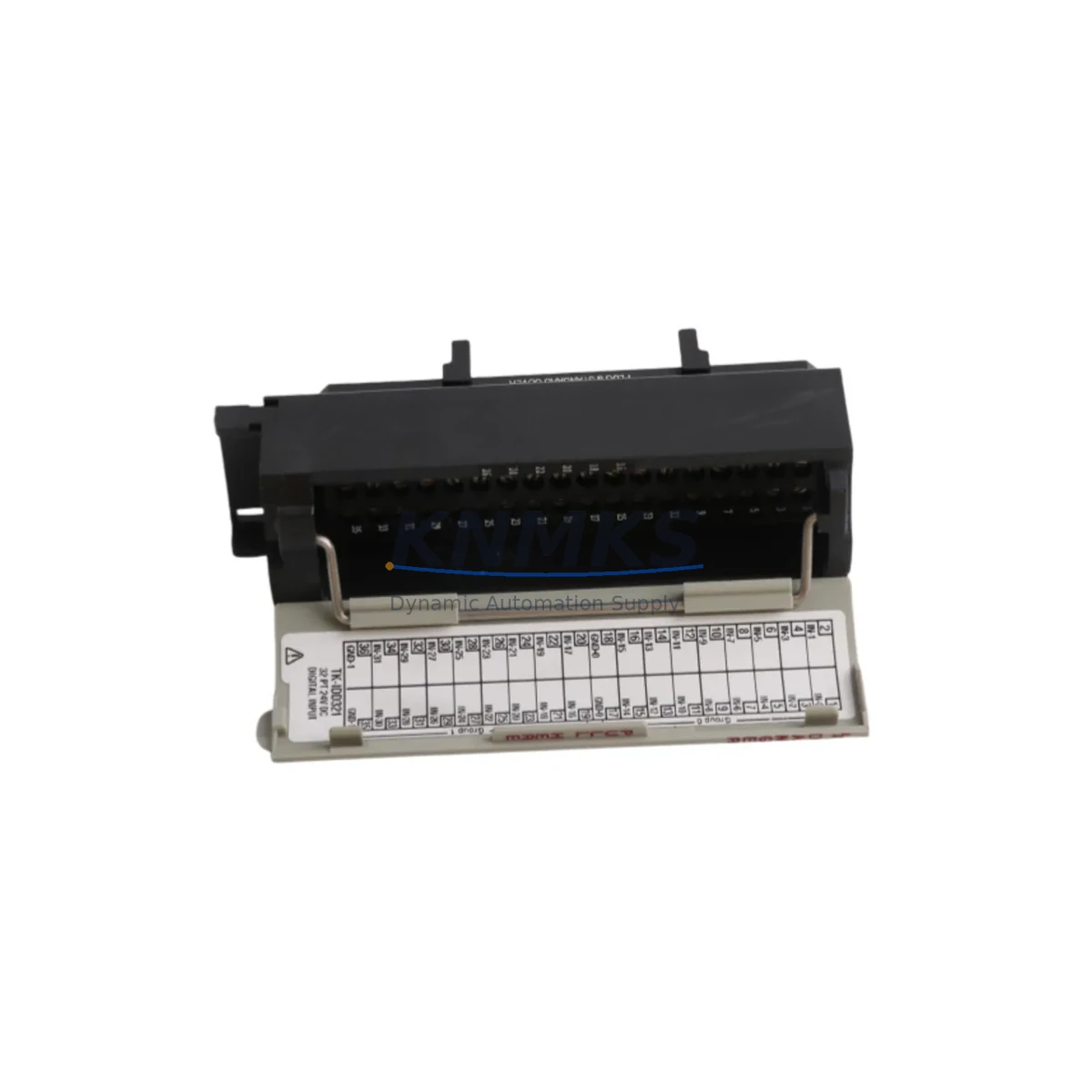
Honeywell TK-IDD321 Migration-Ready Digital Input for Legacy DCS: Proven Retrofit Solution for TPS/TDC Control Systems
The Honeywell TK-IDD321 is a 32-channel Digital Input Module engineered for the TotalPlant Solution (TPS) and TDC 3000 distributed control system platforms. As legacy DCS installations approach end-of-support milestones, the TK-IDD321 remains one of the most reliable retrofit-ready components available for engineers managing brownfield upgrades, control cabinet modernization, and I/O subsystem restoration. Whether you are replacing a failed module in an active production line or pre-positioning spare inventory ahead of a planned turnaround, the TK-IDD321 delivers verified hardware compatibility with the existing TPS backplane architecture, eliminating the need for costly re-engineering of field wiring or cabinet layouts.
For facilities operating legacy Honeywell TDC 3000 or TPS environments, sourcing a verified replacement TK-IDD321 is often the fastest path to restoring system integrity without triggering a full platform migration. The module slots directly into the standard IOP (Input/Output Processor) card cage, interfaces with the UCN (Universal Control Network) communication bus, and retains full compatibility with existing Highway Gateway and Application Module configurations. Engineers can restore digital input functionality without modifying the control database, reloading PLC programs, or reconfiguring HMI display pages — a critical advantage when minimizing planned downtime is the primary constraint.
Migration Compatibility Table
| Parameter | TK-IDD321 Specification | Retrofit Notes |
|---|---|---|
| Platform Compatibility | Honeywell TPS / TDC 3000 | Direct slot-in replacement; no backplane adapter required |
| Channel Count | 32 Digital Input Channels | Verify field terminal block wiring matches existing I/O assignment |
| Input Voltage Range | 24 VDC nominal | Confirm power supply module (e.g., TK-PRS021) output voltage before installation |
| Backplane Interface | IOP Card Cage Slot | Check card cage slot availability; confirm no slot address conflicts with TK-IOM001 or adjacent modules |
| Communication Bus | UCN (Universal Control Network) | No UCN reconfiguration required for like-for-like replacement |
| Module Address | Configured via hardware DIP switch | Record existing address from failed module before removal; replicate on replacement unit |
| Firmware Compatibility | Compatible with TPS R500 and later | Verify TPS software release level; earlier releases may require firmware patch |
| Installation Space | Standard IOP single-slot form factor | No mechanical modification to cabinet or card cage required |
| Field Wiring Termination | Marshalling cabinet terminal blocks | Confirm terminal block labeling matches I/O database channel assignments before reconnection |
| Replacement Category | Direct OEM-equivalent replacement | Suitable for emergency swap and planned maintenance replacement |
| Support terms | support terms confirmed by quotation | Covers hardware defects; pre-shipment functional test included |
Retrofit Planning for Existing Automation Systems
A successful TK-IDD321 retrofit begins well before the module arrives on site. During the planning phase, engineers should audit the IOP card cage to confirm available slot positions and verify that the existing TK-PRS021 power supply module is delivering stable 24 VDC within tolerance. Power budget calculations should account for all installed I/O modules in the cage, including any TK-IDY022 Digital Input modules or TK-ODD321 Digital Output modules sharing the same backplane, to ensure the power supply is not operating near its rated capacity limit.
Field wiring documentation must be reviewed against the current I/O database in the TPS engineering station. Each of the 32 input channels on the TK-IDD321 maps to a specific tag in the control database; any discrepancy between the physical terminal block wiring and the database channel assignment will result in incorrect signal mapping after module replacement. Cross-referencing the marshalling cabinet drawings with the TPS I/O configuration report before disconnecting field cables is a mandatory step that prevents commissioning delays.
For sites where the TPS system interfaces with a Honeywell Application Module or a Highway Gateway connecting to third-party subsystems, engineers should also verify that the UCN node address assigned to the replacement TK-IDD321 matches the original module exactly. The UCN address is set via hardware DIP switches on the module faceplate; an incorrect address will cause the module to appear as an unrecognized node on the network, triggering system alarms and preventing the Application Module from polling the new I/O card. In multi-drop UCN architectures, this step is particularly critical where the TK-IDD321 shares a network segment with communication modules such as the TK-FTA020 field termination assembly.
Where the retrofit scope extends beyond a single module replacement — for example, when upgrading an entire I/O subsystem or migrating from TDC 3000 to TPS — the TK-IDD321 is typically deployed alongside complementary components including analog input modules, redundant power supplies, and updated field termination assemblies. Planning the installation sequence to minimize the number of simultaneous I/O outages is essential for maintaining process continuity during phased upgrades.
Downtime Control During System Migration
Controlling unplanned downtime during a TK-IDD321 replacement requires a structured hot-swap procedure combined with pre-verified spare inventory. Because the TPS platform supports online module replacement in non-redundant I/O configurations, the replacement window can often be reduced to under 30 minutes when the engineering team has completed pre-commissioning checks in advance. The recommended sequence is: isolate the affected I/O card from the control database using the TPS engineering station, physically remove the failed module, install the replacement TK-IDD321 with the correct DIP switch address pre-set, reconnect field wiring using the marshalling cabinet terminal block labels as reference, and then re-enable the I/O card in the database to restore signal scanning.
For facilities where the TK-IDD321 supports critical interlock or safety-related digital inputs, the replacement procedure should be coordinated with the process safety team to ensure that any affected interlocks are placed in bypass mode through the approved management of change process before the module is removed. HMI display pages referencing the affected I/O tags should be monitored throughout the replacement to confirm that signal values return to expected states after the new module is commissioned. If the TPS system is running an older software release, a firmware compatibility check against the replacement module’s hardware revision should be completed before installation to avoid post-swap communication faults.
Maintaining a pre-tested TK-IDD321 in on-site spare inventory is the most effective strategy for minimizing mean time to repair (MTTR) in TPS/TDC environments. Given that Honeywell has discontinued active production of many TPS-generation I/O modules, sourcing verified replacement units from specialist industrial automation suppliers with pre-shipment functional testing and a support terms confirmed by quotation provides the highest confidence that the spare will perform correctly when needed.
Retrofit Support FAQ
Q1: Is the TK-IDD321 a direct replacement for all 32-channel digital input modules in the TPS IOP card cage?
The TK-IDD321 is the standard 32-channel digital input module for the TPS IOP subsystem and is a direct like-for-like replacement for units of the same part number. Before installation, confirm the hardware revision of the failed module and verify that the replacement unit’s firmware revision is compatible with your TPS software release level. For sites running TPS R500 or later, the TK-IDD321 is fully compatible without additional firmware updates in most configurations.
Q2: What commissioning steps are required after installing a replacement TK-IDD321?
After physical installation, verify the DIP switch address matches the original module, reconnect all field wiring to the marshalling terminal blocks, and re-enable the I/O card in the TPS engineering station. Perform a channel-by-channel signal verification by comparing live input states against field device status. Check the TPS system event log for any UCN communication errors or module fault alarms. If the module is used in an interlock application, conduct a functional test of each interlock loop before releasing the system to normal operation.
Q3: Can the TK-IDD321 be used in a mixed TDC 3000 and TPS environment?
Yes. The TK-IDD321 is compatible with both TDC 3000 and TPS IOP card cage architectures, provided the card cage and backplane hardware are of the correct generation. In mixed environments where TDC 3000 and TPS nodes coexist on the same UCN, the module address assignment must be managed carefully to avoid node conflicts. Consult the TPS I/O configuration documentation for your specific system revision before deploying the module in a mixed-platform architecture.
Q4: What support terms and pre-shipment testing is provided with the TK-IDD321?
Every TK-IDD321 unit supplied by KNMKS is covered by a support terms confirmed by quotation against hardware defects from the date of shipment. Each unit undergoes pre-shipment functional testing to verify channel integrity, backplane connector condition, and firmware operability before dispatch. Units are shipped with protective packaging to prevent ESD damage and physical connector damage during transit. In-stock units are available for same-day or next-business-day dispatch to minimize lead time for emergency replacement requirements.
© 2026 KNMKS. All rights reserved.
Original Source: https://knmks.com
Contact: admin@knmks.com | +86 18359268345
Product Identification
- Brand / Ecosystem
-
Honeywell
Honeywell - Model / Series
-
TK-IDD321
Legacy Series - Product Family
- PLCs & Controllers
- Availability Status
- Available on request after model and quantity confirmation
- Inquiry Type
- B2B RFQ, replacement inquiry and project spare-part request
- Pre-Quote Check
- Exact SKU, brand, series, quantity, nameplate photos and destination country are checked before quotation
System Path
Where this product fits in the KNMKS automation structure.
Specification & Inquiry Focus
- Control platform
- PLC, PAC and modular controllers
- Common needs
- CPU, rack, power and I/O expansion
- Project support
- Replacement, cabinet build and maintenance
Buyer Confirmation
Information KNMKS checks before replying.
- Exact model
- TK-IDD321
- Brand / ecosystem
- Honeywell
- Product family
- PLCs & Controllers
- Application note
- Replacement, maintenance, project build or spare-part list
- Useful photos
- Nameplate, installed unit, cabinet layout or connector side
- Delivery details
- Quantity, destination country and target schedule
Document Support
Files and notes can be confirmed during quotation.
- Product photos or nameplate confirmation when available
- Packing and delivery notes before quotation confirmation
- Support scope and delivery terms confirmed per inquiry
- Export document coordination for qualified B2B requests
Inquiry Support
- Model cross-checking before quotation
- CPU, power, rack and expansion module matching
- Support for replacement and project inquiry
What to Send Us
- Brand and exact model number: Honeywell TK-IDD321
- Quantity and required delivery time
- Application, replacement requirement or nameplate photo
- Destination country and shipping preference
RFQ Preparation
This is a product inquiry page built for RFQ communication.
Fast Model Check
Send this model to KNMKS for confirmation.
Include quantity, destination country and photos if this is a maintenance replacement. The inquiry will be saved with a reference number after submission.
Brand & Compatibility Note
KNMKS displays automation product information for well-known industrial brand ecosystems and compatible replacement references. Brand names are used for product identification and compatibility reference only; final availability and commercial terms are confirmed per quotation.
 Manufacturing
 Machine Tools
 Packaging
 Energy & Power



 HMI & Displays
 Servo Systems
 Variable Frequency Drives
 Sensors