
Overview
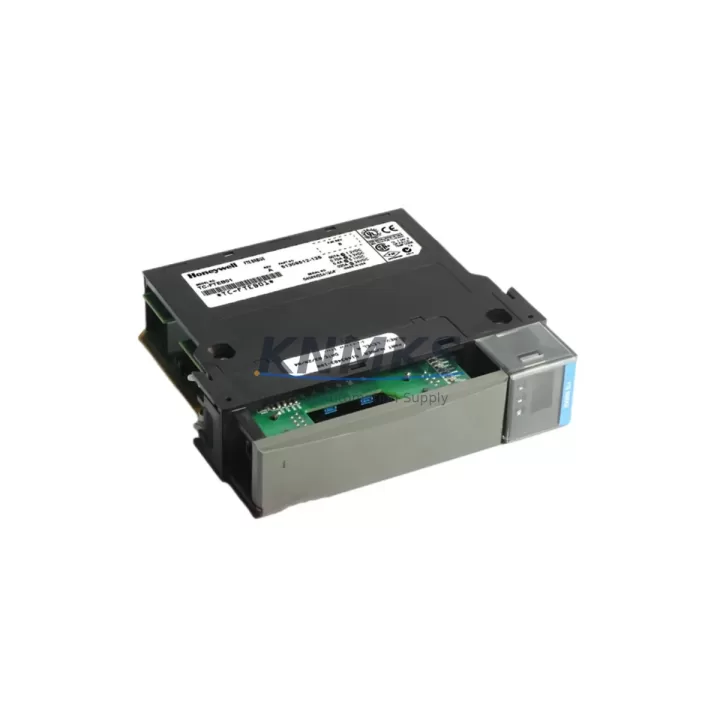
Honeywell TC-FTEB01 51309512-125 Retrofit-Ready FTE Bridge for Experion PKS
The Honeywell TC-FTEB01 (part number 51309512-125) is a Fault Tolerant Ethernet (FTE) Bridge Module designed for use within the Experion PKS distributed control system platform. As legacy Honeywell C200, C200E, and C300 controller-based systems approach end-of-life or require infrastructure modernization, the TC-FTEB01 serves as a critical migration component — enabling engineers to extend the operational life of existing control architectures or execute a structured transition to current-generation hardware without full system replacement.
This module bridges FTE network segments within the Experion PKS chassis environment, maintaining redundant Ethernet communication paths between controllers, I/O modules, and supervisory layers. For facilities managing aging DCS infrastructure, the TC-FTEB01 is frequently specified during control cabinet upgrades, network topology redesigns, and partial platform migrations where maintaining communication continuity is non-negotiable.
Migration Compatibility Table
| Parameter | Details |
|---|---|
| SKU / Part Number | TC-FTEB01 / 51309512-125 |
| Platform Compatibility | Honeywell Experion PKS (C200, C200E, C300 series) |
| Network Interface | Fault Tolerant Ethernet (FTE) — dual-port redundant |
| Backplane Interface | Standard Experion PKS chassis backplane slot |
| Installation Requirement | Fits standard Experion PKS chassis; verify slot assignment per system configuration |
| Communication Protocol | FTE (IEEE 802.3 Ethernet-based, Honeywell proprietary redundancy layer) |
| Replacement Recommendation | Direct replacement for failed or end-of-life TC-FTEB01 units in existing chassis |
| Commissioning Notes | Verify firmware version compatibility; confirm module address assignment in Experion Builder |
| Support terms | 12 months from date of shipment |
Retrofit Planning for Existing Automation Systems
Successful integration of the TC-FTEB01 into a legacy or partially upgraded Experion PKS system requires systematic pre-installation planning. Engineers should begin by auditing the existing chassis configuration — confirming available backplane slots, current power supply capacity, and whether the installed Experion PKS Power Supply Module (such as the TC-PPXX series) can support the additional module load without derating.
Terminal wiring and Ethernet cable routing must be verified against the existing FTE network topology. In systems where the FTE network connects to a Honeywell EHPM (Ethernet Highway Proxy Module) or interfaces with a Series C I/O Link, the bridge module’s port assignments must align with the documented network map to avoid address conflicts or redundancy path failures.
For sites running mixed-generation hardware — for example, chassis containing both legacy C200 Controller Modules and newer C300 Controller Modules — the TC-FTEB01 must be confirmed compatible with the firmware baseline deployed across the system. Experion PKS firmware version mismatches between the bridge module and the active controller can cause FTE link instability or prevent module recognition during startup.
Where I/O expansion is part of the retrofit scope, engineers should account for the physical installation space required by additional Series C I/O Modules or remote I/O cabinets connected via the FTE backbone. Signal isolators may be required at field terminal interfaces where legacy wiring standards differ from current I/O module input specifications.
HMI display configurations in Experion Station should be reviewed post-installation to confirm that FTE network status points and module health indicators are correctly mapped. In some migration scenarios, Experion Builder project files require partial re-download to recognize the replacement module’s hardware address, particularly if the original module was assigned a non-default slot position.
Programming cable access (typically via the controller’s USB or serial service port) should be arranged in advance for on-site firmware verification and any required parameter adjustments during commissioning. Coordinating this access during a planned maintenance window minimizes unplanned downtime exposure.
Downtime Control During System Migration
Minimizing control system downtime during a TC-FTEB01 replacement or FTE network upgrade requires a structured hot-swap or cold-swap protocol depending on the system’s redundancy configuration. In fully redundant Experion PKS deployments, the FTE bridge can often be replaced on the secondary network path while the primary path maintains process control — provided the replacement sequence is coordinated with the site’s DCS engineer and the Experion system’s fault-tolerant switchover behavior is verified in advance.
Before physical module removal, the existing controller program logic should be backed up from Experion Builder, and all active FTE network connections should be documented. This protects against configuration loss in the event of an unexpected system response during the swap procedure.
Post-installation, the module should be powered up with the chassis in a controlled state, and FTE link status confirmed in the Experion Station network view before returning the system to automatic control. Field control continuity is maintained throughout by ensuring the redundant communication path remains active during the entire replacement sequence. Commissioning tests — including FTE switchover simulation and I/O scan verification — should be completed before the maintenance window closes.
All units supplied by KNMKS are pre-tested prior to shipment and covered by a support terms confirmed by quotation, reducing the risk of repeat downtime from component failure.
Retrofit Support FAQ
Q: Is the TC-FTEB01 a direct drop-in replacement for an existing failed unit?
A: Yes, for systems using the same Experion PKS chassis generation. Confirm the backplane slot type and firmware version compatibility before installation. No hardware modification is required for direct replacement in a matching chassis.
Q: What commissioning steps are required after installing the TC-FTEB01?
A: After physical installation, verify module recognition in Experion Builder, confirm FTE network link status on both ports, validate module address assignment, and perform an FTE switchover test. A partial project download may be required if the module address differs from the original configuration.
Q: How do I confirm wiring and terminal compatibility before installation?
A: The TC-FTEB01 connects via the chassis backplane — no field terminal wiring is required for the module itself. Ethernet patch cables to the FTE network switches should be verified for correct port assignment per the site’s FTE network diagram.
Q: What support terms and stock availability does KNMKS provide?
A: All TC-FTEB01 units are supplied with a support terms confirmed by quotation from the date of shipment. Units are pre-tested before dispatch. Contact admin@knmks.com or +86 18359268345 to confirm current stock availability and lead time.
© 2026 KNMKS. All rights reserved.
Original Source: https://knmks.com
Contact: admin@knmks.com | +86 18359268345
Product Identification
- Brand / Ecosystem
-
Honeywell
Honeywell - Model / Series
-
TC-FTEB01 51309512-125
Experion PKS Series - Product Family
- Other Components
- Availability Status
- Available on request after model and quantity confirmation
- Inquiry Type
- B2B RFQ, replacement inquiry and project spare-part request
- Pre-Quote Check
- Exact SKU, brand, series, quantity, nameplate photos and destination country are checked before quotation
System Path
Where this product fits in the KNMKS automation structure.
Specification & Inquiry Focus
- Component range
- Breakers, terminals and cabinet accessories
- Common needs
- Model, photo and installation requirement
- Project support
- Maintenance and mixed spare-part inquiry
Buyer Confirmation
Information KNMKS checks before replying.
- Exact model
- TC-FTEB01 51309512-125
- Brand / ecosystem
- Honeywell
- Product family
- Other Components
- Application note
- Replacement, maintenance, project build or spare-part list
- Useful photos
- Nameplate, installed unit, cabinet layout or connector side
- Delivery details
- Quantity, destination country and target schedule
Document Support
Files and notes can be confirmed during quotation.
- Product photos or nameplate confirmation when available
- Packing and delivery notes before quotation confirmation
- Support scope and delivery terms confirmed per inquiry
- Export document coordination for qualified B2B requests
Inquiry Support
- Mixed automation spare parts inquiry
- Cabinet component and accessory support
- Model identification from photos or labels
What to Send Us
- Brand and exact model number: Honeywell TC-FTEB01 51309512-125
- Quantity and required delivery time
- Application, replacement requirement or nameplate photo
- Destination country and shipping preference
RFQ Preparation
This is a product inquiry page built for RFQ communication.
Fast Model Check
Send this model to KNMKS for confirmation.
Include quantity, destination country and photos if this is a maintenance replacement. The inquiry will be saved with a reference number after submission.
Brand & Compatibility Note
KNMKS displays automation product information for well-known industrial brand ecosystems and compatible replacement references. Brand names are used for product identification and compatibility reference only; final availability and commercial terms are confirmed per quotation.
 Manufacturing
 Machine Tools
 Packaging
 Energy & Power
 PLCs & Controllers
 HMI & Displays
 Servo Systems
 Variable Frequency Drives