
Overview
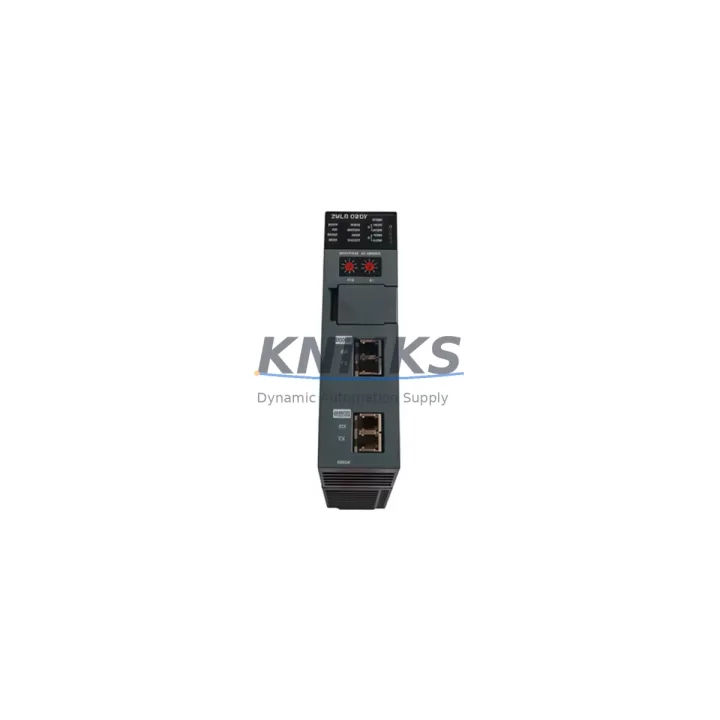
Honeywell 2MLR-DBDF-CC Maintenance-Proven Spare Part for Factory Uptime
The Honeywell 2MLR-DBDF-CC is an original expansion driver module designed for the Experion PKS (Process Knowledge System) distributed control platform. Engineered for continuous process environments in petrochemical, refining, power generation, and advanced manufacturing facilities, this module serves as a critical interface component within the C300 controller chassis and associated I/O expansion backplanes. Maintaining a verified stock of the 2MLR-DBDF-CC is a foundational element of any serious spare parts strategy for Experion PKS installations — particularly in plants operating beyond the standard product lifecycle where OEM lead times can extend to weeks or months.
For maintenance engineers managing aging DCS infrastructure, the 2MLR-DBDF-CC represents a direct-replacement solution that eliminates the need for firmware re-engineering or backplane reconfiguration. Its plug-and-play compatibility with existing Experion PKS chassis means that emergency replacements can be executed within a single maintenance window, restoring full I/O communication and process visibility without extended commissioning procedures.
Spare Maintenance Table
| Parameter | Specification |
|---|---|
| Part Number | 2MLR-DBDF-CC |
| Brand | Honeywell |
| Series | Experion PKS (C300 Platform) |
| Module Type | DCS Expansion Driver Module |
| Backplane Compatibility | Experion PKS C300 Chassis / Expansion I/O Backplane |
| Communication Interface | FTE (Fault Tolerant Ethernet) / FOUNDATION Fieldbus compatible |
| Operating Voltage | 24 VDC (backplane-supplied) |
| Operating Temperature | 0°C to 60°C |
| Mounting | DIN-rail / chassis slot insertion |
| Application Environment | Industrial process control, petrochemical, power, refining |
| Condition | Original / New Surplus / Refurbished (tested) |
| Pre-shipment Testing | Full functional test performed before dispatch |
| Support terms | 12 Months |
| Origin | USA |
| Lead Time | In-stock: ships within 2–5 business days |
Maintenance Planning for Continuous Operation
When scheduling preventive maintenance or responding to an unplanned fault involving the 2MLR-DBDF-CC, experienced maintenance engineers know that the module does not operate in isolation. A thorough site inspection should extend to the surrounding control cabinet components to prevent repeat failures and ensure the replacement module operates within its rated parameters from day one.
Begin by verifying the 24 VDC backplane power supply — typically a Honeywell CC-PWR01 or equivalent redundant power module — is delivering stable, within-tolerance voltage before inserting the replacement 2MLR-DBDF-CC. Voltage fluctuations or ripple on the backplane bus are a leading cause of premature module failure and can damage a new spare within hours of installation. Inspect the CC-TCNT01 C300 Controller Module in the same chassis: if the controller itself is exhibiting communication faults or watchdog resets, replacing only the expansion driver without addressing the controller health will not restore stable operation.
Check all FTE network cables and managed switches connecting the C300 chassis to the Experion PKS server. Degraded Cat5e/Cat6 patch cables, faulty SFP transceivers, or misconfigured VLAN settings on the FTE switch can cause the new 2MLR-DBDF-CC to report communication errors that are incorrectly attributed to the module itself. Similarly, inspect the CC-SCMB01 Series C Migration Board if the installation involves legacy Series C I/O migration — connector oxidation and loose terminations on the migration board are a common source of intermittent I/O faults in older Experion PKS expansions.
For I/O integrity, audit the CC-TAIX01 Analog Input Terminal Assembly and associated field wiring terminations. Loose or corroded terminal connections introduce signal noise that can trigger false process alarms even after a successful module replacement. If the plant uses FOUNDATION Fieldbus H1 segments connected through this expansion, verify segment terminators, spur lengths, and fieldbus power conditioners — a degraded H1 segment will cause the new driver module to report device communication failures that are unrelated to the module’s own health.
Finally, review the CC-PDOB01 Digital Output Processor modules in adjacent chassis slots and confirm that fuse protection on output circuits is intact. A blown fuse on a DO channel can cascade into apparent I/O expansion faults that mislead technicians into replacing the driver module when the root cause lies in the output field circuit. Maintaining a small buffer stock of these associated components — power modules, controller cards, terminal assemblies, and network patch cables — alongside the 2MLR-DBDF-CC significantly reduces mean time to repair (MTTR) during emergency callouts.
Site Replacement Workflow
Step 1 — Isolation and Backup: Before removing the 2MLR-DBDF-CC, export the current Experion PKS controller configuration using Control Builder. Confirm the backup is complete and accessible from a local engineering workstation. If the system is running in redundant mode, verify the secondary controller has assumed control before proceeding.
Step 2 — Safe Module Removal: Power down the affected chassis slot using the backplane power switch (do not de-energize the entire cabinet unless required by site safety procedures). Wearing appropriate ESD protection, extract the 2MLR-DBDF-CC by releasing the front-panel locking lever and sliding the module straight out of the backplane connector. Inspect the backplane connector pins for damage or contamination before inserting the replacement.
Step 3 — Replacement Insertion: Align the new 2MLR-DBDF-CC with the chassis slot guides and firmly seat the module until the locking lever engages. Restore backplane power and observe the module’s LED status indicators: a solid green RUN LED confirms successful initialization. The Experion PKS server should automatically detect the replacement module and restore I/O communication within 60–90 seconds without requiring a controller download.
Step 4 — Verification: In Experion PKS Station, navigate to the affected controller’s I/O tree and confirm all previously faulted I/O points have returned to normal status. Run a brief process simulation or check live field values against known reference readings to validate signal integrity. Document the replacement in the plant’s CMMS with the module serial number, installation date, and pre-replacement fault history.
Step 5 — Spare Stock Replenishment: After consuming a spare from inventory, initiate a replenishment order immediately. For critical DCS expansion modules like the 2MLR-DBDF-CC, maintaining a minimum of one verified spare per installed chassis is the industry-standard recommendation for plants targeting 99.9%+ process availability.
Spare Parts Support FAQ
Q1: Is the 2MLR-DBDF-CC compatible with all Experion PKS versions?
The 2MLR-DBDF-CC is designed for the Experion PKS C300 platform and is compatible with Experion PKS R400 through R520 and later releases. For installations running earlier Experion R300 or legacy TPS/TDC 3000 systems, compatibility should be verified against the specific chassis and backplane revision. Our technical team can assist with compatibility confirmation prior to shipment.
Q2: What pre-shipment testing is performed on each unit?
Every 2MLR-DBDF-CC dispatched from our inventory undergoes a full functional test including backplane power-up verification, communication interface check, and LED status confirmation. Units are shipped in anti-static packaging with a test report. Our support terms confirmed by quotation cover all functional defects identified after installation under normal operating conditions.
Q3: Can you support long-term supply agreements for critical DCS spare parts?
Yes. For maintenance teams managing large Experion PKS installations or multi-site fleets, we offer long-term supply commitments with reserved inventory allocation. This ensures priority access to critical modules like the 2MLR-DBDF-CC, CC-TCNT01, and associated I/O components without exposure to spot-market shortages or extended OEM lead times. Contact our sales team to discuss annual blanket order arrangements.
Q4: What is the recommended spare parts holding strategy for Experion PKS expansion modules?
Industry best practice for process-critical DCS installations is to maintain a minimum of one cold spare per installed module type, with hot-swap spares for modules in single-point-of-failure positions. For the 2MLR-DBDF-CC specifically, plants with more than four expansion chassis should consider holding two units. Annual inspection of stored spares — including power-up testing and firmware version verification — is recommended to ensure spares remain deployment-ready throughout their storage life.
© 2026 KNMKS. All rights reserved.
Original Source: https://knmks.com
Contact: admin@knmks.com | +86 18359268345
Product Identification
- Brand / Ecosystem
-
Honeywell
Honeywell - Model / Series
-
2MLR-DBDF-CC
Experion PKS Series - Product Family
- Other Components
- Availability Status
- Available on request after model and quantity confirmation
- Inquiry Type
- B2B RFQ, replacement inquiry and project spare-part request
- Pre-Quote Check
- Exact SKU, brand, series, quantity, nameplate photos and destination country are checked before quotation
System Path
Where this product fits in the KNMKS automation structure.
Specification & Inquiry Focus
- Component range
- Breakers, terminals and cabinet accessories
- Common needs
- Model, photo and installation requirement
- Project support
- Maintenance and mixed spare-part inquiry
Buyer Confirmation
Information KNMKS checks before replying.
- Exact model
- 2MLR-DBDF-CC
- Brand / ecosystem
- Honeywell
- Product family
- Other Components
- Application note
- Replacement, maintenance, project build or spare-part list
- Useful photos
- Nameplate, installed unit, cabinet layout or connector side
- Delivery details
- Quantity, destination country and target schedule
Document Support
Files and notes can be confirmed during quotation.
- Product photos or nameplate confirmation when available
- Packing and delivery notes before quotation confirmation
- Support scope and delivery terms confirmed per inquiry
- Export document coordination for qualified B2B requests
Inquiry Support
- Mixed automation spare parts inquiry
- Cabinet component and accessory support
- Model identification from photos or labels
What to Send Us
- Brand and exact model number: Honeywell 2MLR-DBDF-CC
- Quantity and required delivery time
- Application, replacement requirement or nameplate photo
- Destination country and shipping preference
RFQ Preparation
This is a product inquiry page built for RFQ communication.
Fast Model Check
Send this model to KNMKS for confirmation.
Include quantity, destination country and photos if this is a maintenance replacement. The inquiry will be saved with a reference number after submission.
Brand & Compatibility Note
KNMKS displays automation product information for well-known industrial brand ecosystems and compatible replacement references. Brand names are used for product identification and compatibility reference only; final availability and commercial terms are confirmed per quotation.
 Manufacturing
 Machine Tools
 Packaging
 Energy & Power
 PLCs & Controllers
 HMI & Displays
 Servo Systems
 Variable Frequency Drives