
Overview
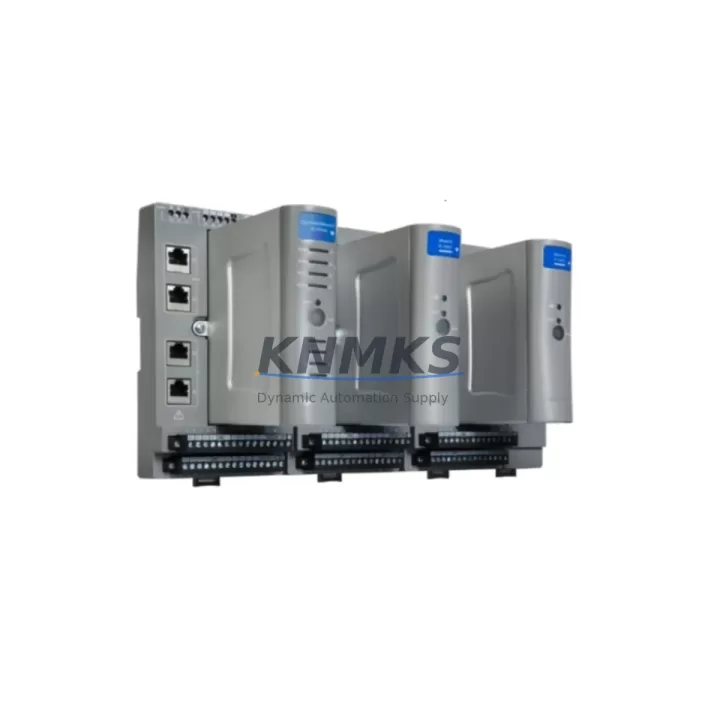
Honeywell SP-EMD171-ESD Migration-Ready ESD Terminal for Legacy Systems
The Honeywell SP-EMD171-ESD is a dedicated ESD (Emergency Shutdown) Terminal Module engineered for the Experion PKS Safety Manager platform. As legacy safety instrumented systems approach end-of-life or require control cabinet upgrades, the SP-EMD171-ESD serves as a validated drop-in replacement that preserves existing wiring topology, terminal block assignments, and SIL-rated logic execution without requiring full system re-engineering. For facilities operating aging SM-series safety controllers, this module provides a direct migration path that minimizes engineering rework and field downtime.
When planning a retrofit from an earlier Safety Manager revision, engineers must verify power rail capacity on the existing backplane. The SP-EMD171-ESD draws from the 24 VDC safety bus, and the hosting chassis — typically a Safety Manager chassis such as the SM-SCU01 or SM-SCU02 — must have sufficient headroom to support the module without triggering power fault diagnostics. Terminal wiring from field-side ESD pushbuttons, solenoid valve feedback loops, and manual call points connects directly to the module’s screw-terminal interface, which maintains the same pitch and labeling convention as predecessor ESD terminal variants, reducing re-termination risk during hot-cutover windows.
Backplane slot addressing is a critical checkpoint during migration. The SP-EMD171-ESD must be assigned the correct module address within the Safety Manager configuration tool to ensure that the existing control program — including cause-and-effect matrices, bypass logic, and trip relay assignments — maps correctly to the replacement hardware. Where the original program was developed in Safety Builder or an equivalent IEC 61511-compliant engineering environment, no logic recompilation is required provided the module type and slot address are matched precisely. This is a key advantage over cross-platform migrations that require full program re-validation.
For sites integrating the SP-EMD171-ESD into a broader Experion PKS architecture, communication link integrity between the Safety Manager and the Experion server must be confirmed post-installation. The FTE (Fault Tolerant Ethernet) backbone used by Experion PKS carries safety status data to operator HMI displays; after module replacement, HMI faceplates referencing ESD group status should be verified for correct tag binding and alarm annunciation. In parallel, any Modbus or OPC-DA/UA data paths feeding the distributed control system or historian should be tested to confirm that ESD state changes propagate correctly across the communication chain.
Installation space confirmation is mandatory before ordering. The SP-EMD171-ESD occupies a standard Safety Manager module slot and must be installed in a compatible chassis. Facilities running mixed-generation cabinets — where earlier I/O expansion modules such as the SM-DIM01 digital input module or SM-DOM01 digital output module share the same rack — should audit available slot positions and confirm that the chassis firmware revision supports the SP-EMD171-ESD module type. Firmware mismatches between the chassis controller and a newly installed module are a common source of initialization faults during retrofit commissioning and must be resolved before returning the safety loop to service.
Pre-shipment functional testing is performed on every SP-EMD171-ESD unit prior to dispatch. Each module undergoes power-on self-test verification, terminal continuity checks, and communication handshake validation against a reference Safety Manager chassis. Units are shipped with a test report and are covered by a support terms confirmed by quotation from the date of delivery, supporting both planned maintenance windows and emergency replacement scenarios where lead-time from the OEM is not acceptable.
Migration Compatibility Table
| Parameter | SP-EMD171-ESD Specification | Retrofit / Migration Note |
|---|---|---|
| Compatible Platform | Honeywell Experion PKS Safety Manager | Confirm SM-SCU01 / SM-SCU02 chassis compatibility |
| Supply Voltage | 24 VDC (Safety Bus) | Verify power rail headroom before installation |
| Terminal Interface | Screw-terminal, standard SM pitch | Direct re-termination from predecessor ESD terminal variants |
| Backplane Interface | Safety Manager backplane bus | Slot address must match original module assignment in Safety Builder |
| Communication Protocol | FTE (Fault Tolerant Ethernet) via SM controller | Verify Experion server tag binding and HMI faceplate after swap |
| SIL Rating | SIL 2 / SIL 3 capable (per system configuration) | No re-validation required if slot address and program are unchanged |
| Firmware Compatibility | Chassis firmware-dependent | Confirm chassis firmware revision supports SP-EMD171-ESD module type |
| Installation Footprint | Standard SM module slot (1 slot) | Audit available slots in mixed-generation cabinets |
| Weight | 220 g | No structural modification required for standard SM chassis |
| Pre-Shipment Testing | Power-on self-test, terminal continuity, comms handshake | Test report included with each unit |
| Support terms | 12 Months from delivery | Covers planned maintenance and emergency replacement scenarios |
| Origin | CN | In-stock; available for immediate dispatch |
Retrofit Planning for Existing Automation Systems
A successful SP-EMD171-ESD retrofit begins with a structured audit of the existing safety cabinet. Engineers should document the current slot map of the Safety Manager chassis, noting the positions of all installed modules including the SM-DIM01 digital input modules, SM-DOM01 digital output modules, and any SM-AIM01 analog input modules sharing the backplane. This audit identifies available slots, confirms power budget, and flags any modules approaching their own end-of-life that should be addressed in the same maintenance window to avoid repeat outages.
The ESD terminal wiring harness — connecting field devices such as manual call points, solenoid valve position feedback, and ESD pushbutton stations — should be photographed and labeled before disconnection. The SP-EMD171-ESD’s terminal block layout mirrors that of its predecessors, but field verification of wire labeling against the as-built loop drawings is mandatory before re-termination. Where loop drawings are outdated or unavailable, a continuity trace from the field junction box to the cabinet terminal strip is recommended prior to module swap.
For cabinets that also host a C300 Controller or a Safety Manager Controller (SM-SCU), the programming cable connection — typically via a USB-to-serial or Ethernet programming port — should be confirmed operational before beginning the swap. Having a live connection to Safety Builder or the Experion engineering station during the cutover allows engineers to monitor module initialization in real time and address any slot-address or firmware mismatch faults immediately, without requiring a second site visit. Where the cabinet also includes a Honeywell CC-PAIX01 or similar analog I/O carrier, signal isolation between the ESD loop and the process control I/O should be verified to prevent cross-channel interference after the new module is energized.
Downtime Control During System Migration
Minimizing process downtime during an SP-EMD171-ESD replacement requires pre-staging the replacement module, verifying its firmware compatibility offline, and preparing a step-by-step cutover checklist before the maintenance window opens. The existing safety program should be exported and archived from Safety Builder immediately before the swap, providing a recovery baseline if the new module initialization encounters an unexpected fault.
Where the process cannot tolerate a full ESD loop outage, a temporary bypass of the affected ESD input channels — executed under a formal Management of Change (MOC) procedure and with appropriate operator authorization — allows the physical module swap to proceed while maintaining process continuity. The bypass must be removed and the loop verified as healthy before the maintenance window is closed. Post-installation, a functional test of each ESD input channel — including trip simulation from the field device and confirmation of the correct response at the final element — is required before the loop is returned to service.
HMI displays referencing the replaced module’s ESD group should be checked for correct status indication after the module is online. In Experion PKS environments, the operator station faceplate for the affected ESD group will typically show a module fault alarm during the swap interval; this alarm should clear automatically once the SP-EMD171-ESD completes its initialization sequence and the Safety Manager controller re-establishes communication with the new module. If the alarm persists, a forced controller rescan or a Safety Builder download of the module configuration may be required to complete the migration.
Retrofit Support FAQ
Q1: Is the SP-EMD171-ESD a direct replacement for earlier Honeywell ESD terminal modules in the Safety Manager platform?
Yes. The SP-EMD171-ESD is designed as a form-fit-function replacement for compatible predecessor ESD terminal variants within the Experion PKS Safety Manager chassis family. Terminal wiring, slot addressing, and program compatibility are maintained, provided the chassis firmware revision supports the module type. Confirm firmware compatibility before installation.
Q2: What commissioning steps are required after installing the SP-EMD171-ESD?
After physical installation and re-termination, confirm the module address in Safety Builder matches the original slot assignment. Perform a controller rescan to verify module recognition. Execute a functional trip test on each ESD input channel. Confirm HMI faceplate status and clear any initialization alarms. Verify FTE communication link integrity between the Safety Manager and the Experion server before returning the loop to service.
Q3: Does the SP-EMD171-ESD ship with a test report, and what does the support terms cover?
Yes. Every unit is pre-tested prior to shipment, covering power-on self-test, terminal continuity, and communication handshake verification. A test report is included with each unit. The support terms confirmed by quotation cover manufacturing defects and functional failures under normal operating conditions from the date of delivery, supporting both planned retrofit projects and emergency spare part replacement scenarios.
Q4: What is the typical lead time, and is stock available for immediate dispatch?
The SP-EMD171-ESD is maintained availability confirmed by RFQ for immediate dispatch. For urgent replacement requirements where OEM lead times are not acceptable, same-day or next-business-day dispatch is available subject to order confirmation. Contact the sales team to confirm current stock levels and dispatch schedule for your specific requirement.
© 2026 KNMKS. All rights reserved. Original Source: https://knmks.com | Contact: admin@knmks.com | +86 18359268345
Product Identification
- Brand / Ecosystem
-
Honeywell
Honeywell - Model / Series
-
SP-EMD171-ESD
Experion PKS Series - Product Family
- HMI & Displays
- Availability Status
- Available on request after model and quantity confirmation
- Inquiry Type
- B2B RFQ, replacement inquiry and project spare-part request
- Pre-Quote Check
- Exact SKU, brand, series, quantity, nameplate photos and destination country are checked before quotation
System Path
Where this product fits in the KNMKS automation structure.
Specification & Inquiry Focus
- Display range
- Operator panels and touch screens
- Common needs
- Screen size, interface and version matching
- Project support
- Retrofit, spare unit and panel replacement
Buyer Confirmation
Information KNMKS checks before replying.
- Exact model
- SP-EMD171-ESD
- Brand / ecosystem
- Honeywell
- Product family
- HMI & Displays
- Application note
- Replacement, maintenance, project build or spare-part list
- Useful photos
- Nameplate, installed unit, cabinet layout or connector side
- Delivery details
- Quantity, destination country and target schedule
Document Support
Files and notes can be confirmed during quotation.
- Product photos or nameplate confirmation when available
- Packing and delivery notes before quotation confirmation
- Support scope and delivery terms confirmed per inquiry
- Export document coordination for qualified B2B requests
Inquiry Support
- Panel size and interface confirmation
- Replacement unit inquiry for discontinued HMIs
- Protective packaging for display shipment
What to Send Us
- Brand and exact model number: Honeywell SP-EMD171-ESD
- Quantity and required delivery time
- Application, replacement requirement or nameplate photo
- Destination country and shipping preference
RFQ Preparation
This is a product inquiry page built for RFQ communication.
Fast Model Check
Send this model to KNMKS for confirmation.
Include quantity, destination country and photos if this is a maintenance replacement. The inquiry will be saved with a reference number after submission.
Brand & Compatibility Note
KNMKS displays automation product information for well-known industrial brand ecosystems and compatible replacement references. Brand names are used for product identification and compatibility reference only; final availability and commercial terms are confirmed per quotation.
 Manufacturing
 Machine Tools
 Packaging
 Energy & Power
 PLCs & Controllers
 Servo Systems
 Variable Frequency Drives
 Sensors