
Overview
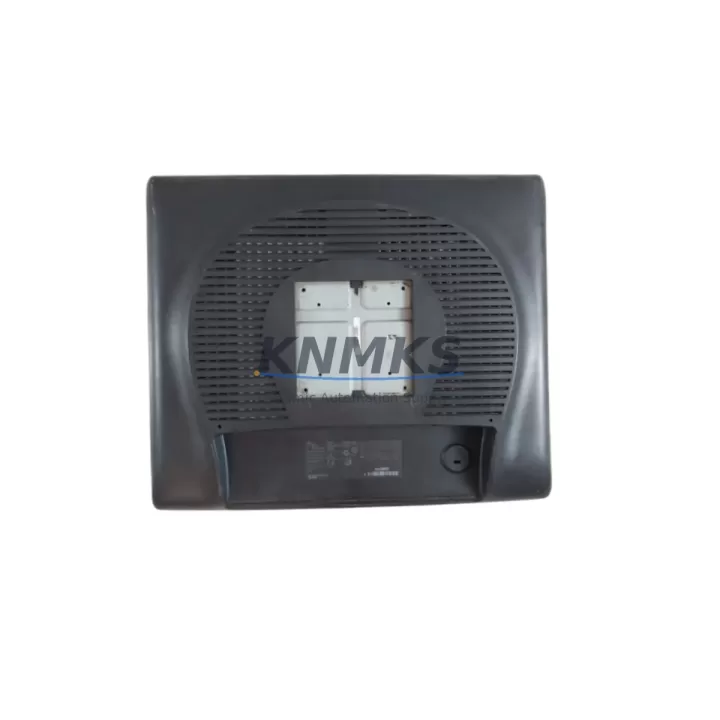
Honeywell 51153996-100 ET1915L-8CWA-1-RGNM-G Migration-Ready HMI for Legacy Control Systems
The Honeywell 51153996-100 ET1915L-8CWA-1-RGNM-G is a 19-inch industrial touchscreen HMI monitor engineered for deployment within Honeywell Experion PKS distributed control system environments. As legacy operator stations reach end-of-life and OEM support windows close, this unit serves as a validated drop-in replacement for aging HMI hardware across refinery, petrochemical, power generation, and continuous process manufacturing facilities. Its compatibility with the Experion PKS C300 controller platform and the EPKS Station software stack makes it a preferred choice for brownfield modernization projects where minimizing engineering rework and downtime is the primary constraint.
Engineers undertaking a control room retrofit must verify several critical parameters before commissioning this unit. Power supply compatibility should be confirmed against the existing 24 VDC or AC mains feed at the operator workstation. Terminal wiring for video signal, USB HID, and serial communication ports must be mapped against the existing cabinet layout. Backplane interface requirements, including any rack-mounted signal conditioning or KVM switching hardware, should be reviewed to ensure physical and electrical compatibility. Module addressing within the Experion Station configuration must be updated to reflect the new hardware node, and any existing HMI graphic displays built in Honeywell HMIWeb Display Builder should be validated for resolution and aspect ratio alignment with the ET1915L panel. Communication links to the Experion server via Ethernet TCP/IP should be re-established and tested under live process conditions before handover.
Firmware version alignment is a common source of commissioning delay in legacy HMI replacements. The ET1915L-8CWA-1-RGNM-G should be confirmed against the Experion PKS software release in use at the site — particularly for stations running R400 through R501 — to ensure driver compatibility and avoid display rendering anomalies. Where the existing station runs an older Honeywell FTE (Fault Tolerant Ethernet) network, the replacement HMI must be validated against the FTE switch configuration and VLAN segmentation in use.
In broader system migration contexts, this HMI is frequently deployed alongside the Honeywell C300 Process Controller, which serves as the primary control node in Experion PKS architectures. The C300 communicates with I/O modules via the FOUNDATION Fieldbus H1 or HART protocol, and any HMI replacement must preserve the operator’s ability to monitor and acknowledge alarms generated by these field devices. The Honeywell PMIO (Process Manager I/O) modules and the Series C I/O Link modules are commonly present in the same control cabinet and should be inventoried as part of the retrofit scope. Where the legacy system includes a Honeywell FDM (Field Device Manager) server, the replacement HMI station must retain network access to the FDM host for asset management continuity.
For facilities migrating from older TDC 3000 or PlantScape systems to Experion PKS, the ET1915L-8CWA-1-RGNM-G provides a consistent operator interface that supports the transition without requiring full retraining of control room personnel. The physical form factor is compatible with standard 19-inch rack-mount and panel-mount enclosures, reducing the need for cabinet modification during the upgrade. Installation space confirmation — including depth clearance behind the panel face and cable management routing — should be completed during the pre-engineering survey.
All units are pre-shipment tested under powered conditions to verify display uniformity, touch calibration, communication port function, and video signal integrity. Stock is maintained for immediate dispatch to support unplanned outage recovery and scheduled turnaround maintenance windows. A support terms confirmed by quotation is provided from the date of shipment, covering manufacturing defects and functional failures under normal operating conditions.
Migration Compatibility Table
| Parameter | Specification / Compatibility Note |
|---|---|
| SKU | 51153996-100 ET1915L-8CWA-1-RGNM-G |
| Brand / Series | Honeywell / Experion PKS Operator Station |
| Display Size | 19-inch TFT LCD, 1280×1024 SXGA |
| Touch Interface | 8-wire resistive touchscreen (RGNM) |
| Video Input | VGA (analog), compatible with Experion Station video output |
| Communication Ports | USB (HID), RS-232 serial; Ethernet via host PC |
| Power Input | 100–240 VAC, 50/60 Hz (confirm against cabinet supply) |
| Mounting | Panel-mount / rack-mount; standard 19-inch enclosure compatible |
| Backplane Interface | Not applicable (standalone monitor); signal via VGA + USB from host |
| Software Compatibility | Honeywell HMIWeb Display Builder, Experion PKS R400–R501+ |
| Firmware Alignment | Verify against site Experion PKS release before commissioning |
| Replacement Scope | Direct replacement for legacy 19-inch Honeywell operator station monitors |
| Pre-Shipment Test | Powered functional test: display, touch, video, ports |
| Support terms | 12 months from shipment date |
| Origin | CN |
Retrofit Planning for Existing Automation Systems
A successful HMI retrofit within an Experion PKS environment requires a structured pre-engineering review that accounts for all hardware and software interdependencies in the control cabinet and network architecture. When replacing the ET1915L-8CWA-1-RGNM-G, the following components are typically within scope of the same retrofit project and should be assessed concurrently.
The Honeywell C300 Process Controller is the most common control node paired with this HMI in Experion PKS installations. Its firmware version and I/O link configuration directly affect the alarm and process data streams displayed on the operator station. If the C300 is also being upgraded as part of the same project, sequencing the HMI replacement after the controller firmware update reduces the risk of display compatibility issues.
PMIO and Series C I/O modules mounted in the same chassis as the C300 provide the analog and digital signal terminations for field instruments. During a retrofit, terminal wiring documentation for these modules must be verified against the as-built drawings to ensure that signal references displayed on the HMI correspond correctly to physical field devices. Any changes to I/O module addressing must be reflected in the Experion configuration database before the new HMI is brought online.
Where the control system includes a Honeywell FTE network switch, the replacement HMI host PC must be re-registered on the FTE VLAN with the correct IP addressing scheme. The FTE switch configuration should be reviewed to confirm that the new station node is recognized within the Experion server’s node table. Communication link testing between the HMI station and the Experion Application Server should be completed before process handover.
In facilities where legacy serial communication is still in use — for example, Modbus RTU links to third-party field devices or older Honeywell UDC controllers — the RS-232 port on the ET1915L host system must be configured with the correct baud rate, parity, and stop bit settings to maintain communication continuity. Signal isolators may be required at the cabinet terminal strip if cable runs exceed recommended lengths or if ground loop interference is present.
Programming cable access for the C300 and associated I/O modules should be confirmed as part of the retrofit plan. Honeywell Control Builder software, running on the Experion Engineering Station, is used to download updated control strategies and I/O configurations. Ensuring that the Engineering Station has network access to the C300 during commissioning reduces the risk of extended downtime if configuration corrections are required.
Downtime Control During System Migration
Minimizing unplanned downtime during an HMI replacement in a live process environment requires a disciplined migration sequence. The following approach is recommended for facilities replacing the ET1915L-8CWA-1-RGNM-G in an operating Experion PKS system.
Before any hardware is removed, a full backup of the Experion configuration database, HMIWeb display files, alarm configuration, and historian tag list should be completed and stored on a separate network location. This backup serves as the recovery baseline if commissioning of the replacement unit encounters unexpected issues.
Where process conditions permit, the HMI replacement should be scheduled during a planned maintenance window or turnaround. If the replacement must be performed under live process conditions, a temporary operator station — such as a laptop running Experion Flex Station — can be used to maintain alarm monitoring and process oversight during the physical swap. This approach preserves control room situational awareness and reduces the risk of missed alarms during the transition.
The physical installation of the ET1915L-8CWA-1-RGNM-G should be completed before the host PC is reconnected to the Experion network. Touch calibration should be performed at the panel before the station is brought into service, using the calibration utility provided with the monitor. Video signal quality should be verified at the operating resolution before the operator is asked to accept the station for process control use.
Post-installation verification should include a structured walkthrough of all HMI display pages, alarm acknowledgement function, trend display, and faceplates for critical control loops. Any display rendering anomalies — such as incorrect tag references, missing graphics, or resolution mismatches — should be resolved before the temporary operator station is removed from service. A signed commissioning record should be completed and retained as part of the site modification documentation.
Retrofit Support FAQ
Q: Is the 51153996-100 ET1915L-8CWA-1-RGNM-G a direct replacement for the existing HMI monitor in my Experion PKS operator station?
A: Yes. This unit is a validated replacement for legacy 19-inch Honeywell operator station monitors used in Experion PKS environments. The physical form factor, video interface, and touch protocol are compatible with standard Experion Station configurations. Confirm the video output type (VGA) and USB HID support on your host PC before installation.
Q: What pre-shipment testing is performed on this unit?
A: Each unit undergoes a powered functional test covering display uniformity, touch calibration accuracy, video signal integrity across the full resolution range, and USB and serial port function. Test records are available upon request. Units are shipped with protective packaging suitable for international freight.
Q: How do I confirm firmware and software compatibility before ordering?
A: Provide your Experion PKS software release version (e.g., R430, R501) and the current HMIWeb Display Builder version in use at your site. Our technical team will confirm compatibility and advise on any driver or configuration updates required before commissioning.
Q: What support terms and inventory availability does KNMKS provide for this part?
A: A support terms confirmed by quotation is provided from the date of shipment, covering manufacturing defects and functional failures under normal operating conditions. Stock is maintained for immediate dispatch to support both planned maintenance and emergency replacement requirements. Contact admin@knmks.com or +86 18359268345 for current availability and lead time confirmation.
© 2026 KNMKS. All rights reserved.
Original Source: https://knmks.com
Contact: admin@knmks.com | +86 18359268345
Product Identification
- Brand / Ecosystem
-
Honeywell
Honeywell - Model / Series
-
51153996-100 ET1915L-8CWA-1-RGNM-G
Experion PKS Series - Product Family
- HMI & Displays
- Availability Status
- Available on request after model and quantity confirmation
- Inquiry Type
- B2B RFQ, replacement inquiry and project spare-part request
- Pre-Quote Check
- Exact SKU, brand, series, quantity, nameplate photos and destination country are checked before quotation
System Path
Where this product fits in the KNMKS automation structure.
Specification & Inquiry Focus
- Display range
- Operator panels and touch screens
- Common needs
- Screen size, interface and version matching
- Project support
- Retrofit, spare unit and panel replacement
Buyer Confirmation
Information KNMKS checks before replying.
- Exact model
- 51153996-100 ET1915L-8CWA-1-RGNM-G
- Brand / ecosystem
- Honeywell
- Product family
- HMI & Displays
- Application note
- Replacement, maintenance, project build or spare-part list
- Useful photos
- Nameplate, installed unit, cabinet layout or connector side
- Delivery details
- Quantity, destination country and target schedule
Document Support
Files and notes can be confirmed during quotation.
- Product photos or nameplate confirmation when available
- Packing and delivery notes before quotation confirmation
- Support scope and delivery terms confirmed per inquiry
- Export document coordination for qualified B2B requests
Inquiry Support
- Panel size and interface confirmation
- Replacement unit inquiry for discontinued HMIs
- Protective packaging for display shipment
What to Send Us
- Brand and exact model number: Honeywell 51153996-100 ET1915L-8CWA-1-RGNM-G
- Quantity and required delivery time
- Application, replacement requirement or nameplate photo
- Destination country and shipping preference
RFQ Preparation
This is a product inquiry page built for RFQ communication.
Fast Model Check
Send this model to KNMKS for confirmation.
Include quantity, destination country and photos if this is a maintenance replacement. The inquiry will be saved with a reference number after submission.
Brand & Compatibility Note
KNMKS displays automation product information for well-known industrial brand ecosystems and compatible replacement references. Brand names are used for product identification and compatibility reference only; final availability and commercial terms are confirmed per quotation.
 Manufacturing
 Machine Tools
 Packaging
 Energy & Power

 PLCs & Controllers
 Servo Systems
 Variable Frequency Drives
 Sensors