
Overview
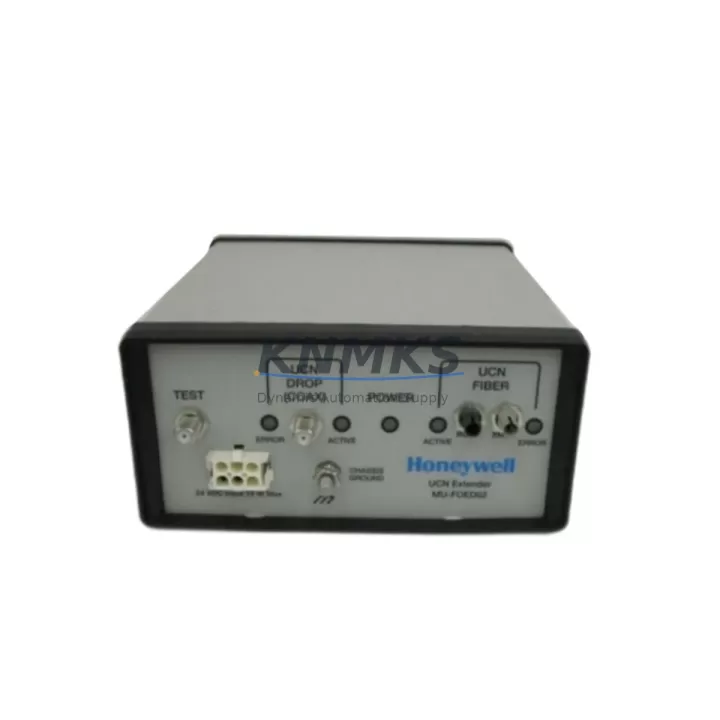
Honeywell MU-FOED02 Migration-Ready UCN Fiber Optic Extender for Legacy Control Systems
The Honeywell MU-FOED02 (Part No. 51197564-200) is a UCN (Universal Control Network) Fiber Optic Extender designed for use within Honeywell TDC 3000 and Experion PKS distributed control system architectures. As legacy TDC 3000 installations approach end-of-life and spare part availability tightens, the MU-FOED02 has become a critical component for engineers managing brownfield plant upgrades, control cabinet modernization, and UCN network segment extensions. This module enables reliable fiber optic signal transmission across UCN segments, maintaining communication integrity between controllers, I/O subsystems, and operator stations during both ongoing operations and phased migration projects.
For facilities transitioning from TDC 3000 to Experion PKS or Experion HS, the MU-FOED02 plays a pivotal role in preserving UCN backbone continuity. It allows engineering teams to extend or reroute fiber optic links without disrupting the existing control network topology, which is essential when upgrading individual cabinets or replacing obsolete modules such as the MC-TDOY22 analog output module or the MU-TDID12 digital input module in parallel with network infrastructure work. Maintaining UCN signal integrity during these transitions directly reduces the risk of unplanned process interruptions.
Migration Compatibility Table
| Parameter | MU-FOED02 (51197564-200) | Notes / Retrofit Guidance |
|---|---|---|
| Compatible Platform | TDC 3000, Experion PKS, Experion HS | Verify UCN segment addressing before installation |
| Network Interface | UCN Fiber Optic | Confirm fiber type (multimode) and connector standard at site |
| Installation Form Factor | Card-cage / backplane mount | Verify slot compatibility with existing MU-series card cage |
| Power Supply Requirement | Supplied via backplane (MU-series) | Confirm backplane power budget; check MU-PSIM11 capacity |
| Communication Protocol | UCN (Honeywell proprietary) | Not compatible with Modbus or PROFIBUS segments directly |
| Firmware Compatibility | TDC 3000 R500+, Experion R210+ | Confirm firmware revision with site historian or DCS vendor |
| Replacement Path | Direct drop-in for same PN | No re-addressing required if slot position is preserved |
| Commissioning Requirement | UCN segment restart may be required | Schedule during planned maintenance window |
| Support terms | 12 Months | Covers manufacturing defects; pre-shipment functional test included |
Retrofit Planning for Existing Automation Systems
Successful integration of the MU-FOED02 into an existing UCN architecture requires a structured pre-installation assessment. Engineers should begin by auditing the current UCN segment map to identify all active nodes, fiber run lengths, and existing extender positions. In many TDC 3000 installations, the MU-FOED02 is installed alongside the MU-NIIM02 network interface module, which manages node addressing and UCN traffic arbitration. Confirming that the NIIM firmware is compatible with the replacement extender prevents address conflicts after module swap.
Power budget verification is a mandatory step. The MU-series card cage relies on the MU-PSIM11 power supply module to distribute backplane power. Before inserting the MU-FOED02, engineers should calculate the total current draw of all installed modules and confirm that available headroom is sufficient. Overloading the backplane power supply is a common cause of intermittent UCN communication faults following module replacements in aging TDC 3000 cabinets.
Terminal wiring and fiber connector inspection should be completed before the replacement module is powered. Multimode fiber connectors on legacy installations are frequently contaminated or physically damaged, and a dirty fiber end-face will degrade UCN signal quality even with a new extender installed. Cleaning and re-polishing connectors, or replacing short fiber patch segments, is recommended as part of the retrofit scope. If the control cabinet layout requires rerouting fiber runs, the MU-CBLS02 cable assembly or equivalent site-standard fiber assemblies should be sourced in advance to avoid delays during the maintenance window.
For plants running Experion PKS alongside legacy TDC 3000 nodes, the MU-FOED02 supports coexistence on the same UCN segment during phased migration. This allows operators to maintain HMI visibility on Experion Station operator consoles while legacy controllers remain online, reducing the risk of losing process oversight during the transition period. HMI display configurations tied to UCN node addresses should be reviewed and backed up before any UCN segment modification is performed.
I/O module address mapping must be documented and preserved throughout the retrofit. When replacing the MU-FOED02 in a slot that previously carried a different module type, the UCN node table in the system database should be updated to reflect the correct module type and slot assignment. Failure to update the node table can cause the Honeywell Universal Station or Experion server to generate spurious alarms or fail to recognize the replacement module during the post-installation UCN scan.
Downtime Control During System Migration
Minimizing process downtime during UCN fiber optic extender replacement requires careful sequencing of pre-work, physical swap, and post-installation verification steps. The recommended approach is to complete all preparatory tasks — fiber inspection, power budget confirmation, node table backup, and HMI screen export — during normal operations, so that the actual module swap can be executed within a tightly controlled maintenance window, typically two to four hours for a single extender replacement.
Before removing the existing MU-FOED02, the UCN segment should be placed in a controlled state. If the segment supports redundant UCN paths, traffic should be shifted to the secondary path before the primary extender is removed. This preserves controller-to-I/O communication continuity and prevents process upsets caused by UCN segment loss. In non-redundant UCN configurations, the affected controllers should be placed in manual or fallback mode, and field operators should be stationed at critical control points to maintain process stability during the swap interval.
After the replacement MU-FOED02 is seated and the card cage is powered, a UCN segment diagnostic should be run from the Experion server or TDC 3000 engineer’s console to confirm that all nodes have re-registered correctly. Any nodes that fail to re-register should be investigated before returning the segment to automatic control. The full commissioning sequence — including UCN node scan, I/O channel verification, and HMI alarm acknowledgment — should be completed and signed off before the maintenance window is closed. Pre-shipment functional testing of the MU-FOED02 prior to dispatch reduces the probability of discovering a defective module on-site, which is the single largest cause of extended maintenance windows in legacy DCS retrofit projects.
Retrofit Support FAQ
Q1: Is the MU-FOED02 51197564-200 a direct replacement for the original Honeywell part?
Yes. The MU-FOED02 with part number 51197564-200 is a direct form-fit-function replacement for the original Honeywell module. No re-addressing or firmware changes are required provided the replacement module is installed in the same card cage slot as the original. Pre-shipment functional testing is performed on all units before dispatch.
Q2: What fiber optic connector and cable type does the MU-FOED02 use?
The MU-FOED02 uses multimode fiber optic cable with ST-type connectors, consistent with standard Honeywell UCN fiber infrastructure. Before installation, inspect existing fiber connectors for contamination or physical damage and clean or replace as necessary. Fiber run length should be within the UCN segment specification for the installed firmware revision.
Q3: Can the MU-FOED02 be used in an Experion PKS system migrated from TDC 3000?
Yes. The MU-FOED02 is compatible with both TDC 3000 and Experion PKS UCN architectures. During phased migration projects where TDC 3000 and Experion PKS nodes coexist on the same UCN segment, the MU-FOED02 supports mixed-node operation. Confirm the Experion server firmware revision supports the UCN segment configuration in use at your site.
Q4: What support terms and stock availability does KNMKS provide for the MU-FOED02?
All MU-FOED02 units supplied by KNMKS carry a support terms confirmed by quotation covering manufacturing defects and functional performance. Units are pre-tested before shipment. Stock is maintained for prompt dispatch to support urgent maintenance and unplanned replacement requirements. Contact our team for current lead times and quantity availability.
© 2026 KNMKS. All rights reserved.
Original Source: https://knmks.com
Contact: admin@knmks.com | +86 18359268345
Product Identification
- Brand / Ecosystem
-
Honeywell
Honeywell - Model / Series
-
MU-FOED02 51197564-200
Experion PKS Series - Product Family
- Other Components
- Availability Status
- Available on request after model and quantity confirmation
- Inquiry Type
- B2B RFQ, replacement inquiry and project spare-part request
- Pre-Quote Check
- Exact SKU, brand, series, quantity, nameplate photos and destination country are checked before quotation
System Path
Where this product fits in the KNMKS automation structure.
Specification & Inquiry Focus
- Component range
- Breakers, terminals and cabinet accessories
- Common needs
- Model, photo and installation requirement
- Project support
- Maintenance and mixed spare-part inquiry
Buyer Confirmation
Information KNMKS checks before replying.
- Exact model
- MU-FOED02 51197564-200
- Brand / ecosystem
- Honeywell
- Product family
- Other Components
- Application note
- Replacement, maintenance, project build or spare-part list
- Useful photos
- Nameplate, installed unit, cabinet layout or connector side
- Delivery details
- Quantity, destination country and target schedule
Document Support
Files and notes can be confirmed during quotation.
- Product photos or nameplate confirmation when available
- Packing and delivery notes before quotation confirmation
- Support scope and delivery terms confirmed per inquiry
- Export document coordination for qualified B2B requests
Inquiry Support
- Mixed automation spare parts inquiry
- Cabinet component and accessory support
- Model identification from photos or labels
What to Send Us
- Brand and exact model number: Honeywell MU-FOED02 51197564-200
- Quantity and required delivery time
- Application, replacement requirement or nameplate photo
- Destination country and shipping preference
RFQ Preparation
This is a product inquiry page built for RFQ communication.
Fast Model Check
Send this model to KNMKS for confirmation.
Include quantity, destination country and photos if this is a maintenance replacement. The inquiry will be saved with a reference number after submission.
Brand & Compatibility Note
KNMKS displays automation product information for well-known industrial brand ecosystems and compatible replacement references. Brand names are used for product identification and compatibility reference only; final availability and commercial terms are confirmed per quotation.
 Manufacturing
 Machine Tools
 Packaging
 Energy & Power
 PLCs & Controllers
 HMI & Displays
 Servo Systems
 Variable Frequency Drives