
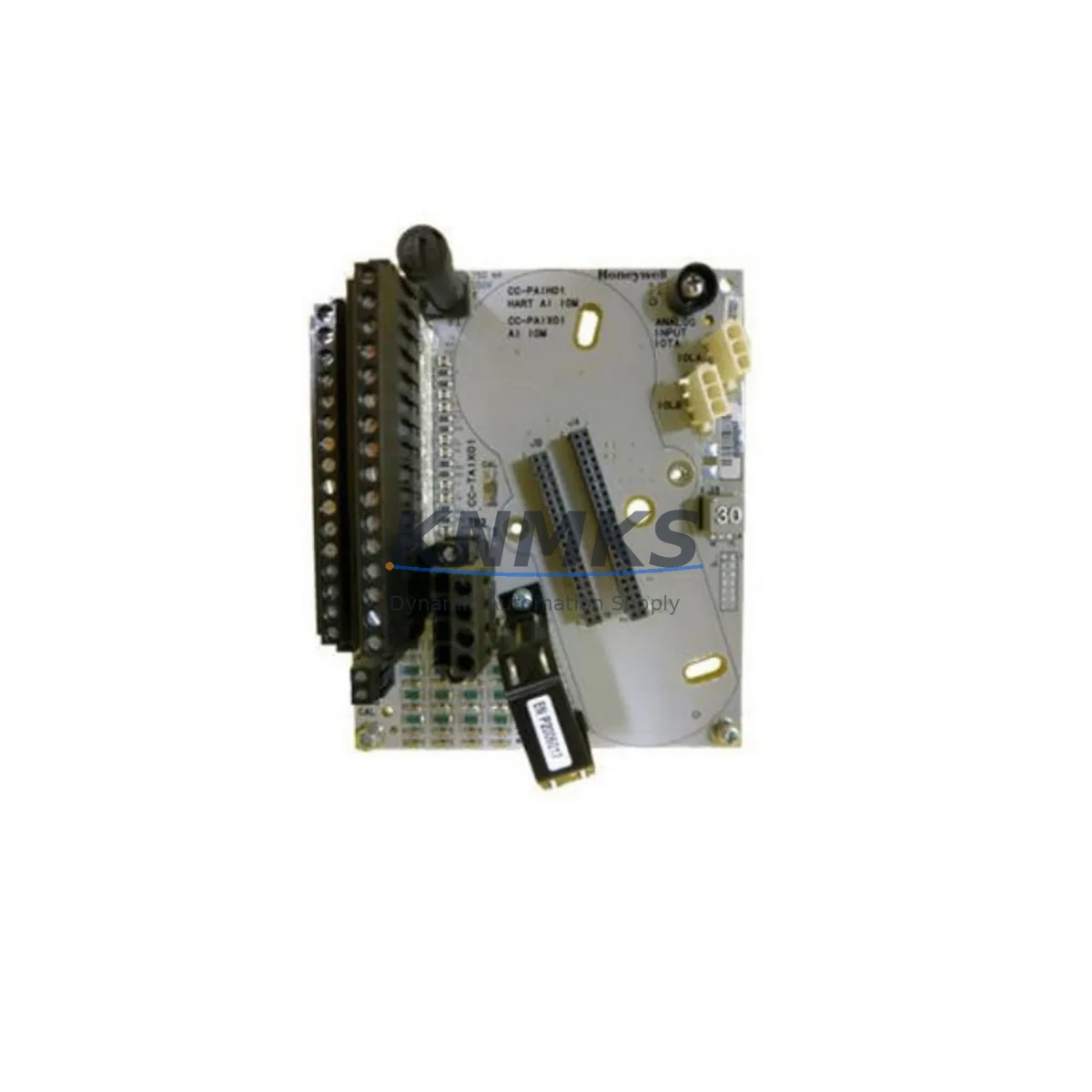
Overview
Honeywell DC-TAON01 Migration-Ready Analog Output for Legacy Control Systems
The Honeywell DC-TAON01 Analog Output IOTA is a migration-ready module engineered for engineers and maintenance teams managing the transition away from legacy Honeywell TotalPlant Solution (TPS) and PlantScape DCS architectures. As original TPS hardware reaches end-of-life and OEM support windows close, the DC-TAON01 provides a verified, in-stock replacement path that preserves existing field wiring, terminal assignments, and control loop logic without requiring a full system overhaul.
Designed to seat directly into the standard IOTA carrier within the TPS FTA (Field Termination Assembly) cabinet, the DC-TAON01 delivers 4–20 mA analog output signals across its channel complement. Engineers migrating from earlier Honeywell analog output cards — including modules from the PM I/O family — will find that the DC-TAON01 maintains backward-compatible terminal pinouts, reducing rewiring labor and minimizing the risk of field signal errors during cutover. Before installation, teams should confirm the FTA rail slot assignment, verify the backplane connector seating depth, and cross-reference the module address configured in the UCN (Universal Control Network) node table against the replacement unit’s factory default settings.
In retrofit projects where the control strategy is being migrated from TPS to Experion PKS, the DC-TAON01 can serve as an interim analog output solution while the new C300 Controller and CHARM I/O infrastructure is staged and commissioned in parallel. This phased approach allows the plant to maintain live process control on the legacy TPS backbone — including the Hiway Gateway and Application Module — while the new Experion system is validated loop by loop. During this transition, the existing FTE (Fault Tolerant Ethernet) network topology should be reviewed to ensure the DC-TAON01’s host node remains reachable and that no address conflicts exist with newly commissioned Experion nodes.
For sites operating mixed-generation cabinets, the DC-TAON01 is frequently deployed alongside the Honeywell MC-TAOY22 analog output module and the MC-PAIH02 analog input IOTA, allowing maintenance teams to standardize spare parts inventory across both TPS and hybrid Experion environments. When the control cabinet also houses a Honeywell CC-TAOX01 or similar CHARM analog output card for the new platform, technicians should clearly label each FTA rail section to prevent cross-installation errors during emergency maintenance. Power budget verification is essential: confirm that the FTA power supply — typically a Honeywell PS-IOAM or equivalent — can support the combined load of all installed IOTAs, including the DC-TAON01, without exceeding the rail’s current rating.
Program compatibility is a critical checkpoint in any DC-TAON01 replacement. The Control Builder or Application Station database must reflect the correct module type, slot address, and channel scaling parameters before the replacement unit is brought online. If the legacy TPS database was built on an older firmware baseline, a firmware version audit of the replacement DC-TAON01 should be completed prior to installation to confirm compatibility with the Application Module’s current operating revision. Any mismatch in firmware expectations can result in module rejection at startup, requiring a database patch or firmware downgrade before the loop can be returned to automatic control.
HMI screen updates are often overlooked during analog output module replacements. If the plant’s Honeywell GUS (Global User Station) or Experion Operator Station displays channel-specific diagnostic faceplates, the faceplate configuration should be reviewed to confirm that output range, engineering units, and alarm limits remain correctly mapped after the DC-TAON01 is installed. Communication link integrity — particularly across the UCN coaxial segment or the FTE switch infrastructure — should be verified with a live loop test before the replaced module is declared in service.
KNMKS maintains forward stock of the DC-TAON01 to support unplanned outage recovery and scheduled turnaround projects. Each unit undergoes pre-shipment functional testing and is covered by a support terms confirmed by quotation from the date of dispatch. Typical lead time from order confirmation to shipment is 1–3 business days for in-stock units, supporting both emergency breakdown response and planned maintenance windows.
Migration Compatibility Table
| Parameter | Details |
|---|---|
| Compatible Platform | Honeywell TPS, PlantScape DCS, Hybrid Experion PKS (interim) |
| Module Type | Analog Output IOTA |
| Output Signal | 4–20 mA (standard) |
| Installation Interface | Standard TPS FTA IOTA carrier rail |
| Backplane Connector | Compatible with TPS FTA backplane; verify slot depth before seating |
| Terminal Wiring | Backward-compatible with legacy TPS FTA field wiring; no rewiring required in standard replacement |
| Module Address | Must be configured in UCN node table; verify against legacy database before power-on |
| Firmware Compatibility | Audit firmware revision against Application Module baseline before installation |
| Communication Protocol | UCN (Universal Control Network); FTE-compatible in hybrid environments |
| HMI Compatibility | GUS / Experion Operator Station; verify faceplate channel mapping post-installation |
| Power Requirement | Supplied via FTA rail; verify PS-IOAM or equivalent power budget before installation |
| Replacement Recommendation | Direct replacement for legacy TPS analog output IOTAs; interim solution during Experion PKS migration |
| Pre-Shipment Testing | Functional output test completed on each unit prior to dispatch |
| Support terms | 12 months from date of dispatch |
Retrofit Planning for Existing Automation Systems
A successful DC-TAON01 retrofit begins with a thorough audit of the existing FTA cabinet layout. Identify the target IOTA slot, confirm the carrier rail condition, and document the existing field wiring terminal assignments before removing the legacy module. In cabinets where space is constrained, verify that the DC-TAON01’s physical dimensions are compatible with adjacent modules — particularly if the neighboring slots are occupied by Honeywell MC-PAIH02 analog input IOTAs or MC-TAOY22 analog output modules that share the same FTA power rail.
Communication module integrity should be confirmed before and after the swap. If the cabinet includes a Honeywell NIM (Network Interface Module) or a UCN Extender for long-distance node connections, verify that the UCN segment remains stable during the module hot-swap or planned outage window. For sites that have already partially migrated to Experion PKS and are running a Honeywell EPLCG (Ethernet to PLC Gateway) or similar protocol bridge, confirm that the DC-TAON01’s UCN node address does not conflict with any newly assigned Experion node IDs on the shared FTE network.
I/O channel scaling and loop calibration should be re-verified after installation. Use the Application Station’s Control Builder to confirm that the output channel’s 4 mA and 20 mA calibration points match the field device’s expected input range. If the plant uses a Honeywell SFC (Sequential Function Chart) or a cascade control strategy that references the DC-TAON01’s output channel, simulate the output ramp in manual mode before returning the loop to automatic to confirm that the field actuator responds correctly and that no signal inversion or scaling offset has been introduced by the replacement.
Downtime Control During System Migration
Minimizing downtime during a DC-TAON01 replacement requires pre-staging the replacement unit with the correct module address, firmware version, and channel configuration before the maintenance window begins. Where process conditions allow, place the affected control loop in manual mode at the operator station and hold the output at the last stable setpoint before removing the legacy module. This preserves the field actuator position and prevents process upsets during the physical swap.
For critical loops where even brief manual intervention is unacceptable, coordinate with the control room to implement a temporary override or bypass strategy using the Application Module’s built-in manual loader function. Document the pre-swap output value, complete the physical replacement, verify module recognition in the UCN node table, and perform a live loop test in manual before releasing the loop to automatic. The entire swap sequence — from module removal to automatic mode restoration — can typically be completed within a 15–30 minute window for a single DC-TAON01 channel, provided all pre-staging steps have been completed.
Post-installation, confirm that the GUS or Experion Operator Station displays the correct module status, that no UCN communication alarms are active for the replaced node, and that the output channel’s engineering unit display and alarm limits are consistent with the pre-swap configuration. Log the replacement in the plant’s maintenance management system with the unit serial number, firmware revision, and installation date to support future support requests and spare parts lifecycle tracking.
Retrofit Support FAQ
Q: Is the DC-TAON01 a direct drop-in replacement for the legacy TPS analog output IOTA?
A: In most standard TPS FTA configurations, yes. The DC-TAON01 is designed to seat into the same IOTA carrier slot and maintain compatible terminal wiring. However, always verify the module address in the UCN node table and confirm firmware compatibility with your Application Module revision before installation.
Q: What commissioning steps are required after installing the DC-TAON01?
A: After physical installation, verify module recognition in the Control Builder node table, confirm UCN communication link integrity, re-verify 4–20 mA output calibration at the field device, and perform a manual loop test before returning to automatic control. Update the GUS or Experion faceplate if channel-specific diagnostics are configured.
Q: Can the DC-TAON01 be used in a hybrid TPS / Experion PKS environment?
A: Yes. The DC-TAON01 can serve as an interim analog output solution on the TPS backbone while Experion PKS infrastructure — including C300 Controllers and CHARM I/O — is staged in parallel. Ensure FTE network node address assignments do not conflict between the legacy TPS UCN and the new Experion nodes.
Q: What support terms and stock availability does KNMKS provide for the DC-TAON01?
A: KNMKS maintains forward stock of the DC-TAON01 for immediate dispatch. Each unit is pre-shipment tested and covered by a support terms confirmed by quotation from the date of dispatch. In-stock units typically ship within 1–3 business days. Contact admin@knmks.com or +86 18359268345 for availability confirmation and bulk order pricing.
© 2026 KNMKS. All rights reserved. Original Source: https://knmks.com | Contact: admin@knmks.com | +86 18359268345
Product Identification
- Brand / Ecosystem
-
Honeywell
Honeywell - Model / Series
-
DC-TAON01
Legacy Control Series - Product Family
- PLCs & Controllers
- Availability Status
- Available on request after model and quantity confirmation
- Inquiry Type
- B2B RFQ, replacement inquiry and project spare-part request
- Pre-Quote Check
- Exact SKU, brand, series, quantity, nameplate photos and destination country are checked before quotation
System Path
Where this product fits in the KNMKS automation structure.
Specification & Inquiry Focus
- Control platform
- PLC, PAC and modular controllers
- Common needs
- CPU, rack, power and I/O expansion
- Project support
- Replacement, cabinet build and maintenance
Buyer Confirmation
Information KNMKS checks before replying.
- Exact model
- DC-TAON01
- Brand / ecosystem
- Honeywell
- Product family
- PLCs & Controllers
- Application note
- Replacement, maintenance, project build or spare-part list
- Useful photos
- Nameplate, installed unit, cabinet layout or connector side
- Delivery details
- Quantity, destination country and target schedule
Document Support
Files and notes can be confirmed during quotation.
- Product photos or nameplate confirmation when available
- Packing and delivery notes before quotation confirmation
- Support scope and delivery terms confirmed per inquiry
- Export document coordination for qualified B2B requests
Inquiry Support
- Model cross-checking before quotation
- CPU, power, rack and expansion module matching
- Support for replacement and project inquiry
What to Send Us
- Brand and exact model number: Honeywell DC-TAON01
- Quantity and required delivery time
- Application, replacement requirement or nameplate photo
- Destination country and shipping preference
RFQ Preparation
This is a product inquiry page built for RFQ communication.
Fast Model Check
Send this model to KNMKS for confirmation.
Include quantity, destination country and photos if this is a maintenance replacement. The inquiry will be saved with a reference number after submission.
Brand & Compatibility Note
KNMKS displays automation product information for well-known industrial brand ecosystems and compatible replacement references. Brand names are used for product identification and compatibility reference only; final availability and commercial terms are confirmed per quotation.
 Manufacturing
 Machine Tools
 Packaging
 Energy & Power
 HMI & Displays
 Servo Systems
 Variable Frequency Drives
 Sensors