
Overview
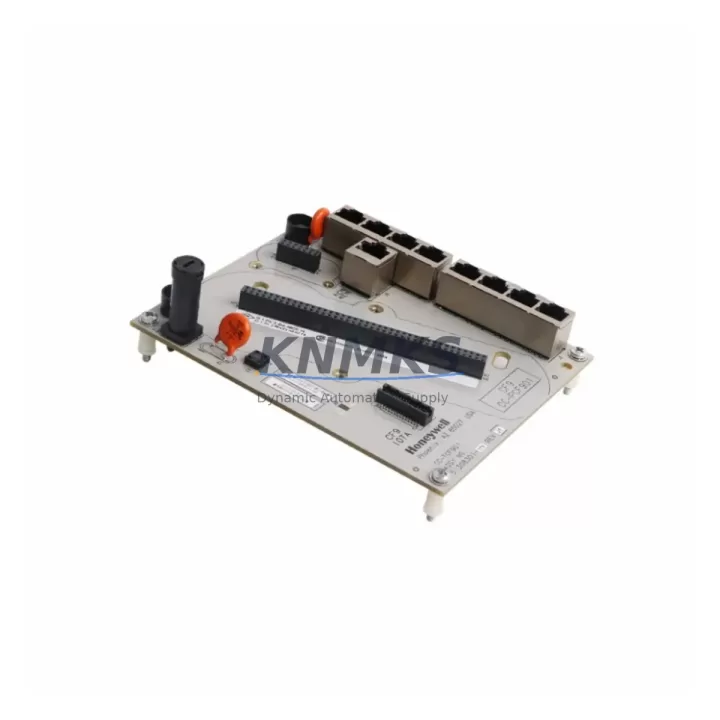
Honeywell CC-PCF901 Migration-Ready Control Firewall for Legacy DCS Systems
The Honeywell CC-PCF901 is a migration-ready control firewall module engineered for Experion PKS distributed control system environments. As legacy Honeywell TotalPlant Solution (TPS) and PlantScape systems approach end-of-life, the CC-PCF901 serves as a validated drop-in replacement for the discontinued DC-TCF902 and CC-TCF901 modules, enabling control engineers to modernize their network security architecture without requiring a full DCS platform overhaul. With verified compatibility across C300 controller nodes, FTE (Fault Tolerant Ethernet) backplane infrastructure, and Experion PKS R400 through R520 software releases, the CC-PCF901 is a cornerstone component in phased migration strategies for refineries, chemical plants, power generation facilities, and continuous process industries.
Procurement teams and automation engineers sourcing the CC-PCF901 benefit from confirmed in-stock availability, pre-shipment functional testing, and a support terms confirmed by quotation covering hardware defects under normal operating conditions. Each unit is inspected against Honeywell factory specifications before dispatch, ensuring that field installation proceeds without unexpected compatibility failures or firmware mismatches.
Migration Compatibility Table
| Parameter | CC-PCF901 (Current) | DC-TCF902 / CC-TCF901 (Legacy) |
|---|---|---|
| Module Form Factor | Standard Experion PKS card slot | Standard Experion PKS card slot |
| Backplane Interface | FTE dual-port Ethernet backplane | FTE dual-port Ethernet backplane |
| Communication Protocol | FTE / Ethernet (IEEE 802.3) | FTE / Ethernet (IEEE 802.3) |
| Supported Experion PKS Releases | R400 – R520+ | R300 – R410 (EOL) |
| Controller Compatibility | C300, ACE, EHPM nodes | C200, C300 (limited) |
| Firmware Upgrade Required | Verify node firmware ≥ R400 baseline | N/A (EOL) |
| Terminal / Wiring Adaptation | No rewiring required for direct swap | Reference original I/O termination drawings |
| Installation Space | Standard Experion PKS chassis slot | Same chassis slot — no mechanical modification |
| Replacement Recommendation | Direct replacement for DC-TCF902 / CC-TCF901 | Discontinue; source CC-PCF901 |
| Commissioning Focus | Node address, FTE link verification, firewall rule validation | — |
| Support terms | 12 months from shipment date | No support terms (EOL) |
Retrofit Planning for Existing Automation Systems
A successful CC-PCF901 retrofit begins well before the module arrives on-site. Engineers should audit the existing Experion PKS chassis to confirm available card slot positions and verify that the FTE switch infrastructure — typically a Cisco IE 2000 or Honeywell-qualified managed switch — supports the updated firewall module’s traffic segmentation rules. Power supply capacity within the chassis must be reviewed; the CC-PCF901 draws from the shared backplane power rail, and installations running near the rated capacity of a PM-PSUP power supply module should be evaluated before adding or swapping firewall cards.
Terminal block wiring from the legacy DC-TCF902 or CC-TCF901 does not require physical modification for a direct slot swap, but engineers should cross-reference the original I/O termination drawings to confirm signal routing has not been field-modified over the system’s operational life. Where the control system includes remote I/O nodes connected via FOUNDATION Fieldbus H1 or PROFIBUS DP segments, the firewall module’s network segmentation configuration must be updated to reflect the current node topology before the replacement unit is brought online.
For sites running Experion PKS alongside legacy Series C or Series A controllers, the migration path may also involve updating the C300 controller module firmware to ensure compatibility with the CC-PCF901’s updated firewall rule set. In multi-node architectures, the EHPM (Experion Hybrid Process Manager) and ACE (Application Control Environment) nodes should be verified for FTE link continuity after the firewall swap. HMI stations running Experion Station or HMIWeb Display Builder should be tested for alarm and faceplate refresh continuity, as firewall rule changes can affect OPC DA/UA data paths if not correctly configured during commissioning.
Sites that include a PM-SCMR safety manager or a Safety Manager SC module in the same control cabinet should confirm that the firewall module replacement does not interrupt the safety network segment. Programming cables such as the MC-TPPR02 or equivalent USB-to-serial adapters used for local controller access should be available on-site during the retrofit window to support any required firmware updates or configuration downloads.
Downtime Control During System Migration
Minimizing unplanned downtime during a CC-PCF901 replacement requires a structured pre-outage preparation protocol. Before the scheduled maintenance window, engineers should export a full backup of the Experion PKS database, including controller configuration, alarm setpoints, HMI graphics, and historian tag assignments. This backup ensures that if the replacement procedure encounters an unexpected firmware incompatibility or FTE link fault, the system can be restored to its last known good state without extended troubleshooting delays.
The physical swap of the CC-PCF901 into the chassis slot is typically completed within 15 to 30 minutes for a prepared team. The critical time investment lies in post-installation verification: confirming FTE link status on both network ports, validating firewall rule propagation across the node, and verifying that all C300 controller nodes and EHPM nodes re-establish communication within expected timeframes. HMI operators should monitor process variable continuity on critical loops during the cutover period, and a hold-point should be established before returning the unit to automatic control mode.
For facilities that cannot tolerate any control interruption, a hot-standby approach using a redundant FTE path can allow the firewall module swap to proceed while maintaining process visibility through the secondary network path. This approach requires that the FTE switch configuration supports path failover and that the replacement CC-PCF901 is pre-configured with the correct node address and firewall rule set before insertion. Pre-shipment testing performed on each unit prior to dispatch reduces the risk of receiving a module that requires additional configuration time on-site, directly supporting downtime targets.
Retrofit Support FAQ
Q1: Is the CC-PCF901 a direct replacement for the DC-TCF902 and CC-TCF901?
Yes. The CC-PCF901 is designed as a form-fit-function replacement for both the DC-TCF902 and CC-TCF901 in Experion PKS chassis environments. No mechanical modification or terminal rewiring is required for a direct slot swap. Engineers should verify the Experion PKS software release version and C300 controller firmware level prior to installation to confirm compatibility with the updated firewall module.
Q2: What commissioning steps are required after installing the CC-PCF901?
After physical installation, the primary commissioning steps include: verifying the module’s node address assignment matches the legacy unit’s configuration, confirming FTE dual-port link status on both network connections, validating firewall rule propagation to all connected controller and EHPM nodes, and testing HMI data path continuity for critical process displays. A full I/O scan and alarm acknowledgment check should be completed before returning the system to automatic operation.
Q3: Has the CC-PCF901 been tested before shipment?
Yes. Every CC-PCF901 unit undergoes pre-shipment functional testing against Honeywell factory specifications, including power-on self-test verification, FTE port link integrity checks, and firmware version confirmation. Units that do not pass inspection are not dispatched. This testing protocol is part of the support terms confirmed by quotation coverage provided from the shipment date.
Q4: What is the support terms coverage and what does it include?
Each CC-PCF901 is covered by a support terms confirmed by quotation from the date of shipment. The support terms covers hardware defects arising under normal operating conditions, including module failure attributable to manufacturing defects or component failure within the confirmed support period. Support requests are supported by our technical team, and replacement units can be dispatched from in-stock inventory to minimize system downtime. Contact admin@knmks.com or +86 18359268345 for support terms support and availability confirmation.
© 2026 KNMKS. All rights reserved. Original Source: https://knmks.com | Contact: admin@knmks.com | +86 18359268345
Product Identification
- Brand / Ecosystem
-
Honeywell
Honeywell - Model / Series
-
CC-PCF901 DC-TCF902 CC-TCF901
Experion PKS Series - Product Family
- Other Components
- Availability Status
- Available on request after model and quantity confirmation
- Inquiry Type
- B2B RFQ, replacement inquiry and project spare-part request
- Pre-Quote Check
- Exact SKU, brand, series, quantity, nameplate photos and destination country are checked before quotation
System Path
Where this product fits in the KNMKS automation structure.
Specification & Inquiry Focus
- Component range
- Breakers, terminals and cabinet accessories
- Common needs
- Model, photo and installation requirement
- Project support
- Maintenance and mixed spare-part inquiry
Buyer Confirmation
Information KNMKS checks before replying.
- Exact model
- CC-PCF901 DC-TCF902 CC-TCF901
- Brand / ecosystem
- Honeywell
- Product family
- Other Components
- Application note
- Replacement, maintenance, project build or spare-part list
- Useful photos
- Nameplate, installed unit, cabinet layout or connector side
- Delivery details
- Quantity, destination country and target schedule
Document Support
Files and notes can be confirmed during quotation.
- Product photos or nameplate confirmation when available
- Packing and delivery notes before quotation confirmation
- Support scope and delivery terms confirmed per inquiry
- Export document coordination for qualified B2B requests
Inquiry Support
- Mixed automation spare parts inquiry
- Cabinet component and accessory support
- Model identification from photos or labels
What to Send Us
- Brand and exact model number: Honeywell CC-PCF901 DC-TCF902 CC-TCF901
- Quantity and required delivery time
- Application, replacement requirement or nameplate photo
- Destination country and shipping preference
RFQ Preparation
This is a product inquiry page built for RFQ communication.
Fast Model Check
Send this model to KNMKS for confirmation.
Include quantity, destination country and photos if this is a maintenance replacement. The inquiry will be saved with a reference number after submission.
Brand & Compatibility Note
KNMKS displays automation product information for well-known industrial brand ecosystems and compatible replacement references. Brand names are used for product identification and compatibility reference only; final availability and commercial terms are confirmed per quotation.
 Manufacturing
 Machine Tools
 Packaging
 Energy & Power
 PLCs & Controllers
 HMI & Displays
 Servo Systems
 Variable Frequency Drives