
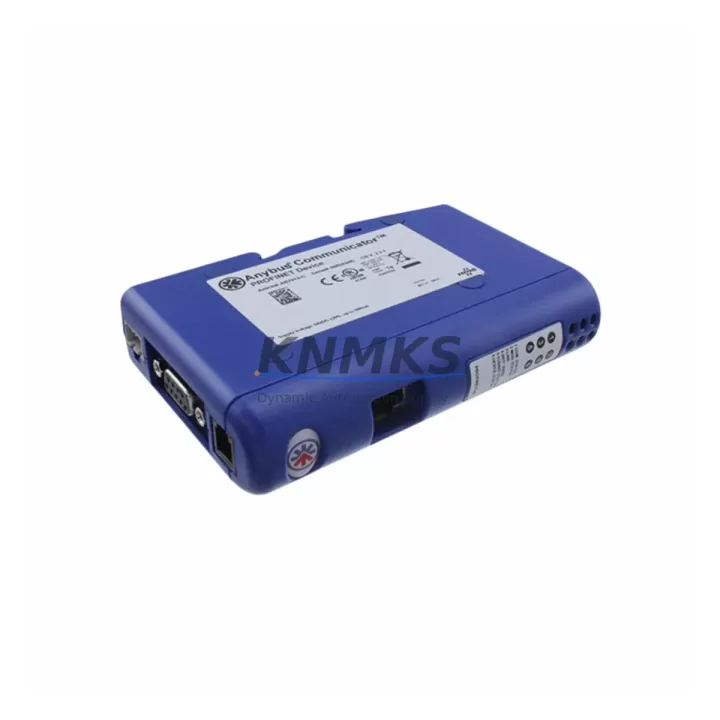
Overview
HMS Networks AB7013-C Maintenance-Proven Spare Part for Factory Uptime
The HMS Networks AB7013-C Anybus Communicator is a proven serial-to-fieldbus gateway widely deployed in industrial automation environments where legacy serial devices must communicate with modern fieldbus or industrial Ethernet networks. As a maintenance-proven spare part, the AB7013-C enables maintenance engineers and procurement teams to restore communication links rapidly during unplanned outages, scheduled shutdowns, or control cabinet upgrades — without the lead-time risk associated with end-of-life or long-delivery components.
Sourced as an original HMS Networks unit, this AB7013-C spare is pre-tested prior to shipment, covered by a support terms confirmed by quotation, and held in multi-region stock to support emergency replacement and planned maintenance cycles globally. Whether you are managing a single-site SCADA retrofit or coordinating a multi-plant modernization program, having a verified AB7013-C in your spare parts inventory eliminates the single point of failure that a missing gateway represents in any serial-integrated production line.
Spare Maintenance Table
| Parameter | Specification / Detail |
|---|---|
| Part Number / SKU | AB7013-C |
| Brand | HMS Networks |
| Series | Anybus Communicator |
| Product Type | Industrial Communication Gateway (Serial to Fieldbus) |
| Communication Interface | Serial (RS-232 / RS-422 / RS-485) to Fieldbus / Industrial Ethernet |
| Supported Protocols | PROFIBUS DP, DeviceNet, CANopen, Modbus-TCP (variant-dependent) |
| Supply Voltage | 24 V DC (±10%) |
| Power Consumption | Approx. 2.5 W typical |
| Operating Temperature | 0 °C to +55 °C |
| Storage Temperature | -25 °C to +85 °C |
| Protection Class | IP20 (DIN rail mount) |
| Mounting | 35 mm DIN rail |
| Weight | Approx. 1,380 g (packaged) |
| Country of Origin | Sweden |
| Compatibility | Drop-in replacement for AB7013-C in existing Anybus Communicator installations |
| Application Environment | Industrial control cabinets, SCADA integration, PLC serial expansion, DCS serial bridging |
| Maintenance Recommendation | Inspect serial cable termination, 24 V DC supply rail, and fieldbus segment wiring at each replacement |
| Support terms | 12 Months — covers manufacturing defects; pre-shipment functional test included |
| Availability | Multi-region stock; ready for immediate dispatch |
Maintenance Planning for Continuous Operation
When replacing the AB7013-C in a live control cabinet, a disciplined maintenance approach requires more than a direct swap of the gateway unit. The AB7013-C sits at the boundary between legacy serial devices — such as variable frequency drives, weighing controllers, barcode readers, or older PLCs — and the plant’s primary fieldbus or industrial Ethernet backbone. Any degradation in the surrounding electrical environment will cause the replacement unit to exhibit the same communication faults as the failed one.
Begin by verifying the 24 V DC power supply rail feeding the gateway. A power supply module with marginal output voltage or excessive ripple is a common root cause of intermittent gateway resets. If the cabinet uses a shared 24 V bus, check adjacent loads and confirm the supply is rated for the combined current draw. Replacing the AB7013-C alongside a suspect power supply module during the same maintenance window eliminates repeat call-outs.
Inspect the serial cable assembly connecting the AB7013-C to the field device. RS-485 and RS-422 lines are susceptible to impedance mismatches, missing termination resistors, and ground loops — all of which produce framing errors that mimic a faulty gateway. Verify termination resistor placement at both ends of the segment and confirm cable shielding is grounded at one point only.
On the fieldbus side, check the PROFIBUS DP or DeviceNet segment for correct bus termination, node address conflicts, and cable continuity. A degraded fieldbus segment will prevent the replacement AB7013-C from establishing a stable master-slave relationship even if the gateway itself is fully functional. Use a fieldbus diagnostic tool or the network master’s diagnostic buffer to confirm segment health before closing the cabinet.
Review the I/O mapping and configuration file stored in the Anybus Configuration Manager. The AB7013-C retains its configuration in non-volatile memory, but if the replacement unit is a factory-fresh spare, the configuration must be re-downloaded before commissioning. Keep a current backup of the .abc configuration file in your site documentation system.
For cabinets that also house Anybus X-gateway units or other HMS Networks protocol converters sharing the same DIN rail and power bus, inspect those units for firmware currency and connector integrity during the same visit. Similarly, if the serial device connected to the AB7013-C is a Siemens SINAMICS or ABB ACS series drive with an onboard RS-485 port, verify the drive’s serial communication parameters (baud rate, parity, stop bits) match the AB7013-C configuration exactly — a mismatch here is the second most common cause of post-replacement communication failure.
Finally, confirm that any surge protection or signal isolation devices installed on the serial lines are functional. Transient voltage suppressors and signal isolators on RS-485 lines protect the AB7013-C from field-induced surges; a failed isolator will expose the replacement gateway to the same surge environment that destroyed the original unit.
Site Replacement Workflow
Step 1 — Pre-replacement documentation. Record the existing AB7013-C node address, baud rate, parity settings, and fieldbus configuration. Export the Anybus Configuration Manager project file. Photograph all cable connections and label each connector before removal.
Step 2 — Safe isolation. Follow site LOTO (Lockout/Tagout) procedures. De-energize the 24 V DC supply to the gateway. Do not de-energize the entire control cabinet unless the process safety plan requires it — the AB7013-C can typically be replaced with adjacent equipment remaining powered if the 24 V rail is individually fused and isolated.
Step 3 — Physical replacement. Remove the failed AB7013-C from the DIN rail. Install the replacement unit in the same rail position. Reconnect all serial and fieldbus connectors in the documented order. Verify connector locking tabs are fully engaged.
Step 4 — Configuration restore. Connect a laptop running Anybus Configuration Manager to the USB or serial configuration port. Download the saved configuration file to the replacement unit. Confirm all parameters match the pre-replacement record.
Step 5 — Power-up and verification. Re-energize the 24 V DC supply. Observe the gateway’s LED status indicators: the RUN LED should illuminate green and the fieldbus network LED should indicate an active connection within 30 seconds. Check the fieldbus master’s diagnostic screen for the AB7013-C node status.
Step 6 — Functional test. Command a test transaction from the fieldbus master to the serial device through the AB7013-C. Confirm data integrity and response time are within specification. Log the replacement in the site maintenance record and update the spare parts inventory.
This workflow minimizes downtime to under 60 minutes for a prepared maintenance team and ensures the replacement AB7013-C is fully validated before the process is returned to automatic control.
Spare Parts Support FAQ
Q1: Is this AB7013-C a genuine HMS Networks original spare or a third-party compatible unit?
This is an original HMS Networks AB7013-C unit sourced through authorized industrial distribution channels. It is not a clone, refurbished unit, or third-party compatible substitute. Each unit undergoes a pre-shipment functional test and ships with a support terms confirmed by quotation covering manufacturing defects.
Q2: How do I verify compatibility with my existing Anybus Communicator installation before ordering?
Confirm the part number on the label of the installed unit matches AB7013-C exactly. Check the Anybus Configuration Manager project file for the configured protocol variant (e.g., PROFIBUS DP slave, DeviceNet adapter). The replacement unit must match the same protocol variant. If you are unsure, contact admin@knmks.com with your existing unit’s label photograph and we will confirm compatibility before dispatch.
Q3: What is your lead time and do you hold stock for emergency replacement orders?
The AB7013-C is held in multi-region stock to support both emergency replacement and planned maintenance procurement. Standard orders ship within 1–3 business days. Emergency same-day dispatch is available for confirmed stock items — contact +86 18359268345 to confirm availability and arrange priority shipping.
Q4: Can you support long-term supply agreements for the AB7013-C to cover multi-year maintenance contracts?
Yes. KNMKS supports blanket purchase orders and long-term supply agreements for the AB7013-C and other HMS Networks Anybus Communicator series components. Long-term agreements include reserved stock allocation, fixed pricing for the contract period, and priority dispatch. Contact admin@knmks.com to discuss your annual consumption volume and contract requirements.
© 2026 KNMKS. All rights reserved.
Original Source: https://knmks.com
Contact: admin@knmks.com | +86 18359268345
Product Identification
- Brand / Ecosystem
-
Other Brands
Assorted Brands - Model / Series
-
AB7013-C
Assorted Series - Product Family
- Communication Modules
- Availability Status
- Available on request after model and quantity confirmation
- Inquiry Type
- B2B RFQ, replacement inquiry and project spare-part request
- Pre-Quote Check
- Exact SKU, brand, series, quantity, nameplate photos and destination country are checked before quotation
System Path
Where this product fits in the KNMKS automation structure.
Specification & Inquiry Focus
- Network range
- Ethernet, fieldbus and gateway modules
- Common needs
- Protocol, port and controller family
- Project support
- Machine networking and data integration
Buyer Confirmation
Information KNMKS checks before replying.
- Exact model
- AB7013-C
- Brand / ecosystem
- Other Brands
- Product family
- Communication Modules
- Application note
- Replacement, maintenance, project build or spare-part list
- Useful photos
- Nameplate, installed unit, cabinet layout or connector side
- Delivery details
- Quantity, destination country and target schedule
Document Support
Files and notes can be confirmed during quotation.
- Product photos or nameplate confirmation when available
- Packing and delivery notes before quotation confirmation
- Support scope and delivery terms confirmed per inquiry
- Export document coordination for qualified B2B requests
Inquiry Support
- Industrial Ethernet and fieldbus module inquiry
- Protocol compatibility review
- Integration project inquiry support
What to Send Us
- Brand and exact model number: Other Brands AB7013-C
- Quantity and required delivery time
- Application, replacement requirement or nameplate photo
- Destination country and shipping preference
RFQ Preparation
This is a product inquiry page built for RFQ communication.
Fast Model Check
Send this model to KNMKS for confirmation.
Include quantity, destination country and photos if this is a maintenance replacement. The inquiry will be saved with a reference number after submission.
Brand & Compatibility Note
KNMKS displays automation product information for well-known industrial brand ecosystems and compatible replacement references. Brand names are used for product identification and compatibility reference only; final availability and commercial terms are confirmed per quotation.
 Manufacturing
 Machine Tools
 Packaging
 Energy & Power
 PLCs & Controllers
 HMI & Displays
 Servo Systems
 Variable Frequency Drives