
Overview
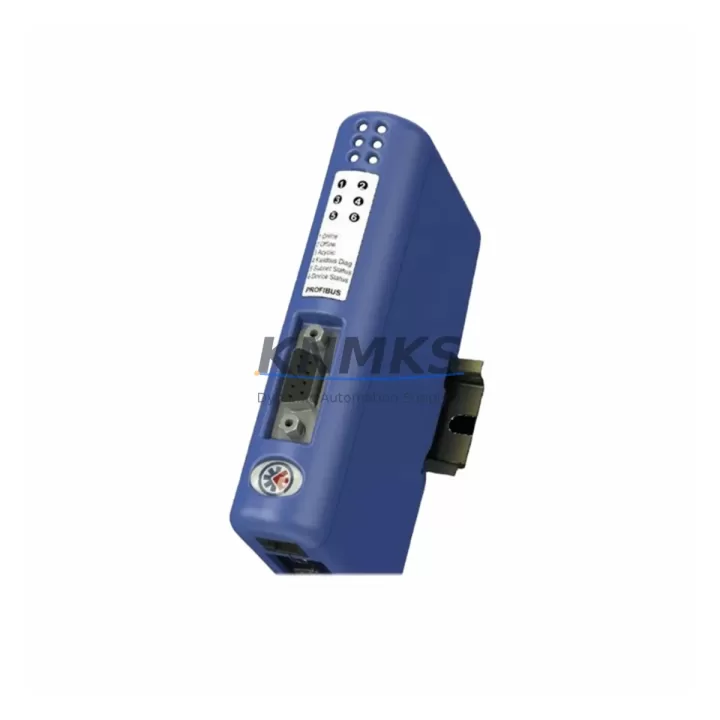
HMS Networks AB-7007-C Maintenance-Proven Spare Part for Factory Uptime
The HMS Networks AB-7007-C is an Anybus Communicator gateway that bridges Modbus RTU serial devices to an EtherNet/IP network, enabling legacy field instruments, drives, and controllers to communicate seamlessly within modern Ethernet-based automation architectures. In industrial plants where mixed-protocol environments are the norm — particularly in process, energy, water treatment, and discrete manufacturing — the AB-7007-C serves as a critical translation node. When this gateway fails or reaches end-of-service, the entire communication chain between field devices and the PLC or DCS host can collapse, triggering unplanned downtime and production loss.
KNMKS maintains verified stock of the AB-7007-C as a maintenance-proven spare, pre-tested before dispatch, and backed by a support terms confirmed by quotation. Each unit is inspected for firmware integrity, connector condition, and communication function prior to shipment, ensuring your replacement is ready to install without additional bench testing on-site.
Spare Maintenance Table
| Parameter | Specification |
|---|---|
| SKU / Part Number | AB-7007-C |
| Brand | HMS Networks |
| Series | Anybus Communicator |
| Function | Modbus RTU (Master/Slave) to EtherNet/IP Adapter gateway |
| Network Side Protocol | EtherNet/IP (Adapter) |
| Serial Side Protocol | Modbus RTU via RS-232 / RS-422 / RS-485 |
| Supply Voltage | 10–30 VDC |
| Power Consumption | Approx. 2.5 W typical |
| Operating Temperature | 0°C to +55°C |
| Storage Temperature | -25°C to +85°C |
| Enclosure / Mounting | DIN-rail mount, IP20 |
| Ethernet Port | 1 × RJ45, 10/100 Mbit/s |
| Serial Port | 1 × Sub-D9 (RS-232/422/485 selectable) |
| Configuration Interface | Anybus Configuration Manager (ACM) software |
| Country of Origin | Sweden |
| Compatibility | Allen-Bradley / Rockwell ControlLogix, CompactLogix, MicroLogix; Omron NJ/NX; Schneider Modicon M340/M580; any EtherNet/IP scanner |
| Support terms | 12 Months — KNMKS Pre-Shipment Tested |
| Dispatch | Multi-region stock, fast global dispatch |
Maintenance Planning for Continuous Operation
When a maintenance or procurement engineer schedules replacement of the AB-7007-C, the gateway is rarely the only component that warrants attention. In a typical control cabinet where this unit is installed, the surrounding electrical and communication infrastructure should be inspected concurrently to prevent repeat failures and maximize the value of the planned outage window.
Begin with the 24 VDC power supply rail feeding the gateway. A degraded or undersized DIN-rail power supply — such as an aging Phoenix Contact QUINT or Siemens SITOP unit — can cause intermittent resets and communication dropouts that are often misdiagnosed as gateway faults. Verify output voltage stability under load before commissioning the replacement AB-7007-C.
Inspect the RS-485 / RS-422 serial wiring on the Sub-D9 connector side. Corroded terminals, incorrect termination resistors, or ground loops on the serial bus are common root causes of Modbus RTU communication errors. Replace any suspect terminal blocks or shielded cable segments at the same time as the gateway swap.
On the EtherNet/IP network side, check the managed industrial Ethernet switch port to which the AB-7007-C connects. Verify port speed/duplex settings (100 Mbit/s, full duplex is recommended), and confirm that the switch — whether a Hirschmann SPIDER, Cisco IE series, or equivalent — is not experiencing port errors or CRC faults that could corrupt EtherNet/IP implicit messaging.
Review the EtherNet/IP scanner configuration in the host PLC (e.g., a Rockwell ControlLogix L7x or CompactLogix 5380). Confirm that the electronic data sheet (EDS file) for the AB-7007-C is correctly installed and that the RPI (Requested Packet Interval) is set appropriately for your process scan rate. Mismatched RPI values can cause connection timeouts after a gateway replacement even when the hardware is fully functional.
If the AB-7007-C is part of a larger Anybus gateway cluster in the same cabinet — for example, alongside an AB-7000 (Modbus RTU to PROFIBUS DP) or an AB-7010 (Modbus RTU to DeviceNet) — inspect those units for firmware currency and connector wear simultaneously. Staggered failures in a gateway cluster are a common source of unplanned downtime in multi-protocol plants.
Finally, verify the condition of the DIN-rail grounding bus and any signal isolators on the serial loop. In environments with variable-frequency drives (VFDs) or high-current switching equipment nearby, induced noise on the Modbus RTU bus can corrupt serial frames. A signal isolator or surge protector on the RS-485 line is a low-cost addition that significantly extends gateway service life.
Site Replacement Workflow
Step 1 — Pre-replacement documentation: Export the existing AB-7007-C configuration using Anybus Configuration Manager (ACM) before powering down. Save the .abc project file to a secure location. Note the IP address, subnet mask, gateway, and EtherNet/IP connection parameters currently in use.
Step 2 — Power isolation: Isolate the 24 VDC supply to the gateway using the dedicated circuit breaker or fuse on the DIN rail. Confirm zero voltage at the power terminals before disconnecting the Sub-D9 serial connector and RJ45 Ethernet cable.
Step 3 — Physical swap: Remove the faulty AB-7007-C from the DIN rail. Mount the replacement unit. Reconnect the serial cable (verify RS-232/422/485 mode switch position matches the original), Ethernet cable, and power terminals. Torque terminal screws to specification.
Step 4 — Configuration restore: Connect a laptop running ACM to the gateway via Ethernet. Load the saved .abc project file and download it to the replacement unit. Confirm IP address and EtherNet/IP parameters match the original configuration.
Step 5 — Commissioning verification: Power up the gateway and observe the LED status indicators. Confirm MOD and NET LEDs indicate normal EtherNet/IP operation (solid green). Verify Modbus RTU communication by checking that the SER LED shows activity. In the host PLC, confirm the EtherNet/IP connection is established and I/O data is updating correctly.
Step 6 — Documentation update: Record the replacement date, new unit serial number, and firmware version in the plant maintenance management system (CMMS). Update the spare parts inventory to trigger reorder of a replacement AB-7007-C for the next maintenance cycle.
Spare Parts Support FAQ
Q1: Is the KNMKS AB-7007-C an original HMS Networks unit?
Yes. KNMKS supplies original HMS Networks AB-7007-C units sourced through verified industrial distribution channels. Each unit undergoes pre-shipment functional testing covering power-up, LED diagnostics, and communication port integrity before dispatch.
Q2: What is the support terms coverage and what does it include?
All AB-7007-C units supplied by KNMKS carry a support terms confirmed by quotation from the date of dispatch. The support terms covers manufacturing defects and functional failures under normal operating conditions. Units that fail within the confirmed support period are replaced or refunded subject to inspection. Support requests are processed via admin@knmks.com.
Q3: Can the AB-7007-C directly replace an older Anybus Communicator model such as the AB-7007-B?
The AB-7007-C is the current production revision of the Modbus RTU to EtherNet/IP Anybus Communicator. It is functionally compatible with applications previously served by the AB-7007-B, though configuration files may require re-import using the current ACM software version. Verify EDS file compatibility with your host PLC before installation. Contact KNMKS technical support for cross-revision compatibility confirmation.
Q4: Does KNMKS offer long-term supply agreements for the AB-7007-C?
Yes. For maintenance teams managing multiple sites or requiring guaranteed stock availability for annual outage schedules, KNMKS offers long-term supply agreements with reserved inventory allocation. Contact admin@knmks.com or call +86 18359268345 to discuss volume pricing and supply continuity terms.
© 2026 KNMKS. All rights reserved.
Original Source: https://knmks.com
Contact: admin@knmks.com | +86 18359268345
Product Identification
- Brand / Ecosystem
-
Other Brands
Assorted Brands - Model / Series
-
AB-7007-C
Assorted Series - Product Family
- Communication Modules
- Availability Status
- Available on request after model and quantity confirmation
- Inquiry Type
- B2B RFQ, replacement inquiry and project spare-part request
- Pre-Quote Check
- Exact SKU, brand, series, quantity, nameplate photos and destination country are checked before quotation
System Path
Where this product fits in the KNMKS automation structure.
Specification & Inquiry Focus
- Network range
- Ethernet, fieldbus and gateway modules
- Common needs
- Protocol, port and controller family
- Project support
- Machine networking and data integration
Buyer Confirmation
Information KNMKS checks before replying.
- Exact model
- AB-7007-C
- Brand / ecosystem
- Other Brands
- Product family
- Communication Modules
- Application note
- Replacement, maintenance, project build or spare-part list
- Useful photos
- Nameplate, installed unit, cabinet layout or connector side
- Delivery details
- Quantity, destination country and target schedule
Document Support
Files and notes can be confirmed during quotation.
- Product photos or nameplate confirmation when available
- Packing and delivery notes before quotation confirmation
- Support scope and delivery terms confirmed per inquiry
- Export document coordination for qualified B2B requests
Inquiry Support
- Industrial Ethernet and fieldbus module inquiry
- Protocol compatibility review
- Integration project inquiry support
What to Send Us
- Brand and exact model number: Other Brands AB-7007-C
- Quantity and required delivery time
- Application, replacement requirement or nameplate photo
- Destination country and shipping preference
RFQ Preparation
This is a product inquiry page built for RFQ communication.
Fast Model Check
Send this model to KNMKS for confirmation.
Include quantity, destination country and photos if this is a maintenance replacement. The inquiry will be saved with a reference number after submission.
Brand & Compatibility Note
KNMKS displays automation product information for well-known industrial brand ecosystems and compatible replacement references. Brand names are used for product identification and compatibility reference only; final availability and commercial terms are confirmed per quotation.
 Manufacturing
 Machine Tools
 Packaging
 Energy & Power
 PLCs & Controllers
 HMI & Displays
 Servo Systems
 Variable Frequency Drives