
Overview
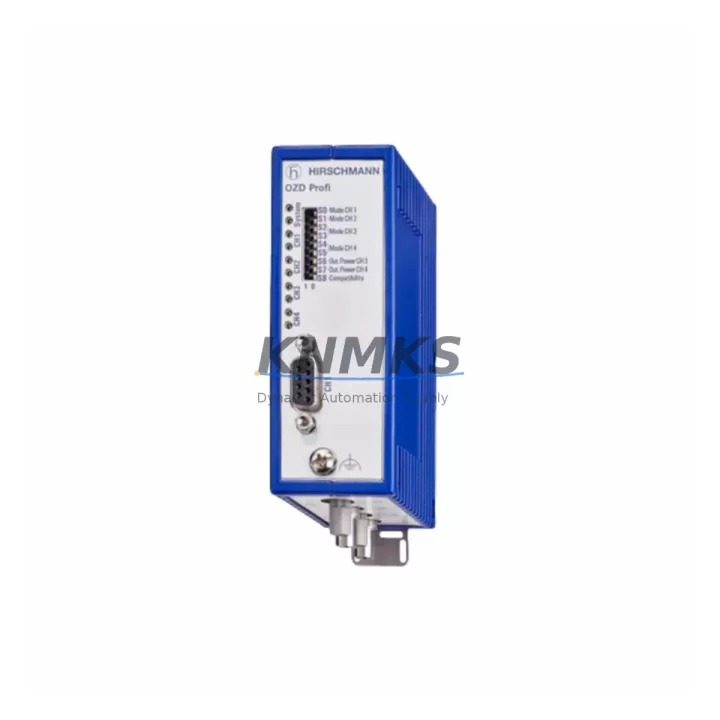
Hirschmann OZDPROFI12MG12 Migration-Ready PROFIBUS Repeater: Legacy System Migration and Compatible Upgrade
The Hirschmann OZDPROFI12MG12 is a PROFIBUS fiberoptic repeater from the OZD PROFI series, engineered for 12 Mbps multimode fiber communication in demanding industrial control environments. As legacy DCS and PLC installations approach end-of-life, the OZDPROFI12MG12 serves as a migration-ready drop-in replacement for discontinued OZD PROFI variants, enabling engineers to extend the operational life of existing PROFIBUS DP networks without requiring full system redesign. Whether you are managing a phased retrofit of a Siemens S5 or S7 control cabinet, upgrading a legacy ABB Advant or Freelance DCS segment, or restoring a failed communication link in a Honeywell TDC 3000 or Experion PKS environment, the OZDPROFI12MG12 provides a reliable, pre-tested solution with confirmed protocol compatibility and a support terms confirmed by quotation.
Before installing the OZDPROFI12MG12 as a replacement unit, engineers should verify several critical parameters to ensure a seamless transition. Power supply capacity at the control cabinet rail must support the repeater’s 24 VDC input requirement; shared power rails feeding multiple PROFIBUS nodes should be load-checked prior to commissioning. Terminal wiring on the fiber port side must match the existing ST or BFOC connector configuration used in the original installation. Backplane interface compatibility is not applicable for this standalone repeater, but DIN rail mounting space and cable routing clearance should be confirmed in the control cabinet layout. Module addressing is not required for the OZDPROFI12MG12 itself, but the PROFIBUS DP master — such as a Siemens CP 5613, CP 5614, or equivalent GSD-configured master card — must retain its existing station address assignments. Program logic in the PLC or DCS controller does not require modification, as the repeater is transparent to the PROFIBUS protocol stack. HMI screen configurations and SCADA tag mappings remain unaffected. Communication link integrity should be verified using a PROFIBUS tester or bus monitor after installation to confirm signal quality across the fiber segment. Firmware versioning is not applicable to this hardware repeater. On-site commissioning should include a loopback test on each fiber port and a live bus scan to confirm all downstream slave devices — including remote I/O stations, variable frequency drives, and field instrument nodes — are responding correctly.
In multi-segment PROFIBUS networks, the OZDPROFI12MG12 is commonly deployed alongside the Hirschmann OZD PROFI 12M G12-EEC for extended temperature environments, or paired with the Hirschmann BAT-Controller or RS2-16M managed switches where Ethernet/PROFINET migration is planned in parallel. For installations requiring segment isolation between copper and fiber PROFIBUS runs, the OZDPROFI12MG12 can be used in conjunction with Siemens DP/PA couplers or Phoenix Contact PROFIBUS repeaters to bridge mixed-media topologies. When the broader control system upgrade involves replacing legacy Siemens S5-115U or S5-135U PLCs with S7-300 or S7-400 platforms, the existing PROFIBUS fiber backbone supported by the OZDPROFI12MG12 can be retained without modification, reducing retrofit scope and cost. In Honeywell or Emerson DeltaV environments where PROFIBUS DP is used for field device integration, the repeater supports continued operation of Endress+Hauser Fieldbus power supplies and PROFIBUS PA segment couplers connected downstream.
Migration Compatibility Table
| Parameter | OZDPROFI12MG12 Specification | Retrofit / Migration Note |
|---|---|---|
| Communication Protocol | PROFIBUS DP, 9.6 kbps – 12 Mbps | Transparent repeater; no GSD file required; compatible with all DP masters |
| Fiber Interface | 12 × Multimode ST/BFOC ports | Verify existing fiber connector type (ST vs. SC) before installation |
| Power Supply | 24 VDC (18–32 VDC range) | Confirm rail capacity; shared 24 VDC rails must be load-verified |
| Mounting | DIN rail (35 mm) | Confirm cabinet DIN rail space; unit dimensions: approx. 45 × 130 × 115 mm |
| Operating Temperature | 0 °C to +60 °C | For harsh environments, consider OZD PROFI 12M G12-EEC (–40 °C to +70 °C) |
| Replacement Compatibility | OZD PROFI 12M G12, OZD PROFI 12M G12-EEC (standard temp) | Drop-in replacement; no firmware update required |
| Bus Topology Support | Star, line, and ring (with redundancy firmware) | Confirm existing topology before replacing; ring mode requires both fiber ports active |
| Commissioning Requirement | Loopback test + live bus scan | Use PROFIBUS tester (e.g., ProfiTrace 2) to verify signal integrity post-installation |
| Support terms | 12 Months | Covers manufacturing defects; pre-shipment functional test included |
| Pre-Shipment Testing | Yes – functional test performed | Each unit tested for port continuity and protocol transparency before dispatch |
Retrofit Planning for Existing Automation Systems
Successful integration of the OZDPROFI12MG12 into an existing automation system requires a structured retrofit plan that accounts for both the repeater itself and the surrounding control architecture. In a typical legacy control cabinet running a Siemens S7-300 with a CP 342-5 PROFIBUS DP master, the repeater connects the copper DP segment from the master to a fiber ring or star topology serving remote I/O stations such as Siemens ET 200M or ET 200S distributed I/O racks. These remote racks may host analog input modules, digital output modules, or specialty function modules that must remain online during the repeater swap to avoid process interruption.
For installations where the PROFIBUS segment also carries signals from variable frequency drives — such as ABB ACS800 or Siemens SINAMICS G120 drives configured with PROFIBUS DP option boards — the repeater replacement must be coordinated with the drive control system to prevent spurious fault trips during the brief communication interruption. Similarly, if the segment includes Endress+Hauser Promass or Proline field transmitters communicating via PROFIBUS PA through a DP/PA coupler, the coupler’s power supply and segment termination must be verified before and after the repeater swap.
In environments where a parallel Ethernet or PROFINET migration is underway, the OZDPROFI12MG12 can serve as a bridge technology, maintaining PROFIBUS DP integrity on legacy segments while new PROFINET islands are commissioned on separate network infrastructure. This phased approach — retaining the OZD PROFI fiber backbone while gradually migrating I/O to PROFINET-capable remote stations — minimizes the risk of simultaneous multi-system changes and allows production to continue on the legacy PROFIBUS segment throughout the transition period. Programming cables and configuration tools such as the Siemens STEP 7 or TIA Portal remain compatible with the existing DP master configuration and do not require modification when the OZDPROFI12MG12 is installed as a like-for-like replacement.
Downtime Control During System Migration
Minimizing unplanned downtime during a PROFIBUS repeater replacement requires preparation, sequencing, and verification. Before removing the failed or end-of-life unit, engineers should document the existing fiber port assignments, cable labels, and bus termination switch positions on the original repeater. A photograph of the wiring and a note of the active LED status pattern on the original unit provides a baseline for post-installation comparison.
The OZDPROFI12MG12 replacement can typically be completed within a planned maintenance window of 30 to 60 minutes, assuming fiber connectors are pre-cleaned and the replacement unit has been pre-tested. To protect the original PLC or DCS program logic, the controller should be placed in STOP mode or the affected PROFIBUS segment should be isolated using the DP master’s diagnostic tools before disconnecting the repeater. This prevents the master from generating bus fault alarms or triggering safety interlocks tied to communication loss detection.
After physical installation, the bus should be brought up segment by segment, starting with the repeater power-on and fiber link verification (confirmed by the green LINK LEDs on each active port), followed by a DP master bus scan to confirm all slave station addresses are responding. If any slave fails to respond, the fiber cable routing and connector seating should be checked before assuming a device fault. Once all slaves are confirmed online, the controller can be returned to RUN mode and process continuity restored. The entire sequence — from power-down to confirmed RUN — can be completed within a single shift when the OZDPROFI12MG12 is pre-staged and the retrofit plan is followed systematically.
Retrofit Support FAQ
Q1: Is the OZDPROFI12MG12 a direct replacement for the OZD PROFI 12M G12?
Yes. The OZDPROFI12MG12 is a drop-in replacement for the OZD PROFI 12M G12 and compatible variants within the OZD PROFI series. No GSD file changes, address reconfiguration, or firmware updates are required on the DP master side. The repeater is protocol-transparent and operates identically to the original unit in standard temperature environments.
Q2: What commissioning steps are required after installation?
After mounting and connecting the fiber cables, power on the unit and verify that the LINK LEDs illuminate on all active fiber ports. Perform a loopback test on each port using a PROFIBUS tester such as ProfiTrace 2 or Softing PB-T3. Then initiate a live bus scan from the DP master to confirm all slave station addresses are responding. Document the scan results and compare against the pre-replacement baseline to confirm full network restoration.
Q3: Does the unit ship with a pre-shipment functional test?
Yes. Every OZDPROFI12MG12 unit undergoes a pre-shipment functional test covering port continuity, power supply verification, and protocol transparency before dispatch. Units are shipped with a support terms confirmed by quotation covering manufacturing defects. Test documentation is available upon request for quality assurance and maintenance records.
Q4: What is the lead time and stock availability?
The OZDPROFI12MG12 is maintained availability confirmed by RFQ for immediate dispatch. Standard lead time for in-stock units is 3–7 business days for international shipments, with expedited options available for emergency replacement requirements. Contact our team at admin@knmks.com or +86 18359268345 to confirm current stock levels and arrange priority dispatch.
© 2026 KNMKS. All rights reserved.
Original Source: https://knmks.com
Contact: admin@knmks.com | +86 18359268345
Product Identification
- Brand / Ecosystem
-
Other Brands
Assorted Brands - Model / Series
-
OZDPROFI12MG12
Assorted Series - Product Family
- Communication Modules
- Availability Status
- Available on request after model and quantity confirmation
- Inquiry Type
- B2B RFQ, replacement inquiry and project spare-part request
- Pre-Quote Check
- Exact SKU, brand, series, quantity, nameplate photos and destination country are checked before quotation
System Path
Where this product fits in the KNMKS automation structure.
Specification & Inquiry Focus
- Network range
- Ethernet, fieldbus and gateway modules
- Common needs
- Protocol, port and controller family
- Project support
- Machine networking and data integration
Buyer Confirmation
Information KNMKS checks before replying.
- Exact model
- OZDPROFI12MG12
- Brand / ecosystem
- Other Brands
- Product family
- Communication Modules
- Application note
- Replacement, maintenance, project build or spare-part list
- Useful photos
- Nameplate, installed unit, cabinet layout or connector side
- Delivery details
- Quantity, destination country and target schedule
Document Support
Files and notes can be confirmed during quotation.
- Product photos or nameplate confirmation when available
- Packing and delivery notes before quotation confirmation
- Support scope and delivery terms confirmed per inquiry
- Export document coordination for qualified B2B requests
Inquiry Support
- Industrial Ethernet and fieldbus module inquiry
- Protocol compatibility review
- Integration project inquiry support
What to Send Us
- Brand and exact model number: Other Brands OZDPROFI12MG12
- Quantity and required delivery time
- Application, replacement requirement or nameplate photo
- Destination country and shipping preference
RFQ Preparation
This is a product inquiry page built for RFQ communication.
Fast Model Check
Send this model to KNMKS for confirmation.
Include quantity, destination country and photos if this is a maintenance replacement. The inquiry will be saved with a reference number after submission.
Brand & Compatibility Note
KNMKS displays automation product information for well-known industrial brand ecosystems and compatible replacement references. Brand names are used for product identification and compatibility reference only; final availability and commercial terms are confirmed per quotation.
 Manufacturing
 Machine Tools
 Packaging
 Energy & Power
 PLCs & Controllers
 HMI & Displays
 Servo Systems
 Variable Frequency Drives