
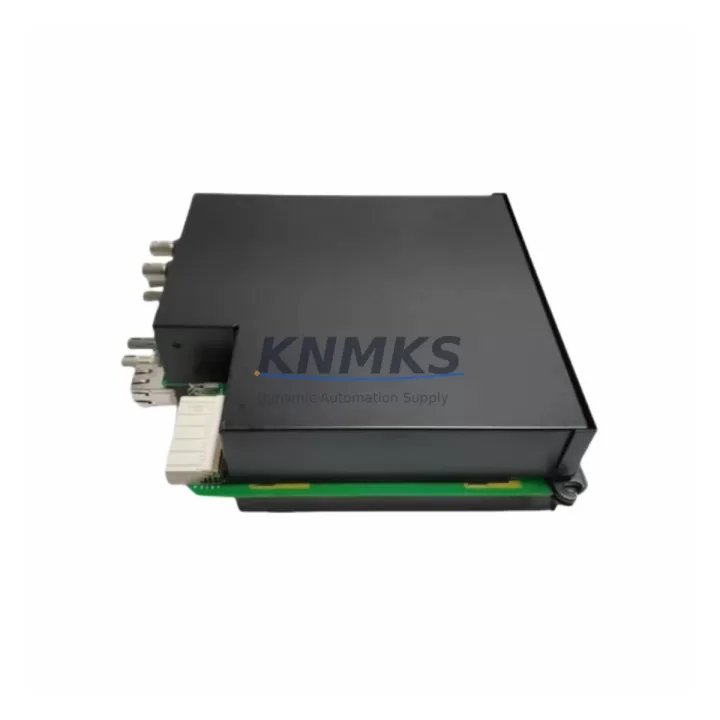
Overview
GE Multilin UR6DV Migration-Ready Digital I/O for Legacy Control Systems
The GE Multilin UR6DV is a migration-ready Digital Input/Output module engineered for the UR Series protection relay platform. As aging control infrastructure reaches end-of-life, the UR6DV provides a reliable, drop-in upgrade path for facilities managing legacy relay panels, outdated I/O architectures, and discontinued protection modules. Whether you are replacing a failed UR6DV in an existing rack or planning a phased modernization of your substation automation system, this module delivers the I/O density, communication compatibility, and form-factor consistency required for a low-risk retrofit.
Designed to slot directly into the UR Series chassis, the UR6DV eliminates the need for panel re-engineering in most retrofit scenarios. Engineers migrating from older GE Multilin relay generations — including systems originally built around the SR Series or early UR platform variants — will find that the UR6DV maintains backward-compatible terminal assignments and supports the same rack backplane interface, significantly reducing rewiring time and the risk of wiring errors during cutover.
Migration Compatibility Table
| Parameter | Details |
|---|---|
| Module Type | Digital Input / Output (DI/DO) |
| Platform Compatibility | GE Multilin UR Series Chassis |
| Backplane Interface | UR Series standard backplane slot |
| Communication Protocols | Modbus RTU, Modbus TCP, IEC 61850 GOOSE, DNP3 |
| Installation Requirement | Direct slot replacement — no chassis modification required |
| Terminal Wiring | Compatible with existing UR Series terminal block layouts |
| Firmware Compatibility | Verify UR CPU module firmware version prior to installation |
| Replacement Recommendation | Suitable direct replacement for legacy UR6DV units; verify I/O count against application |
| Commissioning Focus | I/O mapping, GOOSE subscription verification, logic node re-assignment |
| Support terms | support terms confirmed by quotation — covers manufacturing defects and functional failure |
Retrofit Planning for Existing Automation Systems
A successful UR6DV retrofit begins well before the module arrives on site. The first step is a thorough audit of the existing UR Series chassis configuration. In most substation environments, the UR platform operates alongside a UR CPU module (such as the UR9xx series processor card) that governs all inter-module communication via the backplane. Before removing the legacy I/O card, engineers should export the current relay settings file using EnerVista UR Setup software and archive the logic configuration, I/O assignments, and GOOSE messaging subscriptions.
Power supply capacity is a critical pre-installation check. The UR Series chassis power supply — often a UR6PP or UR6PT power supply module — must have sufficient headroom to support the UR6DV’s operating current draw alongside all other installed modules. Overloaded power supplies are a common cause of intermittent I/O faults in retrofitted panels and should be load-tested before commissioning the new module.
For sites running IEC 61850-based protection schemes, the UR6DV’s GOOSE input and output mappings must be re-verified against the substation’s IED configuration tool (ICT) or system configurator. Any changes to the module’s logical node structure — particularly when replacing a module that had custom GOOSE datasets — require an updated ICD/CID file to be re-imported into the station bus configuration. Sites using Modbus RTU over RS-485 for SCADA integration should also confirm that the UR6DV’s register map aligns with the existing polling configuration in the RTU or data concentrator.
In control cabinets where space is constrained, the UR6DV’s standard UR form factor ensures it occupies the same slot width as the module it replaces. However, engineers should verify that adjacent modules — including UR6AH analog input modules or communication interface cards — have not shifted position due to previous maintenance activity, as misaligned backplane connectors can cause intermittent faults that are difficult to diagnose post-installation.
For sites managing a broader I/O expansion as part of the retrofit, the UR6DV can be paired with additional UR Series I/O modules to increase digital channel count without requiring a new chassis. This approach is common in feeder protection upgrades where the original relay design underestimated the number of breaker status and control signals required by modern SCADA and protection coordination schemes.
Downtime Control During System Migration
Minimizing unplanned downtime is the primary operational concern in any live substation or industrial control system retrofit. For UR6DV replacements, the recommended approach is a pre-staged swap: the replacement module is configured and tested offline using a bench UR chassis before the scheduled maintenance window begins. This allows the engineering team to verify I/O mapping, confirm GOOSE subscriptions, and validate logic outputs without time pressure during the live cutover.
During the maintenance window, the original relay settings file — exported prior to the outage — serves as the authoritative reference for restoring all protection functions. After physical installation of the UR6DV, the settings file is re-imported via EnerVista UR Setup, and each digital input and output is individually tested against the field wiring to confirm correct terminal assignment. Any discrepancies between the archived wiring schedule and the as-found panel condition should be documented and resolved before the protection scheme is re-energized.
For facilities operating under strict protection availability requirements, a temporary bypass scheme using hardwired interposing relays can maintain critical control functions — such as breaker trip and close circuits — during the module swap interval. This approach is particularly valuable in transmission substations where protection redundancy cannot be compromised during the retrofit window.
Post-installation, a functional test of all GOOSE messages, Modbus register reads, and DNP3 data object responses should be completed before the outage window closes. Commissioning records, including I/O test results and communication verification logs, should be retained as part of the site’s asset management documentation. All UR6DV units supplied by KNMKS are pre-tested prior to shipment and include a support terms confirmed by quotation covering manufacturing defects and functional failure under normal operating conditions.
Retrofit Support FAQ
Q: Is the UR6DV a direct drop-in replacement for the existing module in my UR Series chassis?
A: In most cases, yes. The UR6DV is designed to occupy a standard UR Series backplane slot and uses the same terminal block interface as other UR I/O modules. However, you should verify the I/O channel count and confirm that your CPU module firmware version supports the UR6DV before installation. Contact our technical team with your chassis configuration for a pre-sale compatibility check.
Q: What commissioning steps are required after installing the UR6DV?
A: After physical installation, re-import your archived relay settings file using EnerVista UR Setup. Verify all digital input and output assignments against your wiring schedule, re-subscribe any GOOSE messages, and confirm Modbus or DNP3 register mapping with your SCADA system. A full I/O functional test is recommended before returning the protection scheme to service.
Q: Do you provide pre-shipment testing and what does the support terms cover?
A: Yes. Every UR6DV unit is functionally tested prior to shipment. The support terms confirmed by quotation cover manufacturing defects and functional failure under normal operating conditions. Support requests are supported by our technical team with replacement or repair at no additional cost within the confirmed support period.
Q: Can you supply the UR6DV from stock for urgent replacement requirements?
A: We maintain inventory of the UR6DV and common UR Series modules to support urgent breakdown and planned maintenance requirements. Lead times and stock availability can be confirmed by contacting our sales team directly. Express shipping options are available for critical outage situations.
© 2026 KNMKS. All rights reserved.
Original Source: https://knmks.com
Contact: admin@knmks.com | +86 18359268345
Product Identification
- Brand / Ecosystem
-
GE Multilin
Assorted Brands - Model / Series
-
UR6DV
Legacy Series - Product Family
- PLCs & Controllers
- Availability Status
- Available on request after model and quantity confirmation
- Inquiry Type
- B2B RFQ, replacement inquiry and project spare-part request
- Pre-Quote Check
- Exact SKU, brand, series, quantity, nameplate photos and destination country are checked before quotation
System Path
Where this product fits in the KNMKS automation structure.
Specification & Inquiry Focus
- Control platform
- PLC, PAC and modular controllers
- Common needs
- CPU, rack, power and I/O expansion
- Project support
- Replacement, cabinet build and maintenance
Buyer Confirmation
Information KNMKS checks before replying.
- Exact model
- UR6DV
- Brand / ecosystem
- GE Multilin
- Product family
- PLCs & Controllers
- Application note
- Replacement, maintenance, project build or spare-part list
- Useful photos
- Nameplate, installed unit, cabinet layout or connector side
- Delivery details
- Quantity, destination country and target schedule
Document Support
Files and notes can be confirmed during quotation.
- Product photos or nameplate confirmation when available
- Packing and delivery notes before quotation confirmation
- Support scope and delivery terms confirmed per inquiry
- Export document coordination for qualified B2B requests
Inquiry Support
- Model cross-checking before quotation
- CPU, power, rack and expansion module matching
- Support for replacement and project inquiry
What to Send Us
- Brand and exact model number: GE Multilin UR6DV
- Quantity and required delivery time
- Application, replacement requirement or nameplate photo
- Destination country and shipping preference
RFQ Preparation
This is a product inquiry page built for RFQ communication.
Fast Model Check
Send this model to KNMKS for confirmation.
Include quantity, destination country and photos if this is a maintenance replacement. The inquiry will be saved with a reference number after submission.
Brand & Compatibility Note
KNMKS displays automation product information for well-known industrial brand ecosystems and compatible replacement references. Brand names are used for product identification and compatibility reference only; final availability and commercial terms are confirmed per quotation.
 Manufacturing
 Machine Tools
 Packaging
 Energy & Power



 HMI & Displays
 Servo Systems
 Variable Frequency Drives
 Sensors