
Overview
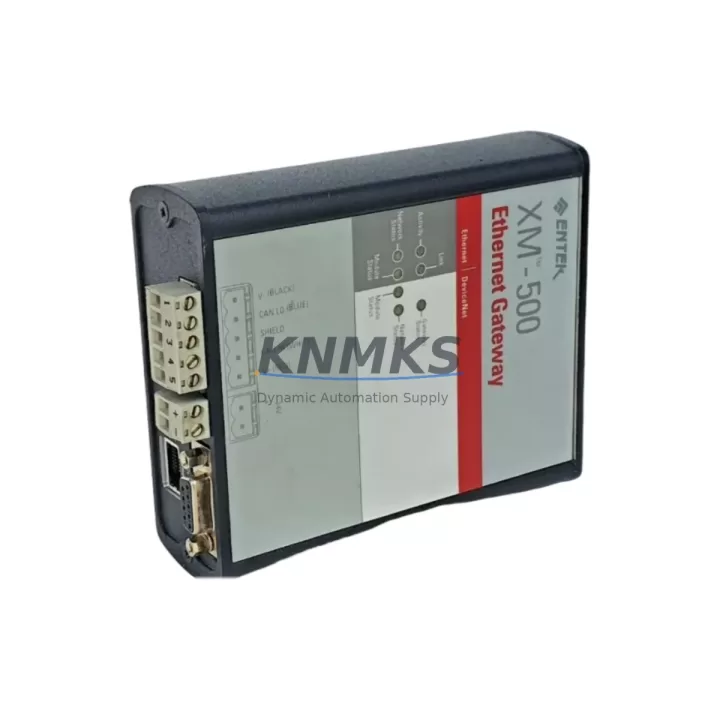
ENTEK 1440-GWEN2DN Maintenance-Proven Spare Part for Factory Uptime
The ENTEK 1440-GWEN2DN is a dual-port Ethernet/DeviceNet gateway module designed for the XM 500 Series machinery protection and condition monitoring platform. As a critical communication bridge between the XM 500 rack and plant-level SCADA, DCS, or PLC networks, this module enables real-time vibration, temperature, and process data to flow seamlessly across industrial Ethernet and DeviceNet fieldbus architectures. Maintaining a verified spare of the 1440-GWEN2DN in your parts inventory is a proven strategy for minimizing unplanned downtime in rotating equipment protection applications — including compressors, turbines, pumps, fans, and gearboxes.
For maintenance engineers managing legacy XM 500 installations, sourcing a tested replacement 1440-GWEN2DN is often the fastest path to restoring full system communication after a gateway fault. For procurement engineers, securing long-lead spare parts like this module well ahead of planned shutdowns or annual overhauls eliminates the risk of extended lead times from OEM channels. Every unit shipped by KNMKS undergoes functional verification and is backed by a support terms confirmed by quotation, ensuring confidence in both emergency replacements and scheduled maintenance cycles.
Spare Maintenance Table
| Part Number | 1440-GWEN2DN |
| Brand | ENTEK (Rockwell Automation / Allen-Bradley) |
| Series | XM 500 Machinery Protection |
| Module Type | Dual-Port Ethernet / DeviceNet Gateway |
| Communication Ports | 2 × Ethernet (10/100 Mbps), 1 × DeviceNet |
| Protocol Support | EtherNet/IP, DeviceNet, CIP |
| Compatible Platform | XM 500 Series (XM-120, XM-121, XM-122, XM-320, XM-360, XM-440) |
| Mounting | XM 500 DIN-rail backplane / rack slot |
| Power Supply | Supplied via XM 500 backplane (24 VDC system bus) |
| Operating Temperature | 0 °C to +60 °C |
| Relative Humidity | 5% to 95% non-condensing |
| Enclosure Rating | IP20 (panel/cabinet mount) |
| Origin | USA |
| Condition | Original Spare — New / Surplus / Refurbished (specify on inquiry) |
| Pre-Shipment Testing | Functional verification performed before dispatch |
| Support terms | 12 Months from date of shipment |
| Application | Rotating equipment protection, vibration monitoring, SCADA/DCS integration |
| Maintenance Interval | Inspect annually; replace on communication fault or firmware incompatibility |
Maintenance Planning for Continuous Operation
When a 1440-GWEN2DN gateway fault is detected — whether through a loss of EtherNet/IP communication, a DeviceNet node dropout, or an XM 500 system alarm — the replacement workflow must account for the broader control cabinet ecosystem to avoid repeat failures and ensure a clean restoration.
Begin by verifying the XM 500 backplane power supply (typically a 1440-VSPS0 or equivalent 24 VDC supply module). A degraded backplane power rail is a common root cause of gateway module failures and must be ruled out before installing a replacement 1440-GWEN2DN. Simultaneously, inspect the XM 500 rack backplane itself for corrosion, bent connector pins, or thermal damage at the gateway slot — physical backplane damage will cause recurring faults regardless of module condition.
Check all Ethernet patch cables and RJ45 connectors at both gateway ports. Industrial environments subject cables to vibration, oil mist, and temperature cycling that degrade connector integrity over time. Replace any cable showing continuity issues or physical jacket damage. On the DeviceNet side, verify the DeviceNet trunk cable termination resistors (120 Ω at each end of the network segment) and inspect the drop cable connections to each XM 500 measurement module.
During the same maintenance window, it is best practice to inspect co-located XM 500 measurement modules such as the XM-120 Dynamic Measurement Module or XM-320 Speed/Timing Module, as these share the backplane bus and can exhibit intermittent communication errors when the gateway is degraded. If the XM 500 system feeds a Rockwell ControlLogix or CompactLogix PLC via EtherNet/IP, verify the EDS file registration and I/O connection parameters in RSLogix 5000 / Studio 5000 after gateway replacement to confirm tag mapping integrity.
For sites using a Rockwell FactoryTalk View SE or ME HMI to display XM 500 machinery protection data, re-establish the OPC or EtherNet/IP data server connection after the gateway swap and confirm all alarm setpoints are correctly received. Finally, review the XM 500 system fuse and circuit protection in the control cabinet — a blown fuse on the 24 VDC supply circuit is sometimes the primary fault that caused the gateway module to fail, and replacing the module without addressing the fuse will result in immediate repeat failure.
Site Replacement Workflow
Step 1 — Isolate and document: Before removing the 1440-GWEN2DN, record the current IP address configuration, DeviceNet node address, and EDS/firmware version from the existing module (if accessible via the XM 500 configuration software or RSLinx). This data is required to restore communication without reconfiguring the entire XM 500 system from scratch.
Step 2 — Power down safely: Follow your site’s lockout/tagout (LOTO) procedure for the XM 500 cabinet. The gateway module is hot-swap capable in some firmware revisions, but for first-time replacements or when the backplane is suspect, a controlled power-down is recommended to prevent transient damage to adjacent measurement modules.
Step 3 — Physical replacement: Remove the faulty 1440-GWEN2DN from its backplane slot. Inspect the slot connector on the backplane for damage. Seat the replacement module firmly until the locking tab engages. Reconnect Ethernet and DeviceNet cables.
Step 4 — Restore configuration: Apply the previously recorded IP address and DeviceNet node address using the XM 500 configuration utility (XM Configuration Software or Studio 5000 Add-On Profile). Verify firmware compatibility — if the replacement module carries a different firmware revision, update as required before going live.
Step 5 — Verify and commission: Confirm EtherNet/IP I/O connection status in the PLC controller, verify all XM 500 measurement module data is visible on the SCADA/HMI, and check that all machinery protection alarms and trips are active and correctly mapped. Document the replacement in your site maintenance log with the new module serial number and support terms start date.
This structured workflow reduces mean time to repair (MTTR) for XM 500 gateway faults from several hours to under 60 minutes when a pre-tested 1440-GWEN2DN spare is available on-site.
Spare Parts Support FAQ
Q1: Is the 1440-GWEN2DN still available as a new original spare, or is it discontinued?
The 1440-GWEN2DN has reached end-of-life status through the OEM channel, but KNMKS maintains stock of original new, surplus, and professionally refurbished units. All units are functionally tested before shipment and covered by a support terms confirmed by quotation. We recommend securing multiple units if your site operates several XM 500 racks, as availability of legacy gateway modules can tighten without notice.
Q2: How do I verify compatibility between a replacement 1440-GWEN2DN and my existing XM 500 system firmware?
Compatibility is determined by the XM 500 system firmware version and the gateway module firmware revision. Before ordering, provide your current XM 500 firmware version (visible in the XM Configuration Software) and we will confirm compatibility. In most cases, the 1440-GWEN2DN is backward compatible across XM 500 firmware generations, but firmware update procedures should be followed when mixing module revisions.
Q3: What does the support terms confirmed by quotation cover, and what is the claims process?
The support terms confirmed by quotation cover functional defects in the module under normal operating conditions consistent with the XM 500 platform specifications. If a module fails within the confirmed support period, contact admin@knmks.com with your order reference and a description of the fault. KNMKS will arrange a replacement or repair at no additional cost. Support terms does not cover damage resulting from incorrect installation, overvoltage, or physical impact.
Q4: Can KNMKS support long-term supply agreements for 1440-GWEN2DN and other XM 500 spare parts?
Yes. KNMKS offers blanket order and long-term supply agreements for critical spare parts including the 1440-GWEN2DN and related XM 500 modules. This is particularly valuable for sites with multiple XM 500 installations or multi-year maintenance contracts where supply continuity is essential. Contact our team to discuss annual volume commitments, reserved stock arrangements, and priority shipment terms.
© 2026 KNMKS. All rights reserved.
Original Source: https://knmks.com
Contact: admin@knmks.com | +86 18359268345
Product Identification
- Brand / Ecosystem
-
Other Brands
Assorted Brands - Model / Series
-
1440-GWEN2DN
Assorted Series - Product Family
- Communication Modules
- Availability Status
- Available on request after model and quantity confirmation
- Inquiry Type
- B2B RFQ, replacement inquiry and project spare-part request
- Pre-Quote Check
- Exact SKU, brand, series, quantity, nameplate photos and destination country are checked before quotation
System Path
Where this product fits in the KNMKS automation structure.
Specification & Inquiry Focus
- Network range
- Ethernet, fieldbus and gateway modules
- Common needs
- Protocol, port and controller family
- Project support
- Machine networking and data integration
Buyer Confirmation
Information KNMKS checks before replying.
- Exact model
- 1440-GWEN2DN
- Brand / ecosystem
- Other Brands
- Product family
- Communication Modules
- Application note
- Replacement, maintenance, project build or spare-part list
- Useful photos
- Nameplate, installed unit, cabinet layout or connector side
- Delivery details
- Quantity, destination country and target schedule
Document Support
Files and notes can be confirmed during quotation.
- Product photos or nameplate confirmation when available
- Packing and delivery notes before quotation confirmation
- Support scope and delivery terms confirmed per inquiry
- Export document coordination for qualified B2B requests
Inquiry Support
- Industrial Ethernet and fieldbus module inquiry
- Protocol compatibility review
- Integration project inquiry support
What to Send Us
- Brand and exact model number: Other Brands 1440-GWEN2DN
- Quantity and required delivery time
- Application, replacement requirement or nameplate photo
- Destination country and shipping preference
RFQ Preparation
This is a product inquiry page built for RFQ communication.
Fast Model Check
Send this model to KNMKS for confirmation.
Include quantity, destination country and photos if this is a maintenance replacement. The inquiry will be saved with a reference number after submission.
Brand & Compatibility Note
KNMKS displays automation product information for well-known industrial brand ecosystems and compatible replacement references. Brand names are used for product identification and compatibility reference only; final availability and commercial terms are confirmed per quotation.
 Manufacturing
 Machine Tools
 Packaging
 Energy & Power
 PLCs & Controllers
 HMI & Displays
 Servo Systems
 Variable Frequency Drives