
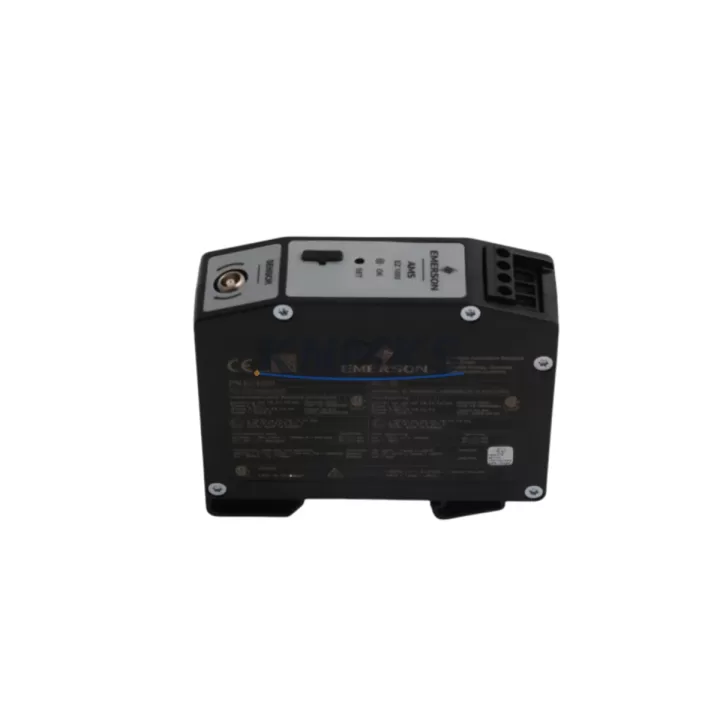
Overview
Emerson EZ1000 Migration-Ready Current Transducer for Legacy Control Systems
The Emerson EZ1000 is a migration-ready current transducer engineered for engineers and maintenance teams managing the transition from end-of-life control architectures to modern automation platforms. As legacy EZ Series panels reach obsolescence and OEM support windows close, the EZ1000 provides a verified drop-in replacement path that preserves existing wiring infrastructure, maintains signal integrity across analog I/O channels, and eliminates the need for full panel redesigns. With a 0–1000A clamp-on measurement range, the EZ1000 is compatible with a broad spectrum of industrial control environments — from legacy DCS installations to modern PLC-based SCADA systems.
For facilities operating aging Emerson EZ Series control cabinets, the EZ1000 addresses one of the most common retrofit bottlenecks: sourcing a current transducer that matches the original terminal pitch, output signal range (typically 4–20 mA or 0–10 V), and DIN rail mounting footprint without requiring panel modification. The EZ1000 retains backward-compatible output specifications, allowing direct substitution without recalibrating downstream analog input modules or rewriting PLC scaling blocks.
When planning a retrofit around the EZ1000, engineers should verify the existing power supply capacity — the transducer requires a stable 24 VDC auxiliary supply, and shared rail loading from co-installed modules such as the Emerson EZ-PWR24 power distribution module must be accounted for. Terminal block compatibility with the original EZ Series wiring harness should be confirmed against the panel’s existing Emerson EZ-TB16 terminal base or equivalent, particularly where conductor cross-sections exceed 2.5 mm². Backplane slot addressing is not applicable for this transducer type, but analog channel mapping within the host PLC — whether a Rockwell Automation 1756-IF16 ControlLogix analog input module or a Siemens S7-300 SM 331 — must be reviewed to ensure the 4–20 mA signal range aligns with the configured input scaling.
Program compatibility is a critical checkpoint during EZ1000 integration. If the legacy system used a proprietary Emerson EZ Series HMI panel with hardcoded tag references to the original transducer’s I/O address, those tag bindings must be remapped before commissioning. In systems where the HMI communicates via Modbus RTU or PROFIBUS DP, the communication link parameters — baud rate, station address, and parity settings — should be documented and preserved during the swap to avoid disrupting upstream SCADA polling cycles. Where the original transducer fed into an Emerson EZ-COM communications module, signal continuity across the retrofit must be validated at the protocol layer before returning the panel to service.
Physical installation space is another factor that frequently delays retrofit timelines. The EZ1000’s compact DIN rail form factor is designed to fit within standard 35 mm rail sections inside existing control cabinets, but engineers should measure available vertical clearance alongside co-installed components such as circuit breakers, the Emerson EZ-IO expansion module, or adjacent relay bases. Where space is constrained, repositioning the EZ1000 to an auxiliary DIN section within the same cabinet is preferable to external enclosure modifications.
Firmware compatibility is not a concern for the EZ1000 as a passive analog transducer, but the host PLC or DCS firmware version should be confirmed to support the analog input range and resolution required. In Rockwell Automation ControlLogix environments, firmware revisions below 20.x may require manual channel configuration updates after module replacement. In Siemens TIA Portal projects, the hardware catalog entry for the analog input module should be verified against the actual installed firmware to prevent configuration mismatches during online download.
All EZ1000 units supplied by KNMKS are pre-shipment tested against OEM electrical specifications, including output linearity, insulation resistance, and burden voltage compliance. Each unit ships with a support terms confirmed by quotation covering manufacturing defects and is sourced from verified supply channels to ensure authenticity. In-stock inventory supports rapid dispatch for emergency breakdown replacements and planned maintenance windows alike.
Migration Compatibility Table
| Parameter | EZ1000 Specification | Retrofit Note |
|---|---|---|
| Measurement Range | 0–1000A AC | Confirm legacy transducer range matches; rescale PLC analog block if different |
| Output Signal | 4–20 mA / 0–10 V (model-dependent) | Verify host analog input module input type before wiring |
| Auxiliary Power | 24 VDC ±10% | Check shared rail load with Emerson EZ-PWR24 or equivalent power module |
| Mounting | 35 mm DIN rail, clamp-on CT | Measure cabinet clearance; compatible with standard EZ Series panel layouts |
| Terminal Compatibility | Screw terminal, 2.5 mm² max | Match against Emerson EZ-TB16 terminal base or existing wiring harness |
| Communication Protocol | Analog (passive); no fieldbus | Upstream Modbus/PROFIBUS links unaffected; validate EZ-COM module signal path |
| HMI Tag Remapping | Required if legacy HMI uses hardcoded I/O tags | Update tag bindings in Emerson EZ Series HMI or SCADA before commissioning |
| Replacement Fit | Drop-in for EZ Series legacy transducers | No panel modification required in standard configurations |
| Pre-Shipment Testing | Yes — linearity, insulation, burden voltage | Each unit tested before dispatch |
| Support terms | 12 Months | Covers manufacturing defects from date of shipment |
Retrofit Planning for Existing Automation Systems
A successful EZ1000 retrofit begins with a structured pre-replacement audit of the existing panel. Start by documenting the current transducer’s wiring diagram, including the conductor routing from the CT secondary to the analog input terminal on the host PLC or DCS. In systems using a Rockwell Automation 1756-IF16 ControlLogix analog input module, note the channel number, input range configuration, and any filter settings applied in the RSLogix 5000 or Studio 5000 project. For Siemens S7-300 installations with an SM 331 analog input module, export the hardware configuration from STEP 7 or TIA Portal before beginning physical work.
Where the legacy panel includes an Emerson EZ-IO expansion module for distributed I/O, confirm that the analog channel assigned to the original transducer is not shared with other field devices. Shared channel configurations are common in older EZ Series panels and can cause unexpected signal conflicts if the replacement transducer’s output impedance differs from the original. The Emerson EZ-COM communications module, if present, should be left powered during the transducer swap to maintain upstream SCADA communication continuity — only the specific analog channel needs to be taken offline.
For panels where the original transducer was mounted adjacent to an Emerson EZ Series relay output module or a signal isolator, verify that the EZ1000’s clamp-on CT jaw can be positioned around the primary conductor without interference from neighboring components. In tight cabinet layouts, a short conductor extension may be required to route the primary cable through the CT jaw before reconnecting to the load terminal. This is a common field adaptation and does not affect transducer accuracy when conductor centering is maintained.
If the retrofit is part of a broader control system upgrade — for example, migrating from an Emerson EZ Series PLC to a Rockwell Automation CompactLogix or a Siemens S7-1200 — the EZ1000 can serve as a bridge component, retaining the existing CT infrastructure while the new controller’s analog input module is configured to accept the 4–20 mA output. This approach reduces the scope of field wiring changes and allows the new PLC program to be validated against live process signals before the legacy controller is decommissioned.
Downtime Control During System Migration
Minimizing unplanned downtime during an EZ1000 retrofit requires a phased approach that isolates the transducer replacement from broader system changes. Begin by placing the affected analog input channel in manual override within the PLC or DCS — this prevents the control loop from responding to the open-circuit signal condition that occurs when the original transducer is disconnected. In Rockwell Automation ControlLogix systems, this is typically achieved by forcing the analog input tag to a known safe value in RSLogix 5000 before breaking the wiring connection. In Siemens S7-300 environments, the corresponding analog input can be masked in the OB35 interrupt routine to prevent fault propagation to the main program cycle.
Once the EZ1000 is installed and wired, restore the analog input channel from manual override and verify the live signal reading against a calibrated clamp meter on the primary conductor. Signal deviation of more than ±1% of full scale should be investigated before returning the control loop to automatic mode. If the legacy HMI displays a current measurement derived from the transducer output, confirm that the displayed value matches the field measurement before signing off on the retrofit.
For facilities with strict change management requirements, the EZ1000 retrofit can be completed during a scheduled maintenance window without requiring a full panel shutdown. The clamp-on CT design allows the primary conductor to remain energized during installation, eliminating the need to de-energize the load circuit. Only the transducer’s auxiliary 24 VDC supply and analog output wiring need to be interrupted, which can typically be completed within a 15–30 minute window. This approach preserves original program logic, maintains field control continuity, and significantly reduces retrofit risk compared to full panel replacement strategies.
Post-retrofit, retain the original transducer as a spare for at least one full production cycle. Given the extended lead times associated with legacy EZ Series components, having a tested backup on-site provides insurance against secondary failures during the stabilization period. KNMKS maintains in-stock inventory of the EZ1000 to support both immediate breakdown replacements and planned buffer stock programs.
Retrofit Support FAQ
Q: Is the EZ1000 a direct replacement for the original Emerson EZ Series current transducer?
A: Yes. The EZ1000 is designed as a drop-in replacement for legacy Emerson EZ Series current transducers with equivalent measurement range and output signal specifications. No panel modification is required in standard configurations. Verify output signal type (4–20 mA or 0–10 V) against the host analog input module before ordering.
Q: What commissioning steps are required after installing the EZ1000?
A: After installation, restore the analog input channel from manual override, verify the live signal reading against a calibrated reference, confirm HMI tag values match field measurements, and validate upstream SCADA or DCS data integrity. In systems with Modbus RTU or PROFIBUS DP communication, confirm that the polling cycle has resumed normally before closing the work order.
Q: How do I confirm wiring compatibility with my existing panel?
A: Check the terminal pitch and conductor cross-section against the EZ1000’s screw terminal specification (2.5 mm² max). If the existing wiring uses ferrule-terminated conductors, confirm ferrule compatibility with the EZ1000’s terminal block. For panels using an Emerson EZ-TB16 terminal base, the EZ1000’s wiring interface is directly compatible without adapter hardware.
Q: What support terms and supply terms apply to the EZ1000?
A: All EZ1000 units supplied by KNMKS carry a support terms confirmed by quotation from the date of shipment, covering manufacturing defects under normal operating conditions. Units are pre-shipment tested for output linearity, insulation resistance, and burden voltage compliance. In-stock inventory is maintained for rapid dispatch. Contact admin@knmks.com or +86 18359268345 for availability and lead-time confirmation.
© 2026 KNMKS. All rights reserved.
Original Source: https://knmks.com
Contact: admin@knmks.com | +86 18359268345
Product Identification
- Brand / Ecosystem
-
Emerson
Assorted Brands - Model / Series
-
EZ1000
Legacy Series - Product Family
- PLCs & Controllers
- Availability Status
- Available on request after model and quantity confirmation
- Inquiry Type
- B2B RFQ, replacement inquiry and project spare-part request
- Pre-Quote Check
- Exact SKU, brand, series, quantity, nameplate photos and destination country are checked before quotation
System Path
Where this product fits in the KNMKS automation structure.
Specification & Inquiry Focus
- Control platform
- PLC, PAC and modular controllers
- Common needs
- CPU, rack, power and I/O expansion
- Project support
- Replacement, cabinet build and maintenance
Buyer Confirmation
Information KNMKS checks before replying.
- Exact model
- EZ1000
- Brand / ecosystem
- Emerson
- Product family
- PLCs & Controllers
- Application note
- Replacement, maintenance, project build or spare-part list
- Useful photos
- Nameplate, installed unit, cabinet layout or connector side
- Delivery details
- Quantity, destination country and target schedule
Document Support
Files and notes can be confirmed during quotation.
- Product photos or nameplate confirmation when available
- Packing and delivery notes before quotation confirmation
- Support scope and delivery terms confirmed per inquiry
- Export document coordination for qualified B2B requests
Inquiry Support
- Model cross-checking before quotation
- CPU, power, rack and expansion module matching
- Support for replacement and project inquiry
What to Send Us
- Brand and exact model number: Emerson EZ1000
- Quantity and required delivery time
- Application, replacement requirement or nameplate photo
- Destination country and shipping preference
RFQ Preparation
This is a product inquiry page built for RFQ communication.
Fast Model Check
Send this model to KNMKS for confirmation.
Include quantity, destination country and photos if this is a maintenance replacement. The inquiry will be saved with a reference number after submission.
Brand & Compatibility Note
KNMKS displays automation product information for well-known industrial brand ecosystems and compatible replacement references. Brand names are used for product identification and compatibility reference only; final availability and commercial terms are confirmed per quotation.
 Manufacturing
 Machine Tools
 Packaging
 Energy & Power



 HMI & Displays
 Servo Systems
 Variable Frequency Drives
 Sensors