
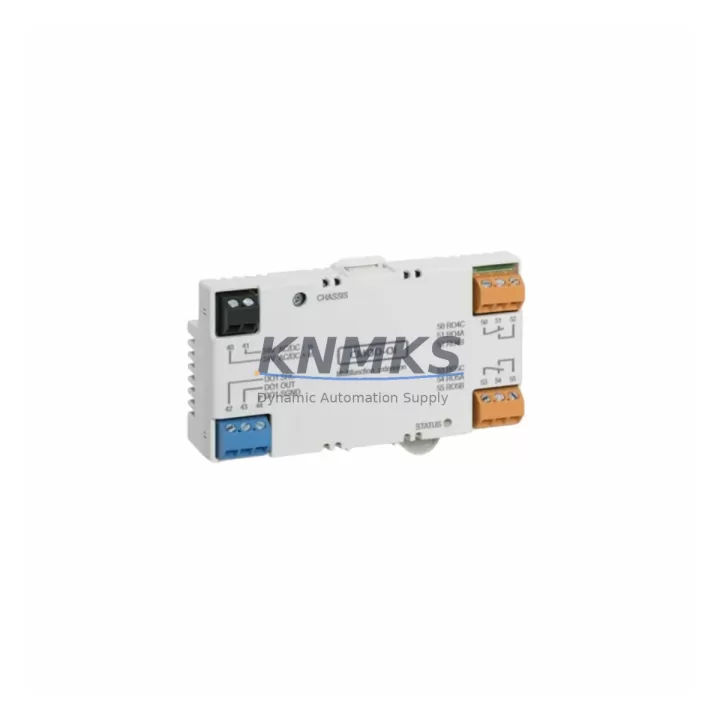
Overview
ABB CMOD-01 Migration-Ready Comm Module for Legacy Systems
The ABB CMOD-01 is a migration-ready communication expansion module engineered for engineers and maintenance teams managing the transition from legacy ABB control architectures to modern automation platforms. Whether you are executing a scheduled outage upgrade, responding to an end-of-life parts shortage, or modernizing a distributed control cabinet, the CMOD-01 delivers a verified drop-in replacement path with minimal re-engineering overhead. This unit ships pre-tested, carries a support terms confirmed by quotation, and is maintained in multi-region stock to support both emergency dispatch and planned retrofit schedules.
The CMOD-01 is designed to slot into existing CMOD-series racks and backplanes without requiring structural modifications to the control cabinet. Engineers replacing a failed or discontinued communication module can retain the original terminal wiring, preserve existing I/O addressing, and maintain HMI screen layouts without rebuilding tag databases from scratch. This significantly reduces the risk of introducing configuration errors during a live system changeover.
In retrofit projects involving ABB AC500 PLC platforms or legacy S800 I/O systems, the CMOD-01 is frequently deployed alongside the CI854 PROFIBUS communication interface and the TB820 media converter to bridge older fieldbus segments to modern Ethernet-based supervisory networks. When the control architecture includes distributed I/O expansion, the AI810 analog input module and the DI810 digital input module are commonly installed in the same rack to complete the I/O layer during the migration. For projects requiring serial-to-Ethernet protocol conversion at the field level, the NMBP-01 fieldbus adapter is a compatible companion module that supports the same backplane form factor.
Before installing the CMOD-01 as a replacement, engineers should verify the following: the rack backplane slot assignment matches the original module address; the power supply capacity in the control cabinet supports the module’s current draw without exceeding the rail budget; terminal block wiring is compatible with the connector pinout on the replacement unit; and the firmware version loaded on the host controller is compatible with the CMOD-01 hardware revision. In systems where the original module was configured with a non-default communication baud rate or node address, these parameters must be re-entered during commissioning to avoid communication faults on startup.
HMI screens connected to the legacy system should be reviewed prior to cutover. If the CMOD-01 is replacing a module that served as a gateway between the PLC and an operator panel, the communication link parameters — including station address, protocol type, and scan rate — must be confirmed in both the PLC program and the HMI project file. Failure to align these settings is one of the most common causes of post-replacement communication alarms that extend unplanned downtime.
Migration Compatibility Table
| Parameter | Detail |
|---|---|
| SKU | CMOD-01 |
| Brand / Series | ABB / CMOD Series |
| Module Type | Communication Expansion Module |
| Backplane Interface | CMOD-series rack backplane (standard slot) |
| Communication Protocols | PROFIBUS DP, Modbus RTU (firmware-dependent) |
| Installation Form Factor | DIN-rail / rack-mount, compatible with existing CMOD cabinet layout |
| Terminal Wiring Compatibility | Retain original terminal block wiring; verify connector pinout before installation |
| Firmware Compatibility | Confirm host controller firmware revision supports CMOD-01 hardware version |
| Module Address Configuration | Re-enter original node address and baud rate during commissioning |
| HMI Link Verification | Confirm station address, protocol type, and scan rate in HMI project |
| Power Supply Requirement | Verify cabinet rail budget before installation; check module current draw |
| Pre-Shipment Testing | Yes — each unit tested before dispatch |
| Support terms | 12 months from date of delivery |
| Origin | China (CN) |
| Stock Availability | Multi-region stock; available for emergency and scheduled dispatch |
| Replacement Recommendation | Direct replacement for end-of-life or failed CMOD-01 units in legacy ABB systems |
Retrofit Planning for Existing Automation Systems
Successful CMOD-01 retrofits require a structured pre-installation audit of the existing control architecture. Begin by documenting the current rack layout, including the slot positions of all installed modules — communication, I/O, and power — and confirming that the replacement CMOD-01 will occupy the same physical slot as the original unit. In multi-rack configurations, the CI854 PROFIBUS communication interface may be installed in an adjacent rack to extend the fieldbus segment; its node address must remain consistent with the CMOD-01’s configured station number to avoid address conflicts on the network.
Power distribution within the control cabinet is a critical checkpoint. The TB820 media converter, if present in the same cabinet, draws from the same 24 VDC rail as the CMOD-01. Engineers should calculate the combined current draw of all active modules — including the AI810 analog input module and DI810 digital input module — against the rated output of the installed power supply module before proceeding with the replacement. Undersized power supplies are a frequent root cause of intermittent communication faults after module swaps.
For systems that include serial communication links to legacy HMI panels or third-party SCADA systems, the NMBP-01 fieldbus adapter provides a compatible interface for bridging older RS-485 or RS-232 segments to the CMOD-01’s communication port. This is particularly relevant in retrofit projects where the supervisory network has been upgraded to Ethernet but field devices still operate on legacy serial protocols. Confirm that the adapter’s protocol configuration matches the CMOD-01’s expected communication parameters before energizing the system.
Signal isolation should also be evaluated during retrofit planning. In environments with high electrical noise — common in motor control centers and variable frequency drive cabinets — signal isolators installed between the CMOD-01 and field wiring can prevent communication errors caused by ground loops or induced noise. This step is often overlooked during rapid replacement scenarios but is essential for long-term system stability.
Downtime Control During System Migration
Minimizing unplanned downtime during a CMOD-01 replacement requires preparation that begins well before the maintenance window opens. The most effective approach is to export and archive the complete PLC program — including all communication configuration blocks, I/O mapping tables, and HMI tag references — before removing the original module. This backup serves as the recovery baseline if the replacement unit requires re-commissioning or if a configuration parameter is lost during the swap.
During the physical replacement, the original module should be removed only after the host controller has been placed in STOP mode and all field outputs have been confirmed safe. The CMOD-01 replacement unit should be inserted into the same rack slot, with the module address switches or firmware-configured node address set to match the original before the controller is returned to RUN mode. This sequence preserves the existing program logic and prevents the controller from generating I/O fault alarms on startup.
Communication link verification is the final step before returning the system to normal operation. Confirm that the PROFIBUS or Modbus network segment connected to the CMOD-01 is showing all expected slave devices as active in the controller’s diagnostic view. If any devices appear offline, check the physical wiring, termination resistors, and node address assignments before escalating to a firmware-level investigation. In most cases, communication faults after a module swap are caused by configuration mismatches rather than hardware defects, and can be resolved within the maintenance window without extending downtime.
For systems where continuous process control is required, a parallel commissioning approach — where the replacement CMOD-01 is configured and tested on a bench setup before the live swap — can reduce the active maintenance window to under 30 minutes in straightforward replacement scenarios.
Retrofit Support FAQ
Q1: Is the CMOD-01 a direct drop-in replacement for the original ABB CMOD-01 unit?
Yes. The CMOD-01 is a direct replacement for the original ABB CMOD-01 communication expansion module. It is compatible with the same CMOD-series rack backplane and uses the same connector pinout. No structural modifications to the control cabinet are required. Verify the firmware revision of the host controller before installation to confirm hardware compatibility.
Q2: What commissioning steps are required after installing the replacement CMOD-01?
After physical installation, re-enter the original node address and communication baud rate in the module’s configuration. Confirm that the host controller’s PLC program recognizes the module at the correct rack slot address. Verify the HMI communication link by checking station address, protocol type, and scan rate settings. Run a full I/O diagnostic scan before returning the system to automatic mode.
Q3: Has the CMOD-01 been tested before shipment, and what support terms is provided?
Yes. Every CMOD-01 unit undergoes pre-shipment functional testing before dispatch. Each unit is covered by a support terms confirmed by quotation from the date of delivery. Multi-region stock is maintained to support both emergency replacement dispatch and scheduled maintenance outages. Contact admin@knmks.com for availability confirmation and lead time.
Q4: What should I check if communication faults appear after installing the CMOD-01?
First, verify that the module node address and baud rate match the original configuration. Check physical wiring and termination resistors on the PROFIBUS or Modbus segment. Confirm that the host controller firmware version is compatible with the CMOD-01 hardware revision. If the HMI is showing communication alarms, verify the station address and protocol settings in the HMI project file. In most cases, post-replacement communication faults are configuration-related and can be resolved without hardware replacement.
© 2026 KNMKS. All rights reserved.
Original Source: https://knmks.com
Contact: admin@knmks.com | +86 18359268345
Product Identification
- Brand / Ecosystem
-
ABB
ABB - Model / Series
-
CMOD-01
Legacy Series - Product Family
- PLCs & Controllers
- Availability Status
- Available on request after model and quantity confirmation
- Inquiry Type
- B2B RFQ, replacement inquiry and project spare-part request
- Pre-Quote Check
- Exact SKU, brand, series, quantity, nameplate photos and destination country are checked before quotation
System Path
Where this product fits in the KNMKS automation structure.
Specification & Inquiry Focus
- Control platform
- PLC, PAC and modular controllers
- Common needs
- CPU, rack, power and I/O expansion
- Project support
- Replacement, cabinet build and maintenance
Buyer Confirmation
Information KNMKS checks before replying.
- Exact model
- CMOD-01
- Brand / ecosystem
- ABB
- Product family
- PLCs & Controllers
- Application note
- Replacement, maintenance, project build or spare-part list
- Useful photos
- Nameplate, installed unit, cabinet layout or connector side
- Delivery details
- Quantity, destination country and target schedule
Document Support
Files and notes can be confirmed during quotation.
- Product photos or nameplate confirmation when available
- Packing and delivery notes before quotation confirmation
- Support scope and delivery terms confirmed per inquiry
- Export document coordination for qualified B2B requests
Inquiry Support
- Model cross-checking before quotation
- CPU, power, rack and expansion module matching
- Support for replacement and project inquiry
What to Send Us
- Brand and exact model number: ABB CMOD-01
- Quantity and required delivery time
- Application, replacement requirement or nameplate photo
- Destination country and shipping preference
RFQ Preparation
This is a product inquiry page built for RFQ communication.
Fast Model Check
Send this model to KNMKS for confirmation.
Include quantity, destination country and photos if this is a maintenance replacement. The inquiry will be saved with a reference number after submission.
Brand & Compatibility Note
KNMKS displays automation product information for well-known industrial brand ecosystems and compatible replacement references. Brand names are used for product identification and compatibility reference only; final availability and commercial terms are confirmed per quotation.
 Manufacturing
 Machine Tools
 Packaging
 Energy & Power



 HMI & Displays
 Servo Systems
 Variable Frequency Drives
 Sensors