
Overview
BECKHOFF CX2500 Migration-Ready Embedded PC for Legacy Control Systems
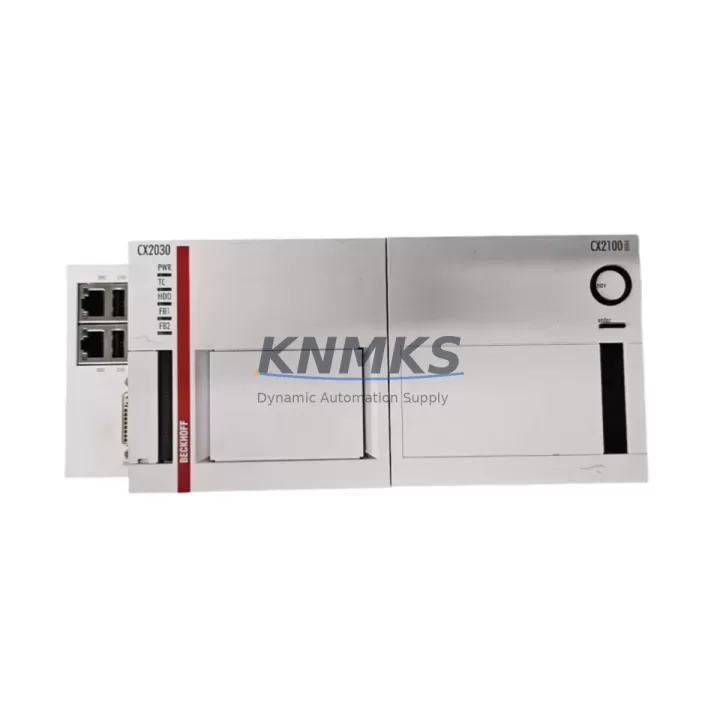
The BECKHOFF CX2500 is a migration-ready Embedded PC designed for engineers and maintenance teams undertaking legacy control system modernization. As a direct functional successor to the discontinued CX2030 and CX2550 platforms, the CX2500 delivers a reliable, drop-in upgrade path for aging CX-series control cabinets without requiring a full PLC architecture redesign. Whether you are replacing end-of-life hardware in a packaging line, a press control system, or a multi-axis motion application, the CX2500 provides the processing headroom, EtherCAT compatibility, and TwinCAT 3 runtime support needed to restore and extend system life.
For facilities managing legacy BECKHOFF installations, the CX2500 is stocked and available for immediate dispatch. Each unit ships with a support terms confirmed by quotation and undergoes pre-shipment functional testing to reduce commissioning risk on the plant floor.
Migration Compatibility Table
| Parameter | Legacy Unit (CX2030 / CX2550) | Replacement: CX2500 | Migration Notes |
|---|---|---|---|
| Form Factor | DIN-rail mountable, CX-series backplane | DIN-rail mountable, CX-series backplane | Mechanical fit confirmed; verify cabinet depth clearance |
| Backplane Interface | CX-series local bus (E-bus) | CX-series local bus (E-bus) | Compatible with existing EL/EK terminal blocks |
| Communication Protocol | EtherCAT, ADS, Modbus TCP | EtherCAT, ADS, Modbus TCP, OPC UA | Expanded protocol support; verify HMI ADS routing |
| TwinCAT Runtime | TwinCAT 2 / TwinCAT 3 | TwinCAT 3 (TC3) | TC2 projects require migration to TC3 format |
| I/O Expansion | Via EL-series terminals | Via EL-series terminals | Existing EL6070 license modules and EK1110 EtherCAT couplers remain compatible |
| Power Supply | 24 V DC, via CX2100 power supply unit | 24 V DC, via CX2100 power supply unit | Confirm CX2100 PSU capacity; check total bus current draw |
| Module Address / Node ID | Configured via TwinCAT System Manager | Configured via TwinCAT System Manager | Re-scan I/O tree after hardware swap; verify AMS Net ID |
| Firmware Version | Legacy BIOS / firmware | Current BECKHOFF firmware | Update firmware before TC3 project activation |
| Installation Space | Standard CX-series width | Standard CX-series width | Verify DIN-rail slot count and adjacent terminal spacing |
| Replacement Recommendation | CX2500 is the recommended migration target for CX2030 and CX2550 end-of-life units. Consult BECKHOFF migration guide for TC2-to-TC3 project conversion steps. | ||
| Support terms | — | 12 Months | Covers hardware defects; pre-shipment functional test included |
Retrofit Planning for Existing Automation Systems
A successful CX2500 retrofit begins well before the hardware arrives on site. The first step is a thorough audit of the existing control cabinet: confirm that the CX2100 power supply unit can sustain the combined bus current demand of all attached EL-series I/O terminals, including any analog input/output modules, safety terminals, and communication cards. If the existing CX2100 is operating near its rated output, a replacement or supplementary PSU should be sourced in parallel with the CX2500 order.
Next, document all terminal wiring at the backplane. The CX2500 connects to the same CX-series local E-bus, meaning existing EL6070 software license modules and EK1110 EtherCAT junction couplers remain in place without rewiring. However, engineers should photograph and record terminal addresses before powering down, as the TwinCAT System Manager will require a full I/O rescan after the CPU module is swapped. Any custom AMS Net IDs assigned to remote EtherCAT segments must be re-entered in the new unit’s network configuration.
For systems running TwinCAT 2 projects on the legacy CX2030 or CX2550, the program logic must be converted to TwinCAT 3 format prior to activation on the CX2500. BECKHOFF’s TC2-to-TC3 migration utility handles most standard function block libraries, but custom libraries and third-party motion add-ons should be validated individually. HMI screens built on BECKHOFF CP-series operator panels communicating via ADS will need their ADS routing tables updated to reflect the new AMS Net ID of the CX2500.
Communication links to upstream SCADA systems, MES platforms, or historian servers should be tested in a staging environment where possible. The CX2500 supports OPC UA natively in addition to the ADS and Modbus TCP protocols present on legacy units, offering an opportunity to modernize data acquisition paths during the same maintenance window. If the existing control cabinet includes a CP6xxx or CP7xxx HMI panel connected via DVI or DisplayPort, verify cable compatibility with the CX2500’s video output specification before finalizing the installation plan.
Downtime Control During System Migration
Minimizing unplanned downtime is the primary concern for any brownfield retrofit. For CX2500 installations replacing a CX2030 or CX2550, the recommended approach is a parallel preparation strategy: configure and test the CX2500 offline using a bench-top replica of the I/O configuration before the scheduled maintenance window. Load the converted TwinCAT 3 project, verify all variable mappings, and simulate I/O responses using BECKHOFF’s TwinCAT Scope and I/O simulation tools.
During the live cutover, power down the control cabinet in a controlled sequence: disable field outputs first, then shut down the CPU, then remove the legacy module. Install the CX2500, reconnect the E-bus, and power up. The TwinCAT System Manager will automatically detect the I/O configuration if the terminal layout is unchanged. Activate the pre-loaded TC3 project, verify all I/O channel states against the original program logic, and confirm communication links to remote EtherCAT nodes and SCADA systems before re-enabling field outputs.
Retaining a backup image of the original CX2030 or CX2550 CF card or SSD is strongly recommended. This preserves the original program logic and allows rapid rollback if commissioning issues arise. With pre-tested hardware and a structured cutover plan, most CX2500 retrofits can be completed within a single 4–8 hour maintenance shift, protecting production continuity and reducing the risk of extended unplanned outages.
Retrofit Support FAQ
Q1: Is the CX2500 a direct drop-in replacement for the CX2030 and CX2550?
The CX2500 shares the same CX-series backplane interface and DIN-rail form factor as the CX2030 and CX2550, making it mechanically compatible. However, the TwinCAT runtime has advanced to TC3, so existing TC2 projects require conversion before activation. All EL-series I/O terminals, including EL6070 license modules and EK1110 EtherCAT couplers, remain fully compatible without rewiring.
Q2: What commissioning steps are required after installing the CX2500?
After physical installation, perform a full I/O rescan in TwinCAT System Manager, re-enter the AMS Net ID, update ADS routing tables for any connected HMI or SCADA systems, activate the TC3 project, and verify all I/O channel states. Update the CX2500 firmware to the latest BECKHOFF release before project activation to ensure compatibility with current TC3 libraries.
Q3: Does the unit ship with a support terms, and is pre-shipment testing performed?
Yes. Every CX2500 unit supplied by KNMKS includes a support terms confirmed by quotation covering hardware defects and ships after a pre-shipment functional test. Units are dispatched from in-stock inventory to support urgent replacement requirements. Contact admin@knmks.com or +86 18359268345 for lead time confirmation and expedited shipping options.
Q4: Can the CX2500 support the same I/O terminal count as the legacy system?
The CX2500 supports the full range of BECKHOFF EL-series I/O terminals via the CX-series E-bus backplane. The total terminal count is limited by the power budget of the CX2100 power supply unit. If the existing installation is near the CX2100’s rated bus current capacity, a power budget recalculation is recommended before finalizing the terminal configuration for the upgraded system.
© 2026 KNMKS. All rights reserved.
Original Source: https://knmks.com
Contact: admin@knmks.com | +86 18359268345
Product Identification
- Brand / Ecosystem
-
BECKHOFF
Assorted Brands - Model / Series
-
CX2500/CX2030/CX2550/CX2100/EL6070/EK1110
Legacy Series - Product Family
- PLCs & Controllers
- Availability Status
- Available on request after model and quantity confirmation
- Inquiry Type
- B2B RFQ, replacement inquiry and project spare-part request
- Pre-Quote Check
- Exact SKU, brand, series, quantity, nameplate photos and destination country are checked before quotation
System Path
Where this product fits in the KNMKS automation structure.
Specification & Inquiry Focus
- Control platform
- PLC, PAC and modular controllers
- Common needs
- CPU, rack, power and I/O expansion
- Project support
- Replacement, cabinet build and maintenance
Buyer Confirmation
Information KNMKS checks before replying.
- Exact model
- CX2500/CX2030/CX2550/CX2100/EL6070/EK1110
- Brand / ecosystem
- BECKHOFF
- Product family
- PLCs & Controllers
- Application note
- Replacement, maintenance, project build or spare-part list
- Useful photos
- Nameplate, installed unit, cabinet layout or connector side
- Delivery details
- Quantity, destination country and target schedule
Document Support
Files and notes can be confirmed during quotation.
- Product photos or nameplate confirmation when available
- Packing and delivery notes before quotation confirmation
- Support scope and delivery terms confirmed per inquiry
- Export document coordination for qualified B2B requests
Inquiry Support
- Model cross-checking before quotation
- CPU, power, rack and expansion module matching
- Support for replacement and project inquiry
What to Send Us
- Brand and exact model number: BECKHOFF CX2500/CX2030/CX2550/CX2100/EL6070/EK1110
- Quantity and required delivery time
- Application, replacement requirement or nameplate photo
- Destination country and shipping preference
RFQ Preparation
This is a product inquiry page built for RFQ communication.
Fast Model Check
Send this model to KNMKS for confirmation.
Include quantity, destination country and photos if this is a maintenance replacement. The inquiry will be saved with a reference number after submission.
Brand & Compatibility Note
KNMKS displays automation product information for well-known industrial brand ecosystems and compatible replacement references. Brand names are used for product identification and compatibility reference only; final availability and commercial terms are confirmed per quotation.
 Manufacturing
 Machine Tools
 Packaging
 Energy & Power



 HMI & Displays
 Servo Systems
 Variable Frequency Drives
 Sensors