
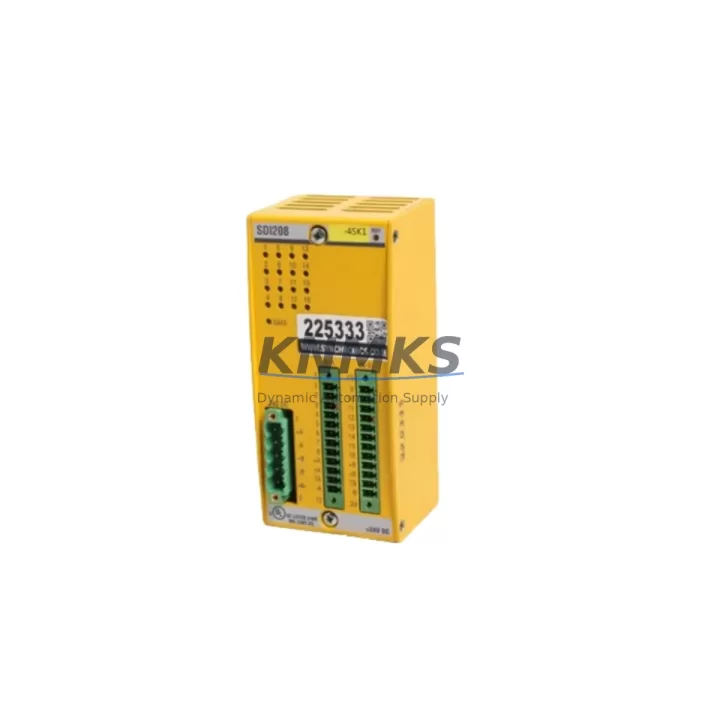
Overview
Bachmann SDI208 Migration-Ready Safety Input for Legacy Systems
The Bachmann SDI208 is an 8-channel SIL3-certified Safety Digital Input Module engineered for direct integration into MX200 and MX213 rack architectures. As legacy Bachmann control platforms approach end-of-life and OEM spare part availability narrows, the SDI208 has become a primary migration target for automation engineers tasked with sustaining safety-critical production lines without full system replacement. Whether you are managing a phased retrofit of an existing safety PLC cabinet, extending the operational life of a Bachmann MX Series rack, or executing a controlled migration from an older SDI-series module, the SDI208 delivers verified compatibility, reduced commissioning risk, and a documented support terms confirmed by quotation from date of shipment.
Migration projects involving the SDI208 typically begin with a thorough audit of the existing control cabinet. Engineers must confirm available backplane slot positions within the MX200 or MX213 chassis, verify that the 24 VDC power supply module — such as the Bachmann PS204 or equivalent — can sustain the additional current draw introduced by the SDI208, and cross-reference terminal wiring diagrams against the new module’s I/O channel assignments. In many legacy installations, field wiring was originally terminated to older SDI-series modules with different pin-out conventions; a wiring adapter or re-termination at the marshalling panel is often required before the SDI208 can be seated and addressed.
Backplane communication is handled via the MX Series internal bus, which the SDI208 supports natively. However, engineers should confirm the firmware revision of the Bachmann MX213 CPU module currently installed, as SDI208 compatibility is validated against specific firmware branches. Where the CPU firmware is outdated, a controlled firmware update — performed offline during a scheduled maintenance window — is strongly recommended before the SDI208 is brought online. This step is critical for ensuring that the safety function diagnostic coverage and response time parameters reported by the CPU accurately reflect the SDI208’s SIL3 capability.
For installations where the Bachmann MX200 rack communicates upstream via PROFIBUS DP or Ethernet-based protocols to a supervisory SCADA or DCS layer, the SDI208 module address must be configured to match the existing I/O map. Failure to align module addressing before power-up will result in diagnostic faults at the CPU level and may trigger a safety shutdown. Pre-commissioning simulation using the Bachmann SolutionCenter programming environment — with the SDI208 declared in the hardware configuration — allows engineers to validate the I/O map, test safety function logic, and confirm HMI screen tag bindings before any live field connection is made.
In control cabinets where space is constrained, the SDI208’s standard MX Series form factor ensures it occupies a single backplane slot, consistent with the modules it replaces. Where a full rack upgrade is planned alongside the SDI208 installation, companion modules such as the Bachmann SDO204 safety digital output module or the Bachmann AI204 analog input module may be installed in adjacent slots during the same maintenance window, minimizing total downtime exposure. For systems requiring expanded I/O capacity beyond the existing rack, a secondary MX213 expansion rack connected via the MX Series rack coupler provides a validated path to additional channel density without altering the primary CPU configuration.
Pre-shipment testing is performed on every SDI208 unit prior to dispatch. Each module undergoes functional verification of all 8 input channels, SIL3 diagnostic self-test confirmation, and backplane interface continuity checks. Units are shipped with original Bachmann packaging and are accompanied by a test report. Stock is maintained for immediate dispatch, with typical lead times of 1–3 business days for in-stock units. All SDI208 modules supplied are covered by a support terms confirmed by quotation against manufacturing defects and functional failure under normal operating conditions.
Migration Compatibility Table
| Parameter | SDI208 (Replacement) | Legacy SDI-Series (Reference) | Notes |
|---|---|---|---|
| Rack Compatibility | MX200, MX213 | MX200, MX213 | Direct slot replacement; no rack modification required |
| Input Channels | 8 x 24 VDC Digital Input | Varies by legacy model | Verify channel count against existing I/O map |
| Safety Integrity Level | SIL3 (IEC 62061) | SIL2 / SIL3 depending on model | Confirm SIL requirement in safety plan |
| Backplane Interface | MX Series internal bus | MX Series internal bus | Native compatibility; no adapter required |
| Power Supply Requirement | 24 VDC via backplane | 24 VDC via backplane | Verify PS204 or equivalent capacity before installation |
| Terminal Wiring | Per SDI208 datasheet pin-out | Per legacy module datasheet | Re-termination may be required; verify before seating module |
| Communication Protocol | MX internal bus; PROFIBUS DP / Ethernet upstream | MX internal bus | Upstream protocol unchanged; module address must match I/O map |
| Firmware Compatibility | Validated against MX213 CPU firmware branches | N/A | Update CPU firmware if below validated revision |
| Programming Environment | Bachmann SolutionCenter | Bachmann SolutionCenter | Declare SDI208 in hardware config before commissioning |
| Installation Space | 1 x MX Series backplane slot | 1 x MX Series backplane slot | No additional space required |
| Pre-Shipment Testing | Full 8-channel functional test + SIL3 diagnostic check | N/A | Test report included with shipment |
| Support terms | 12 Months from shipment date | N/A | Covers manufacturing defects and functional failure |
Retrofit Planning for Existing Automation Systems
A successful SDI208 retrofit begins well before the module arrives on site. The planning phase should encompass a full review of the existing MX200 or MX213 rack layout, including the current slot assignments of all installed modules. In a typical legacy cabinet, the rack may house a mix of the Bachmann MX213 CPU, the Bachmann PS204 power supply module, existing SDI-series safety input modules, and SDO-series safety output modules. Identifying which slots are occupied, which are available, and which modules are candidates for simultaneous replacement allows the project team to sequence the retrofit efficiently and avoid repeated cabinet outages.
Terminal block wiring is one of the most time-sensitive elements of any SDI208 installation. Field cables from safety sensors — emergency stop circuits, light curtains, two-hand control devices — must be re-terminated to match the SDI208 channel pin-out. Where the existing installation used a Bachmann AI204 analog input module in an adjacent slot for process monitoring, care must be taken to ensure that re-termination work on the SDI208 does not disturb the AI204 wiring. Labelling all field cables before disconnection and using a structured re-termination checklist reduces the risk of wiring errors that could compromise safety function integrity.
For systems where the MX Series rack communicates to an HMI panel — such as a Bachmann-compatible operator terminal running on the same Ethernet segment — HMI screen tags bound to the legacy SDI module’s I/O addresses must be reviewed and updated in the HMI project before the SDI208 is commissioned. This is particularly important where the HMI displays safety input status, diagnostic alarms, or bypass states. Failing to update HMI tag bindings can result in misleading operator displays during and after the retrofit, creating a potential safety risk during the transition period.
Where the retrofit scope extends beyond a single module replacement to a broader control system upgrade, the SDI208 is frequently installed alongside a Bachmann MX Series rack coupler to support I/O expansion into a secondary chassis. This approach allows the primary MX213 CPU to retain its existing program logic and safety function configuration while gaining access to additional input channels in the expansion rack. The rack coupler connection should be verified for cable integrity and termination resistance before the expanded I/O is declared in the SolutionCenter hardware configuration.
Downtime Control During System Migration
Minimizing unplanned downtime during an SDI208 migration requires a structured approach to pre-commissioning, changeover sequencing, and post-installation verification. The most effective strategy is to complete all preparatory work — firmware verification, hardware configuration updates in SolutionCenter, HMI tag review, and wiring pre-termination on a temporary marshalling panel — before the production line is taken offline. This front-loading of engineering effort compresses the actual cabinet outage to the physical module swap, wiring transfer, and functional test sequence.
During the changeover window, the recommended sequence is: power down the MX200 or MX213 rack in a controlled manner following the site’s lockout/tagout procedure; remove the legacy SDI module from its backplane slot; seat the SDI208 and confirm backplane connector engagement; transfer field wiring from the temporary marshalling panel or directly re-terminate to the SDI208 terminal block; restore rack power; and execute the SolutionCenter online diagnostic to confirm the SDI208 is recognized and all 8 input channels report correctly. The entire physical swap and wiring transfer can typically be completed within a two-hour maintenance window for a single-module replacement, provided all preparatory steps have been completed.
Original program logic stored in the MX213 CPU is not affected by the SDI208 module swap, provided the hardware configuration in SolutionCenter has been updated to declare the SDI208 prior to the changeover. Safety function logic, including emergency stop response sequences and light curtain muting routines, remains intact. Post-installation, a full safety function test — activating each input channel in sequence and confirming the expected CPU response — should be completed and documented before the production line is returned to service. This test record forms part of the site’s safety validation documentation and supports ongoing compliance with IEC 62061 or ISO 13849 requirements.
Retrofit Support FAQ
Q: Is the SDI208 a direct drop-in replacement for all legacy Bachmann SDI-series safety input modules installed in MX200 racks?
A: The SDI208 is compatible with MX200 and MX213 rack architectures and occupies a standard MX Series backplane slot. However, the specific legacy SDI model being replaced must be cross-referenced against the SDI208 datasheet to confirm channel count, terminal pin-out, and SIL rating alignment. In most cases, re-termination of field wiring is required. Contact our technical team with your existing module part number for a confirmed replacement assessment before ordering.
Q: What commissioning steps are required after seating the SDI208 in the rack?
A: After physical installation, the SDI208 must be declared in the Bachmann SolutionCenter hardware configuration and the updated project downloaded to the MX213 CPU. A full 8-channel input functional test should then be performed, followed by a SIL3 diagnostic self-test confirmation via the SolutionCenter diagnostic interface. HMI tag bindings should be verified, and a safety function validation test completed and documented before returning the system to production.
Q: How is the SDI208 wired, and are wiring adapters available for legacy terminal configurations?
A: The SDI208 uses the standard MX Series terminal block connector. Field wiring must be terminated according to the SDI208 channel pin-out as specified in the Bachmann SDI208 datasheet. Where the legacy module used a different pin-out convention, re-termination at the module terminal block or at a marshalling panel is required. Wiring adapter solutions are available on request — contact our sales team with your existing wiring diagram for a tailored recommendation.
Q: What support terms and stock availability applies to SDI208 units supplied by KNMKS?
A: All SDI208 modules supplied by KNMKS are covered by a support terms confirmed by quotation from the date of shipment, covering manufacturing defects and functional failure under normal operating conditions. Units are pre-tested prior to dispatch, with a functional test report included. Stock is maintained for immediate dispatch; typical lead time for in-stock units is 1–3 business days. For volume requirements or forward stock agreements, contact our sales team to discuss dedicated inventory allocation.
© 2026 KNMKS. All rights reserved.
Original Source: https://knmks.com
Contact: admin@knmks.com | +86 18359268345
Product Identification
- Brand / Ecosystem
-
Bachmann
Assorted Brands - Model / Series
-
SDI208
Legacy Series - Product Family
- PLCs & Controllers
- Availability Status
- Available on request after model and quantity confirmation
- Inquiry Type
- B2B RFQ, replacement inquiry and project spare-part request
- Pre-Quote Check
- Exact SKU, brand, series, quantity, nameplate photos and destination country are checked before quotation
System Path
Where this product fits in the KNMKS automation structure.
Specification & Inquiry Focus
- Control platform
- PLC, PAC and modular controllers
- Common needs
- CPU, rack, power and I/O expansion
- Project support
- Replacement, cabinet build and maintenance
Buyer Confirmation
Information KNMKS checks before replying.
- Exact model
- SDI208
- Brand / ecosystem
- Bachmann
- Product family
- PLCs & Controllers
- Application note
- Replacement, maintenance, project build or spare-part list
- Useful photos
- Nameplate, installed unit, cabinet layout or connector side
- Delivery details
- Quantity, destination country and target schedule
Document Support
Files and notes can be confirmed during quotation.
- Product photos or nameplate confirmation when available
- Packing and delivery notes before quotation confirmation
- Support scope and delivery terms confirmed per inquiry
- Export document coordination for qualified B2B requests
Inquiry Support
- Model cross-checking before quotation
- CPU, power, rack and expansion module matching
- Support for replacement and project inquiry
What to Send Us
- Brand and exact model number: Bachmann SDI208
- Quantity and required delivery time
- Application, replacement requirement or nameplate photo
- Destination country and shipping preference
RFQ Preparation
This is a product inquiry page built for RFQ communication.
Fast Model Check
Send this model to KNMKS for confirmation.
Include quantity, destination country and photos if this is a maintenance replacement. The inquiry will be saved with a reference number after submission.
Brand & Compatibility Note
KNMKS displays automation product information for well-known industrial brand ecosystems and compatible replacement references. Brand names are used for product identification and compatibility reference only; final availability and commercial terms are confirmed per quotation.
 Manufacturing
 Machine Tools
 Packaging
 Energy & Power



 HMI & Displays
 Servo Systems
 Variable Frequency Drives
 Sensors