
Overview
Allen-Bradley 6186M-19PT Maintenance-Proven Spare for Factory Uptime
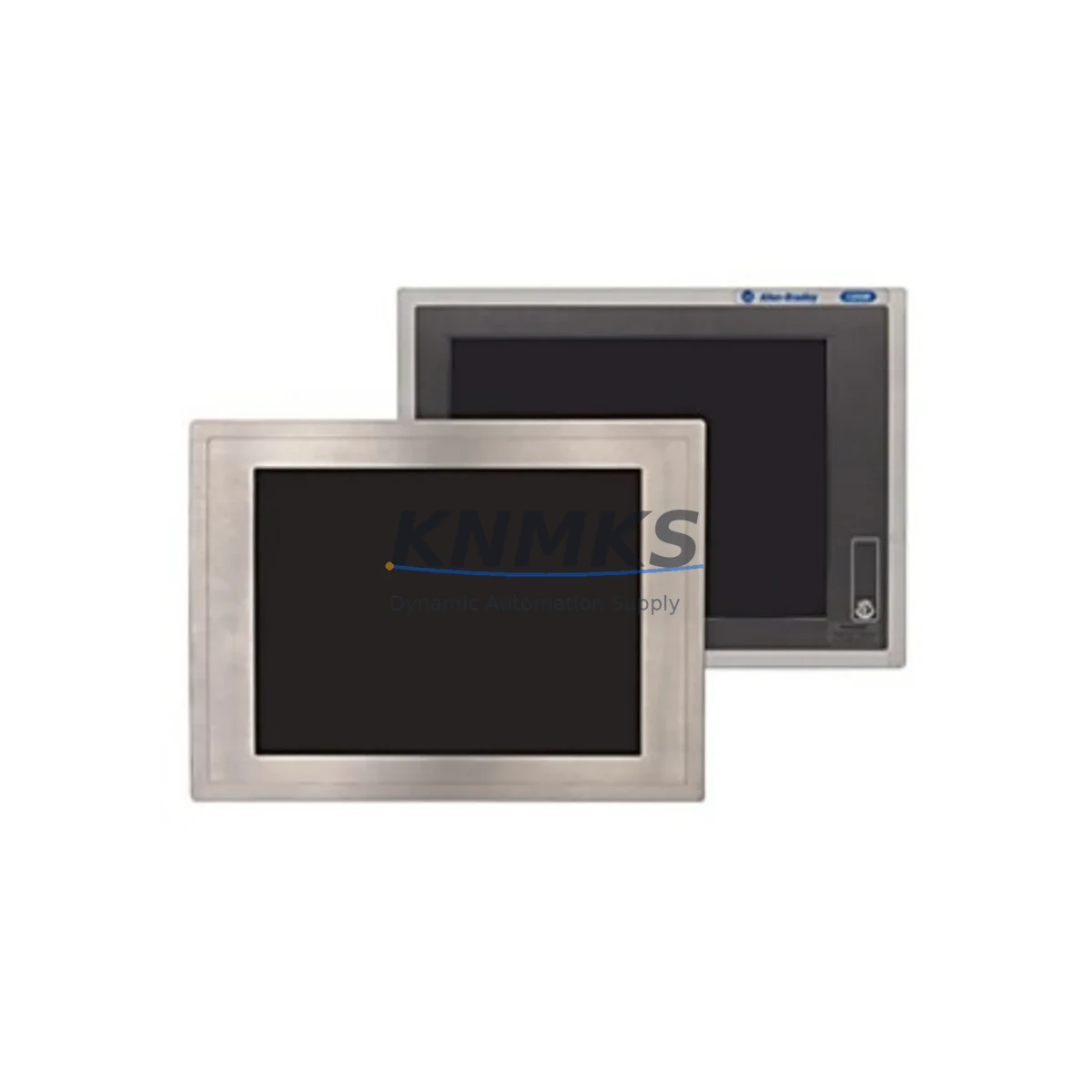
The Allen-Bradley 6186M-19PT is a 19-inch industrial flat panel touch monitor engineered for demanding factory floor environments. As a direct original spare for the 6186M Series, this unit supports continuous operation in PLC-driven control systems, SCADA workstations, and panel-view enclosures where display reliability is mission-critical. Maintenance engineers and procurement teams managing legacy Rockwell Automation control cabinets rely on the 6186M-19PT to eliminate unplanned downtime caused by display failure — one of the most disruptive single-point failures in a production line.
Whether you are executing a scheduled annual overhaul, responding to an emergency display fault, or building a strategic spare parts inventory for a multi-site facility, the 6186M-19PT delivers verified compatibility with existing 6186M Series mounting frames, cabling, and power infrastructure. Each unit is pre-shipment tested under load conditions to confirm touchscreen calibration, video signal integrity, and backlight performance before dispatch.
Spare Maintenance Table
| Parameter | Specification |
|---|---|
| Part Number | 6186M-19PT |
| Series | Allen-Bradley 6186M |
| Display Size | 19 inch (SXGA) |
| Touch Technology | Resistive Touchscreen |
| Input Signal | VGA / DVI (model-dependent) |
| Operating Voltage | 24 VDC / 100–240 VAC (verify per revision) |
| Operating Temperature | 0°C to 50°C |
| Protection Rating | NEMA 4 / IP65 front panel |
| Mounting | Panel mount, 6186M Series frame compatible |
| Compatibility | Rockwell Automation FactoryTalk View, PanelView Plus, 6186M enclosures |
| Application | HMI display, SCADA workstation, operator interface terminal |
| Pre-Shipment Test | Yes — touchscreen, backlight, video signal verified |
| Support terms | 12 Months |
| Origin | USA |
| Long-Term Supply | Available — contact for 12–36 month supply agreements |
Maintenance Planning for Continuous Operation
When replacing the 6186M-19PT in a control cabinet or operator station, a thorough inspection of the surrounding electrical environment is essential to prevent repeat failures and ensure system stability. Begin by verifying the 24 VDC panel power supply — units such as the Allen-Bradley 1606-XLP or equivalent Rockwell 24V regulated supply — to confirm output voltage is within tolerance and free of ripple that could damage display electronics.
Inspect the VGA or DVI signal cable routing from the industrial PC or PanelView Plus controller. Damaged shielding or loose connectors are a common root cause of intermittent display faults that are misdiagnosed as monitor failure. At the same time, check the USB or serial touchscreen interface cable for continuity and secure termination at both the monitor and host controller ends.
For cabinets housing a 1756 ControlLogix or 1769 CompactLogix PLC backplane alongside the HMI workstation, verify that the backplane power module (such as the 1756-PA75 or 1756-PB75) is delivering stable voltage to all I/O modules. Voltage sags caused by a degraded power module can manifest as display resets or touchscreen lockups, creating a false impression of monitor failure.
Review the terminal block wiring at the 24 VDC input to the monitor. Loose or corroded terminals on Phoenix Contact or Weidmüller-style blocks are a frequent source of intermittent power interruption. If the cabinet includes a signal isolator or surge protection device on the video or power line, inspect it for signs of thermal stress or tripped protection.
For facilities running FactoryTalk View SE or ME, confirm that the SCADA or HMI software configuration still references the correct display resolution and touch input driver after the replacement. A mismatch between software display settings and the new monitor’s native resolution can cause operator interface scaling issues that reduce productivity during the restart phase.
Finally, if the control cabinet includes a 1783 Stratix managed switch or similar industrial Ethernet infrastructure connecting the HMI to the PLC network, verify network link status after monitor replacement to ensure the operator station re-establishes communication with the control system without requiring a full network restart.
Site Replacement Workflow
The 6186M-19PT is a direct form-fit-function replacement for existing 6186M Series monitors installed in Rockwell Automation-compatible enclosures. The panel-mount cutout dimensions and mounting hole pattern are retained across the 6186M Series, allowing technicians to complete a physical swap without enclosure modification.
Before powering down the operator station, document the current HMI screen configuration and any active alarm states to accelerate system restoration. Disconnect the 24 VDC power input and signal cables, noting cable labels and connector orientations. Remove the existing monitor from the panel frame, install the 6186M-19PT, and reconnect all cables in reverse order.
On power-up, perform a touchscreen calibration sequence as required by the FactoryTalk View or connected HMI software. Confirm display resolution, brightness, and touch response across the full active area before returning the operator station to production service. Total replacement time for a prepared technician is typically under 30 minutes, minimizing production line downtime to a single shift window.
For aging installations where the original 6186M monitor has reached end-of-service life, the 6186M-19PT also serves as a long-term retrofit solution, extending the operational life of the control cabinet without requiring a full HMI platform migration.
Spare Parts Support FAQ
Q1: Is the 6186M-19PT compatible with all revisions of the 6186M Series enclosure?
The 6186M-19PT is designed for the 6186M Series panel-mount frame. Physical mounting dimensions are consistent across the series. However, verify the power input voltage (24 VDC vs. AC input variants) and signal interface (VGA vs. DVI) against your specific enclosure revision before installation. Our technical team can assist with compatibility confirmation prior to shipment.
Q2: What is included in the pre-shipment testing process?
Each 6186M-19PT unit undergoes a full functional test prior to dispatch, including touchscreen calibration verification, backlight illumination check, video signal input test, and power input stability confirmation. A test report is available upon request. All units ship with a support terms confirmed by quotation covering manufacturing defects and functional failure under normal operating conditions.
Q3: Can you support long-term or blanket purchase orders for multi-site inventory programs?
Yes. We support 12–36 month supply agreements for maintenance teams managing multiple facilities. Blanket orders allow you to lock in pricing, guarantee stock availability, and reduce emergency procurement lead times. Contact our sales team to discuss volume pricing and scheduled delivery options.
Q4: What should I do if the replacement monitor does not display correctly after installation?
First, verify that the video signal cable is fully seated at both the monitor and host controller. Confirm that the host PC or PanelView output resolution matches the 6186M-19PT native resolution. If the touchscreen is unresponsive, re-run the calibration utility from the HMI software. If the issue persists, contact our technical support team — all units are covered by a support terms confirmed by quotation and we will arrange a replacement or repair at no additional cost.
© 2026 KNMKS. All rights reserved.
Original Source: https://knmks.com
Contact: admin@knmks.com | +86 18359268345
Product Identification
- Brand / Ecosystem
-
Allen-Bradley
Allen-Bradley - Model / Series
- 6186M-19PT
- Product Family
- HMI & Displays
- Availability Status
- Available on request after model and quantity confirmation
- Inquiry Type
- B2B RFQ, replacement inquiry and project spare-part request
- Pre-Quote Check
- Exact SKU, brand, series, quantity, nameplate photos and destination country are checked before quotation
System Path
Where this product fits in the KNMKS automation structure.
Specification & Inquiry Focus
- Display range
- Operator panels and touch screens
- Common needs
- Screen size, interface and version matching
- Project support
- Retrofit, spare unit and panel replacement
Buyer Confirmation
Information KNMKS checks before replying.
- Exact model
- 6186M-19PT
- Brand / ecosystem
- Allen-Bradley
- Product family
- HMI & Displays
- Application note
- Replacement, maintenance, project build or spare-part list
- Useful photos
- Nameplate, installed unit, cabinet layout or connector side
- Delivery details
- Quantity, destination country and target schedule
Document Support
Files and notes can be confirmed during quotation.
- Product photos or nameplate confirmation when available
- Packing and delivery notes before quotation confirmation
- Support scope and delivery terms confirmed per inquiry
- Export document coordination for qualified B2B requests
Inquiry Support
- Panel size and interface confirmation
- Replacement unit inquiry for discontinued HMIs
- Protective packaging for display shipment
What to Send Us
- Brand and exact model number: Allen-Bradley 6186M-19PT
- Quantity and required delivery time
- Application, replacement requirement or nameplate photo
- Destination country and shipping preference
RFQ Preparation
This is a product inquiry page built for RFQ communication.
Fast Model Check
Send this model to KNMKS for confirmation.
Include quantity, destination country and photos if this is a maintenance replacement. The inquiry will be saved with a reference number after submission.
Brand & Compatibility Note
KNMKS displays automation product information for well-known industrial brand ecosystems and compatible replacement references. Brand names are used for product identification and compatibility reference only; final availability and commercial terms are confirmed per quotation.
 Manufacturing
 Machine Tools
 Packaging
 Energy & Power
 PLCs & Controllers
 Servo Systems
 Variable Frequency Drives
 Sensors