
Overview
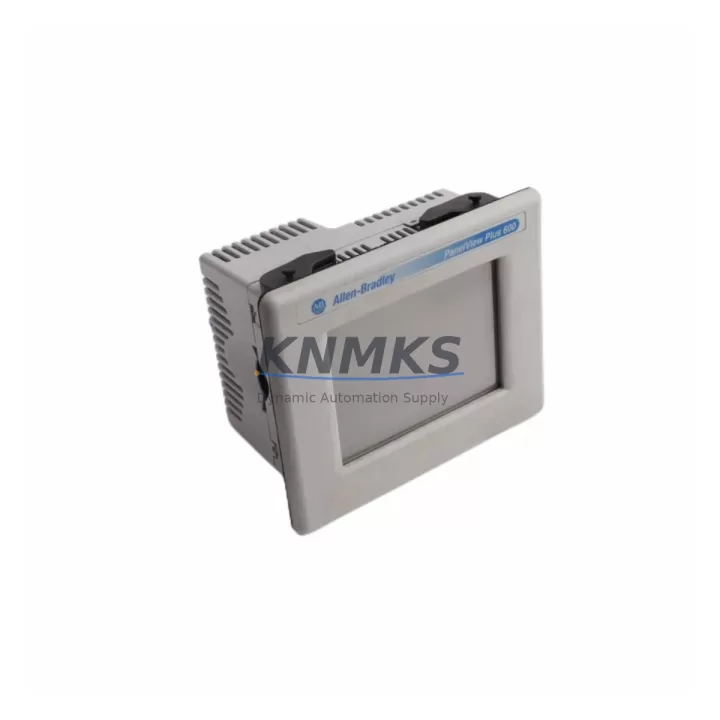
Allen-Bradley 2711R-T10T Migration-Ready HMI for Legacy Control Systems
The Allen-Bradley 2711R-T10T is a 10-inch color touch-screen operator terminal from the PanelView 800 series, purpose-built for industrial environments where legacy HMI panels are reaching end-of-life or have been discontinued. As Rockwell Automation continues to phase out older PanelView Plus 6 and PanelView Component platforms, the 2711R-T10T provides a validated migration path that preserves existing control logic, minimizes panel re-engineering, and reduces total retrofit cost. This unit is stocked, pre-shipment tested, and backed by a support terms confirmed by quotation.
Engineers replacing discontinued PanelView 550, PanelView 600, or PanelView Plus 6 700 terminals will find the 2711R-T10T dimensionally compatible with standard 22-gauge steel enclosures and DIN-rail-ready control cabinets. The unit communicates natively over EtherNet/IP, enabling direct integration with ControlLogix L7x and CompactLogix L3x controllers without gateway hardware. For sites still running DeviceNet or DH-485 legacy backbones, a 1761-NET-DNI or 1761-NET-AIC communication adapter bridges the protocol gap during phased migration, allowing the new HMI to coexist with legacy I/O racks until full cutover is complete.
Migration Compatibility Table
| Parameter | Detail |
|---|---|
| SKU / Part Number | 2711R-T10T |
| Series | PanelView 800 |
| Display | 10-inch WVGA Color TFT Touch Screen |
| Communication Protocols | EtherNet/IP (primary); RS-232 serial (auxiliary) |
| Compatible Controllers | ControlLogix L7x, CompactLogix L3x/L2x, Micro820, Micro850 |
| Legacy Replacement Targets | PanelView 550, PanelView 600, PanelView Plus 6 700, PanelView Component C600 |
| Power Supply | 24 VDC (±10%), 1.5 A max — verify existing PSU capacity before swap |
| Panel Cutout | Confirm cutout dimensions against existing enclosure drawing |
| Firmware | Compatible with Connected Components Workbench (CCW) v13 and above |
| Installation Environment | IP65 front panel; NEMA 4/4X rated; -20°C to +60°C operating range |
| Programming Software | Connected Components Workbench (CCW) — free download from Rockwell |
| Retrofit Recommendation | Direct swap for PanelView 800 family; adapter bracket required for PanelView Plus 6 cutouts |
| Commissioning Focus | Tag re-mapping, screen migration via CCW import, EtherNet/IP node address assignment |
| Support terms | 12 Months — covers hardware defects, DOA replacement, and pre-shipment functional test |
Retrofit Planning for Existing Automation Systems
A successful 2711R-T10T retrofit begins with a thorough audit of the existing control cabinet. Before removing the legacy panel, document the current 24 VDC power supply rail loading — the 1606-XLP power supply series is commonly found in these cabinets and must have sufficient headroom (at minimum 1.5 A spare capacity) to support the new HMI without tripping under inrush. Terminal block wiring for the Ethernet port should be routed through a managed switch such as the Stratix 2000 or Stratix 5700 to maintain network segmentation and support IGMP snooping for EtherNet/IP multicast traffic.
On the controller side, verify that the ControlLogix or CompactLogix processor firmware is at a revision level supported by the CCW project file exported from the legacy system. If the existing program was developed in PanelBuilder 32 or ME Studio, a manual tag re-mapping exercise is required — CCW does not auto-import these formats. Plan for 4–8 hours of engineering time per 100 screen objects during the conversion phase. For sites with 1756-IB16 or 1756-OB16 digital I/O modules in the existing rack, no hardware changes are needed; the 2711R-T10T reads and writes to controller tags directly over EtherNet/IP, leaving the I/O backplane untouched.
Where the legacy system includes a 1747-SLC 5/05 or 1747-SLC 5/04 processor, a protocol bridge using the 1761-NET-AIC serial adapter allows the 2711R-T10T to communicate via DF1 Full-Duplex during the transition period. This approach is particularly valuable in food processing and water treatment facilities where a full PLC replacement is not yet budgeted. The HMI can be installed and commissioned on the new Ethernet segment while the SLC 500 continues to run production, with cutover scheduled during a planned maintenance window.
Downtime Control During System Migration
Minimizing unplanned downtime is the primary concern during any HMI migration. The recommended approach for the 2711R-T10T retrofit is a parallel commissioning strategy: install and wire the new terminal alongside the existing panel before the cutover window, complete all tag mapping and screen validation in CCW offline mode using the controller’s exported L5X program file, and perform a hot-swap during a scheduled shift change or weekend maintenance period.
Pre-shipment functional testing is performed on every 2711R-T10T unit before dispatch — each terminal is powered, communication-verified, and screen-cycled to confirm display integrity and touch calibration. This eliminates the risk of receiving a DOA unit on the day of cutover. On-site, the commissioning sequence should follow this order: (1) confirm 24 VDC supply voltage at the terminal connector, (2) assign a static IP address within the controller’s EtherNet/IP subnet, (3) download the CCW application file, (4) verify all critical alarm and setpoint screens against the original HMI documentation, and (5) obtain operator sign-off before releasing the line. Total cutover time for a well-prepared retrofit is typically 2–4 hours, keeping production impact within a single shift window.
For sites where continuous operation is mandatory, a temporary bypass using hardwired operator stations (pushbuttons and pilot lights on a 1492-J terminal block sub-panel) can maintain manual control of critical outputs while the HMI is offline. This approach is standard practice in pharmaceutical batch processing and chemical dosing applications where regulatory requirements prohibit uncontrolled process interruptions.
Retrofit Support FAQ
Q1: Is the 2711R-T10T a direct replacement for the PanelView Plus 6 700?
The 2711R-T10T is a functional replacement for PanelView Plus 6 700 terminals in EtherNet/IP-connected applications. Panel cutout dimensions differ — an adapter plate is required for existing PanelView Plus 6 cutouts. Application files must be re-developed in CCW; ME Studio projects are not directly importable. All controller tag structures and logic remain unchanged.
Q2: What commissioning steps are required after installation?
After physical installation, assign a static IP address, download the CCW application via USB or Ethernet, verify tag bindings on all screens, test alarm acknowledgment paths, and confirm communication status with the ControlLogix or CompactLogix controller. A full I/O force test on critical outputs is recommended before returning the line to automatic mode.
Q3: Can the 2711R-T10T communicate with legacy SLC 500 or MicroLogix controllers?
Yes, via RS-232 DF1 Full-Duplex protocol using the auxiliary serial port. A 1761-CBL-PM02 programming cable or equivalent null-modem adapter is required. EtherNet/IP communication is not available with SLC 500 or MicroLogix 1000/1100 platforms; a 1761-NET-ENI Ethernet interface module can bridge this gap for MicroLogix 1400 installations.
Q4: What does the support terms confirmed by quotation cover?
The support terms confirmed by quotation cover all hardware defects, DOA (dead-on-arrival) units, and failures arising from normal industrial operating conditions within the specified environmental ratings. Each unit undergoes pre-shipment functional testing including power-on verification, display test, and communication port check. Support requests are processed with priority dispatch — replacement units are shipped within 2 business days of fault confirmation. Physical damage, incorrect wiring, or operation outside rated voltage/temperature ranges are excluded.
© 2026 KNMKS. All rights reserved.
Original Source: https://knmks.com
Contact: admin@knmks.com | +86 18359268345
Product Identification
- Brand / Ecosystem
-
Allen-Bradley
Allen-Bradley - Model / Series
-
2711R-T10T
ControlLogix Series - Product Family
- HMI & Displays
- Availability Status
- Available on request after model and quantity confirmation
- Inquiry Type
- B2B RFQ, replacement inquiry and project spare-part request
- Pre-Quote Check
- Exact SKU, brand, series, quantity, nameplate photos and destination country are checked before quotation
System Path
Where this product fits in the KNMKS automation structure.
Specification & Inquiry Focus
- Display range
- Operator panels and touch screens
- Common needs
- Screen size, interface and version matching
- Project support
- Retrofit, spare unit and panel replacement
Buyer Confirmation
Information KNMKS checks before replying.
- Exact model
- 2711R-T10T
- Brand / ecosystem
- Allen-Bradley
- Product family
- HMI & Displays
- Application note
- Replacement, maintenance, project build or spare-part list
- Useful photos
- Nameplate, installed unit, cabinet layout or connector side
- Delivery details
- Quantity, destination country and target schedule
Document Support
Files and notes can be confirmed during quotation.
- Product photos or nameplate confirmation when available
- Packing and delivery notes before quotation confirmation
- Support scope and delivery terms confirmed per inquiry
- Export document coordination for qualified B2B requests
Inquiry Support
- Panel size and interface confirmation
- Replacement unit inquiry for discontinued HMIs
- Protective packaging for display shipment
What to Send Us
- Brand and exact model number: Allen-Bradley 2711R-T10T
- Quantity and required delivery time
- Application, replacement requirement or nameplate photo
- Destination country and shipping preference
RFQ Preparation
This is a product inquiry page built for RFQ communication.
Fast Model Check
Send this model to KNMKS for confirmation.
Include quantity, destination country and photos if this is a maintenance replacement. The inquiry will be saved with a reference number after submission.
Brand & Compatibility Note
KNMKS displays automation product information for well-known industrial brand ecosystems and compatible replacement references. Brand names are used for product identification and compatibility reference only; final availability and commercial terms are confirmed per quotation.
 Manufacturing
 Machine Tools
 Packaging
 Energy & Power
 PLCs & Controllers
 Servo Systems
 Variable Frequency Drives
 Sensors