
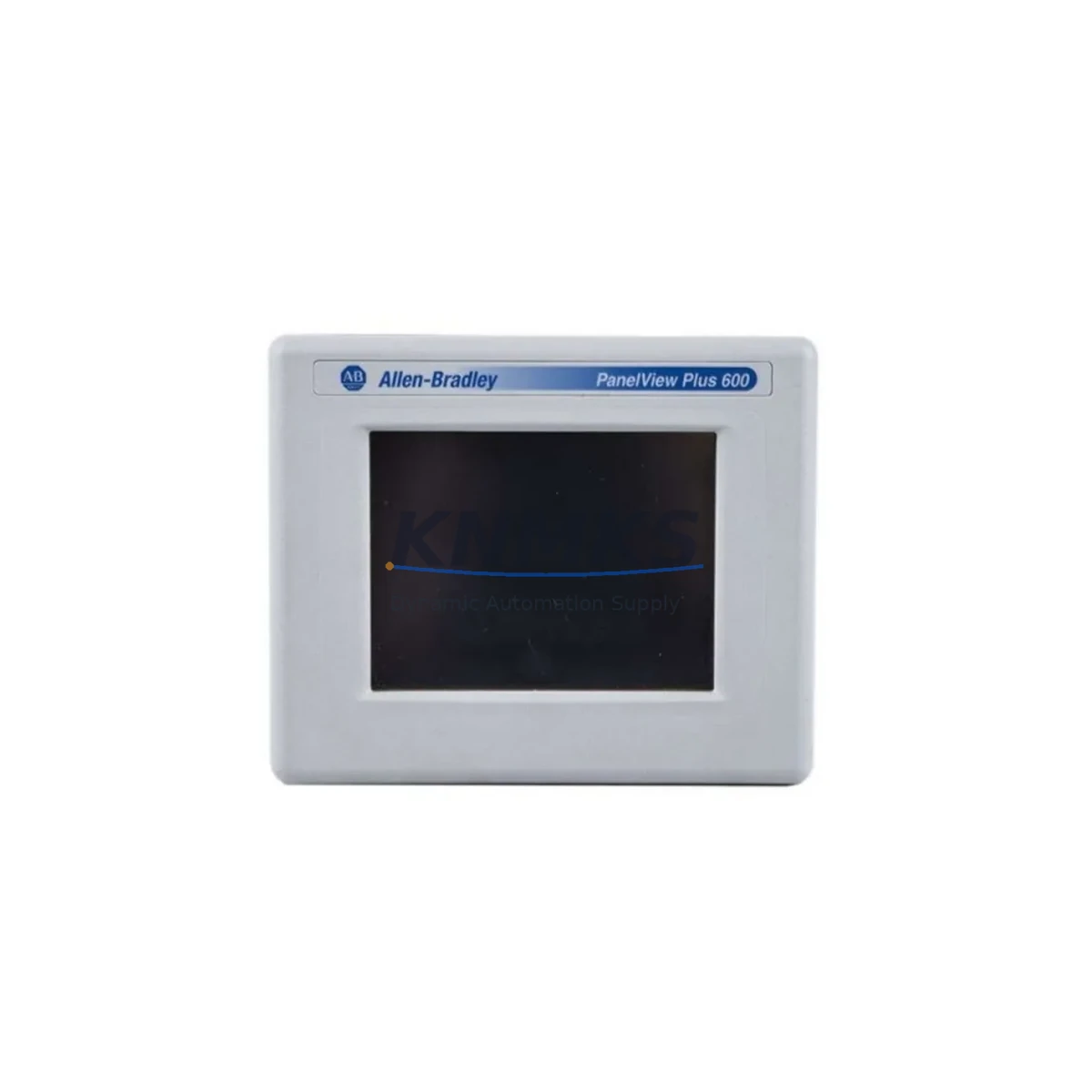
Overview
Allen-Bradley 2711PC-T6C20D Spare Part for Factory Uptime
The Allen-Bradley 2711PC-T6C20D is a PanelView Plus Compact 6-inch color touchscreen HMI terminal designed for demanding industrial environments. As a maintenance-proven spare part, it supports rapid replacement in ControlLogix and CompactLogix-based control systems, minimizing unplanned downtime and restoring production continuity with minimal disruption to existing panel wiring and programming.
For maintenance engineers managing aging automation infrastructure, holding a verified 2711PC-T6C20D in your spare parts inventory is a proactive strategy against costly production stoppages. This unit ships fully tested, with original firmware compatibility confirmed, and is backed by a support terms confirmed by quotation — giving procurement teams confidence in long-term supply reliability and budget predictability.
Whether you are executing a scheduled annual overhaul, responding to an emergency HMI failure, or conducting a control cabinet inspection, the 2711PC-T6C20D integrates directly into existing PanelView Plus Compact installations without requiring panel redesign or software re-engineering. Its compatibility with Rockwell Automation’s FactoryTalk View ME software ensures that existing HMI programs can be transferred and validated quickly on-site.
Spare Maintenance Table
| Parameter | Specification |
|---|---|
| Part Number | 2711PC-T6C20D |
| Brand | Allen-Bradley (Rockwell Automation) |
| Series | PanelView Plus Compact |
| Display Size | 6-inch Color Touchscreen |
| Communication | Ethernet/IP, DH-485, DF1 |
| Power Supply | 24V DC |
| Operating Temperature | 0°C to 55°C |
| Protection Rating | NEMA 4/4X, IP65 (front panel) |
| Compatibility | ControlLogix, CompactLogix, MicroLogix, SLC 500 |
| Software | FactoryTalk View ME |
| Origin | United States |
| Condition | Original, Factory-Tested |
| Support terms | 12 Months |
| Shipment | Tested Before Dispatch |
| Application | Industrial HMI Replacement, Control Cabinet Upgrade |
Maintenance Planning for Continuous Operation
When replacing the 2711PC-T6C20D in the field, a thorough inspection of the surrounding electrical circuit is essential to prevent repeat failures and ensure system stability. Maintenance engineers should begin by verifying the 24V DC power supply feeding the HMI — a failing or undersized power supply module is a common root cause of premature HMI damage. Check the power supply output voltage under load and inspect for ripple or voltage sag before installing the replacement unit.
Next, inspect the Ethernet/IP communication cable and RJ45 connector integrity. Degraded Cat5e or Cat6 cabling, loose patch panel terminations, or a failing managed switch port can cause intermittent communication faults that may be misdiagnosed as HMI hardware failure. If the system uses DH-485 or DF1 serial communication, inspect the RS-232/RS-485 signal cable and terminal block connections for corrosion or loose crimps.
For installations where the 2711PC-T6C20D interfaces with a CompactLogix or ControlLogix controller, verify the controller’s I/O module status and confirm that no I/O faults are present before commissioning the replacement HMI. A 1769-IQ16 digital input module or 1769-OB16 digital output module fault can generate misleading alarms on the HMI screen, complicating post-replacement validation.
Control cabinet inspections should also include a check of the terminal block wiring associated with the HMI’s discrete I/O connections, any signal isolators in the 4–20mA analog loop, and the condition of panel-mounted fuses or circuit breakers protecting the HMI power circuit. If the cabinet houses a 1783-ETAP Ethernet tap or a 1783-US5T unmanaged switch, confirm port status and link speed negotiation after reconnecting the replacement HMI.
For sites running legacy systems with aging backplanes or rack-mounted I/O, this replacement event is also an opportunity to inspect the backplane connectors and reseat any 1746 SLC 500 I/O modules that may have developed intermittent contact issues. Documenting these findings as part of your annual maintenance record supports long-term spare parts planning and reduces the risk of cascading failures during peak production periods.
Site Replacement Workflow
Step 1 — Pre-Replacement Verification: Confirm the failed unit’s part number (2711PC-T6C20D) and firmware version. Back up the existing HMI application from FactoryTalk View ME if the unit is still partially functional. If not, retrieve the application file from your site backup or engineering archive.
Step 2 — Power Isolation: Isolate the 24V DC supply to the HMI using the dedicated circuit breaker or fuse in the control cabinet. Verify isolation with a calibrated multimeter before proceeding.
Step 3 — Physical Removal: Disconnect the Ethernet/IP or serial communication cable, the 24V DC power connector, and any discrete I/O wiring. Remove the panel cutout mounting hardware and extract the unit from the front of the panel.
Step 4 — Replacement Installation: Install the 2711PC-T6C20D replacement unit into the existing panel cutout. The standard cutout dimensions are compatible with the original installation, eliminating the need for panel modification. Reconnect all wiring in reverse order, ensuring correct polarity on the DC power terminals.
Step 5 — Application Restore and Commissioning: Power up the unit and load the FactoryTalk View ME application via USB or Ethernet. Confirm communication with the ControlLogix or CompactLogix controller, validate all screen navigation, alarm displays, and I/O status indicators before returning the system to production.
Step 6 — Documentation: Record the replacement date, new unit serial number, and post-commissioning test results in the site maintenance log. Update the spare parts inventory to trigger reorder of a replacement 2711PC-T6C20D to maintain your buffer stock level.
Spare Parts Support FAQ
Q1: Is the 2711PC-T6C20D still available as a new original spare, or only as a refurbished unit?
The 2711PC-T6C20D units we supply are sourced as original spare parts and are tested before shipment. Each unit is verified for functionality and ships with a support terms confirmed by quotation. We maintain long-term stock to support sites with extended maintenance cycles and legacy system life extension programs.
Q2: How do I confirm compatibility between the 2711PC-T6C20D and my existing ControlLogix or CompactLogix system?
Compatibility is confirmed by the communication protocol in use — Ethernet/IP for ControlLogix and CompactLogix, or DH-485/DF1 for legacy MicroLogix and SLC 500 systems. The 2711PC-T6C20D supports all of these protocols natively. Provide your controller model and firmware version when ordering, and our technical team will confirm compatibility before shipment.
Q3: What is included in the pre-shipment testing process?
Each 2711PC-T6C20D is powered on, display function is verified, touchscreen calibration is confirmed, and communication ports are tested prior to dispatch. Units that do not pass functional testing are not shipped. A test report is available upon request for quality-critical procurement processes.
Q4: Can you support long-term supply for sites with multi-year maintenance contracts?
Yes. We support blanket order arrangements and scheduled delivery programs for sites requiring guaranteed spare parts availability over 12–36 month maintenance cycles. Contact our sales team to discuss volume pricing, reserved stock agreements, and lead time commitments for the 2711PC-T6C20D and related PanelView Plus Compact series components.
—
© 2026 KNMKS. All rights reserved.
Original Source: https://knmks.com
Contact: admin@knmks.com | +86 18359268345
Product Identification
- Brand / Ecosystem
-
Allen-Bradley
Allen-Bradley - Model / Series
-
2711PC-T6C20D
ControlLogix Series - Product Family
- PLCs & Controllers
- Availability Status
- Available on request after model and quantity confirmation
- Inquiry Type
- B2B RFQ, replacement inquiry and project spare-part request
- Pre-Quote Check
- Exact SKU, brand, series, quantity, nameplate photos and destination country are checked before quotation
System Path
Where this product fits in the KNMKS automation structure.
Specification & Inquiry Focus
- Control platform
- PLC, PAC and modular controllers
- Common needs
- CPU, rack, power and I/O expansion
- Project support
- Replacement, cabinet build and maintenance
Buyer Confirmation
Information KNMKS checks before replying.
- Exact model
- 2711PC-T6C20D
- Brand / ecosystem
- Allen-Bradley
- Product family
- PLCs & Controllers
- Application note
- Replacement, maintenance, project build or spare-part list
- Useful photos
- Nameplate, installed unit, cabinet layout or connector side
- Delivery details
- Quantity, destination country and target schedule
Document Support
Files and notes can be confirmed during quotation.
- Product photos or nameplate confirmation when available
- Packing and delivery notes before quotation confirmation
- Support scope and delivery terms confirmed per inquiry
- Export document coordination for qualified B2B requests
Inquiry Support
- Model cross-checking before quotation
- CPU, power, rack and expansion module matching
- Support for replacement and project inquiry
What to Send Us
- Brand and exact model number: Allen-Bradley 2711PC-T6C20D
- Quantity and required delivery time
- Application, replacement requirement or nameplate photo
- Destination country and shipping preference
RFQ Preparation
This is a product inquiry page built for RFQ communication.
Fast Model Check
Send this model to KNMKS for confirmation.
Include quantity, destination country and photos if this is a maintenance replacement. The inquiry will be saved with a reference number after submission.
Brand & Compatibility Note
KNMKS displays automation product information for well-known industrial brand ecosystems and compatible replacement references. Brand names are used for product identification and compatibility reference only; final availability and commercial terms are confirmed per quotation.
 Manufacturing
 Machine Tools
 Packaging
 Energy & Power



 HMI & Displays
 Servo Systems
 Variable Frequency Drives
 Sensors