
Overview
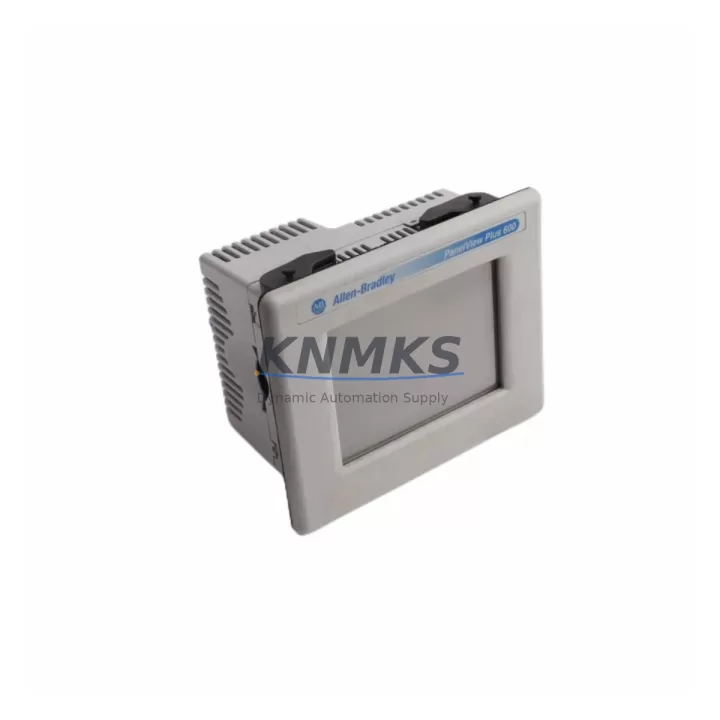
Allen-Bradley 2711P-T6C5D Migration-Ready HMI for Legacy Control Systems
The Allen-Bradley 2711P-T6C5D is a 6-inch color touchscreen operator terminal from the PanelView Plus 6 Compact series, engineered to serve as a direct migration path for aging HMI panels in legacy automation environments. Whether you are replacing an end-of-life PanelView 550, PanelView 600, or an earlier PanelView Plus 700 unit, the 2711P-T6C5D delivers a validated upgrade route that preserves your existing ControlLogix or CompactLogix control architecture without requiring a full system redesign.
For maintenance engineers and system integrators managing retrofit projects across discrete manufacturing, process control, and material handling lines, the 2711P-T6C5D addresses the most critical pain points in legacy HMI replacement: physical footprint compatibility, communication protocol continuity, and application file migration. The unit supports EtherNet/IP as its primary communication link, enabling seamless integration with existing 1756-EN2T or 1756-EN3TR Ethernet communication modules already installed in your ControlLogix chassis. DH-485 and RS-232 serial ports are also available for facilities still operating older SLC 500 or MicroLogix controllers that have not yet been migrated to Logix-based platforms.
Before committing to installation, retrofit planners should verify the following parameters against the existing panel cutout and control cabinet layout: the 2711P-T6C5D requires a panel cutout of approximately 192 mm × 138 mm, and the overall depth behind the panel face must accommodate the terminal body and any rear-mounted communication cables. If the existing enclosure was sized for a PanelView 600 or a first-generation PanelView Plus 600, a minor cutout modification may be required. Power supply requirements are 24 VDC nominal, and the existing 1606-XLP or 1606-XLS power supply modules in the control cabinet should be verified for adequate current capacity before energizing the replacement unit.
Application migration from legacy ME (FactoryTalk View Machine Edition) projects is handled through FactoryTalk View Studio. Existing .MER runtime files developed for earlier PanelView Plus terminals can be converted and validated against the 2711P-T6C5D display resolution and tag database. Engineers should audit all alarm configurations, trend displays, and parameter entry screens during the conversion process, as display scaling differences between 6-inch and earlier panel sizes may require layout adjustments. HMI screen templates referencing controller tags via the 1756-L71 or 1756-L73 processor should be re-verified after migration to confirm tag path integrity across the updated communication configuration.
For installations where the 2711P-T6C5D is being integrated alongside a broader control cabinet upgrade, the terminal is commonly deployed in conjunction with 1769-L30ER or 1769-L33ER CompactLogix processors, 1734-AENT POINT I/O adapter modules for distributed I/O expansion, and 1783-US5T or 1783-US8T unmanaged Ethernet switches for local network segmentation. In larger panel builds involving a 1756 ControlLogix chassis, the HMI communicates directly over EtherNet/IP to the backplane via the installed Ethernet bridge module, eliminating the need for a dedicated HMI communication card.
Firmware compatibility should be confirmed prior to commissioning. The 2711P-T6C5D ships with a factory-installed firmware version; if the target ControlLogix or CompactLogix processor is running a firmware revision that predates the HMI’s supported range, a processor firmware update may be required before establishing a stable communication link. This step is particularly relevant in facilities where the PLC firmware has not been updated since the original system commissioning, which is common in legacy lines that have operated continuously for 10 or more years.
All units supplied by KNMKS are pre-tested prior to shipment. Each 2711P-T6C5D undergoes power-on verification, communication port functional testing, and display integrity checks before packaging. Units are shipped with original or equivalent protective packaging to prevent transit damage. A support terms confirmed by quotation is provided from the date of shipment, covering manufacturing defects and functional failures under normal operating conditions. Replacement or repair is coordinated directly through KNMKS with a target response time designed to minimize unplanned downtime on your production line.
Stock availability is maintained to support both planned retrofit projects and emergency breakdown replacements. Contact the KNMKS sales team to confirm current inventory levels, lead times for bulk orders, and compatibility verification support for your specific application.
Migration Compatibility Table
| Parameter | 2711P-T6C5D (Replacement) | Legacy Units (PanelView 600 / PV Plus 600) |
|---|---|---|
| Display Size | 6-inch color TFT touchscreen | 6-inch color / monochrome |
| Communication Ports | EtherNet/IP, RS-232, DH-485 | DH-485, RS-232, DF1 (varies by model) |
| Power Supply | 24 VDC nominal | 24 VDC nominal |
| Panel Cutout | ~192 mm × 138 mm | Varies — verify before installation |
| Controller Compatibility | ControlLogix, CompactLogix, SLC 500, MicroLogix | SLC 500, PLC-5, MicroLogix (limited Logix) |
| Application Software | FactoryTalk View ME (Studio) | PanelBuilder 32 / FT View ME (older) |
| Firmware Update Required | Verify PLC firmware revision compatibility | N/A |
| Installation Depth | Confirm rear clearance in existing enclosure | Shallower profile on some legacy models |
| Replacement Recommendation | Direct replacement for PV600, PV Plus 600 6-inch | End-of-life / discontinued |
| Commissioning Focus | Tag path verification, screen scaling, comms test | N/A |
| Support terms | 12 months from shipment (KNMKS) | N/A |
Retrofit Planning for Existing Automation Systems
Successful integration of the 2711P-T6C5D into an existing automation system requires a structured pre-installation audit. Begin by documenting the current HMI’s communication configuration, including the IP address scheme, DF1 or DH-485 node assignments, and any serial communication parameters such as baud rate and parity settings. This information will be required when configuring the replacement terminal’s communication setup in FactoryTalk View Studio.
In control cabinets where the 2711P-T6C5D is being installed alongside a CompactLogix 1769-L30ER processor, verify that the 1769-ECR right-end cap or 1769-ECL left-end cap is correctly positioned on the local I/O bank before powering the system. If the retrofit also involves expanding the I/O count, 1734-IB8 or 1734-OB8 POINT I/O modules can be added to the existing 1734-AENT adapter without disrupting the HMI communication link. For systems requiring signal isolation between field devices and the controller, 1492-IFM series interface modules or equivalent signal conditioners should be incorporated into the terminal block layout before final wiring.
Where the control cabinet includes a 1756 ControlLogix chassis, the 2711P-T6C5D communicates over EtherNet/IP through the existing 1756-EN2T module. No additional backplane modules are required for HMI communication in this configuration. If the project also involves replacing an aging 1747-SN SLC Remote I/O scanner or a 1756-DHRIO DH+ bridge module as part of a broader protocol migration, the HMI application files should be updated concurrently to reflect the new tag structure before the cutover date.
For facilities using a 2711P-RDK6C programming cable or USB-to-serial adapter for on-site firmware updates and application transfers, confirm cable compatibility with the 2711P-T6C5D’s USB port before the scheduled maintenance window. Having the correct transfer cable and a pre-validated .MER file on a USB drive significantly reduces the time required for on-site commissioning.
Downtime Control During System Migration
Minimizing unplanned downtime during an HMI replacement is the primary operational concern for most maintenance teams. The recommended approach for a 2711P-T6C5D retrofit is to complete all application file preparation, communication configuration, and bench testing before the scheduled production window. This means loading the converted .MER file onto the replacement terminal, verifying all tag connections in offline simulation mode, and confirming that the EtherNet/IP communication parameters match the target controller’s configuration — all before the unit is brought to the production floor.
During the physical swap, the existing terminal’s wiring harness should be photographed and labeled before disconnection. The 24 VDC power terminals and communication cable connectors on the 2711P-T6C5D are clearly labeled, and the wiring sequence should be followed precisely to avoid polarity errors or communication faults on first power-up. If the existing enclosure requires a cutout modification, this work should be completed during a planned maintenance shutdown rather than during an emergency breakdown response.
Once the replacement terminal is powered and communicating with the controller, perform a full screen-by-screen functional verification of all HMI displays, alarm acknowledgment sequences, and parameter entry functions before releasing the line back to production. Document the commissioning results, including the firmware version installed, the IP address assigned, and the .MER file version loaded, as part of the site’s maintenance records. This documentation supports future troubleshooting and ensures continuity if a second replacement unit is required during the support terms confirmed by quotation period.
For facilities managing multiple simultaneous retrofit projects across several production lines, KNMKS can support staged delivery schedules to align unit availability with planned maintenance windows, reducing the risk of inventory shortfalls during peak retrofit seasons.
Retrofit Support FAQ
Q: Is the 2711P-T6C5D a direct drop-in replacement for the PanelView Plus 600 6-inch terminal?
A: In most cases, yes. The 2711P-T6C5D is designed as the successor to the PanelView Plus 600 series. Panel cutout dimensions should be verified against the existing enclosure before ordering, as minor dimensional differences may exist depending on the original installation. Communication ports and power supply requirements are compatible with the majority of existing PanelView Plus 600 installations.
Q: Can I transfer my existing FactoryTalk View ME application directly to the 2711P-T6C5D?
A: Existing .MER files developed for PanelView Plus 600 or earlier PanelView Plus terminals can be opened and converted in FactoryTalk View Studio. A display resolution and tag path audit is recommended after conversion to confirm that all screens render correctly on the 2711P-T6C5D’s display. Alarm configurations and trend objects should be individually verified before the application is loaded to the replacement terminal.
Q: What communication protocols does the 2711P-T6C5D support for legacy controller integration?
A: The 2711P-T6C5D supports EtherNet/IP for ControlLogix and CompactLogix systems, RS-232 DF1 for SLC 500 and MicroLogix controllers, and DH-485 for older Allen-Bradley networks. This multi-protocol capability makes it suitable for facilities operating mixed-generation control architectures during a phased migration program.
Q: What does the support terms confirmed by quotation from KNMKS cover, and what is the process for a support terms claim?
A: The support terms confirmed by quotation cover manufacturing defects and functional failures under normal operating conditions from the date of shipment. If a unit fails within the confirmed support period, contact KNMKS at admin@knmks.com or +86 18359268345 to initiate a return and replacement process. All units are pre-tested before shipment to minimize the risk of DOA (dead-on-arrival) failures, and replacement units are dispatched with priority to reduce production impact.
© 2026 KNMKS. All rights reserved.
Original Source: https://knmks.com
Contact: admin@knmks.com | +86 18359268345
Product Identification
- Brand / Ecosystem
-
Allen-Bradley
Allen-Bradley - Model / Series
-
2711P-T6C5D
ControlLogix Series - Product Family
- PLCs & Controllers
- Availability Status
- Available on request after model and quantity confirmation
- Inquiry Type
- B2B RFQ, replacement inquiry and project spare-part request
- Pre-Quote Check
- Exact SKU, brand, series, quantity, nameplate photos and destination country are checked before quotation
System Path
Where this product fits in the KNMKS automation structure.
Specification & Inquiry Focus
- Control platform
- PLC, PAC and modular controllers
- Common needs
- CPU, rack, power and I/O expansion
- Project support
- Replacement, cabinet build and maintenance
Buyer Confirmation
Information KNMKS checks before replying.
- Exact model
- 2711P-T6C5D
- Brand / ecosystem
- Allen-Bradley
- Product family
- PLCs & Controllers
- Application note
- Replacement, maintenance, project build or spare-part list
- Useful photos
- Nameplate, installed unit, cabinet layout or connector side
- Delivery details
- Quantity, destination country and target schedule
Document Support
Files and notes can be confirmed during quotation.
- Product photos or nameplate confirmation when available
- Packing and delivery notes before quotation confirmation
- Support scope and delivery terms confirmed per inquiry
- Export document coordination for qualified B2B requests
Inquiry Support
- Model cross-checking before quotation
- CPU, power, rack and expansion module matching
- Support for replacement and project inquiry
What to Send Us
- Brand and exact model number: Allen-Bradley 2711P-T6C5D
- Quantity and required delivery time
- Application, replacement requirement or nameplate photo
- Destination country and shipping preference
RFQ Preparation
This is a product inquiry page built for RFQ communication.
Fast Model Check
Send this model to KNMKS for confirmation.
Include quantity, destination country and photos if this is a maintenance replacement. The inquiry will be saved with a reference number after submission.
Brand & Compatibility Note
KNMKS displays automation product information for well-known industrial brand ecosystems and compatible replacement references. Brand names are used for product identification and compatibility reference only; final availability and commercial terms are confirmed per quotation.
 Manufacturing
 Machine Tools
 Packaging
 Energy & Power



 HMI & Displays
 Servo Systems
 Variable Frequency Drives
 Sensors