
Overview
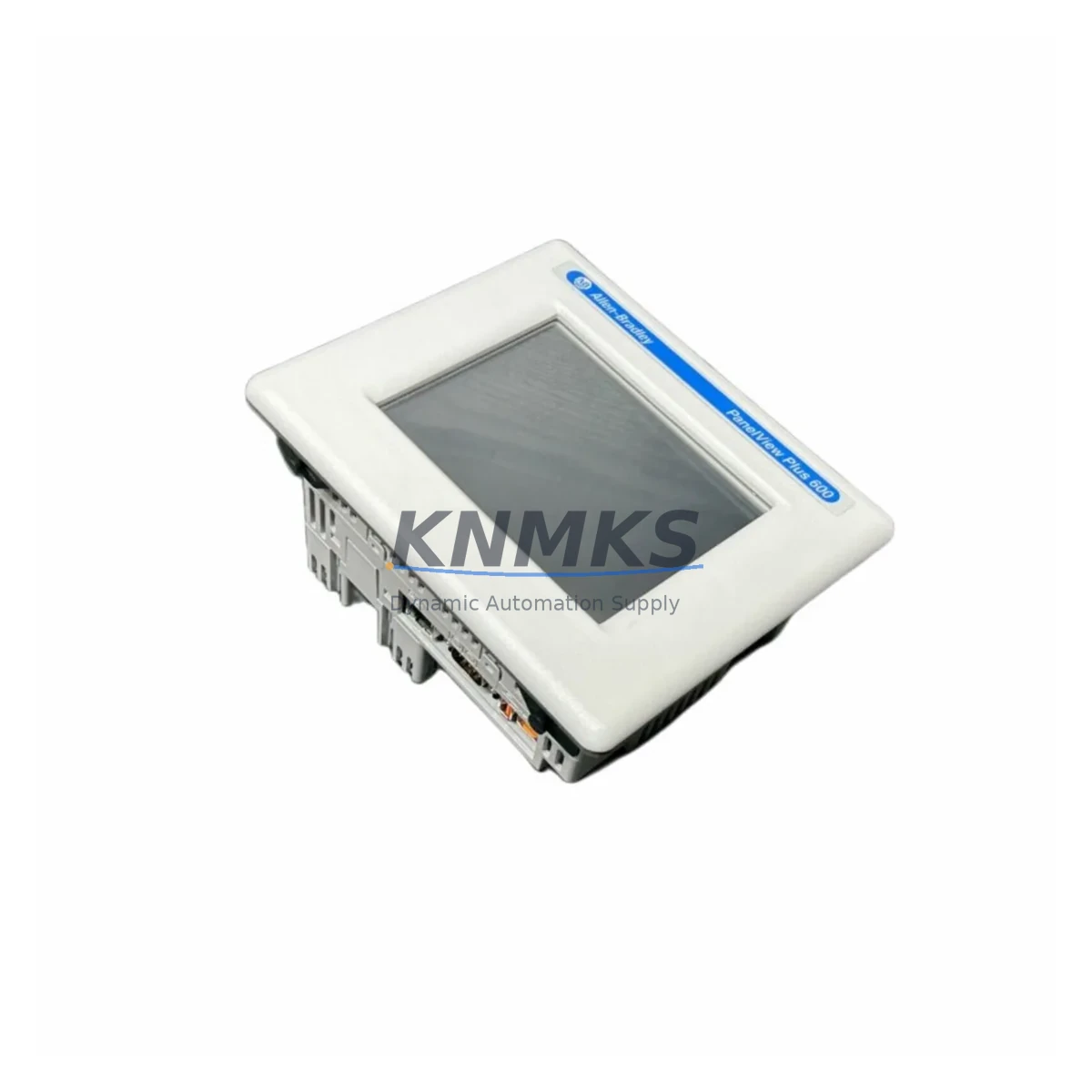
Allen-Bradley 2711P-T6C20A Maintenance-Proven Spare Part for Factory Uptime
The Allen-Bradley 2711P-T6C20A is a 6-inch color touch terminal from the PanelView Plus 600 series, engineered for demanding industrial HMI applications across discrete manufacturing, process control, and machine automation environments. As a maintenance-proven spare part, the 2711P-T6C20A is a critical component in any facility running Rockwell Automation ControlLogix or CompactLogix PLC architectures. Sourced as an original spare, this unit is fully tested prior to shipment and backed by a support terms confirmed by quotation, ensuring your production line can recover quickly from unplanned HMI failures.
Maintenance engineers and spare parts procurement teams operating legacy or mid-generation Rockwell systems recognize the 2711P-T6C20A as a high-priority stocking item. HMI failures are among the most disruptive events in a control cabinet — they halt operator visibility, disable alarm acknowledgment, and prevent manual overrides. Keeping a verified replacement unit on the shelf eliminates the lead time risk associated with sourcing HMI terminals on demand, particularly for systems that have been in service for five or more years.
At KNMKS, every 2711P-T6C20A unit undergoes pre-shipment functional verification, including display integrity, touch calibration, communication port testing, and firmware compatibility checks. Units are packaged in anti-static, shock-resistant materials to preserve condition during international transit. Long-term supply continuity is supported for customers managing multi-site maintenance programs or annual MRO procurement cycles.
Spare Maintenance Table
| Parameter | Specification |
|---|---|
| Part Number / SKU | 2711P-T6C20A |
| Brand | Allen-Bradley (Rockwell Automation) |
| Series | PanelView Plus 600 |
| Display Size | 6-inch Color TFT Touch Screen |
| Resolution | 320 × 240 (QVGA) |
| Communication | DH-485, RS-232, USB |
| Compatible PLC Platforms | ControlLogix, CompactLogix, MicroLogix, SLC 500 |
| Power Supply | 24V DC |
| Operating Temperature | 0°C to 55°C |
| Protection Rating | NEMA 4/4X, IP65 (front panel) |
| Country of Origin | United States |
| Unit Weight | 900 g (approx.) |
| Support terms | 12 Months from date of shipment |
| Condition | Original Spare — Pre-shipment tested |
| Application Environment | Discrete manufacturing, process control, machine automation |
| Maintenance Recommendation | Inspect touch calibration and communication link every 12 months; replace backlight if display dims |
Maintenance Planning for Continuous Operation
When replacing the 2711P-T6C20A in a control cabinet or machine panel, a thorough site inspection is essential to prevent repeat failures and ensure full system restoration. Maintenance engineers should treat an HMI replacement as an opportunity to audit the surrounding electrical environment.
24V DC Power Supply: Verify that the panel power supply — commonly a 1606-XLP or 1606-XLS series unit — is delivering stable 24V DC within tolerance. Voltage fluctuations or ripple above specification are a leading cause of premature HMI failure and display anomalies. Measure output under load before connecting the replacement terminal.
Communication Wiring and Ports: Inspect the DH-485 or RS-232 communication cable connecting the HMI to the PLC. Damaged shielding, loose connectors, or incorrect termination resistance can cause intermittent communication faults that mimic HMI hardware failure. If the system uses a 1761-NET-AIC or similar Advanced Interface Converter, verify its condition and configuration simultaneously.
PLC Processor and I/O Modules: Confirm that the connected ControlLogix or CompactLogix processor — such as a 1756-L71 or 1769-L33ER — is operating normally and that the HMI application program is intact. Check I/O module status indicators for any faulted channels that may have contributed to the original HMI alarm condition.
Backplane and Chassis Integrity: For rack-mounted systems, inspect the 1756 or 1769 backplane for signs of corrosion, loose module seating, or thermal stress. A compromised backplane can introduce communication errors that affect HMI data exchange.
Terminal Blocks and Wiring: Check all terminal block connections in the control cabinet for tightness, corrosion, and correct labeling. Loose signal wiring to analog or digital I/O modules can generate spurious alarms that operators attempt to clear through the HMI, accelerating touch screen wear.
Fuses and Circuit Protection: Replace any blown or discolored fuses in the HMI power circuit. Verify that surge protection devices on the 24V DC rail are functional, particularly in environments with frequent motor starts or welding operations nearby.
Documenting all findings during the replacement procedure supports future preventive maintenance scheduling and helps procurement engineers build an accurate spare parts list for the next annual MRO review.
Site Replacement Workflow
The following workflow is designed to minimize downtime and ensure a verified, compatible installation of the 2711P-T6C20A in place of a failed or end-of-life HMI terminal:
Step 1 — Isolate and De-energize: Follow site LOTO (Lockout/Tagout) procedures. Disconnect 24V DC power from the HMI circuit. Label all communication cables before disconnection to prevent wiring errors during reinstallation.
Step 2 — Remove the Failed Unit: Unclip or unscrew the existing terminal from the panel cutout. Note the panel cutout dimensions to confirm the replacement unit fits without modification. The 2711P-T6C20A uses a standard PanelView Plus 600 cutout profile.
Step 3 — Inspect and Prepare the Replacement: Unbox the replacement 2711P-T6C20A and verify the serial number and firmware version against your site documentation. If a specific firmware version is required for compatibility with your PLC application, confirm before powering up.
Step 4 — Install and Connect: Mount the replacement unit, reconnect communication cables in the correct order, and restore 24V DC power. Observe the startup sequence and confirm that the HMI establishes communication with the PLC within the expected timeout period.
Step 5 — Functional Verification: Navigate all HMI screens, test alarm acknowledgment, verify data display accuracy against known PLC tag values, and confirm touch calibration. Document the replacement date, unit serial number, and any configuration changes in the site maintenance log.
Step 6 — Restore Production: Release LOTO, notify the operations team, and monitor the first production cycle for any residual communication or display issues. Update the spare parts inventory to reflect the consumed unit and initiate a replenishment order to maintain buffer stock.
Spare Parts Support FAQ
Q1: Is the 2711P-T6C20A compatible with both ControlLogix and CompactLogix systems?
Yes. The 2711P-T6C20A supports DH-485 and RS-232 communication protocols, making it compatible with a wide range of Rockwell Automation PLC platforms including ControlLogix, CompactLogix, MicroLogix, and SLC 500 series. Always verify the communication driver and firmware version against your specific PLC application before installation.
Q2: What does the support terms confirmed by quotation cover, and how is it supported?
The support terms confirmed by quotation cover manufacturing defects and functional failures under normal operating conditions from the date of shipment. KNMKS provides direct after-sales support via email and phone. In the event of a support terms claim, customers are required to provide the unit serial number, purchase date, and a description of the fault. Replacement or repair is coordinated on a case-by-case basis to minimize site downtime.
Q3: How do I confirm the unit is genuine and has been tested before shipment?
Every 2711P-T6C20A supplied by KNMKS undergoes pre-shipment functional testing, including display, touch, and communication verification. Units are shipped with anti-static and shock-resistant packaging. Customers requiring test reports or inspection certificates should request these at the time of order. Traceability documentation is available for MRO procurement compliance.
Q4: Can KNMKS support long-term or recurring procurement for this part number?
Yes. KNMKS maintains ongoing sourcing relationships to support long-term supply of the 2711P-T6C20A and related PanelView Plus 600 series components. Customers managing multi-site maintenance programs or annual MRO budgets are encouraged to contact our sales team to discuss volume pricing, lead time commitments, and consignment stocking arrangements.
© 2026 KNMKS. All rights reserved.
Original Source: https://knmks.com
Contact: admin@knmks.com | +86 18359268345
Product Identification
- Brand / Ecosystem
-
Allen-Bradley
Allen-Bradley - Model / Series
-
2711P-T6C20A
ControlLogix Series - Product Family
- PLCs & Controllers
- Availability Status
- Available on request after model and quantity confirmation
- Inquiry Type
- B2B RFQ, replacement inquiry and project spare-part request
- Pre-Quote Check
- Exact SKU, brand, series, quantity, nameplate photos and destination country are checked before quotation
System Path
Where this product fits in the KNMKS automation structure.
Specification & Inquiry Focus
- Control platform
- PLC, PAC and modular controllers
- Common needs
- CPU, rack, power and I/O expansion
- Project support
- Replacement, cabinet build and maintenance
Buyer Confirmation
Information KNMKS checks before replying.
- Exact model
- 2711P-T6C20A
- Brand / ecosystem
- Allen-Bradley
- Product family
- PLCs & Controllers
- Application note
- Replacement, maintenance, project build or spare-part list
- Useful photos
- Nameplate, installed unit, cabinet layout or connector side
- Delivery details
- Quantity, destination country and target schedule
Document Support
Files and notes can be confirmed during quotation.
- Product photos or nameplate confirmation when available
- Packing and delivery notes before quotation confirmation
- Support scope and delivery terms confirmed per inquiry
- Export document coordination for qualified B2B requests
Inquiry Support
- Model cross-checking before quotation
- CPU, power, rack and expansion module matching
- Support for replacement and project inquiry
What to Send Us
- Brand and exact model number: Allen-Bradley 2711P-T6C20A
- Quantity and required delivery time
- Application, replacement requirement or nameplate photo
- Destination country and shipping preference
RFQ Preparation
This is a product inquiry page built for RFQ communication.
Fast Model Check
Send this model to KNMKS for confirmation.
Include quantity, destination country and photos if this is a maintenance replacement. The inquiry will be saved with a reference number after submission.
Brand & Compatibility Note
KNMKS displays automation product information for well-known industrial brand ecosystems and compatible replacement references. Brand names are used for product identification and compatibility reference only; final availability and commercial terms are confirmed per quotation.
 Manufacturing
 Machine Tools
 Packaging
 Energy & Power



 HMI & Displays
 Servo Systems
 Variable Frequency Drives
 Sensors