
Overview
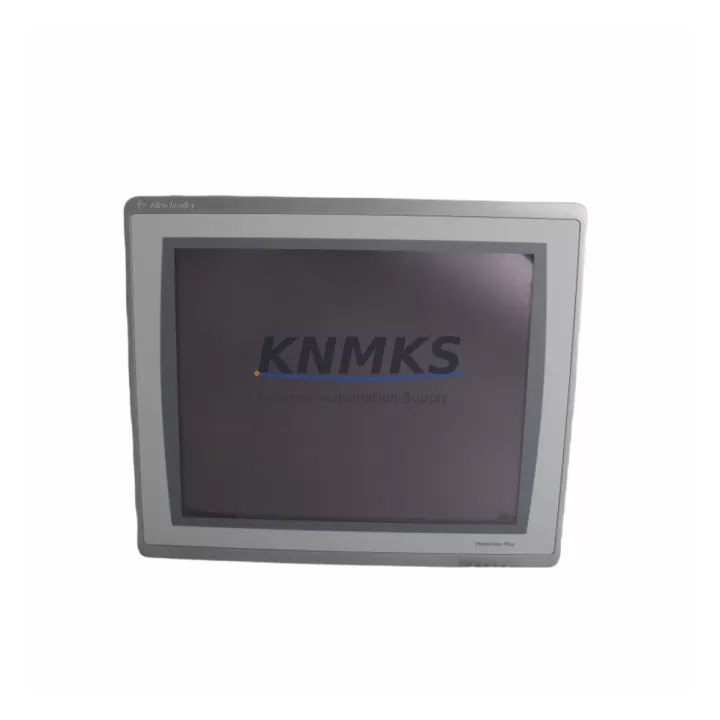
Allen-Bradley 2711P-T19C22D9P Maintenance-Proven Spare Part for Factory Uptime
The Allen-Bradley 2711P-T19C22D9P is a 19-inch PanelView Plus 7 Performance HMI terminal engineered for demanding industrial environments. As a maintenance-proven spare part, it plays a central role in keeping production lines operational, reducing unplanned downtime, and supporting long-term system continuity in ControlLogix and CompactLogix-based control architectures. Whether you are managing a scheduled annual overhaul, responding to an emergency HMI failure, or building a strategic spare parts inventory for a multi-line facility, the 2711P-T19C22D9P delivers the reliability and compatibility that maintenance engineers and procurement teams depend on.
Sourced as an original Allen-Bradley component, this unit is fully compatible with the PanelView Plus 7 Performance series and integrates seamlessly with Rockwell Automation’s Studio 5000 and FactoryTalk View ME software environments. Its wide-format 19-inch display, multi-touch capability, and robust industrial-grade enclosure make it a preferred choice for control cabinet upgrades, legacy system life extension, and new panel builds alike. Each unit shipped by KNMKS undergoes pre-shipment functional testing and is backed by a support terms confirmed by quotation, giving procurement engineers the confidence to stock this part as a long-term supply asset.
Spare Maintenance Table
| Parameter | Specification |
|---|---|
| Part Number / SKU | 2711P-T19C22D9P |
| Brand | Allen-Bradley (Rockwell Automation) |
| Series | PanelView Plus 7 Performance |
| Display Size | 19 inches, Wide-format TFT LCD |
| Touch Technology | Multi-touch capacitive |
| Communication Ports | Dual Ethernet (EtherNet/IP), USB Host & Device, RS-232 |
| Compatible Controllers | ControlLogix, CompactLogix, GuardLogix, SoftLogix |
| Software Compatibility | FactoryTalk View ME, Studio 5000 |
| Operating Voltage | 24V DC nominal |
| Operating Temperature | 0°C to 55°C (32°F to 131°F) |
| Protection Rating | NEMA 4/4X, IP65 (front panel) |
| Product Weight | Approx. 5.1 kg |
| Origin | United States |
| Condition | Original, New or Refurbished-Tested |
| Pre-Shipment Testing | Yes — functional verification before dispatch |
| Support terms | 12 Months |
| Typical Application | Control cabinet HMI, SCADA interface, machine operator panel |
| Maintenance Recommendation | Inspect display surface, USB ports, and Ethernet connectors every 6 months. Verify firmware version compatibility with connected PLC before installation. |
Maintenance Planning for Continuous Operation
When replacing or stocking the 2711P-T19C22D9P, a thorough maintenance review of the surrounding control cabinet components is essential to prevent cascading failures and ensure a clean, stable restart. Maintenance engineers should begin by verifying the 24V DC power supply feeding the HMI — units such as the Allen-Bradley 1606-XLP series power supplies are commonly paired with PanelView Plus 7 terminals and should be inspected for output voltage stability, ripple, and thermal performance before the new HMI is commissioned.
The EtherNet/IP communication path is equally critical. The 1783-US8T or similar Stratix managed switches that connect the HMI to the ControlLogix backplane should be checked for port integrity, firmware currency, and correct VLAN configuration. A faulty switch port or misconfigured network segment can prevent the replacement HMI from establishing communication with the PLC, leading to unnecessary troubleshooting delays during a production restart.
Within the ControlLogix chassis, the 1756-EN2T or 1756-EN2TR EtherNet/IP communication modules serve as the bridge between the HMI and the controller. These modules should be inspected for firmware compatibility with the FactoryTalk View ME application version running on the 2711P-T19C22D9P. Mismatched firmware between the communication module and the HMI application is a common source of intermittent connection faults that are difficult to diagnose under production pressure.
I/O modules in the same chassis — particularly 1756-IB16 digital input modules and 1756-OB16E digital output modules — should be visually inspected for indicator status and verified against the PLC fault log before the HMI replacement is declared complete. An HMI swap that reveals pre-existing I/O faults can extend downtime if these components are not pre-checked. Similarly, any 1756-IF8 analog input modules connected to process sensors should be verified for signal integrity.
For facilities running older PanelView Plus 6 terminals such as the 2711P-T10C4D8 or 2711P-T12W21D8S alongside the newer Plus 7 units, maintaining a mixed spare parts inventory that covers both generations is a sound procurement strategy. This approach ensures that a single spare can address failures across multiple panel generations without requiring an immediate full-system upgrade.
Finally, the terminal block assemblies and cable harnesses connecting the HMI enclosure to field devices — including 1492-CABLE series pre-wired cables and 1492-J series terminal blocks — should be inspected for insulation integrity, secure terminations, and correct labeling. Loose or corroded terminal connections are a leading cause of intermittent HMI communication faults that are often misdiagnosed as HMI hardware failures.
Site Replacement Workflow
Replacing the 2711P-T19C22D9P on-site is a structured process that, when followed correctly, minimizes downtime and eliminates compatibility risks. Begin by documenting the existing HMI configuration: export the FactoryTalk View ME application file from the current terminal using a USB drive or network backup, and record the firmware version, IP address, subnet mask, gateway, and any custom display settings. This documentation is your recovery baseline and must be completed before the old unit is powered down.
Next, isolate the HMI from the control network by disconnecting the Ethernet cables and powering down the 24V DC supply. Remove the existing terminal from the panel cutout, taking care to label all cable connections before disconnection. Mount the replacement 2711P-T19C22D9P into the same cutout — the unit uses the same NEMA 4/4X panel cutout dimensions as other PanelView Plus 7 Performance 19-inch models, eliminating the need for panel modification in most cases.
Reconnect all cables, restore 24V DC power, and verify that the unit boots correctly. Load the previously exported FactoryTalk View ME application file, confirm the IP address configuration matches the network documentation, and test communication with the ControlLogix controller before returning the line to production. A full I/O status check from the HMI operator screen should be performed to confirm that all field signals are reading correctly before the system is handed back to operations.
For facilities transitioning from legacy PanelView Plus 6 terminals to the Plus 7 Performance series, the 2711P-T19C22D9P offers a direct upgrade path with minimal panel rework, improved display brightness, and enhanced multi-touch capability — all of which contribute to faster operator response times and reduced human error during critical process events.
Spare Parts Support FAQ
Q1: Is the 2711P-T19C22D9P compatible with my existing FactoryTalk View ME application?
Yes, in most cases. The PanelView Plus 7 Performance series is designed to run FactoryTalk View ME applications developed for PanelView Plus 6 and Plus 7 terminals with minimal modification. We recommend verifying the ME application version against the firmware version of the replacement unit before installation. KNMKS can provide firmware version details upon request to support your compatibility verification process.
Q2: What is included in the support terms confirmed by quotation and pre-shipment testing?
Every 2711P-T19C22D9P shipped by KNMKS undergoes functional power-on testing, display verification, and communication port checks before dispatch. The support terms confirmed by quotation cover manufacturing defects and component failures under normal operating conditions. It does not cover physical damage caused by incorrect installation, overvoltage, or environmental conditions outside the rated specification. Support requests are processed directly through KNMKS with a target response time of 48 hours.
Q3: Can KNMKS support long-term supply for this part number?
Yes. KNMKS maintains ongoing sourcing relationships for Allen-Bradley PanelView Plus 7 Performance series components, including the 2711P-T19C22D9P. For facilities with planned maintenance schedules or multi-site procurement programs, we recommend contacting our sales team to discuss blanket order arrangements, lead time commitments, and volume pricing. Long-term supply agreements help eliminate the procurement risk associated with end-of-life or allocation-constrained components.
Q4: How should I manage spare parts inventory for HMI terminals in a multi-line facility?
Industry best practice recommends maintaining at least one spare HMI terminal per five to ten installed units of the same model, with a minimum of one spare per facility regardless of installed base size. For critical production lines where HMI failure would result in a full line stop, a dedicated on-site spare is strongly recommended. KNMKS can assist with spare parts audits and inventory planning for facilities managing mixed fleets of Allen-Bradley HMI and PLC components.
© 2026 KNMKS. All rights reserved.
Original Source: https://knmks.com
Contact: admin@knmks.com | +86 18359268345
Product Identification
- Brand / Ecosystem
-
Allen-Bradley
Allen-Bradley - Model / Series
-
2711P-T19C22D9P
ControlLogix Series - Product Family
- HMI & Displays
- Availability Status
- Available on request after model and quantity confirmation
- Inquiry Type
- B2B RFQ, replacement inquiry and project spare-part request
- Pre-Quote Check
- Exact SKU, brand, series, quantity, nameplate photos and destination country are checked before quotation
System Path
Where this product fits in the KNMKS automation structure.
Specification & Inquiry Focus
- Display range
- Operator panels and touch screens
- Common needs
- Screen size, interface and version matching
- Project support
- Retrofit, spare unit and panel replacement
Buyer Confirmation
Information KNMKS checks before replying.
- Exact model
- 2711P-T19C22D9P
- Brand / ecosystem
- Allen-Bradley
- Product family
- HMI & Displays
- Application note
- Replacement, maintenance, project build or spare-part list
- Useful photos
- Nameplate, installed unit, cabinet layout or connector side
- Delivery details
- Quantity, destination country and target schedule
Document Support
Files and notes can be confirmed during quotation.
- Product photos or nameplate confirmation when available
- Packing and delivery notes before quotation confirmation
- Support scope and delivery terms confirmed per inquiry
- Export document coordination for qualified B2B requests
Inquiry Support
- Panel size and interface confirmation
- Replacement unit inquiry for discontinued HMIs
- Protective packaging for display shipment
What to Send Us
- Brand and exact model number: Allen-Bradley 2711P-T19C22D9P
- Quantity and required delivery time
- Application, replacement requirement or nameplate photo
- Destination country and shipping preference
RFQ Preparation
This is a product inquiry page built for RFQ communication.
Fast Model Check
Send this model to KNMKS for confirmation.
Include quantity, destination country and photos if this is a maintenance replacement. The inquiry will be saved with a reference number after submission.
Brand & Compatibility Note
KNMKS displays automation product information for well-known industrial brand ecosystems and compatible replacement references. Brand names are used for product identification and compatibility reference only; final availability and commercial terms are confirmed per quotation.
 Manufacturing
 Machine Tools
 Packaging
 Energy & Power
 PLCs & Controllers
 Servo Systems
 Variable Frequency Drives
 Sensors