
Overview
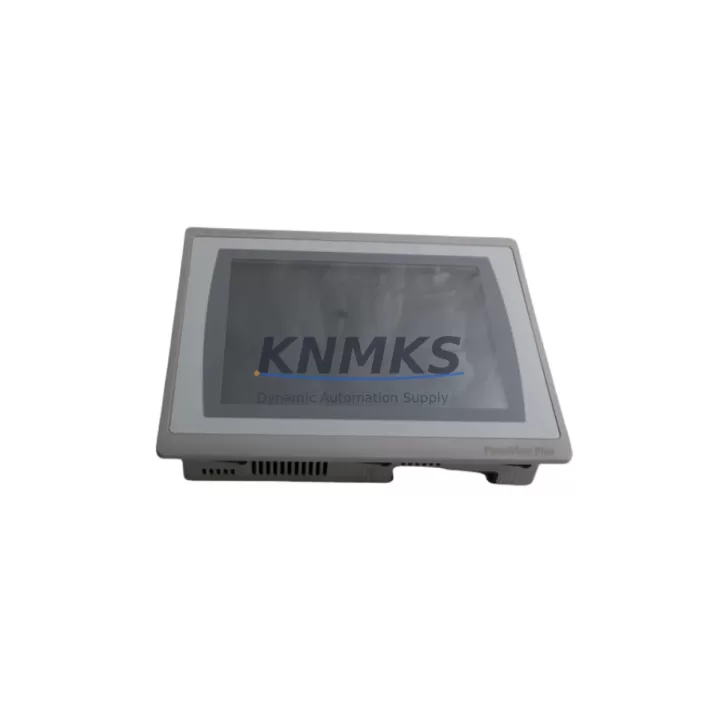
Allen-Bradley 2711P-T10C21D8S Maintenance-Proven Spare Part for Factory Uptime
The Allen-Bradley 2711P-T10C21D8S is a 10.4-inch color touch-screen HMI terminal from the PanelView Plus 7 Standard series, engineered by Rockwell Automation for demanding industrial environments. As a direct original spare part, it is purpose-built to restore operator interface functionality in ControlLogix, CompactLogix, and GuardLogix control architectures with zero configuration compromise. Maintenance engineers managing continuous production lines, batch processing systems, or legacy retrofit projects rely on the 2711P-T10C21D8S to eliminate unplanned downtime caused by HMI failure — one of the most disruptive single-point faults in a modern control cabinet.
For procurement engineers, sourcing a verified original 2711P-T10C21D8S from a reliable supplier with documented pre-shipment testing and a support terms confirmed by quotation is the lowest-risk path to restoring production. Counterfeit or refurbished HMI terminals introduce firmware incompatibility, communication instability, and accelerated failure — risks that far outweigh any short-term cost saving. Every unit shipped by KNMKS undergoes functional verification before dispatch, with full traceability documentation available on request.
Spare Maintenance Table
| SKU / Part Number | 2711P-T10C21D8S |
| Brand / Manufacturer | Allen-Bradley (Rockwell Automation) |
| Series | PanelView Plus 7 Standard |
| Product Type | HMI Operator Terminal (Touch Screen) |
| Display Size | 10.4-inch Color TFT LCD |
| Input Voltage | 24V DC (18–32V DC operating range) |
| Communication Ports | EtherNet/IP (dual RJ-45), USB Host & Device, RS-232 |
| Compatible Controllers | ControlLogix, CompactLogix, GuardLogix, SoftLogix |
| Operating Temperature | 0°C to 55°C (32°F to 131°F) |
| Protection Rating | NEMA 4/4X, 12, 13; IP65 (front panel) |
| Memory | 512 MB RAM / 512 MB Flash |
| Origin | United States (USA) |
| Condition | Original New / Surplus New |
| Pre-Shipment Testing | Yes — functional verification before dispatch |
| Support terms | 12 Months |
| Typical Application | Process control, machine automation, SCADA interface, retrofit HMI replacement |
Maintenance Planning for Continuous Operation
When a 2711P-T10C21D8S fails or is flagged during a scheduled control cabinet inspection, the replacement workflow extends beyond the HMI terminal itself. Maintenance engineers should treat the event as a full electrical circuit review to prevent repeat failures and ensure system integrity.
Begin with the 24V DC power supply feeding the HMI — units such as the Allen-Bradley 1606-XLP or equivalent industrial DIN-rail power supply should be load-tested and verified for output stability within the 18–32V DC tolerance band. A marginal power supply is a leading cause of premature HMI failure and display corruption. Inspect the terminal block wiring (e.g., Allen-Bradley 1492-series terminal blocks) for loose connections, oxidation, or insulation damage at the 24V input and ground terminals.
Next, audit the EtherNet/IP network infrastructure: check the managed switch port connected to the HMI for duplex mismatch, excessive CRC errors, or link instability. If the 2711P-T10C21D8S communicates with a ControlLogix 1756-L series controller or a CompactLogix 1769-L series controller, verify that the controller firmware and the FactoryTalk View ME application version are compatible with the replacement terminal’s firmware revision. Firmware mismatches are a common source of communication faults after HMI replacement.
For cabinets that also house 1756-EN2T or 1756-EN3TR EtherNet/IP communication modules, confirm that the IP address assignment and subnet configuration for the new HMI are correctly entered before commissioning. If the control system includes safety I/O modules or a GuardLogix safety controller, verify that the HMI safety tag mapping is intact after the swap. Additionally, inspect any signal isolators or surge protection devices on the communication lines — these components absorb transient energy and should be replaced on a preventive schedule, not only after failure.
For sites running legacy systems, the 2711P-T10C21D8S is a validated replacement for older PanelView Plus 6 terminals in many retrofit scenarios, provided the FactoryTalk View ME application is re-compiled for the new hardware platform. Documenting this compatibility check in the site maintenance log reduces commissioning time for future replacements.
Site Replacement Workflow
Step 1 — Isolation & Backup: De-energize the control cabinet following site LOTO procedures. Back up the existing HMI application from the terminal (if still functional) using FactoryTalk View ME Studio or a USB transfer. Archive the backup with the date, firmware version, and panel tag.
Step 2 — Physical Removal: Disconnect the 24V DC power connector, EtherNet/IP cables, and USB peripherals. Remove the terminal from the panel cutout by releasing the mounting clamps from the rear. Note the torque specification for reinstallation (typically 0.9 N·m for panel clamps).
Step 3 — Inspection & Cleaning: Inspect the panel cutout gasket for compression set or damage. Replace the gasket if the IP65 seal integrity is in doubt. Clean the cutout edges before installing the replacement unit.
Step 4 — Installation & Configuration: Mount the 2711P-T10C21D8S, reconnect all cables, and restore power. Load the backed-up application via USB or network transfer. Verify the EtherNet/IP connection to the controller, confirm all tag communications are active, and run a full I/O status check from the HMI diagnostics screen.
Step 5 — Commissioning Sign-Off: Conduct a functional test of all operator screens, alarm pages, and trend displays. Record the replacement in the site maintenance log with the new unit’s serial number and support terms start date. Retain the KNMKS shipment documentation as support terms evidence.
Spare Parts Support FAQ
Q1: Is the 2711P-T10C21D8S compatible with my existing FactoryTalk View ME application?
The 2711P-T10C21D8S runs FactoryTalk View ME and is compatible with applications developed for PanelView Plus 7 Standard terminals of the same screen size. If migrating from a PanelView Plus 6 (2711P-T10C4D8 or similar), the application must be re-compiled in FactoryTalk View ME Studio targeting the PanelView Plus 7 platform. KNMKS recommends verifying firmware revision compatibility before installation.
Q2: What is included in the support terms confirmed by quotation and pre-shipment testing?
Every 2711P-T10C21D8S unit is powered on and functionally verified before dispatch — including display, touch input, communication ports, and boot sequence. The support terms confirmed by quotation cover manufacturing defects and functional failure under normal operating conditions from the date of shipment. Support requests are supported with full traceability documentation.
Q3: Can KNMKS support long-term or blanket purchase orders for this part?
Yes. KNMKS supports long-term supply agreements for the 2711P-T10C21D8S with lead times and pricing confirmed at order placement. For sites with multiple HMI panels or multi-plant operations, blanket orders with phased delivery schedules are available. Contact admin@knmks.com to discuss volume pricing and inventory reservation.
Q4: How do I verify I am receiving an original Allen-Bradley unit and not a counterfeit?
KNMKS sources 2711P-T10C21D8S units from authorized distribution channels and surplus inventory with full chain-of-custody documentation. Each unit ships with its original Rockwell Automation labeling, serial number, and date code intact. Customers may request inspection photos and test reports prior to shipment. If authenticity verification is required for your procurement process, contact us before placing the order.
© 2026 KNMKS. All rights reserved.
Original Source: https://knmks.com
Contact: admin@knmks.com | +86 18359268345
Product Identification
- Brand / Ecosystem
-
Allen-Bradley
Allen-Bradley - Model / Series
-
2711P-T10C21D8S
ControlLogix Series - Product Family
- HMI & Displays
- Availability Status
- Available on request after model and quantity confirmation
- Inquiry Type
- B2B RFQ, replacement inquiry and project spare-part request
- Pre-Quote Check
- Exact SKU, brand, series, quantity, nameplate photos and destination country are checked before quotation
System Path
Where this product fits in the KNMKS automation structure.
Specification & Inquiry Focus
- Display range
- Operator panels and touch screens
- Common needs
- Screen size, interface and version matching
- Project support
- Retrofit, spare unit and panel replacement
Buyer Confirmation
Information KNMKS checks before replying.
- Exact model
- 2711P-T10C21D8S
- Brand / ecosystem
- Allen-Bradley
- Product family
- HMI & Displays
- Application note
- Replacement, maintenance, project build or spare-part list
- Useful photos
- Nameplate, installed unit, cabinet layout or connector side
- Delivery details
- Quantity, destination country and target schedule
Document Support
Files and notes can be confirmed during quotation.
- Product photos or nameplate confirmation when available
- Packing and delivery notes before quotation confirmation
- Support scope and delivery terms confirmed per inquiry
- Export document coordination for qualified B2B requests
Inquiry Support
- Panel size and interface confirmation
- Replacement unit inquiry for discontinued HMIs
- Protective packaging for display shipment
What to Send Us
- Brand and exact model number: Allen-Bradley 2711P-T10C21D8S
- Quantity and required delivery time
- Application, replacement requirement or nameplate photo
- Destination country and shipping preference
RFQ Preparation
This is a product inquiry page built for RFQ communication.
Fast Model Check
Send this model to KNMKS for confirmation.
Include quantity, destination country and photos if this is a maintenance replacement. The inquiry will be saved with a reference number after submission.
Brand & Compatibility Note
KNMKS displays automation product information for well-known industrial brand ecosystems and compatible replacement references. Brand names are used for product identification and compatibility reference only; final availability and commercial terms are confirmed per quotation.
 Manufacturing
 Machine Tools
 Packaging
 Energy & Power
 PLCs & Controllers
 Servo Systems
 Variable Frequency Drives
 Sensors