
Overview
Allen-Bradley 2711-B6C2 Spare Part for Factory Uptime
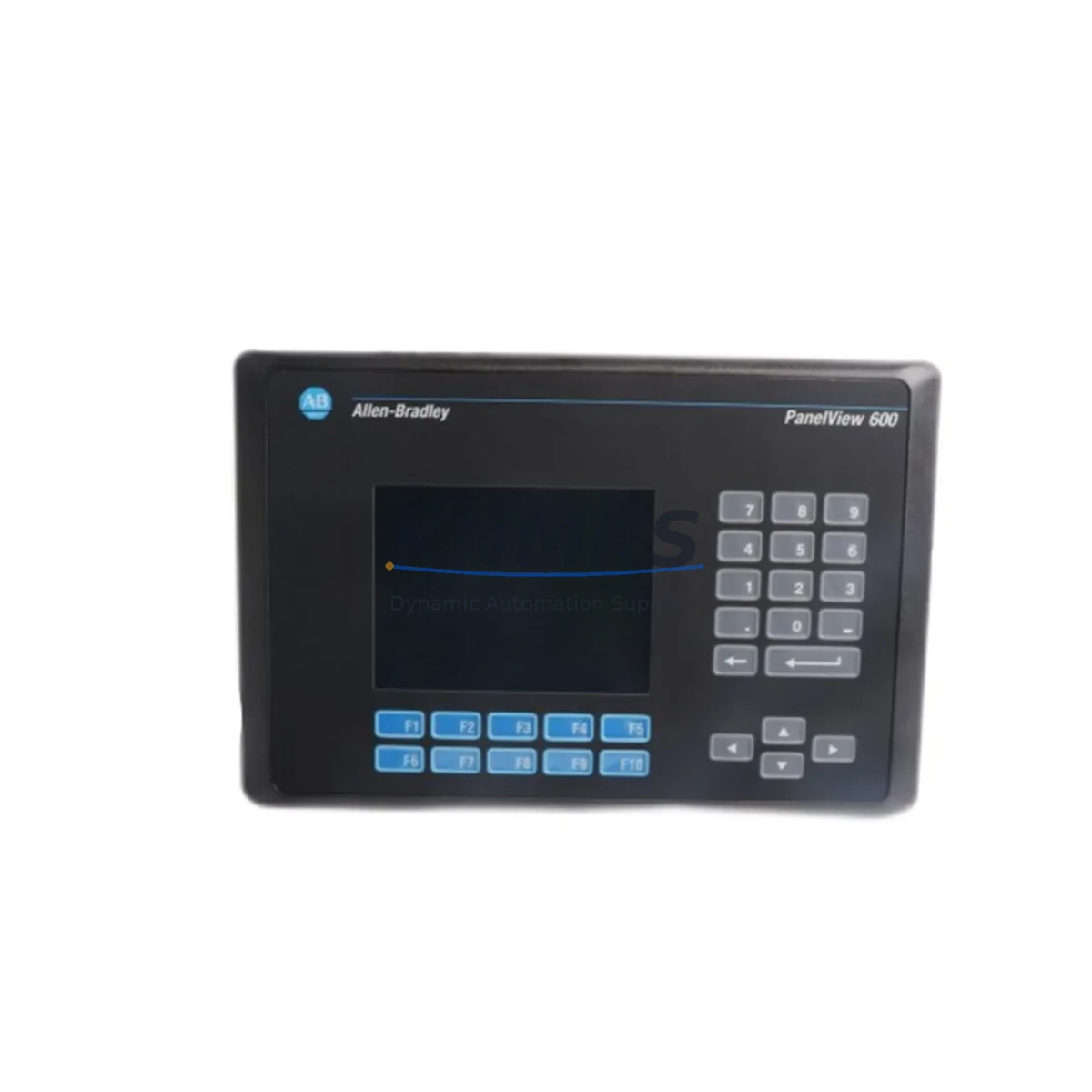
The Allen-Bradley 2711-B6C2 is a 6-inch monochrome touch/keypad PanelView 600 HMI operator terminal manufactured by Rockwell Automation. Designed for demanding industrial environments, this unit serves as a critical human-machine interface in control cabinets running ControlLogix, SLC 500, and MicroLogix PLC platforms. As production lines age and OEM support windows close, maintaining a verified spare of the 2711-B6C2 in your parts inventory is a proven strategy for minimizing unplanned downtime and protecting factory continuity.
At KNMKS, every 2711-B6C2 unit is sourced from verified supply channels, functionally tested prior to shipment, and backed by a support terms confirmed by quotation. We support maintenance engineers and procurement teams across manufacturing, oil & gas, water treatment, automotive assembly, and process industries who require fast, reliable access to original-specification spare parts.
Spare Maintenance Table
| Parameter | Specification |
|---|---|
| SKU / Part Number | 2711-B6C2 |
| Brand | Allen-Bradley (Rockwell Automation) |
| Series | PanelView 600 |
| Product Type | HMI Operator Terminal |
| Display Size | 6-inch Monochrome |
| Interface Type | Touch Screen + Keypad |
| Communication | DH-485 / RS-232 |
| Compatible PLC Platforms | SLC 500, MicroLogix, ControlLogix (via gateway) |
| Power Supply | 24V DC |
| Operating Temperature | 0°C to 55°C |
| Protection Rating | NEMA 4 / IP65 (front panel) |
| Country of Origin | United States |
| Unit Weight | 1,560 g |
| Support terms | 12 Months |
| Condition | Original Spare — Tested Before Shipment |
| Application Environment | Industrial Control Cabinet, Panel Door Mount |
| Maintenance Recommendation | Inspect display, keypad response, and communication port annually; replace backlight if dimming observed |
Maintenance Planning for Continuous Operation
When a 2711-B6C2 HMI fails on the production floor, the impact extends well beyond the terminal itself. Maintenance engineers performing a structured replacement should treat this event as an opportunity to audit the surrounding control cabinet for components that share the same operational stress cycle.
Begin with the 24V DC power supply feeding the HMI. Units such as the Allen-Bradley 1606-XLP series or equivalent industrial DIN-rail power supplies should be checked for output voltage stability and capacitor aging — a marginal power supply is a common root cause of intermittent HMI faults and display corruption. Simultaneously, inspect the DH-485 communication cable and termination resistors connecting the 2711-B6C2 to the SLC 500 or MicroLogix processor; damaged shielding or loose terminal connections frequently cause communication timeouts that are misdiagnosed as HMI hardware failure.
If the control system includes an SLC 500 processor module (such as the 1747-L532 or 1747-L543), verify that the processor firmware is compatible with the PanelView 600 application file version. Mismatched firmware after an HMI swap is a preventable source of post-replacement downtime. For cabinets using 1746 I/O modules alongside the HMI, this is also an appropriate time to check for blown fuses on analog input cards and verify that digital output modules are not showing fault LEDs.
In facilities running mixed communication architectures, a 1761-NET-AIC Advanced Interface Converter or similar DH-485-to-RS-232 bridge may be present in the same cabinet. These components are often overlooked during HMI replacement but are equally subject to connector wear and should be inspected for secure seating. Finally, review the terminal block wiring on the HMI power input and communication ports — loose ferrules and corroded terminals are a leading cause of recurring faults in high-vibration environments.
Stocking a 2711-B6C2 spare alongside a compatible power supply module and a pre-terminated DH-485 cable assembly reduces mean time to repair (MTTR) from hours to under 30 minutes for experienced technicians.
Site Replacement Workflow
Step 1 — Verify Compatibility: Confirm the replacement 2711-B6C2 matches the original unit’s catalog suffix (C2 = color keypad/touch; verify against the existing panel cutout and application file). Download the existing application from the original HMI using PanelBuilder 1400e or PanelBuilder32 before powering down, if the unit is still partially functional.
Step 2 — Safe Isolation: De-energize the 24V DC supply to the HMI at the circuit breaker or fuse holder. Lock out / tag out per site LOTO procedure. Do not disconnect communication cables while the PLC processor is in RUN mode — place the SLC 500 or MicroLogix in PROGRAM mode first to avoid spurious fault logs.
Step 3 — Physical Swap: Remove the panel-mount bezel screws (typically 4–6 points), disconnect the power connector and DH-485/RS-232 cable, and extract the unit. Install the replacement 2711-B6C2, reconnect cables in reverse order, and torque bezel screws to specification to maintain NEMA 4 / IP65 sealing.
Step 4 — Application Restore: Transfer the saved application file to the replacement HMI via serial cable using PanelBuilder software. Verify all screen navigation, alarm displays, and data entry functions before returning the system to RUN mode.
Step 5 — Functional Verification: Cycle the HMI through all operator screens, confirm communication status indicators are active, and log the replacement in the site maintenance record. Update the spare parts inventory to trigger reorder of a replacement unit — maintaining at least one 2711-B6C2 availability confirmed by RFQ is recommended for any facility with more than two PanelView 600 installations.
This workflow is applicable to legacy system life-extension projects where upgrading to a current-generation PanelView Plus or PanelView 800 is not yet scheduled, and where maintaining the existing SLC 500 / MicroLogix architecture is the preferred operational strategy.
Spare Parts Support FAQ
Q1: Is the 2711-B6C2 still available as a new original spare, or only as refurbished?
The 2711-B6C2 has been discontinued by Rockwell Automation, but original-specification units remain available through authorized industrial spare parts distributors. KNMKS supplies units sourced from verified channels, each tested for display function, keypad response, and communication port integrity before shipment. All units are backed by a support terms confirmed by quotation covering manufacturing defects and functional failure under normal operating conditions.
Q2: How do I confirm compatibility with my existing SLC 500 or MicroLogix system before ordering?
Compatibility is determined by three factors: communication protocol (DH-485 or RS-232), PanelBuilder application file version, and PLC processor firmware revision. Provide your processor catalog number and current firmware version to our technical team at admin@knmks.com and we will confirm compatibility before shipment. We recommend retaining a backup copy of your application file as part of standard spare parts documentation.
Q3: What is your lead time and can you support urgent downtime recovery orders?
Standard orders ship within 1–3 business days from verified stock. For urgent downtime recovery situations, contact us directly at +86 18359268345 to confirm real-time availability and expedited shipping options. We maintain standing inventory of high-demand PanelView 600 series units specifically to support unplanned maintenance events.
Q4: What does the support terms confirmed by quotation cover, and what is the process for a support terms claim?
The support terms confirmed by quotation cover functional failure of the unit under normal industrial operating conditions, including display, keypad, communication ports, and power input circuitry. It does not cover physical damage caused by incorrect installation, overvoltage, or environmental exposure beyond rated specifications. To initiate a support terms claim, contact admin@knmks.com with your order number, a description of the fault, and site installation photos. Replacement or repair will be processed within 5 business days of fault confirmation.
© 2026 KNMKS. All rights reserved.
Original Source: https://knmks.com
Contact: admin@knmks.com | +86 18359268345
Product Identification
- Brand / Ecosystem
-
Allen-Bradley
Allen-Bradley - Model / Series
-
2711-B6C2
ControlLogix Series - Product Family
- PLCs & Controllers
- Availability Status
- Available on request after model and quantity confirmation
- Inquiry Type
- B2B RFQ, replacement inquiry and project spare-part request
- Pre-Quote Check
- Exact SKU, brand, series, quantity, nameplate photos and destination country are checked before quotation
System Path
Where this product fits in the KNMKS automation structure.
Specification & Inquiry Focus
- Control platform
- PLC, PAC and modular controllers
- Common needs
- CPU, rack, power and I/O expansion
- Project support
- Replacement, cabinet build and maintenance
Buyer Confirmation
Information KNMKS checks before replying.
- Exact model
- 2711-B6C2
- Brand / ecosystem
- Allen-Bradley
- Product family
- PLCs & Controllers
- Application note
- Replacement, maintenance, project build or spare-part list
- Useful photos
- Nameplate, installed unit, cabinet layout or connector side
- Delivery details
- Quantity, destination country and target schedule
Document Support
Files and notes can be confirmed during quotation.
- Product photos or nameplate confirmation when available
- Packing and delivery notes before quotation confirmation
- Support scope and delivery terms confirmed per inquiry
- Export document coordination for qualified B2B requests
Inquiry Support
- Model cross-checking before quotation
- CPU, power, rack and expansion module matching
- Support for replacement and project inquiry
What to Send Us
- Brand and exact model number: Allen-Bradley 2711-B6C2
- Quantity and required delivery time
- Application, replacement requirement or nameplate photo
- Destination country and shipping preference
RFQ Preparation
This is a product inquiry page built for RFQ communication.
Fast Model Check
Send this model to KNMKS for confirmation.
Include quantity, destination country and photos if this is a maintenance replacement. The inquiry will be saved with a reference number after submission.
Brand & Compatibility Note
KNMKS displays automation product information for well-known industrial brand ecosystems and compatible replacement references. Brand names are used for product identification and compatibility reference only; final availability and commercial terms are confirmed per quotation.
 Manufacturing
 Machine Tools
 Packaging
 Energy & Power



 HMI & Displays
 Servo Systems
 Variable Frequency Drives
 Sensors