
Overview
Allen-Bradley 1788-ENBT Migration-Ready EtherNet/IP Module: Legacy System Retrofit & Compatibility Upgrade
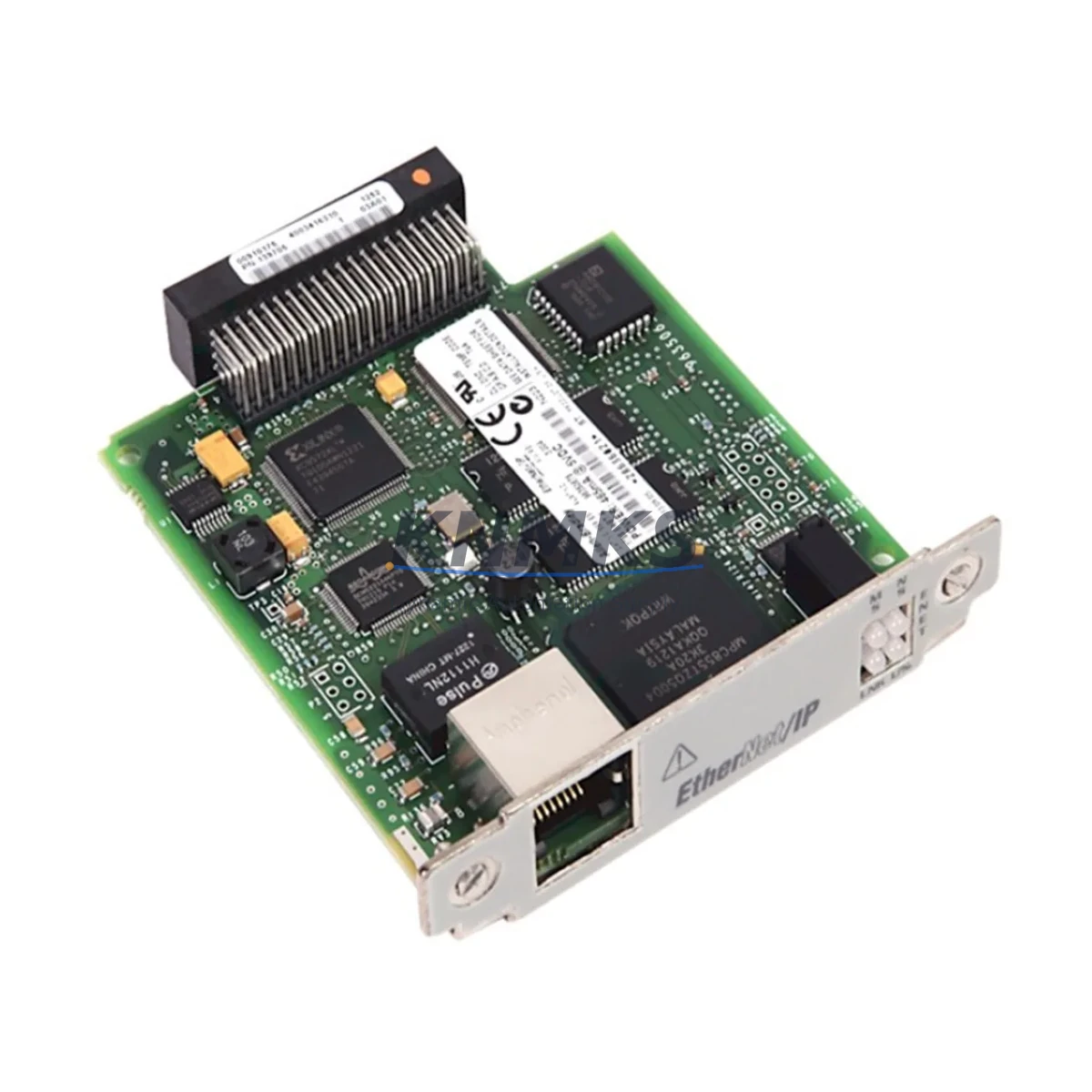
The Allen-Bradley 1788-ENBT is an EtherNet/IP communication daughterboard designed for integration with ControlLogix chassis-based control systems. As legacy Rockwell Automation platforms age and original spare parts become increasingly scarce, the 1788-ENBT remains a critical component for engineers managing brownfield retrofits, control cabinet upgrades, and communication protocol migrations. Whether you are replacing a failed unit in an existing 1756 ControlLogix rack or modernizing a production line that still relies on older 1788-series communication infrastructure, this module provides a verified, drop-in compatible solution backed by a support terms confirmed by quotation and confirmed inventory availability.
The 1788-ENBT mounts directly onto compatible ControlLogix communication modules, extending EtherNet/IP connectivity without requiring a full controller replacement. This makes it particularly valuable in facilities where capital expenditure for a complete PLC overhaul is not yet approved, but where network reliability and protocol compatibility must be maintained. Engineers working on partial upgrades — for example, migrating a legacy DeviceNet or DH+ segment to EtherNet/IP while retaining the existing 1756-L61 or 1756-L63 controller — will find the 1788-ENBT an essential bridge component during the transition period.
Migration Compatibility Table
| Parameter | Specification / Retrofit Note |
|---|---|
| SKU / Part Number | 1788-ENBT |
| Brand / Manufacturer | Allen-Bradley (Rockwell Automation) |
| Series | 1788 ControlLogix Communication |
| Communication Protocol | EtherNet/IP (IEEE 802.3) |
| Interface / Connector | RJ-45 Ethernet port; daughterboard edge connector |
| Compatible Host Modules | 1788-ENBT compatible ControlLogix communication cards (verify host module revision before installation) |
| Backplane / Rack Compatibility | 1756 ControlLogix chassis (4-slot, 7-slot, 10-slot, 13-slot, 17-slot) |
| Power Requirement | Supplied via host module; verify chassis power supply (e.g., 1756-PA72 or 1756-PB72) capacity before adding modules |
| Firmware Compatibility | Confirm host module firmware revision; update via RSLogix 5000 / Studio 5000 if required |
| Replacement Recommendation | Direct drop-in for failed or end-of-life 1788-ENBT units; no program logic changes required in most cases |
| Commissioning Note | Verify IP address assignment, EDS file registration in RSLinx Classic or Studio 5000, and I/O tree mapping after installation |
| Support terms | 12 months from date of shipment |
| Stock Status | Available — verified inventory, global shipping |
Retrofit Planning for Existing Automation Systems
Successful integration of the 1788-ENBT into a legacy control system requires a structured pre-installation assessment. Before removing the failed module, document the existing IP address configuration, subnet mask, gateway settings, and any CIP connection parameters stored in the RSLinx Classic or Studio 5000 project. This prevents communication loss to downstream I/O adapters, drives, and HMI panels that depend on the EtherNet/IP network segment managed by this daughterboard.
In a typical ControlLogix retrofit scenario, the 1788-ENBT works alongside several other components that may also require attention. The 1756-EN2T or 1756-ENBT Ethernet communication module in the same rack often shares network responsibilities; confirm that its firmware is current and that its CIP connection count is not saturated before routing additional traffic through the retrofitted 1788-ENBT. Similarly, if the control cabinet includes a 1756-DNB DeviceNet bridge module for legacy field devices, verify that the migration plan accounts for any DeviceNet-to-EtherNet/IP protocol conversion requirements.
Terminal wiring on the Ethernet side is straightforward — standard Cat5e or Cat6 patch cable to a managed industrial switch — but backplane seating of the daughterboard onto its host module requires careful alignment to avoid bent connector pins, which is a common cause of intermittent communication faults in field retrofits. Torque the module latch to the chassis rail per Rockwell’s installation specification.
For facilities running Wonderware, FactoryTalk View SE, or third-party SCADA systems connected via OPC-DA or OPC-UA, confirm that the HMI tag database references the correct module slot address after reinstallation. A slot address mismatch between the physical rack position and the I/O configuration in the Studio 5000 project will cause the controller to fault on first scan. If the system includes a 1756-RM redundancy module pair, the retrofit should be performed during a planned switchover window to maintain control continuity on the redundant controller path.
Where I/O expansion is part of the broader upgrade scope, the 1794-AENT FLEX I/O EtherNet/IP adapter and associated 1794-series I/O modules are commonly deployed alongside the 1788-ENBT to extend distributed I/O capacity without adding chassis slots. Signal isolators between legacy 4–20 mA analog field devices and new I/O cards should also be verified for loop power compatibility during the retrofit planning phase.
Downtime Control During System Migration
Minimizing unplanned downtime is the primary concern for any brownfield retrofit involving a communication module replacement. The 1788-ENBT swap can typically be completed within a planned maintenance window of two to four hours when pre-commissioning steps are completed offline. Key actions to compress downtime include: exporting the current RSLinx Classic topic configuration and Studio 5000 project backup before the outage begins; pre-configuring the replacement module’s IP address using BOOTP/DHCP Server utility on a laptop connected to the same network segment; and staging the EDS file registration in advance so that RSLinx recognizes the module immediately upon power-up.
If the host controller is a 1756-L7x or 1756-L8x series with non-volatile memory, the program and I/O configuration will survive a power cycle without re-download, which significantly reduces recovery time. For older 1756-L6x controllers without battery-backed SRAM, ensure a current program backup is loaded and ready for download before the maintenance window opens.
Preserving original program logic is non-negotiable. Do not modify the I/O configuration tree or module properties in Studio 5000 unless the replacement module’s firmware revision requires a configuration update. Unnecessary changes to the project during a live retrofit are the most common source of extended downtime and post-commissioning faults. Once the module is seated and powered, verify green status LEDs on both the host module and the 1788-ENBT daughterboard before re-enabling the EtherNet/IP network connections and releasing the system to production.
Retrofit Support FAQ
Q1: Is the 1788-ENBT a direct replacement for a failed unit in my existing ControlLogix rack?
Yes. The 1788-ENBT is a drop-in replacement for existing installations. No changes to the Studio 5000 project or I/O configuration are required in standard replacement scenarios, provided the host module type and firmware revision are compatible. Confirm the host module part number before ordering.
Q2: How do I verify firmware compatibility before installation?
Check the firmware revision of the host communication module using RSLinx Classic or the Module Properties dialog in Studio 5000. Cross-reference with Rockwell Automation’s Product Compatibility and Download Center (PCDC) to confirm the minimum firmware revision supported by the 1788-ENBT. If a firmware update is required, perform it before the production retrofit window using a bench test setup where possible.
Q3: What pre-shipment testing is performed on this module?
Each 1788-ENBT unit undergoes functional verification prior to shipment, including power-on self-test and communication port integrity checks. Units are supplied with a support terms confirmed by quotation covering manufacturing defects and functional failures under normal operating conditions. Detailed test records are available upon request for critical infrastructure applications.
Q4: What is the typical lead time and do you maintain stock for urgent replacement orders?
We maintain verified inventory of the 1788-ENBT to support urgent breakdown replacement scenarios. Standard orders ship within 1–3 business days. For critical production line failures requiring same-day or next-day dispatch, contact our sales team directly to confirm real-time stock availability and expedited shipping options.
© 2026 KNMKS. All rights reserved.
Original Source: https://knmks.com
Contact: admin@knmks.com | +86 18359268345
Product Identification
- Brand / Ecosystem
-
Allen-Bradley
Allen-Bradley - Model / Series
-
1788-ENBT
ControlLogix Series - Product Family
- PLCs & Controllers
- Availability Status
- Available on request after model and quantity confirmation
- Inquiry Type
- B2B RFQ, replacement inquiry and project spare-part request
- Pre-Quote Check
- Exact SKU, brand, series, quantity, nameplate photos and destination country are checked before quotation
System Path
Where this product fits in the KNMKS automation structure.
Specification & Inquiry Focus
- Control platform
- PLC, PAC and modular controllers
- Common needs
- CPU, rack, power and I/O expansion
- Project support
- Replacement, cabinet build and maintenance
Buyer Confirmation
Information KNMKS checks before replying.
- Exact model
- 1788-ENBT
- Brand / ecosystem
- Allen-Bradley
- Product family
- PLCs & Controllers
- Application note
- Replacement, maintenance, project build or spare-part list
- Useful photos
- Nameplate, installed unit, cabinet layout or connector side
- Delivery details
- Quantity, destination country and target schedule
Document Support
Files and notes can be confirmed during quotation.
- Product photos or nameplate confirmation when available
- Packing and delivery notes before quotation confirmation
- Support scope and delivery terms confirmed per inquiry
- Export document coordination for qualified B2B requests
Inquiry Support
- Model cross-checking before quotation
- CPU, power, rack and expansion module matching
- Support for replacement and project inquiry
What to Send Us
- Brand and exact model number: Allen-Bradley 1788-ENBT
- Quantity and required delivery time
- Application, replacement requirement or nameplate photo
- Destination country and shipping preference
RFQ Preparation
This is a product inquiry page built for RFQ communication.
Fast Model Check
Send this model to KNMKS for confirmation.
Include quantity, destination country and photos if this is a maintenance replacement. The inquiry will be saved with a reference number after submission.
Brand & Compatibility Note
KNMKS displays automation product information for well-known industrial brand ecosystems and compatible replacement references. Brand names are used for product identification and compatibility reference only; final availability and commercial terms are confirmed per quotation.
 Manufacturing
 Machine Tools
 Packaging
 Energy & Power



 HMI & Displays
 Servo Systems
 Variable Frequency Drives
 Sensors