
Overview
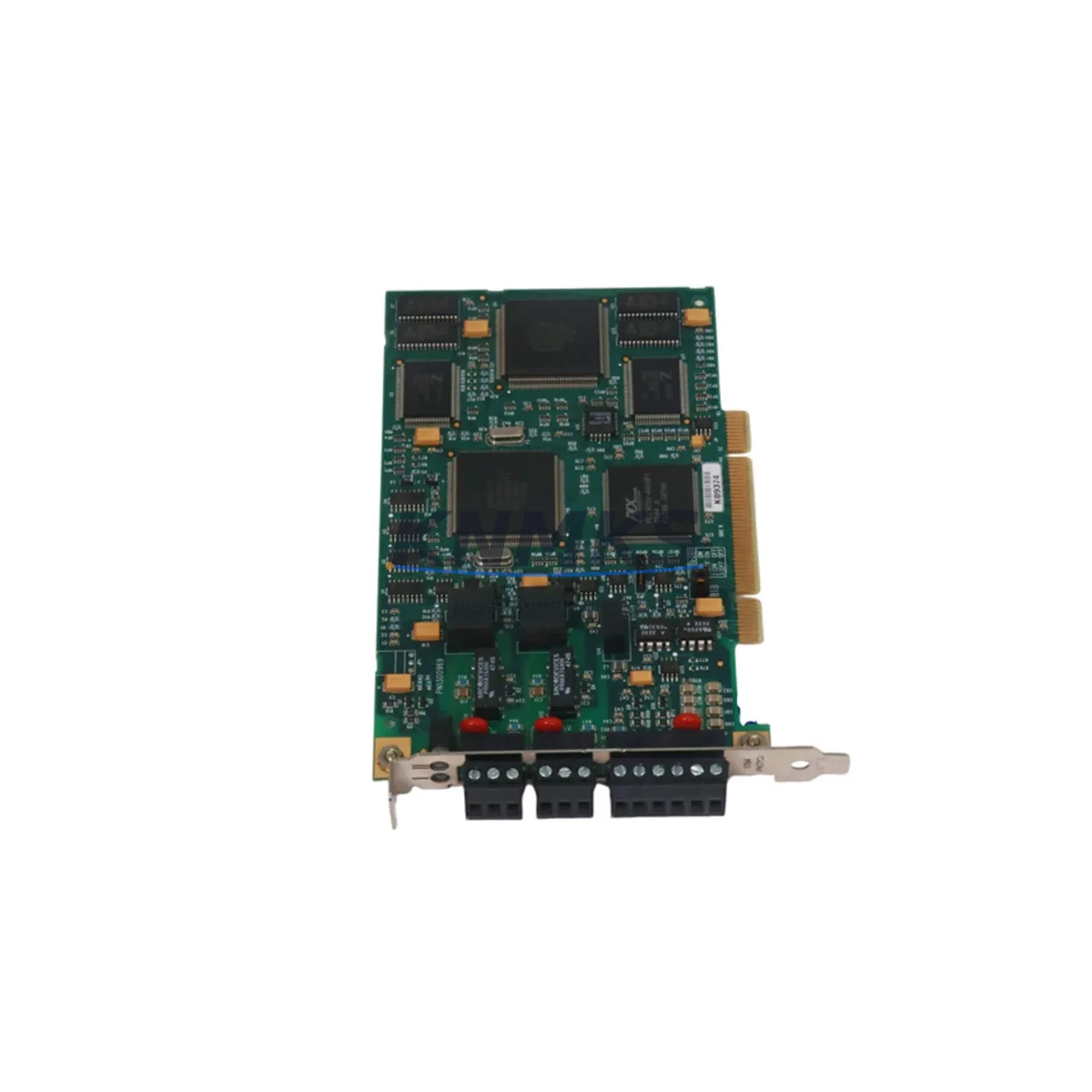
Allen-Bradley 1784-PKTXD Migration-Ready ControlNet Card for Legacy Control Systems
The Allen-Bradley 1784-PKTXD is a PCI ControlNet interface card engineered for industrial environments where legacy control infrastructure must be preserved, extended, or systematically upgraded. As a migration-ready replacement for discontinued 1784 Series ControlNet adapters, the 1784-PKTXD enables engineers to restore ControlNet communication capability without redesigning the host PC platform or rewriting the control program. Whether you are recovering a failed node in a running production line, retrofitting an aging DCS-linked ControlNet segment, or executing a phased upgrade of a multi-rack Allen-Bradley PLC-5 or ControlLogix system, the 1784-PKTXD provides a verified, field-proven path forward.
ControlNet remains a widely deployed deterministic network in process industries, automotive assembly, and utilities. Many facilities continue to operate 1784-series ControlNet cards in engineering workstations and SCADA hosts that were commissioned in the late 1990s and early 2000s. When these cards fail or become unavailable through standard distribution channels, the impact is immediate: loss of programming access, loss of real-time I/O monitoring, and potential unplanned downtime. The 1784-PKTXD addresses this gap directly, offering a stocked, tested, and warranted replacement that can be installed and commissioned within a single maintenance window.
Before installation, engineers should confirm that the host PC chassis has an available PCI slot — not PCIe — as the 1784-PKTXD uses the legacy 32-bit PCI bus standard. This distinction is critical when the host workstation has been partially upgraded. The card requires RSLinx Classic or RSLinx Enterprise driver configuration, and the existing RSLinx shortcut and device driver settings from the previous card should be documented before removal to accelerate recommissioning. If the host PC is running a 64-bit operating system, driver compatibility must be verified against the installed RSLinx version prior to ordering.
In retrofit scenarios involving Allen-Bradley PLC-5 racks, the 1784-PKTXD restores the programming and monitoring link between the engineering workstation and the 1771 I/O backplane via ControlNet. Engineers should verify the ControlNet node address assigned to the card does not conflict with existing network nodes, particularly when the original card’s configuration file is unavailable. The ControlNet network map should be exported from RSNetWorx for ControlNet before the swap to preserve scheduled and unscheduled connection parameters.
For facilities migrating toward ControlLogix platforms, the 1784-PKTXD can serve as a transitional communication bridge, maintaining ControlNet connectivity to legacy 1771 I/O chassis while new 1756-series ControlLogix racks are commissioned in parallel. During this phase, components such as the 1756-CNB or 1756-CNBR ControlNet bridge module in the ControlLogix rack, the 1771-ACN15 ControlNet adapter in the legacy PLC-5 chassis, and the 1784-PKTXD in the engineering workstation form a complete migration topology that allows program validation and I/O verification before cutover. Power supply capacity in the existing 1771 chassis should be reviewed when adding or repositioning I/O modules during the migration, as the 1771-P4S or equivalent power supply may be operating near its rated output.
Communication link integrity is a primary concern during any ControlNet migration. The physical coaxial trunk and tap infrastructure should be inspected for impedance mismatches, damaged BNC connectors, and missing termination resistors before the new card is brought online. A ControlNet network health check using RSNetWorx for ControlNet will identify any nodes reporting missed packets or excessive retries. If the migration also involves updating HMI screens — for example, transitioning from PanelView 550 or PanelView 900 terminals to PanelView Plus 7 — the tag database and communication path definitions in FactoryTalk View must be updated to reflect the new node addressing and connection parameters established after the card swap.
Firmware compatibility is another checkpoint that is frequently overlooked in field retrofits. The 1784-PKTXD firmware version should be confirmed against the RSLinx Classic version installed on the host. In some legacy installations, RSLinx Classic versions below 2.57 may not fully support the card’s diagnostic reporting features. Updating RSLinx before the card swap, rather than after, reduces the risk of a failed driver installation during a live maintenance window.
Physical installation space is straightforward for standard tower or rack-mount workstations, but should be confirmed in compact or embedded PC platforms where PCI slot access may be restricted by adjacent cards or internal cabling. The card’s bracket height — standard versus low-profile — should also be verified against the chassis form factor before the replacement unit is dispatched to site.
KNMKS maintains verified stock of the 1784-PKTXD and conducts pre-shipment functional testing on each unit. All units are supplied with a support terms confirmed by quotation covering manufacturing defects and functional failures under normal operating conditions. Global shipping is available with lead times confirmed at order placement. For urgent replacement requirements, same-day dispatch is available for in-stock units ordered before the daily cutoff.
Migration Compatibility Table
| Parameter | Detail |
|---|---|
| SKU | 1784-PKTXD |
| Brand / Series | Allen-Bradley / 1784 Series |
| Interface | 32-bit PCI (not PCIe) |
| Network Protocol | ControlNet (IEC 61158) |
| Replaces / Compatible With | 1784-PKTX, 1784-PKTXD (original), 1784-PCIC legacy variants |
| Host OS Compatibility | Windows XP / 7 / 10 (32/64-bit — verify RSLinx driver version) |
| Driver Requirement | RSLinx Classic or RSLinx Enterprise |
| Installation Space | Standard PCI slot; confirm bracket height (standard or low-profile) |
| Communication Compatibility | ControlNet scheduled and unscheduled messaging; RSNetWorx for ControlNet required for network scheduling |
| Retrofit Recommendation | Export RSNetWorx network map and RSLinx shortcuts before swap; verify node address before commissioning |
| Commissioning Checkpoint | Node address conflict check; ControlNet health scan; RSLinx driver installation; HMI path update if applicable |
| Support terms | 12 months from shipment date |
Retrofit Planning for Existing Automation Systems
A successful 1784-PKTXD retrofit begins with a complete audit of the existing ControlNet topology. In a typical legacy installation, the engineering workstation running RSLogix 5 or RSLogix 500 communicates with one or more PLC-5 racks via ControlNet, with the 1784-PKTXD serving as the host-side network node. The rack-side ControlNet connection is typically handled by a 1771-ACN15 ControlNet adapter mounted in the 1771 I/O chassis. If the 1771-ACN15 is also approaching end of service life, it should be evaluated for replacement in the same maintenance window to avoid a second unplanned outage.
Power supply capacity in the 1771 chassis is a frequently underestimated constraint during retrofit planning. Adding or repositioning I/O modules — for example, replacing failed analog input modules with current-production equivalents — increases the backplane current draw. The 1771-P4S or 1771-P7 power supply ratings should be reviewed against the updated module load before the retrofit is finalized.
For facilities that have already partially migrated to ControlLogix, the 1756-CNB ControlNet bridge module in the 1756 chassis provides the rack-side ControlNet node, while the 1784-PKTXD in the workstation maintains the programming and monitoring connection. During the transition period, both the legacy PLC-5 program in RSLogix 5 and the new ControlLogix program in RSLogix 5000 or Studio 5000 may need to be accessible from the same workstation, requiring careful RSLinx driver and shortcut management.
If the retrofit scope includes HMI modernization — for example, replacing a PanelView 900 with a PanelView Plus 7 Standard — the FactoryTalk View ME application must be updated to reflect the new ControlNet node addresses and communication paths established after the card swap. This step is often deferred but should be included in the retrofit plan to avoid HMI communication failures after the workstation card is replaced.
Signal isolation requirements should also be reviewed when the retrofit involves changes to analog I/O wiring. In installations where signal isolators are used between field instruments and 1771 analog input modules, the isolator output range and loop power configuration must be compatible with the replacement module’s input specifications.
Downtime Control During System Migration
Minimizing downtime during a 1784-PKTXD replacement requires preparation that begins before the maintenance window opens. The existing RSLinx configuration — including all device shortcuts, driver settings, and communication paths — should be exported and saved to a network location accessible from a backup workstation. The RSNetWorx for ControlNet network schedule file should be backed up separately, as it contains the scheduled connection parameters that govern deterministic I/O update rates across the ControlNet segment.
The PLC program currently resident in the processor should be uploaded and saved before the card swap begins, even if a recent backup already exists. This ensures that the program version running in the controller at the time of the retrofit is preserved, protecting against any discrepancy between the backup file and the live program caused by undocumented field modifications.
Physical installation of the 1784-PKTXD typically requires less than 15 minutes in a standard tower workstation. The majority of the maintenance window is consumed by driver installation, RSLinx configuration, node address verification, and ControlNet health scanning. Pre-staging the RSLinx installer and the RSNetWorx configuration file on a USB drive reduces the time spent locating software during the maintenance window.
If the host workstation must remain online during the swap — for example, because it also hosts an OPC server or historian connection used by other systems — a planned handover to a backup workstation should be arranged before the maintenance window begins. The backup workstation should have RSLinx and RSNetWorx pre-installed and configured with the exported shortcuts and network schedule to allow immediate takeover if the primary workstation requires extended downtime.
Post-installation verification should include a full ControlNet health scan in RSNetWorx, confirmation that all scheduled connections are re-established, and a functional test of the HMI communication paths. Any alarms or diagnostic messages generated during the first 30 minutes of operation after the swap should be reviewed to confirm that the replacement card is operating within normal parameters.
Retrofit Support FAQ
Q1: Is the 1784-PKTXD a direct drop-in replacement for the 1784-PKTX?
The 1784-PKTXD is the dual-port variant of the 1784-PKTX family and uses the same PCI interface and RSLinx driver framework. In most installations, it can replace a failed 1784-PKTX with driver reinstallation and node address verification. Confirm that the host PC has a standard 32-bit PCI slot and that the installed RSLinx version supports the PKTXD driver before proceeding.
Q2: What commissioning steps are required after installing the replacement card?
After physical installation, install or update the RSLinx Classic driver for the 1784-PKTXD, configure the ControlNet driver shortcut in RSLinx, verify the node address does not conflict with existing network nodes, run a ControlNet health scan in RSNetWorx for ControlNet, and confirm that all scheduled and unscheduled connections are re-established. If HMI communication paths reference the workstation node, update the FactoryTalk View or PanelView configuration accordingly.
Q3: How is the unit tested before shipment, and what does the support terms confirmed by quotation cover?
Each 1784-PKTXD unit undergoes pre-shipment functional testing to verify ControlNet communication capability and PCI interface integrity. The support terms confirmed by quotation cover manufacturing defects and functional failures under normal operating conditions from the date of shipment. Units that fail during the confirmed support period are replaced or repaired at no charge. Contact admin@knmks.com to initiate a support terms claim.
Q4: Is stock available for immediate shipment, and what are the lead times?
KNMKS maintains verified stock of the 1784-PKTXD. In-stock units are available for same-day dispatch for orders placed before the daily cutoff. Lead times for out-of-stock units are confirmed at order placement. Global shipping is supported. Contact admin@knmks.com or call +86 18359268345 for current stock status and shipping options.
© 2026 KNMKS. All rights reserved.
Original Source: https://knmks.com
Contact: admin@knmks.com | +86 18359268345
Product Identification
- Brand / Ecosystem
-
Allen-Bradley
Allen-Bradley - Model / Series
-
1784-PKTXD
Legacy Series - Product Family
- PLCs & Controllers
- Availability Status
- Available on request after model and quantity confirmation
- Inquiry Type
- B2B RFQ, replacement inquiry and project spare-part request
- Pre-Quote Check
- Exact SKU, brand, series, quantity, nameplate photos and destination country are checked before quotation
System Path
Where this product fits in the KNMKS automation structure.
Specification & Inquiry Focus
- Control platform
- PLC, PAC and modular controllers
- Common needs
- CPU, rack, power and I/O expansion
- Project support
- Replacement, cabinet build and maintenance
Buyer Confirmation
Information KNMKS checks before replying.
- Exact model
- 1784-PKTXD
- Brand / ecosystem
- Allen-Bradley
- Product family
- PLCs & Controllers
- Application note
- Replacement, maintenance, project build or spare-part list
- Useful photos
- Nameplate, installed unit, cabinet layout or connector side
- Delivery details
- Quantity, destination country and target schedule
Document Support
Files and notes can be confirmed during quotation.
- Product photos or nameplate confirmation when available
- Packing and delivery notes before quotation confirmation
- Support scope and delivery terms confirmed per inquiry
- Export document coordination for qualified B2B requests
Inquiry Support
- Model cross-checking before quotation
- CPU, power, rack and expansion module matching
- Support for replacement and project inquiry
What to Send Us
- Brand and exact model number: Allen-Bradley 1784-PKTXD
- Quantity and required delivery time
- Application, replacement requirement or nameplate photo
- Destination country and shipping preference
RFQ Preparation
This is a product inquiry page built for RFQ communication.
Fast Model Check
Send this model to KNMKS for confirmation.
Include quantity, destination country and photos if this is a maintenance replacement. The inquiry will be saved with a reference number after submission.
Brand & Compatibility Note
KNMKS displays automation product information for well-known industrial brand ecosystems and compatible replacement references. Brand names are used for product identification and compatibility reference only; final availability and commercial terms are confirmed per quotation.
 Manufacturing
 Machine Tools
 Packaging
 Energy & Power



 HMI & Displays
 Servo Systems
 Variable Frequency Drives
 Sensors