
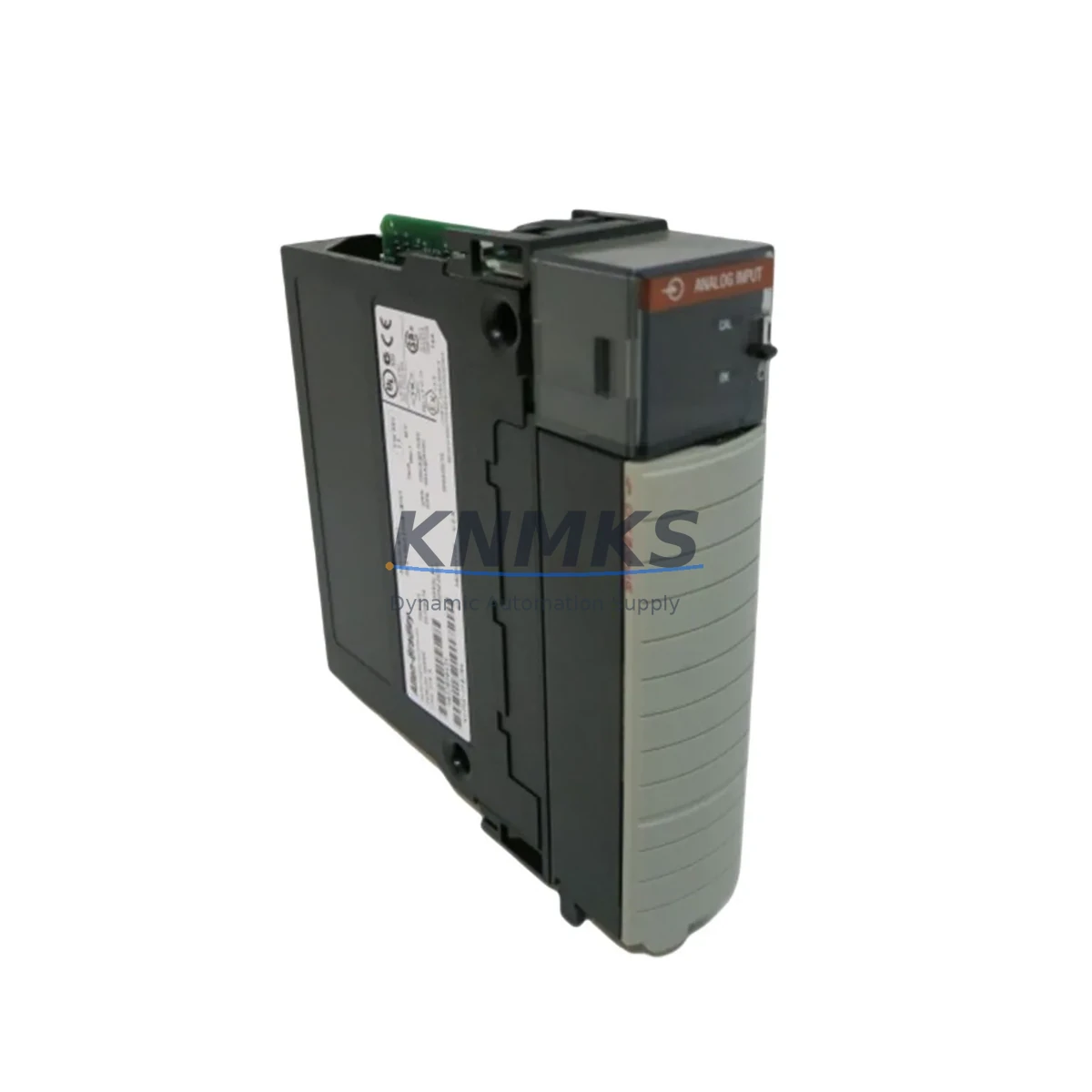
Overview
Allen-Bradley 1756SC-IF8U Maintenance-Proven Spare Part for Factory Uptime
The Allen-Bradley 1756SC-IF8U is an 8-channel universal analog input module designed for the ControlLogix 1756 backplane platform. As a maintenance-proven spare part, it supports continuous factory operation by enabling rapid field replacement of failed or degraded analog input channels without requiring system reconfiguration or firmware changes. Whether you are managing a scheduled annual shutdown, responding to an unplanned process fault, or building a strategic spare parts inventory for a critical production line, the 1756SC-IF8U delivers the compatibility, signal accuracy, and installation confidence that maintenance engineers and procurement teams require.
This module accepts voltage, current, thermocouple, and RTD inputs across all eight channels, making it one of the most versatile analog input options in the ControlLogix ecosystem. Its universal input capability reduces the number of distinct spare SKUs a facility must stock, simplifying inventory management while maintaining full coverage across diverse sensor types. Each unit shipped by KNMKS undergoes pre-shipment functional verification and is backed by a support terms confirmed by quotation, giving procurement engineers confidence in both quality and long-term supply continuity.
Spare Maintenance Table
| Parameter | Specification |
|---|---|
| SKU / Part Number | 1756SC-IF8U |
| Brand | Allen-Bradley (Rockwell Automation) |
| Series | ControlLogix 1756SC |
| Module Type | 8-Channel Universal Analog Input |
| Input Types Supported | Voltage (±10 V), Current (4–20 mA), Thermocouple (B, C, D, E, J, K, N, R, S, T), RTD (Pt, Cu, Ni) |
| Resolution | 16-bit |
| Backplane Compatibility | ControlLogix 1756 series backplane |
| Communication | ControlLogix backplane (via 1756 chassis) |
| Power Consumption | Supplied via backplane (no external power required) |
| Operating Temperature | 0 °C to 60 °C |
| Mounting | 1756 chassis slot (any slot) |
| Origin | United States |
| Product Category | Industrial Automation / PLC Analog Input Modules |
| Support terms | 12 Months — Covers manufacturing defects and functional failure under normal operating conditions |
| Pre-Shipment Testing | Yes — Functional verification performed before dispatch |
| Maintenance Recommendation | Inspect channel calibration annually; verify wiring integrity at terminal block; confirm firmware compatibility with active Logix Designer project before hot-swap |
Maintenance Planning for Continuous Operation
Replacing the 1756SC-IF8U in a live ControlLogix system requires a structured approach to avoid introducing new faults during the restoration process. Before removing the failed module, maintenance engineers should document the current channel configuration, including input type assignments, filter settings, and engineering unit scaling, using Logix Designer’s online export function. This ensures the replacement module can be configured identically without relying on memory or informal records.
During the same maintenance window, it is best practice to inspect adjacent components that share the same electrical circuit or chassis slot neighborhood. The 1756-PA75 or 1756-PB75 power supply module should be checked for output voltage stability, as a degraded power supply is a common root cause of analog input module faults that are initially misdiagnosed as module failures. Similarly, the 1756-A17 or equivalent chassis backplane should be visually inspected for bent connector pins or oxidation at the module interface.
Field wiring connected to the 1756SC-IF8U typically runs through 1492-AIFM8-F-5 analog interface modules or equivalent terminal blocks, which should be inspected for loose terminations, moisture ingress, or corrosion — particularly in environments with high humidity or chemical exposure. Signal cables from field transmitters should be checked for shield continuity and proper grounding to prevent common-mode noise from corrupting analog readings after the new module is installed.
If the system includes 1756-EN2T or 1756-EN3TR EtherNet/IP communication modules in the same chassis, verify that the controller’s I/O tree remains intact after the module swap and that no connection faults are logged in the controller diagnostics. For systems using 1756-RM redundancy modules, confirm that the redundant chassis reflects the updated module configuration before returning the system to automatic mode. Where signal isolation is required between field devices and the ControlLogix chassis, MTL or Phoenix Contact signal isolators in the same loop should also be tested for correct output range following the module replacement.
Site Replacement Workflow
The 1756SC-IF8U is designed for in-chassis replacement within the ControlLogix platform, supporting both planned and emergency maintenance scenarios. The following workflow minimizes downtime and ensures system integrity during the replacement process:
Step 1 — Pre-Replacement Verification: Confirm the replacement module’s firmware revision is compatible with the active Logix Designer project. If the project was created with a specific module revision, update the I/O configuration in Logix Designer to match the new module’s revision before going online, or use the “Change Module” function to accept the new revision without a full project download.
Step 2 — Safe Removal: In non-redundant systems, inhibit the module in the I/O tree before physical removal to prevent the controller from faulting. In redundant systems, perform the swap on the secondary chassis first. Remove the module by pressing the top and bottom latch tabs simultaneously and sliding it out of the chassis slot.
Step 3 — Installation and Configuration: Insert the 1756SC-IF8U into the same chassis slot. The module will be automatically recognized if the I/O configuration matches. Verify channel-by-channel input type assignments in Logix Designer and confirm that engineering unit scaling matches the original configuration. Un-inhibit the module and monitor the controller’s I/O status for any connection faults.
Step 4 — Post-Replacement Validation: Compare live analog values against known process references (e.g., field transmitter local indicators) to confirm signal accuracy. Log the replacement in the facility’s maintenance management system (CMMS) and update the spare parts inventory record to trigger reorder of a replacement spare unit.
This workflow applies equally to legacy ControlLogix systems running older firmware and to current-generation systems, making the 1756SC-IF8U a reliable long-term replacement option for aging control infrastructure where system-wide upgrades are not yet feasible.
Spare Parts Support FAQ
Q1: Is the 1756SC-IF8U compatible with all ControlLogix chassis and firmware versions?
The 1756SC-IF8U is compatible with all standard 1756 ControlLogix chassis (4, 7, 10, 13, and 17-slot). Firmware compatibility depends on the Logix Designer project revision. KNMKS recommends confirming the module’s firmware revision against your active project before ordering. Our technical team can assist with revision verification upon request.
Q2: What does the support terms confirmed by quotation cover, and how is a support terms claim processed?
The support terms confirmed by quotation cover manufacturing defects and functional failures under normal operating conditions. It does not cover damage caused by incorrect installation, overvoltage, or physical impact. To initiate a support terms claim, contact admin@knmks.com with the order number, a description of the fault, and any available diagnostic data. Replacement or repair is arranged within the confirmed support period without additional charge.
Q3: Can KNMKS support long-term or recurring supply of the 1756SC-IF8U for multi-site maintenance programs?
Yes. KNMKS maintains stock of the 1756SC-IF8U and can support blanket purchase orders, scheduled delivery programs, and multi-site procurement contracts. For facilities managing large ControlLogix installations across multiple plants, we recommend establishing a standing supply agreement to ensure availability during peak maintenance seasons or unplanned outage events. Contact admin@knmks.com to discuss volume pricing and delivery scheduling.
Q4: How is the module tested before shipment, and what documentation is provided?
Each 1756SC-IF8U unit undergoes functional verification prior to dispatch, confirming that all eight analog input channels respond correctly across the supported input types. A basic test report is available upon request. Units are packaged in anti-static protective packaging suitable for international shipping. Customs documentation, including HS code classification and country of origin certification, is provided with each shipment.
© 2026 KNMKS. All rights reserved.
Original Source: https://knmks.com
Contact: admin@knmks.com | +86 18359268345
Product Identification
- Brand / Ecosystem
-
Allen-Bradley
Allen-Bradley - Model / Series
-
1756SC-IF8U
ControlLogix Series - Product Family
- PLCs & Controllers
- Availability Status
- Available on request after model and quantity confirmation
- Inquiry Type
- B2B RFQ, replacement inquiry and project spare-part request
- Pre-Quote Check
- Exact SKU, brand, series, quantity, nameplate photos and destination country are checked before quotation
System Path
Where this product fits in the KNMKS automation structure.
Specification & Inquiry Focus
- Control platform
- PLC, PAC and modular controllers
- Common needs
- CPU, rack, power and I/O expansion
- Project support
- Replacement, cabinet build and maintenance
Buyer Confirmation
Information KNMKS checks before replying.
- Exact model
- 1756SC-IF8U
- Brand / ecosystem
- Allen-Bradley
- Product family
- PLCs & Controllers
- Application note
- Replacement, maintenance, project build or spare-part list
- Useful photos
- Nameplate, installed unit, cabinet layout or connector side
- Delivery details
- Quantity, destination country and target schedule
Document Support
Files and notes can be confirmed during quotation.
- Product photos or nameplate confirmation when available
- Packing and delivery notes before quotation confirmation
- Support scope and delivery terms confirmed per inquiry
- Export document coordination for qualified B2B requests
Inquiry Support
- Model cross-checking before quotation
- CPU, power, rack and expansion module matching
- Support for replacement and project inquiry
What to Send Us
- Brand and exact model number: Allen-Bradley 1756SC-IF8U
- Quantity and required delivery time
- Application, replacement requirement or nameplate photo
- Destination country and shipping preference
RFQ Preparation
This is a product inquiry page built for RFQ communication.
Fast Model Check
Send this model to KNMKS for confirmation.
Include quantity, destination country and photos if this is a maintenance replacement. The inquiry will be saved with a reference number after submission.
Brand & Compatibility Note
KNMKS displays automation product information for well-known industrial brand ecosystems and compatible replacement references. Brand names are used for product identification and compatibility reference only; final availability and commercial terms are confirmed per quotation.
 Manufacturing
 Machine Tools
 Packaging
 Energy & Power



 HMI & Displays
 Servo Systems
 Variable Frequency Drives
 Sensors