
Overview
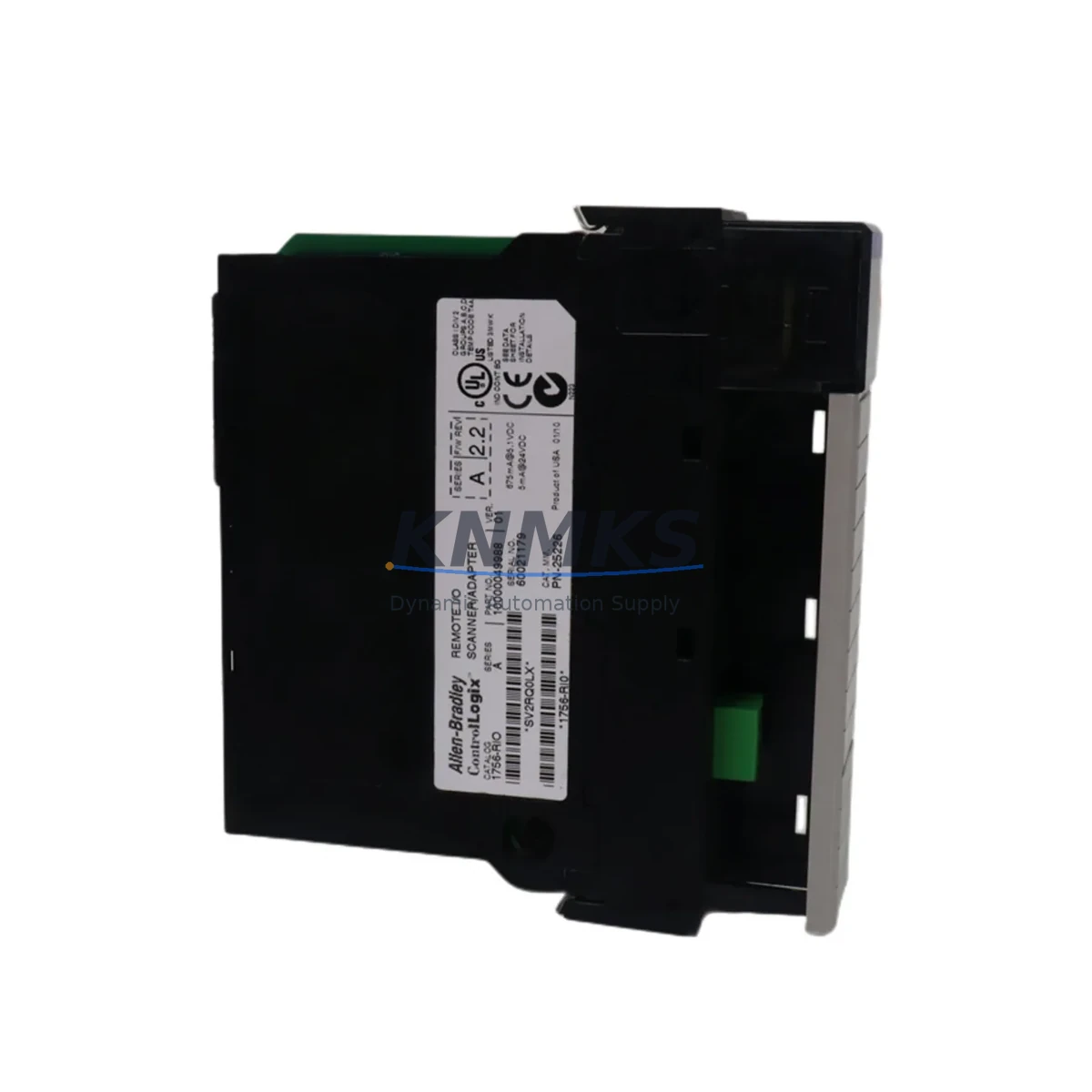
Allen-Bradley 1756-RIO Migration-Ready Remote I/O Scanner for Legacy Control Systems
The Allen-Bradley 1756-RIO is a ControlLogix-platform Remote I/O Scanner module engineered to bridge legacy PLC-5 and SLC 500 Remote I/O networks with modern ControlLogix control architectures. As Rockwell Automation progressively phases out older RIO-based platforms, the 1756-RIO has become a critical migration component for facilities operating legacy remote I/O drops across distributed control cabinets, conveyor systems, process skids, and multi-rack automation cells.
For engineers managing brownfield upgrades, the 1756-RIO eliminates the need for full I/O rewiring by preserving the existing 1771 RIO cable infrastructure while introducing ControlLogix processing power and modern Logix programming environments. This makes it an indispensable module in phased migration strategies where minimizing downtime and protecting existing field wiring investments are top priorities.
Migration Compatibility Table
| Parameter | Specification / Compatibility |
|---|---|
| Module SKU | 1756-RIO |
| Platform | Allen-Bradley ControlLogix (1756 Series) |
| Backplane Interface | 1756 ControlLogix backplane compatible |
| Communication Protocol | Remote I/O (RIO) – compatible with 1771 RIO cable networks |
| Legacy Systems Replaced | PLC-5 RIO Scanner, SLC 500 RIO Adapter, 1747-SN, 1771-ASB |
| RIO Network Speed | 57.6K / 115.2K / 230.4K baud (selectable) |
| Max RIO Drops Supported | Up to 32 logical rack drops per scanner |
| Installation Form Factor | Single-slot 1756 ControlLogix chassis module |
| Power Supply Requirement | Sourced via 1756 backplane; requires compatible 1756-PA72 or 1756-PB72 power supply |
| Programming Environment | Studio 5000 Logix Designer (RSLogix 5000 v16+) |
| Firmware Compatibility | Verify chassis firmware revision before installation; update via ControlFLASH if required |
| Mounting | Any slot in 1756-A4, 1756-A7, 1756-A10, 1756-A13, 1756-A17 chassis |
| Replacement Path | Direct replacement for aging PLC-5 RIO scanner cards in ControlLogix migration projects |
| Commissioning Notes | Verify rack address DIP switches, baud rate settings, and I/O map in Logix controller tags |
| Support terms | support terms confirmed by quotation – KNMKS quality-tested before shipment |
Retrofit Planning for Existing Automation Systems
Successful integration of the 1756-RIO into a legacy control environment requires systematic pre-migration planning. Before installation, engineers should audit the existing RIO network topology: document all active rack drops, confirm the baud rate currently in use on the 1771 RIO trunk cable, and verify that the existing field wiring terminations at each remote rack are intact and correctly labeled.
Power budget verification is a non-negotiable first step. The 1756-RIO draws power from the ControlLogix backplane, so the installed 1756-PA72 or 1756-PB72 power supply must have sufficient remaining capacity after accounting for all other modules in the chassis. In high-density chassis configurations — particularly those also hosting 1756-EN2T EtherNet/IP communication modules or 1756-L74 / 1756-L75 ControlLogix controllers — a power budget spreadsheet should be completed before ordering additional modules.
Terminal wiring at the remote end of the RIO network typically connects to legacy 1771-ASB adapter modules or equivalent remote I/O adapter cards. These adapters remain in place during migration; the 1756-RIO scanner at the ControlLogix end replaces only the scanner-side hardware. This means field I/O wiring, terminal blocks, and remote rack enclosures are fully preserved, dramatically reducing retrofit labor costs and installation risk.
For facilities also upgrading HMI infrastructure, the migration from PLC-5 to ControlLogix often runs in parallel with a transition from legacy PanelView terminals to PanelView Plus 7 or FactoryTalk View SE environments. HMI tag databases must be remapped to reflect the new Logix controller tag structure, as PLC-5 integer file addressing (N7:0, etc.) does not directly translate to Logix tag-based addressing. This remapping should be completed and validated in a staging environment before live cutover.
Where the existing system includes 1756-DNB DeviceNet scanner modules or 1756-DHRIO Data Highway Plus / Remote I/O combination modules, the 1756-RIO can coexist in the same chassis, allowing a mixed-protocol migration approach. This is particularly valuable in facilities where some remote drops are being migrated to EtherNet/IP while others remain on the legacy RIO trunk during a phased cutover.
Signal isolation requirements should also be reviewed. In environments with significant electrical noise — common in heavy manufacturing, mining, and petrochemical applications — installing signal isolators or surge protection devices on the RIO trunk cable entry points protects both the scanner module and the remote adapter hardware from transient damage during and after migration.
Downtime Control During System Migration
Minimizing unplanned downtime is the primary concern for any brownfield migration involving the Allen-Bradley 1756-RIO. A structured cutover plan should define a precise maintenance window, with all pre-migration steps — firmware updates, program uploads, I/O map verification, and spare module staging — completed before the production line is taken offline.
The recommended approach is to upload and archive the existing PLC-5 or SLC 500 program before any hardware changes are made. This archived program serves as the baseline reference for I/O address mapping during the Logix conversion process. Rockwell Automation’s Migration Conversion Tool (available within Studio 5000) can assist with automated translation of ladder logic rungs, though manual review of all converted rungs — particularly those involving RIO rack/group/slot addressing — is strongly advised.
During the cutover window, the sequence should follow: power down the legacy controller chassis → remove the legacy RIO scanner card → install the 1756-RIO in the designated ControlLogix chassis slot → confirm DIP switch settings for rack address and baud rate → restore power → download the converted Logix program → go online and verify I/O status for each remote drop before returning the system to automatic mode.
Where a parallel-run strategy is feasible, the ControlLogix chassis with the 1756-RIO can be powered and connected to the RIO trunk while the legacy scanner remains active, allowing pre-cutover verification of communication links and remote rack recognition without interrupting production. This approach is particularly effective in multi-drop RIO networks where individual drops can be validated sequentially.
Post-cutover, a structured commissioning checklist should confirm: all remote I/O drops are online and recognized, all input and output tags are correctly mapped in the Logix program, HMI displays are reflecting live process values, and any interlocks or safety logic dependent on RIO-sourced signals are functioning as designed. KNMKS provides pre-shipment functional testing on all 1756-RIO modules, reducing the risk of DOA hardware contributing to extended downtime.
Retrofit Support FAQ
Q1: Can the 1756-RIO directly replace a PLC-5 RIO scanner without rewiring the remote I/O trunk cable?
Yes. The 1756-RIO is designed to connect to existing 1771 RIO trunk cable infrastructure. The remote end adapters (such as 1771-ASB modules) remain in place. Only the scanner-side hardware in the controller chassis is replaced, preserving all field wiring and remote rack hardware.
Q2: What firmware version is required on the ControlLogix controller to support the 1756-RIO?
The 1756-RIO is supported under RSLogix 5000 v16 and later (Studio 5000 Logix Designer). The ControlLogix controller firmware should be updated to a compatible revision using ControlFLASH prior to installation. Always verify the specific firmware compatibility matrix for your controller model (e.g., 1756-L71, 1756-L74, 1756-L75) before proceeding.
Q3: How is the I/O address mapping configured after installing the 1756-RIO?
The 1756-RIO uses a rack/group/slot addressing model consistent with legacy RIO conventions. In Studio 5000, the module is added to the I/O tree and configured with the appropriate rack address (matching the DIP switch settings on the remote adapter), baud rate, and rack size. The resulting I/O data is accessible via controller-scoped tags in the Logix program.
Q4: Does KNMKS provide support terms and pre-shipment testing for the 1756-RIO?
Yes. All 1756-RIO modules supplied by KNMKS are covered by a support terms confirmed by quotation and undergo functional testing prior to shipment. In-stock units are available for immediate dispatch. For urgent retrofit projects, contact our sales team to confirm lead time and arrange expedited shipping.
© 2026 KNMKS. All rights reserved.
Original Source: https://knmks.com
Contact: admin@knmks.com | +86 18359268345
Product Identification
- Brand / Ecosystem
-
Allen-Bradley
Allen-Bradley - Model / Series
-
1756-RIO
ControlLogix Series - Product Family
- PLCs & Controllers
- Availability Status
- Available on request after model and quantity confirmation
- Inquiry Type
- B2B RFQ, replacement inquiry and project spare-part request
- Pre-Quote Check
- Exact SKU, brand, series, quantity, nameplate photos and destination country are checked before quotation
System Path
Where this product fits in the KNMKS automation structure.
Specification & Inquiry Focus
- Control platform
- PLC, PAC and modular controllers
- Common needs
- CPU, rack, power and I/O expansion
- Project support
- Replacement, cabinet build and maintenance
Buyer Confirmation
Information KNMKS checks before replying.
- Exact model
- 1756-RIO
- Brand / ecosystem
- Allen-Bradley
- Product family
- PLCs & Controllers
- Application note
- Replacement, maintenance, project build or spare-part list
- Useful photos
- Nameplate, installed unit, cabinet layout or connector side
- Delivery details
- Quantity, destination country and target schedule
Document Support
Files and notes can be confirmed during quotation.
- Product photos or nameplate confirmation when available
- Packing and delivery notes before quotation confirmation
- Support scope and delivery terms confirmed per inquiry
- Export document coordination for qualified B2B requests
Inquiry Support
- Model cross-checking before quotation
- CPU, power, rack and expansion module matching
- Support for replacement and project inquiry
What to Send Us
- Brand and exact model number: Allen-Bradley 1756-RIO
- Quantity and required delivery time
- Application, replacement requirement or nameplate photo
- Destination country and shipping preference
RFQ Preparation
This is a product inquiry page built for RFQ communication.
Fast Model Check
Send this model to KNMKS for confirmation.
Include quantity, destination country and photos if this is a maintenance replacement. The inquiry will be saved with a reference number after submission.
Brand & Compatibility Note
KNMKS displays automation product information for well-known industrial brand ecosystems and compatible replacement references. Brand names are used for product identification and compatibility reference only; final availability and commercial terms are confirmed per quotation.
 Manufacturing
 Machine Tools
 Packaging
 Energy & Power



 HMI & Displays
 Servo Systems
 Variable Frequency Drives
 Sensors