
Overview
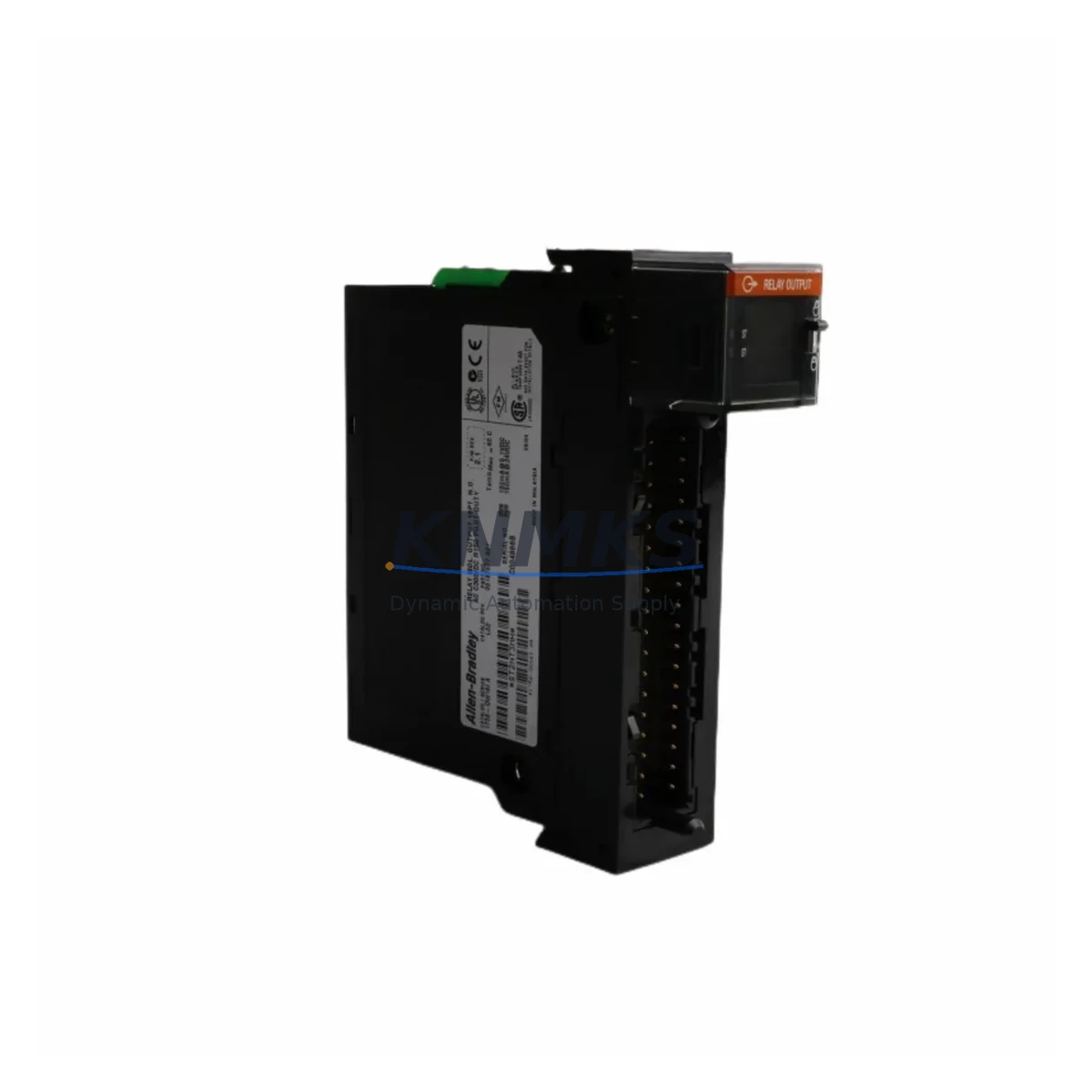
Allen-Bradley 1756-OW16I Maintenance-Proven Spare Part for Factory Uptime
The Allen-Bradley 1756-OW16I is a 16-point isolated relay output module designed for the ControlLogix 1756 platform — one of Rockwell Automation’s most widely deployed PLC architectures in discrete manufacturing, process control, and critical infrastructure. As a maintenance-proven spare, the 1756-OW16I is a cornerstone component in any serious spare parts inventory for facilities running ControlLogix-based control systems. Its isolated relay outputs provide robust switching capability for motor starters, solenoid valves, pilot lights, and other field devices, making it indispensable in both routine maintenance and emergency fault recovery scenarios.
For maintenance engineers managing aging ControlLogix cabinets, the 1756-OW16I is frequently the first module to show wear in high-cycle applications. Relay contacts degrade over time under inductive loads, and a failed output module can halt an entire production line within minutes. Stocking a verified original spare eliminates the risk of extended downtime caused by sourcing delays. For procurement engineers, sourcing an original Allen-Bradley 1756-OW16I from a reliable supplier with documented testing and a support terms confirmed by quotation is the lowest-risk path to maintaining system integrity and audit compliance.
Spare Maintenance Table
| Parameter | Specification |
|---|---|
| Part Number | 1756-OW16I |
| Brand | Allen-Bradley / Rockwell Automation |
| Series | ControlLogix 1756 |
| Module Type | Relay Output Module (Isolated) |
| Output Points | 16 Points, Individually Isolated |
| Output Voltage Range | 10–265V AC/DC |
| Max Load Current | 2A per point (resistive), 0.5A per point (inductive) |
| Backplane Compatibility | 1756 ControlLogix Chassis (all standard sizes) |
| Communication | ControlLogix backplane (1756 series) |
| Operating Temperature | 0°C to 60°C (32°F to 140°F) |
| Isolation | Channel-to-channel isolated |
| Indicators | Per-point LED status indicators |
| Origin | United States |
| Condition | Original, New or Tested Surplus |
| Support terms | 12 Months from shipment date |
| Pre-shipment Testing | Function-tested before dispatch |
| Application | Discrete manufacturing, process control, utilities, OEM machinery |
Maintenance Planning for Continuous Operation
When replacing or inspecting the 1756-OW16I in a ControlLogix cabinet, a disciplined maintenance engineer will not stop at the module itself. The relay output module sits within a broader electrical circuit, and a failure in any adjacent component can cause misdiagnosis or repeat failures after replacement.
Begin by verifying the 1756-PA75 or 1756-PB75 power supply module — the chassis power supply must deliver stable voltage within specification before any output module is trusted. A degraded power supply is a common root cause of intermittent relay output faults. Next, inspect the 1756-A13 or 1756-A7 chassis backplane for physical damage, corrosion on the module connectors, or signs of heat stress. A compromised backplane slot will cause the replacement 1756-OW16I to fail prematurely.
Check all field wiring terminations at the 1756-TBCH or equivalent wiring arm. Loose or corroded terminals are a leading cause of relay output failures in high-vibration environments. For high-cycle inductive loads such as motor starters or solenoid valves, verify that appropriate surge suppressors or snubber circuits are installed across the load — without these, relay contact life is significantly reduced.
If the 1756-OW16I is used in a system with mixed I/O, also inspect adjacent 1756-IB16 or 1756-IA16 input modules for any cross-contamination from field wiring faults. Communication health should be verified through the 1756-EN2T or 1756-ENBT EtherNet/IP communication module — confirm that the controller can read and write to the output module without I/O faults in the RSLogix 5000 or Studio 5000 project. For facilities using a PanelView Plus HMI connected to the same ControlLogix system, verify that output tag mappings remain intact after module replacement to avoid operator interface alarms.
Finally, review the 1492-IFM series interface modules or terminal blocks used to connect field devices to the 1756-OW16I. These passive components are often overlooked during annual maintenance but are critical to reliable signal continuity. Maintaining a small buffer stock of these components alongside the 1756-OW16I itself is a best practice for facilities with zero-tolerance downtime requirements.
Site Replacement Workflow
Replacing the 1756-OW16I on-site is a straightforward procedure when the correct spare is available and the replacement workflow is followed systematically:
- Isolate and de-energize: Follow your site LOTO (Lockout/Tagout) procedure. De-energize the chassis power supply and confirm zero voltage at the module terminals before removal.
- Document current configuration: Before removal, use RSLogix 5000 or Studio 5000 to export the I/O configuration and verify the module’s slot assignment, output tag names, and any module-specific parameters (e.g., fault state, program state output values).
- Remove the failed module: Press the top and bottom locking tabs, slide the 1756-OW16I out of the chassis slot. Inspect the backplane connector for damage.
- Install the replacement: Slide the new 1756-OW16I into the same slot. The module will auto-configure from the controller’s stored I/O configuration if the project is set to auto-detect.
- Restore power and verify: Re-energize the chassis. Confirm the module status LED shows green (OK). In Studio 5000, verify no I/O faults are present and force-test critical output points before returning the system to production.
- Update maintenance records: Log the replacement date, module serial number, and any field wiring observations. This supports support requests and future failure analysis.
This workflow minimizes mean time to repair (MTTR) and ensures the replacement 1756-OW16I is fully validated before the production line resumes. For legacy systems running older firmware, confirm that the replacement module’s firmware revision is compatible with the controller’s project version.
Spare Parts Support FAQ
Q1: Is the 1756-OW16I compatible with all ControlLogix 1756 chassis sizes?
Yes. The 1756-OW16I is compatible with all standard 1756 series chassis, including the 1756-A4, 1756-A7, 1756-A10, 1756-A13, and 1756-A17. It occupies a single slot and communicates via the ControlLogix backplane. Always verify the chassis power supply capacity when adding modules to a partially populated chassis.
Q2: How is the 1756-OW16I tested before shipment?
Each unit undergoes functional testing prior to dispatch, including verification of relay contact continuity, LED indicator operation, and backplane communication integrity. A test report is available upon request. Units are shipped in anti-static packaging with physical inspection documentation.
Q3: What is the recommended inventory strategy for the 1756-OW16I?
For facilities with 3 or more ControlLogix systems using relay output modules, maintaining a minimum of 1–2 spare 1756-OW16I units on-site is recommended. Given that Rockwell Automation has announced end-of-life timelines for certain 1756 series components, early procurement of verified original spares reduces long-term supply risk and protects against price escalation.
Q4: What support terms and long-term supply support is available?
All 1756-OW16I units supplied by KNMKS carry a support terms confirmed by quotation from the shipment date, covering manufacturing defects and functional failures under normal operating conditions. We maintain ongoing inventory of ControlLogix spare modules to support long-term maintenance contracts and annual shutdown procurement. Contact our technical team for volume pricing, lead time confirmation, and compatibility verification for your specific system revision.
© 2026 KNMKS. All rights reserved.
Original Source: https://knmks.com
Contact: admin@knmks.com | +86 18359268345
Product Identification
- Brand / Ecosystem
-
Allen-Bradley
Allen-Bradley - Model / Series
-
1756-OW16I
ControlLogix Series - Product Family
- PLCs & Controllers
- Availability Status
- Available on request after model and quantity confirmation
- Inquiry Type
- B2B RFQ, replacement inquiry and project spare-part request
- Pre-Quote Check
- Exact SKU, brand, series, quantity, nameplate photos and destination country are checked before quotation
System Path
Where this product fits in the KNMKS automation structure.
Specification & Inquiry Focus
- Control platform
- PLC, PAC and modular controllers
- Common needs
- CPU, rack, power and I/O expansion
- Project support
- Replacement, cabinet build and maintenance
Buyer Confirmation
Information KNMKS checks before replying.
- Exact model
- 1756-OW16I
- Brand / ecosystem
- Allen-Bradley
- Product family
- PLCs & Controllers
- Application note
- Replacement, maintenance, project build or spare-part list
- Useful photos
- Nameplate, installed unit, cabinet layout or connector side
- Delivery details
- Quantity, destination country and target schedule
Document Support
Files and notes can be confirmed during quotation.
- Product photos or nameplate confirmation when available
- Packing and delivery notes before quotation confirmation
- Support scope and delivery terms confirmed per inquiry
- Export document coordination for qualified B2B requests
Inquiry Support
- Model cross-checking before quotation
- CPU, power, rack and expansion module matching
- Support for replacement and project inquiry
What to Send Us
- Brand and exact model number: Allen-Bradley 1756-OW16I
- Quantity and required delivery time
- Application, replacement requirement or nameplate photo
- Destination country and shipping preference
RFQ Preparation
This is a product inquiry page built for RFQ communication.
Fast Model Check
Send this model to KNMKS for confirmation.
Include quantity, destination country and photos if this is a maintenance replacement. The inquiry will be saved with a reference number after submission.
Brand & Compatibility Note
KNMKS displays automation product information for well-known industrial brand ecosystems and compatible replacement references. Brand names are used for product identification and compatibility reference only; final availability and commercial terms are confirmed per quotation.
 Manufacturing
 Machine Tools
 Packaging
 Energy & Power



 HMI & Displays
 Servo Systems
 Variable Frequency Drives
 Sensors