
Overview
Allen-Bradley 1756-OF4 Maintenance-Proven Spare Part for Factory Uptime
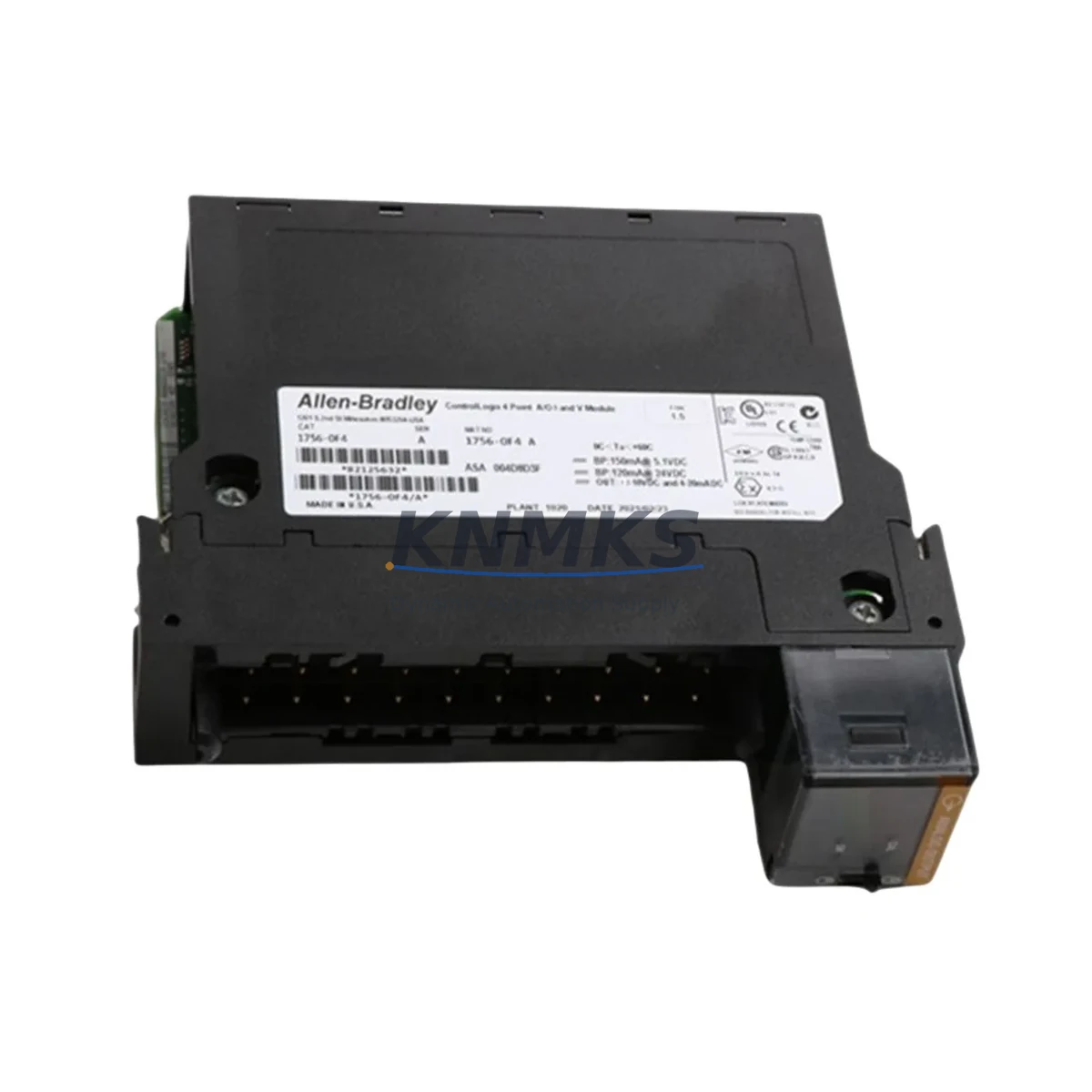
The Allen-Bradley 1756-OF4 is a 4-channel analog output module designed for the Rockwell Automation ControlLogix 1756 platform. As a critical field device in process control, motion coordination, and drive command applications, the 1756-OF4 converts digital control signals from the ControlLogix processor into precise analog voltage or current outputs — typically 0–10 V or 4–20 mA — to drive downstream actuators, variable frequency drives, control valves, and proportional solenoids. Maintaining a verified spare of the 1756-OF4 in your cabinet-side inventory is a foundational practice for any facility running continuous or semi-continuous production lines where unplanned downtime carries significant cost.
For maintenance engineers managing aging ControlLogix systems, the 1756-OF4 represents one of the most frequently rotated analog output modules in the 1756 chassis family. Its 4-channel architecture makes it a compact solution for multi-loop process control, and its compatibility with the standard 1756 backplane means it can be hot-swapped in most configurations without requiring a full system shutdown — provided the replacement module is pre-configured and the I/O tree is correctly mapped in Studio 5000 or RSLogix 5000. Procurement engineers sourcing replacement 1756-OF4 modules should verify the firmware revision and hardware series letter to ensure seamless drop-in compatibility with the existing chassis and controller firmware.
This listing supplies an original, tested Allen-Bradley 1756-OF4 module with a support terms confirmed by quotation, suitable for emergency replacement, scheduled maintenance rotation, and long-term spare parts inventory programs.
Spare Maintenance Table
| Parameter | Specification |
|---|---|
| SKU / Part Number | 1756-OF4 |
| Brand | Allen-Bradley (Rockwell Automation) |
| Series | ControlLogix 1756 |
| Module Type | Analog Output Module |
| Number of Channels | 4 (Voltage or Current, software-selectable per channel) |
| Output Signal Range | 0–10 V DC / ±10 V DC / 4–20 mA / 0–20 mA |
| Resolution | 16-bit |
| Backplane Compatibility | 1756 ControlLogix Backplane (all standard chassis sizes) |
| Power Consumption | Supplied via 1756 backplane; field-side power required for current output |
| Operating Temperature | 0 °C to 60 °C (32 °F to 140 °F) |
| Storage Temperature | -40 °C to 85 °C |
| Relative Humidity | 5–95% non-condensing |
| Isolation | Channel-to-backplane isolation provided |
| Mounting | 1756 chassis slot (any slot) |
| Country of Origin | United States |
| Support terms | 12 Months from date of shipment |
| Condition | Original, tested before shipment |
Maintenance Planning for Continuous Operation
When replacing a 1756-OF4 in a live ControlLogix system, a disciplined maintenance workflow extends well beyond the module swap itself. Maintenance engineers should treat the replacement event as a full analog output loop audit. Begin by verifying the field-side wiring at the 1756-OF4 terminal block: check for loose terminations, corroded conductors, and correct shielding practices, particularly in environments with high electromagnetic interference from variable frequency drives or large motor starters.
Before inserting the replacement module, inspect the 1756 chassis backplane connector for bent pins or contamination. A damaged backplane can cause intermittent faults that are easily misdiagnosed as module failures, leading to unnecessary module replacements. If the chassis is approaching end-of-life or shows signs of physical stress, consider scheduling a chassis replacement alongside the module swap.
The 1756-PA75 or 1756-PB75 power supply module feeding the chassis should be load-checked during the maintenance window. An undersized or aging power supply can cause marginal voltage conditions on the backplane that degrade analog output accuracy and trigger nuisance faults. Confirm that the total chassis load, including all installed I/O modules, remains within the power supply’s rated capacity.
For systems using the 1756-OF4 to command variable frequency drives via 4–20 mA speed reference signals, verify the drive’s analog input scaling and confirm that the new module’s channel configuration in Studio 5000 matches the original — including engineering unit scaling, rate-of-change limiting, and fault state output values. Incorrect fault state configuration can cause drives to run at full speed or zero speed during a controller fault, both of which may be hazardous depending on the application.
If the control cabinet includes signal isolators or signal conditioners between the 1756-OF4 outputs and field devices, inspect these components for drift or failure. Signal isolators are often overlooked during module-level troubleshooting but are a common source of loop inaccuracy in older installations. Similarly, check any terminal blocks and DIN rail-mounted fuse holders protecting the analog output field circuits — blown fuses or high-resistance connections will cause output channels to appear faulty even when the module itself is functioning correctly.
For facilities running mixed analog and digital I/O in the same chassis, also verify the status of adjacent 1756-IB16 or 1756-OB16E digital I/O modules during the maintenance window. Shared chassis faults can affect multiple modules simultaneously, and a thorough inspection during a planned replacement reduces the risk of a secondary failure shortly after the primary repair is completed.
Procurement engineers building a spare parts inventory for ControlLogix systems should consider stocking at least one 1756-OF4 per production line, alongside a matched 1756-EN2T EtherNet/IP communication module and a spare processor such as the 1756-L73 or 1756-L74, to cover the most common single-point failure scenarios in a ControlLogix chassis. A well-structured spare parts program reduces mean time to repair (MTTR) and supports long-term system availability without dependence on expedited freight or spot-market sourcing.
Site Replacement Workflow
Step 1 — Pre-Replacement Preparation: Download and archive the current controller program from the 1756 processor using Studio 5000 or RSLogix 5000. Record the existing 1756-OF4 channel configuration, including output type (voltage/current), engineering unit scaling, and fault/program state output values for all 4 channels. Photograph the field wiring at the module’s terminal block before disconnection.
Step 2 — Safe Isolation: If the system does not support hot-swap for this slot (verify in the controller’s I/O configuration), place the controller in Program mode to inhibit outputs before removing the module. For current-output channels driving actuators or drives, confirm that the downstream devices are in a safe state before de-energizing the loop.
Step 3 — Module Removal: Disconnect the field wiring connector from the 1756-OF4. Press the module’s release tab and slide it out of the chassis slot. Inspect the backplane connector on both the module and the chassis for damage.
Step 4 — Replacement Module Verification: Confirm that the replacement 1756-OF4 matches the hardware series and firmware revision of the removed module, or verify compatibility with the installed controller firmware version. Modules with mismatched series letters may require an I/O configuration update in the controller program.
Step 5 — Installation and Configuration: Insert the replacement module into the chassis slot. If the controller is online and the module was previously inhibited, un-inhibit the module in the I/O tree and verify that the module status indicator shows a solid green RUN state. Confirm that all 4 output channels are producing the expected engineering unit values by cross-checking with field instrumentation or a calibrated loop calibrator.
Step 6 — Loop Verification and Documentation: Perform a full 4-point calibration check on each output channel (0%, 25%, 75%, 100% of span). Document the as-found and as-left readings. Update the maintenance management system (CMMS) with the replacement date, module serial number, and any observations noted during the replacement. Return the removed module for evaluation and repair or disposal per site procedures.
Spare Parts Support FAQ
Q1: Is the 1756-OF4 compatible with all ControlLogix chassis sizes?
Yes. The 1756-OF4 is compatible with all standard 1756 ControlLogix chassis, including the 4-slot (1756-A4), 7-slot (1756-A7), 10-slot (1756-A10), 13-slot (1756-A13), and 17-slot (1756-A17) configurations. The module occupies a single chassis slot and draws power from the backplane. Ensure the chassis power supply has sufficient capacity to support the additional load before installation.
Q2: How do I verify compatibility between the replacement 1756-OF4 and my existing controller firmware?
Rockwell Automation publishes firmware compatibility matrices for all 1756 series modules. As a general rule, modules with a higher hardware series letter may require a minimum controller firmware revision. Before ordering, provide your controller catalog number (e.g., 1756-L73) and current firmware revision to our sales team, and we will confirm compatibility. We can also supply modules pre-tested against specific firmware versions upon request.
Q3: What does the support terms confirmed by quotation cover, and what is the claims process?
Our support terms confirmed by quotation cover defects in materials and workmanship under normal operating conditions. Each module is tested before shipment to verify basic functionality. In the event of a support terms claim, contact admin@knmks.com with the order number, module serial number, and a description of the fault. We will arrange return shipping and provide a replacement or refund within the agreed lead time. Support terms does not cover damage resulting from incorrect installation, overvoltage, or physical mishandling.
Q4: Can you support long-term supply agreements for 1756-OF4 and other ControlLogix spare parts?
Yes. We support blanket purchase orders and long-term supply agreements for facilities with ongoing ControlLogix maintenance programs. This is particularly valuable for plants managing legacy 1756 systems where Rockwell Automation has announced end-of-life or reduced availability for specific catalog numbers. Contact our procurement team at admin@knmks.com or +86 18359268345 to discuss volume pricing, reserved inventory, and scheduled delivery programs.
© 2026 KNMKS. All rights reserved.
Original Source: https://knmks.com
Contact: admin@knmks.com | +86 18359268345
Product Identification
- Brand / Ecosystem
-
Allen-Bradley
Allen-Bradley - Model / Series
-
1756-OF4
ControlLogix Series - Product Family
- PLCs & Controllers
- Availability Status
- Available on request after model and quantity confirmation
- Inquiry Type
- B2B RFQ, replacement inquiry and project spare-part request
- Pre-Quote Check
- Exact SKU, brand, series, quantity, nameplate photos and destination country are checked before quotation
System Path
Where this product fits in the KNMKS automation structure.
Specification & Inquiry Focus
- Control platform
- PLC, PAC and modular controllers
- Common needs
- CPU, rack, power and I/O expansion
- Project support
- Replacement, cabinet build and maintenance
Buyer Confirmation
Information KNMKS checks before replying.
- Exact model
- 1756-OF4
- Brand / ecosystem
- Allen-Bradley
- Product family
- PLCs & Controllers
- Application note
- Replacement, maintenance, project build or spare-part list
- Useful photos
- Nameplate, installed unit, cabinet layout or connector side
- Delivery details
- Quantity, destination country and target schedule
Document Support
Files and notes can be confirmed during quotation.
- Product photos or nameplate confirmation when available
- Packing and delivery notes before quotation confirmation
- Support scope and delivery terms confirmed per inquiry
- Export document coordination for qualified B2B requests
Inquiry Support
- Model cross-checking before quotation
- CPU, power, rack and expansion module matching
- Support for replacement and project inquiry
What to Send Us
- Brand and exact model number: Allen-Bradley 1756-OF4
- Quantity and required delivery time
- Application, replacement requirement or nameplate photo
- Destination country and shipping preference
RFQ Preparation
This is a product inquiry page built for RFQ communication.
Fast Model Check
Send this model to KNMKS for confirmation.
Include quantity, destination country and photos if this is a maintenance replacement. The inquiry will be saved with a reference number after submission.
Brand & Compatibility Note
KNMKS displays automation product information for well-known industrial brand ecosystems and compatible replacement references. Brand names are used for product identification and compatibility reference only; final availability and commercial terms are confirmed per quotation.
 Manufacturing
 Machine Tools
 Packaging
 Energy & Power



 HMI & Displays
 Servo Systems
 Variable Frequency Drives
 Sensors