
Overview
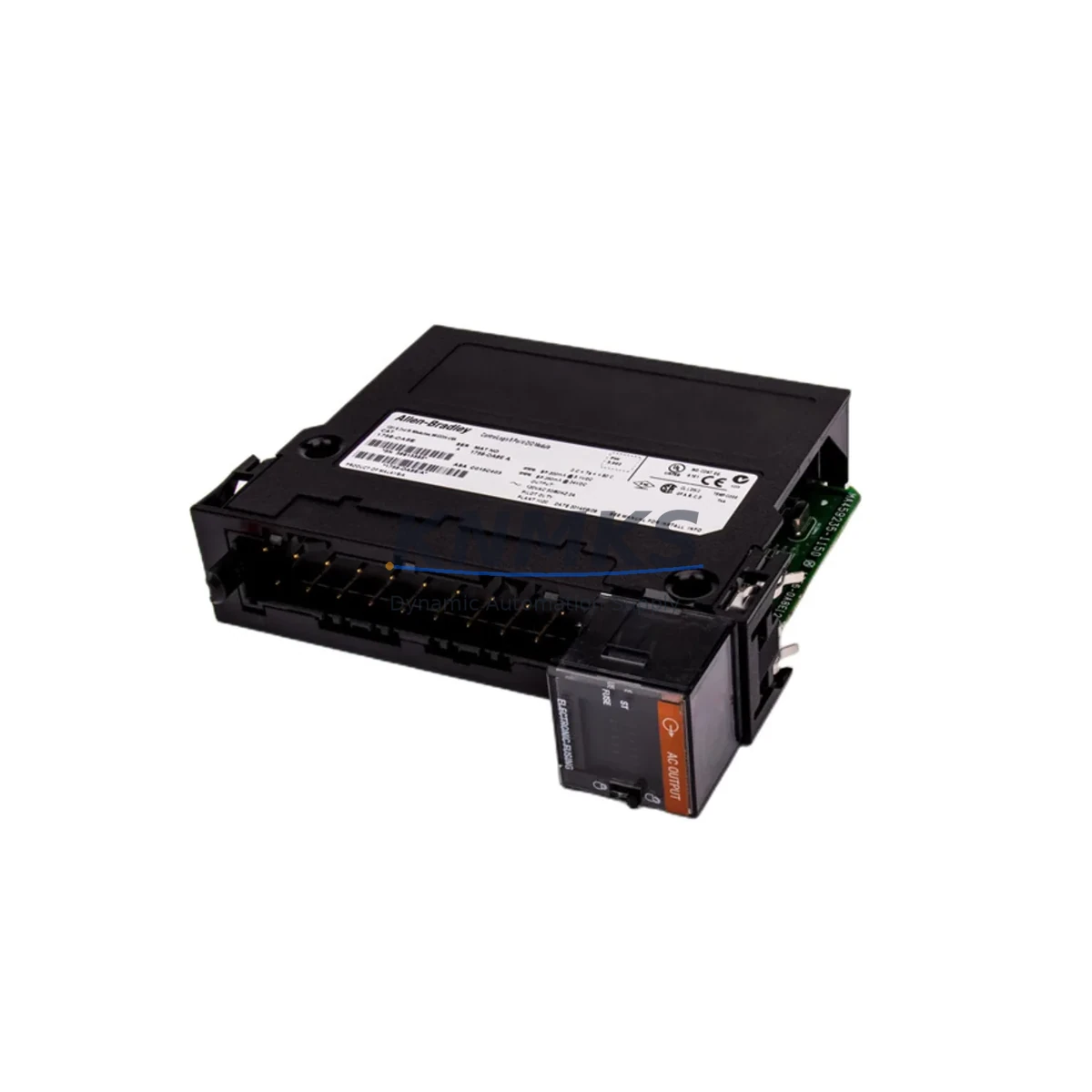
Allen-Bradley 1756-OA8E Maintenance-Proven Spare Part for Factory Uptime
The Allen-Bradley 1756-OA8E is an 8-point, 120/240V AC digital output module designed for the ControlLogix 1756 platform — one of the most widely deployed programmable automation controller (PAC) systems in discrete and process manufacturing environments. As a maintenance-proven spare part, the 1756-OA8E is a critical component for facilities that depend on uninterrupted production cycles, rapid fault recovery, and long-term system continuity.
For maintenance engineers managing aging ControlLogix cabinets, the 1756-OA8E addresses one of the most common failure points in AC output circuits: degraded triacs, blown output fuses, and thermally stressed output channels caused by inductive load switching. Stocking a verified original 1756-OA8E spare eliminates the risk of extended downtime when a field module fails during a production shift. Each unit shipped by KNMKS is sourced from authorized supply chains, functionally tested prior to dispatch, and backed by a support terms confirmed by quotation — giving procurement engineers the confidence to commit to long-term spare parts planning.
Whether you are managing a single ControlLogix rack or coordinating spare parts across multiple plant sites, the 1756-OA8E belongs on every critical spare list for facilities running 1756-series control systems.
Spare Maintenance Table
| Parameter | Specification |
|---|---|
| SKU / Part Number | 1756-OA8E |
| Brand | Allen-Bradley (Rockwell Automation) |
| Series | ControlLogix 1756 |
| Module Type | Digital AC Output Module |
| Output Points | 8 Points |
| Output Voltage Range | 74–265V AC (Nominal: 120/240V AC) |
| Output Current per Point | 2A (max) |
| Backplane Compatibility | 1756 ControlLogix Chassis (all standard sizes: 4, 7, 10, 13, 17-slot) |
| Isolation | Group isolated (4 points per group) |
| Fusing | Electronic fusing per output group |
| Diagnostics | Open-wire detection, blown fuse detection |
| Operating Temperature | 0°C to 60°C (32°F to 140°F) |
| Installation | Hot-swappable in ControlLogix chassis |
| Application Environment | Industrial control panels, discrete manufacturing, process automation |
| Maintenance Recommendation | Inspect output channels annually; replace on first sign of triac degradation or nuisance fusing |
| Origin | United States |
| Support terms | 12 Months (KNMKS) |
| Condition | Original, tested before shipment |
Maintenance Planning for Continuous Operation
When a 1756-OA8E output module is flagged for replacement during a scheduled inspection or emergency fault response, experienced maintenance engineers know that the module itself is rarely the only component that requires attention. A thorough site assessment should extend to the surrounding electrical circuit and control cabinet infrastructure to prevent repeat failures and ensure a clean return to service.
Begin by verifying the integrity of the 1756-PA75 or 1756-PB75 power supply module feeding the chassis. Undervoltage or ripple on the backplane power rail is a leading cause of premature output module failure and can go undetected without a dedicated power quality check. If the chassis is running a redundant power configuration, inspect both supply modules and their associated wiring harnesses.
Next, audit the 1756-TBCH or 1756-TBS6H wiring terminal bases connected to the output module. Loose terminations, corroded contacts, or undersized conductors on high-cycle AC output circuits accelerate wear on the module’s internal triacs. Replace any terminal base showing signs of heat discoloration or mechanical fatigue.
For facilities running mixed I/O architectures, cross-check the adjacent 1756-IA8D or 1756-IA16 AC input modules in the same chassis. Input modules sharing the same AC common with the 1756-OA8E are exposed to the same voltage transients and should be included in the inspection cycle. Similarly, if the control cabinet includes a 1756-EN2T or 1756-EN3TR EtherNet/IP communication module, verify firmware revision compatibility after any module swap to avoid unexpected I/O tree reconfiguration.
In process environments where the 1756-OA8E drives solenoid valves, motor starters, or contactor coils, consider installing or inspecting surge suppression devices (MOVs or RC snubbers) across each inductive load. These low-cost components significantly extend output module service life and reduce nuisance fusing events. If the cabinet also contains a 1756-OB16E or 1756-OB32 DC output module for mixed-voltage output circuits, include it in the same maintenance window to consolidate downtime.
Finally, for systems with an integrated PanelView Plus HMI displaying output status, confirm that the HMI tag database reflects the correct slot assignment after module replacement. A mismatch between physical slot and HMI tag mapping is a common post-maintenance error that can trigger false alarms or mask real faults during the first production run after restart.
Site Replacement Workflow
Step 1 — Pre-Replacement Verification: Confirm the failed module’s slot number, chassis ID, and firmware revision using RSLogix 5000 / Studio 5000. Export the current I/O configuration as a backup before any hardware change.
Step 2 — Safe Isolation: De-energize the AC output field circuits at the field disconnect or MCC. Do not rely solely on the software inhibit function. Verify zero voltage at the terminal base using a calibrated meter before touching wiring.
Step 3 — Hot-Swap Removal: The 1756-OA8E supports hot-swap removal from a powered ControlLogix chassis. Slide the module locking tab, pull the module straight out, and set it aside for failure analysis. Do not remove the terminal base wiring during this step.
Step 4 — Spare Module Inspection: Before installing the replacement 1756-OA8E, visually inspect the module for shipping damage, verify the catalog number label, and confirm the firmware revision sticker matches your system’s compatibility requirements.
Step 5 — Installation and Re-energization: Seat the replacement module firmly into the chassis slot until the locking tab engages. Re-energize the field circuits and observe the module status LEDs. A solid green RUN LED with no FLT indication confirms successful installation.
Step 6 — Functional Test: Force each output point individually from Studio 5000 (with appropriate safety precautions) to confirm field device response. Document the test results and update the maintenance log with the replacement date, module serial number, and technician ID.
This workflow minimizes mean time to repair (MTTR), preserves system configuration integrity, and ensures the replacement module is fully validated before returning the line to automatic operation.
Spare Parts Support FAQ
Q1: Is the 1756-OA8E supplied by KNMKS an original Allen-Bradley module?
Yes. All 1756-OA8E units are sourced from authorized industrial supply channels. Each module is inspected and functionally tested before shipment. A support terms confirmed by quotation is included with every unit, covering defects in materials and workmanship under normal operating conditions.
Q2: How do I verify compatibility between the 1756-OA8E and my existing ControlLogix chassis?
The 1756-OA8E is compatible with all standard 1756 ControlLogix chassis sizes (4, 7, 10, 13, and 17-slot). Compatibility is determined by the chassis series and the firmware revision of your Logix controller. Consult Rockwell Automation Publication 1756-TD002 for the full compatibility matrix, or contact KNMKS with your controller catalog number and firmware version for pre-purchase confirmation.
Q3: What is the recommended spare parts stocking strategy for the 1756-OA8E?
For facilities with 3 or more ControlLogix chassis containing 1756-OA8E modules, KNMKS recommends maintaining a minimum of 1–2 spare units on-site. For high-cycle applications (solenoid valve control, motor starter switching) or facilities with extended lead-time constraints, a standing blanket order with KNMKS ensures continuous availability without capital overcommitment.
Q4: Can KNMKS support long-term supply of the 1756-OA8E for multi-year maintenance contracts?
Yes. KNMKS maintains dedicated inventory for ControlLogix 1756-series modules to support long-term maintenance agreements, annual shutdown procurement, and emergency replenishment programs. Contact admin@knmks.com or call +86 18359268345 to discuss volume pricing, lead times, and consignment stocking options.
© 2026 KNMKS. All rights reserved.
Original Source: https://knmks.com
Contact: admin@knmks.com | +86 18359268345
Product Identification
- Brand / Ecosystem
-
Allen-Bradley
Allen-Bradley - Model / Series
-
1756-OA8E
ControlLogix Series - Product Family
- PLCs & Controllers
- Availability Status
- Available on request after model and quantity confirmation
- Inquiry Type
- B2B RFQ, replacement inquiry and project spare-part request
- Pre-Quote Check
- Exact SKU, brand, series, quantity, nameplate photos and destination country are checked before quotation
System Path
Where this product fits in the KNMKS automation structure.
Specification & Inquiry Focus
- Control platform
- PLC, PAC and modular controllers
- Common needs
- CPU, rack, power and I/O expansion
- Project support
- Replacement, cabinet build and maintenance
Buyer Confirmation
Information KNMKS checks before replying.
- Exact model
- 1756-OA8E
- Brand / ecosystem
- Allen-Bradley
- Product family
- PLCs & Controllers
- Application note
- Replacement, maintenance, project build or spare-part list
- Useful photos
- Nameplate, installed unit, cabinet layout or connector side
- Delivery details
- Quantity, destination country and target schedule
Document Support
Files and notes can be confirmed during quotation.
- Product photos or nameplate confirmation when available
- Packing and delivery notes before quotation confirmation
- Support scope and delivery terms confirmed per inquiry
- Export document coordination for qualified B2B requests
Inquiry Support
- Model cross-checking before quotation
- CPU, power, rack and expansion module matching
- Support for replacement and project inquiry
What to Send Us
- Brand and exact model number: Allen-Bradley 1756-OA8E
- Quantity and required delivery time
- Application, replacement requirement or nameplate photo
- Destination country and shipping preference
RFQ Preparation
This is a product inquiry page built for RFQ communication.
Fast Model Check
Send this model to KNMKS for confirmation.
Include quantity, destination country and photos if this is a maintenance replacement. The inquiry will be saved with a reference number after submission.
Brand & Compatibility Note
KNMKS displays automation product information for well-known industrial brand ecosystems and compatible replacement references. Brand names are used for product identification and compatibility reference only; final availability and commercial terms are confirmed per quotation.
 Manufacturing
 Machine Tools
 Packaging
 Energy & Power



 HMI & Displays
 Servo Systems
 Variable Frequency Drives
 Sensors