
Overview
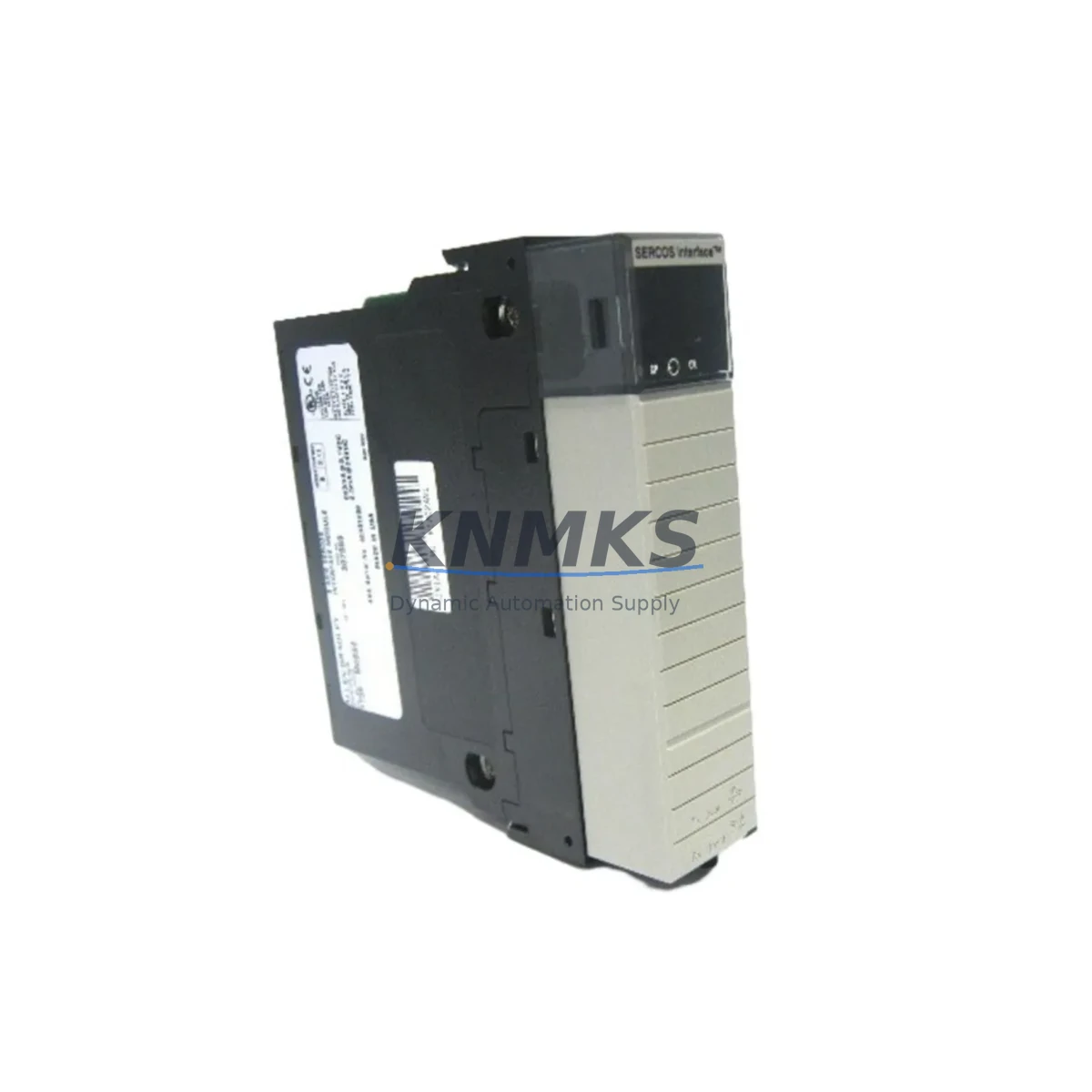
Allen-Bradley 1756-M08SE Maintenance-Proven Spare Part for Factory Uptime
The Allen-Bradley 1756-M08SE is an 8-axis SERCOS interface servo motion module designed for the ControlLogix 1756 platform. As a critical motion control component in high-throughput manufacturing environments — from automotive assembly lines to packaging machinery and precision CNC systems — this module coordinates real-time servo axis synchronization through the SERCOS fiber-optic ring. When this module fails or degrades, the entire motion group goes offline, resulting in unplanned downtime that can cost thousands of dollars per hour. Stocking a verified spare of the 1756-M08SE is one of the most cost-effective decisions a maintenance or reliability engineer can make for any ControlLogix-based servo system.
Our 1756-M08SE units are sourced from authorized channels, individually tested under load conditions, and shipped with full functional verification documentation. Each unit carries a support terms confirmed by quotation covering defects in materials and workmanship. We support long-term supply continuity for MRO procurement teams managing aging ControlLogix installations, including systems running Studio 5000 Logix Designer with legacy motion profiles.
Spare Maintenance Table
| Parameter | Specification |
|---|---|
| Part Number | 1756-M08SE |
| Brand | Allen-Bradley (Rockwell Automation) |
| Series | ControlLogix 1756 |
| Module Type | 8-Axis SERCOS Interface Servo Motion Module |
| Communication Interface | SERCOS fiber-optic ring (ring topology) |
| Axes Supported | Up to 8 servo axes per module |
| Backplane Compatibility | ControlLogix 1756 chassis (any slot) |
| Power Supply Compatibility | 1756-PA72, 1756-PB72, 1756-PA75, 1756-PB75 series |
| Operating Temperature | 0°C to 60°C (32°F to 140°F) |
| Relative Humidity | 5% to 95% non-condensing |
| Installation | Hot-swap capable in ControlLogix chassis |
| Firmware | Compatible with Studio 5000 Logix Designer v20+ |
| Origin | United States |
| Condition | Original spare, functionally tested |
| Support terms | 12 Months — defects in materials and workmanship |
| Shipping | Tested before dispatch; global express available |
Maintenance Planning for Continuous Operation
When a 1756-M08SE is flagged during a control cabinet inspection or fails during a production run, the replacement process should be treated as a system-level event — not an isolated module swap. Maintenance engineers should simultaneously audit the surrounding ControlLogix infrastructure to prevent secondary failures from masking the root cause or triggering a repeat outage within weeks.
Begin with the 1756 chassis backplane: inspect for bent pins, corrosion, or thermal stress marks that could cause intermittent communication faults even after the motion module is replaced. Next, verify the ControlLogix power supply (typically a 1756-PA72 or 1756-PB72) — an under-voltage or ripple condition on the backplane bus is a common hidden cause of motion module faults that reappear after replacement. Check the SERCOS fiber-optic cables and ring connectors for micro-fractures, contamination, or excessive bend radius; a degraded fiber link will cause axis communication errors that mimic module failure.
On the drive side, inspect the Kinetix 6000 or Kinetix 6500 servo drives connected to the SERCOS ring. A drive with a degraded SERCOS node card can corrupt ring communication and cause the 1756-M08SE to report axis faults. Review the 1756-EN2T or 1756-EN3TR EtherNet/IP communication module in the same chassis — if the controller is losing heartbeat with the SCADA or HMI layer during the fault event, a network module issue may be compounding the motion fault. Also check the 1756-L7x or 1756-L8x ControlLogix controller firmware version for known motion instruction compatibility issues with the replacement module’s firmware revision.
For sites running mixed-generation ControlLogix systems, verify that the 1756-RM or 1756-RM2 redundancy module (if present) has properly synchronized the new motion configuration to the secondary chassis before returning the line to production. Finally, inspect 24VDC field power distribution to I/O modules in the same cabinet — a shared power rail fault can cause spurious axis faults that are incorrectly attributed to the motion module.
Site Replacement Workflow
Step 1 — Pre-replacement documentation: Export the current motion group configuration from Studio 5000 Logix Designer, including axis tags, motion profiles, SERCOS node addresses, and tuning parameters. Save a controller backup (.ACD file) before any hardware change.
Step 2 — Safe shutdown: Command all axes to the home or park position via the HMI or manual jog. Disable the SERCOS ring from the controller. De-energize the servo drives at the main disconnect — do not rely solely on the E-stop circuit for isolation during module replacement.
Step 3 — Module removal: The 1756-M08SE supports hot-swap in a powered chassis, but for first-time replacements in unfamiliar systems, power down the chassis to eliminate risk. Remove the module by pressing the top and bottom locking tabs simultaneously and sliding it out of the backplane slot.
Step 4 — Replacement installation: Insert the new 1756-M08SE into the same slot. The module will self-identify to the controller. Confirm the module LED status: steady green on the OK indicator confirms backplane communication. Reconnect SERCOS fiber cables — verify TX/RX orientation.
Step 5 — Configuration restore and commissioning: Download the saved controller project. Verify all axis configurations are intact. Run the SERCOS ring initialization sequence from Studio 5000. Perform a motion test on each axis at reduced speed before returning to full production speed. Document the replacement in the site maintenance log with the new module serial number and firmware version.
This workflow minimizes mean time to repair (MTTR) and ensures the replacement does not introduce new configuration drift into the motion system.
Spare Parts Support FAQ
Q: Is this 1756-M08SE unit tested before shipment?
A: Yes. Every unit undergoes functional verification including backplane communication check, SERCOS interface test, and axis configuration load before dispatch. A test report is available upon request for MRO procurement records.
Q: What is the support terms coverage and how is it claimed?
A: All 1756-M08SE units carry a support terms confirmed by quotation from the date of shipment, covering defects in materials and workmanship under normal industrial operating conditions. To initiate a support terms claim, contact admin@knmks.com with your order number, site fault description, and photos of the module label and fault indicators.
Q: Can this module replace older 1756-M08SE revisions in legacy ControlLogix systems?
A: In most cases, yes. The 1756-M08SE is backward-compatible across ControlLogix chassis generations. However, firmware compatibility between the module revision and the controller firmware version (L5x, L7x, L8x) should be verified in the Rockwell Automation Product Compatibility and Download Center (PCDC) before installation in systems running firmware below v20.
Q: Do you support long-term supply for ongoing MRO programs?
A: Yes. KNMKS maintains standing inventory of ControlLogix motion modules including the 1756-M08SE to support annual maintenance contracts, scheduled turnaround (TAR) events, and emergency breakdown orders. Contact us at admin@knmks.com or +86 18359268345 to discuss volume pricing and reserved stock arrangements.
© 2026 KNMKS. All rights reserved.
Original Source: https://knmks.com
Contact: admin@knmks.com | +86 18359268345
Product Identification
- Brand / Ecosystem
-
Allen-Bradley
Allen-Bradley - Model / Series
-
1756-M08SE
ControlLogix Series - Product Family
- PLCs & Controllers
- Availability Status
- Available on request after model and quantity confirmation
- Inquiry Type
- B2B RFQ, replacement inquiry and project spare-part request
- Pre-Quote Check
- Exact SKU, brand, series, quantity, nameplate photos and destination country are checked before quotation
System Path
Where this product fits in the KNMKS automation structure.
Specification & Inquiry Focus
- Control platform
- PLC, PAC and modular controllers
- Common needs
- CPU, rack, power and I/O expansion
- Project support
- Replacement, cabinet build and maintenance
Buyer Confirmation
Information KNMKS checks before replying.
- Exact model
- 1756-M08SE
- Brand / ecosystem
- Allen-Bradley
- Product family
- PLCs & Controllers
- Application note
- Replacement, maintenance, project build or spare-part list
- Useful photos
- Nameplate, installed unit, cabinet layout or connector side
- Delivery details
- Quantity, destination country and target schedule
Document Support
Files and notes can be confirmed during quotation.
- Product photos or nameplate confirmation when available
- Packing and delivery notes before quotation confirmation
- Support scope and delivery terms confirmed per inquiry
- Export document coordination for qualified B2B requests
Inquiry Support
- Model cross-checking before quotation
- CPU, power, rack and expansion module matching
- Support for replacement and project inquiry
What to Send Us
- Brand and exact model number: Allen-Bradley 1756-M08SE
- Quantity and required delivery time
- Application, replacement requirement or nameplate photo
- Destination country and shipping preference
RFQ Preparation
This is a product inquiry page built for RFQ communication.
Fast Model Check
Send this model to KNMKS for confirmation.
Include quantity, destination country and photos if this is a maintenance replacement. The inquiry will be saved with a reference number after submission.
Brand & Compatibility Note
KNMKS displays automation product information for well-known industrial brand ecosystems and compatible replacement references. Brand names are used for product identification and compatibility reference only; final availability and commercial terms are confirmed per quotation.
 Manufacturing
 Machine Tools
 Packaging
 Energy & Power



 HMI & Displays
 Servo Systems
 Variable Frequency Drives
 Sensors