
Overview
Allen-Bradley 1756-LSP Migration-Ready Safety Partner for Legacy Control Systems
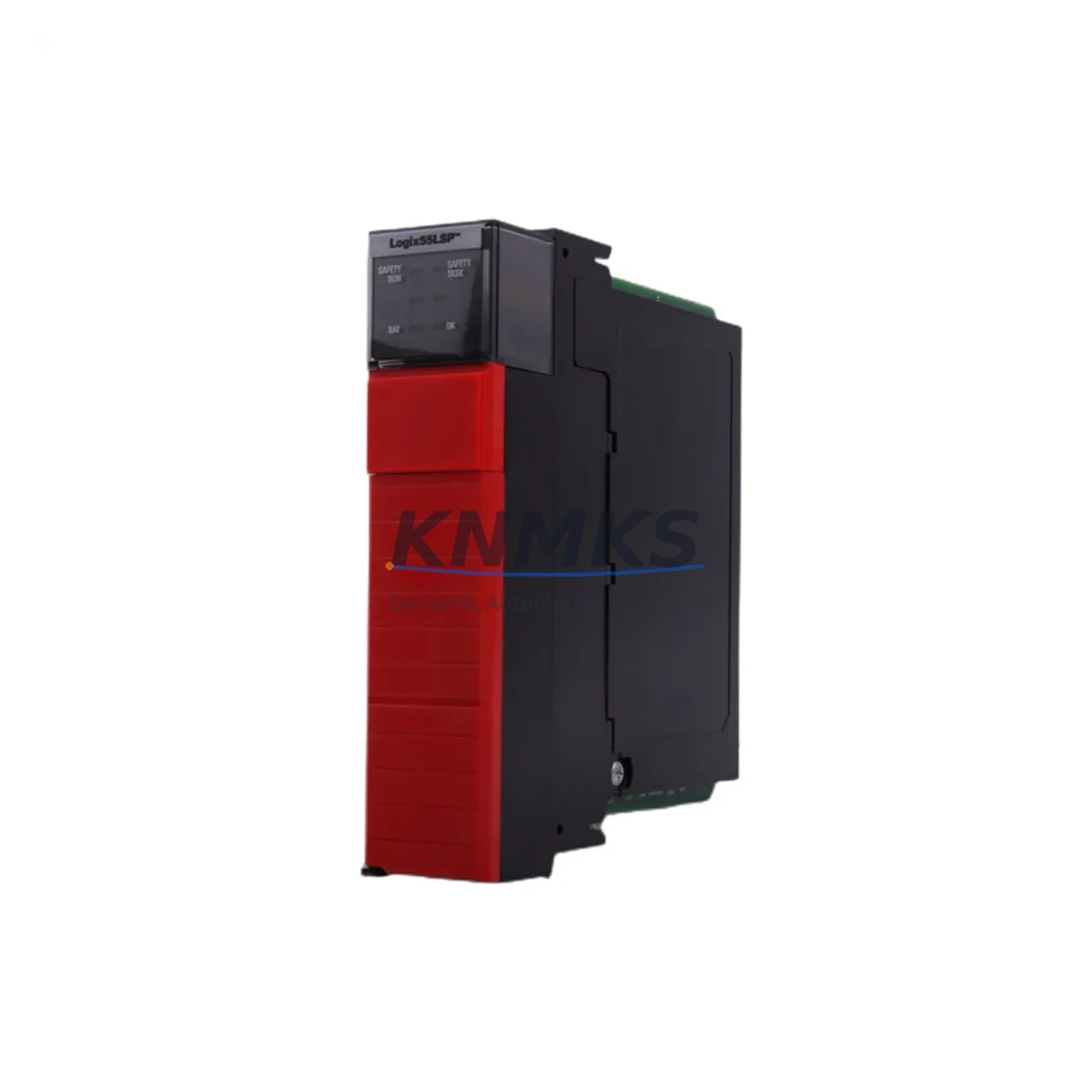
The Allen-Bradley 1756-LSP is a dedicated Safety Partner module designed for use within the GuardLogix 1756 ControlLogix platform. As legacy safety control architectures reach end-of-life or face obsolescence, the 1756-LSP provides a validated, migration-ready replacement path for facilities operating older safety relay panels, hardwired interlock systems, or first-generation safety PLCs. Whether you are upgrading a legacy line controller, consolidating a distributed safety architecture, or recovering a system after an unplanned failure, the 1756-LSP delivers the compatibility, reliability, and documentation support required for a controlled, low-risk retrofit.
The 1756-LSP operates as a paired Safety Partner to the 1756-L6xS or 1756-L7xS GuardLogix controllers, sharing the same 1756 ControlLogix chassis backplane. It does not execute user logic independently — instead, it continuously cross-checks the primary controller’s safety program execution, providing the redundant verification required to achieve SIL 3 / PLe safety integrity levels. This architecture makes it particularly well-suited for machinery safety upgrades, process safety system modernization, and safety-critical retrofit projects where the existing safety relay infrastructure is no longer maintainable or certifiable.
When planning a retrofit involving the 1756-LSP, engineers must confirm several key parameters before committing to installation. First, verify that the target chassis — typically a 1756-A7, 1756-A10, or 1756-A13 rack — has an available adjacent slot, as the 1756-LSP must be installed in the slot immediately to the right of its paired GuardLogix controller. Backplane slot addressing must be reconfigured in Studio 5000 Logix Designer if the module is being relocated from a previous installation. Power budget calculations for the 1756-PA75 or 1756-PB75 power supply must account for the combined draw of the controller, the Safety Partner, and all co-resident I/O modules including 1756-IB16 digital input modules and 1756-OB16E digital output modules.
Terminal wiring for safety I/O connected to the GuardLogix system — including dual-channel E-stop inputs, light curtain interfaces, and safety gate monitors — does not require modification when replacing a like-for-like 1756-LSP. However, if the retrofit involves migrating from an older 1756-L6xS controller to a 1756-L7xS or 1756-L8xS platform, the safety task configuration, safety I/O module ownership, and SNN (Safety Network Number) assignments must be reviewed and re-validated. Communication links to remote safety I/O over EtherNet/IP — including connections to 1734 POINT Guard I/O or 1791DS CompactBlock Guard I/O — must be re-established and tested after any controller or Safety Partner replacement.
Firmware compatibility is a critical checkpoint in any 1756-LSP retrofit. The Safety Partner firmware must match the major revision of the paired GuardLogix controller. Mismatched firmware will prevent the safety task from entering Run mode and will generate a controller fault. Before shipment, each 1756-LSP unit in our inventory is tested for power-on self-test completion and firmware revision verification. Customers are advised to confirm the target controller’s firmware revision prior to ordering to ensure a matched pair is supplied.
HMI integration should also be reviewed during the retrofit planning phase. If the existing system uses a PanelView Plus 7 or PanelView 800 terminal communicating over EtherNet/IP to the GuardLogix controller, the HMI tag database and safety status displays should be validated after the Safety Partner replacement to confirm that safety status bits — including the Safety Partner OK bit and the Safety Task Fault bit — are correctly mapped and displayed. Downtime during the replacement can typically be contained to a single maintenance window if pre-staging, firmware loading, and program backup are completed in advance.
Migration Compatibility Table
| Parameter | Detail |
|---|---|
| SKU / Part Number | 1756-LSP |
| Compatible Controllers | 1756-L6xS, 1756-L7xS GuardLogix Safety Controllers |
| Chassis Compatibility | 1756-A7, 1756-A10, 1756-A13, 1756-A17 ControlLogix Chassis |
| Slot Requirement | Must occupy slot immediately to the right of paired GuardLogix controller |
| Backplane Interface | 1756 ControlLogix standard backplane |
| Communication Protocol | EtherNet/IP (via controller); DeviceNet and ControlNet supported via co-resident bridge modules |
| Safety Integrity Level | SIL 3 (IEC 61508), PLe (ISO 13849) |
| Firmware Matching | Must match major revision of paired GuardLogix controller |
| Power Consumption | Verify against 1756-PA75 / 1756-PB75 power supply budget |
| Installation Space | 1 chassis slot (standard 1756 form factor) |
| Legacy Replacement Path | Direct replacement for failed or end-of-life 1756-LSP units |
| Retrofit Recommendation | Pre-stage firmware, backup safety program, validate SNN before hot-swap |
| Commissioning Checkpoint | Safety task Run mode confirmation, I/O ownership re-establishment, HMI status tag validation |
| Support terms | 12 Months — covers manufacturing defects and functional failure under normal operating conditions |
Retrofit Planning for Existing Automation Systems
A successful 1756-LSP retrofit begins well before the maintenance window opens. The first step is a full audit of the existing ControlLogix chassis configuration: document every module installed, its slot address, its firmware revision, and its I/O wiring schedule. In systems where the 1756-LSP is paired with a 1756-L72S controller, the safety program — including all safety routines, safety I/O configurations, and safety-rated function blocks — must be backed up using Studio 5000 Logix Designer and stored offline before any hardware is disturbed.
Power supply capacity is a frequent oversight in retrofit projects. The 1756-PA75 or 1756-PB75 chassis power supply must be able to support the combined backplane current draw of all installed modules. Adding or replacing modules — including the 1756-LSP — requires recalculating the power budget. If the existing supply is operating near its rated capacity, a power supply upgrade may be required before the Safety Partner replacement can proceed safely.
For systems that include remote I/O over EtherNet/IP — such as 1734 POINT Guard I/O adapters or 1791DS CompactBlock Guard I/O modules — the safety I/O ownership configuration must be re-established after the Safety Partner is replaced. Each remote safety I/O module stores the Safety Network Number of its owning controller; if the SNN changes during the retrofit, the remote modules must be re-commissioned. This process requires physical access to each remote I/O drop and should be factored into the downtime estimate.
Communication modules co-resident in the chassis — such as the 1756-EN2T EtherNet/IP bridge or the 1756-DNB DeviceNet scanner — are not affected by the Safety Partner replacement and do not require reconfiguration. However, if the retrofit also involves upgrading the GuardLogix controller from a 1756-L6xS to a 1756-L7xS, the 1756-EN2T module connections and MSG instruction paths in the standard (non-safety) program should be verified after the controller swap. Programming cables such as the 1756-CP3 or standard USB-to-serial adapters used for local programming access should be available on-site during commissioning.
Downtime Control During System Migration
Minimizing downtime during a 1756-LSP replacement requires a structured pre-staging process. Before the maintenance window, the replacement module should be powered on in a bench environment, its firmware revision confirmed, and a power-on self-test completed. If the target system’s GuardLogix controller firmware revision is known in advance, the replacement 1756-LSP can be pre-loaded with matching firmware using a temporary chassis and power supply, eliminating firmware update time during the live replacement.
The safety program should be fully backed up and verified readable before the existing Safety Partner is removed. During the replacement, the GuardLogix controller will enter a faulted state as soon as the Safety Partner is removed from the backplane — this is expected behavior. The replacement module should be installed promptly, the controller power-cycled, and the safety task allowed to re-enter Run mode before any safety I/O is re-energized. The entire hot-swap sequence, when pre-staged correctly, can typically be completed within a single 30-to-60-minute maintenance window.
To protect original program logic, never overwrite the safety program during the replacement process. The existing safety task, safety routines, and safety I/O configuration should remain intact in the controller memory. Only the Safety Partner hardware is being replaced — no program changes are required for a like-for-like 1756-LSP substitution. After the replacement, verify that the Safety Partner OK status bit is set, the safety task is in Run mode, and all safety I/O modules report healthy status before returning the system to production.
Retrofit Support FAQ
Q: Is the 1756-LSP a direct drop-in replacement for an existing failed Safety Partner?
A: Yes, for like-for-like replacements within the same GuardLogix platform generation. The replacement 1756-LSP must be installed in the same chassis slot and must match the firmware major revision of the paired GuardLogix controller. No program changes are required for a direct substitution.
Q: What commissioning steps are required after installing the replacement 1756-LSP?
A: After installation, power-cycle the chassis and confirm that the Safety Partner OK bit is set in the controller status data. Verify that the safety task enters Run mode without faults. Re-establish safety I/O ownership for any remote 1734 POINT Guard I/O or 1791DS modules if the SNN was modified. Validate HMI safety status displays before returning to production.
Q: Does the 1756-LSP ship pre-tested and ready for installation?
A: Yes. Each unit undergoes a power-on self-test and firmware revision verification before shipment. We recommend confirming the target controller’s firmware revision before ordering to ensure a matched pair. Units are shipped with standard anti-static packaging suitable for sensitive industrial electronics.
Q: What does the support terms confirmed by quotation cover?
A: The support terms confirmed by quotation cover manufacturing defects and functional failure under normal operating conditions. It does not cover damage resulting from incorrect installation, overvoltage, physical impact, or use outside the module’s rated environmental specifications. Support requests are processed through our sales team at admin@knmks.com.
© 2026 KNMKS. All rights reserved.
Original Source: https://knmks.com
Contact: admin@knmks.com | +86 18359268345
Product Identification
- Brand / Ecosystem
-
Allen-Bradley
Allen-Bradley - Model / Series
-
1756-LSP
ControlLogix Series - Product Family
- PLCs & Controllers
- Availability Status
- Available on request after model and quantity confirmation
- Inquiry Type
- B2B RFQ, replacement inquiry and project spare-part request
- Pre-Quote Check
- Exact SKU, brand, series, quantity, nameplate photos and destination country are checked before quotation
System Path
Where this product fits in the KNMKS automation structure.
Specification & Inquiry Focus
- Control platform
- PLC, PAC and modular controllers
- Common needs
- CPU, rack, power and I/O expansion
- Project support
- Replacement, cabinet build and maintenance
Buyer Confirmation
Information KNMKS checks before replying.
- Exact model
- 1756-LSP
- Brand / ecosystem
- Allen-Bradley
- Product family
- PLCs & Controllers
- Application note
- Replacement, maintenance, project build or spare-part list
- Useful photos
- Nameplate, installed unit, cabinet layout or connector side
- Delivery details
- Quantity, destination country and target schedule
Document Support
Files and notes can be confirmed during quotation.
- Product photos or nameplate confirmation when available
- Packing and delivery notes before quotation confirmation
- Support scope and delivery terms confirmed per inquiry
- Export document coordination for qualified B2B requests
Inquiry Support
- Model cross-checking before quotation
- CPU, power, rack and expansion module matching
- Support for replacement and project inquiry
What to Send Us
- Brand and exact model number: Allen-Bradley 1756-LSP
- Quantity and required delivery time
- Application, replacement requirement or nameplate photo
- Destination country and shipping preference
RFQ Preparation
This is a product inquiry page built for RFQ communication.
Fast Model Check
Send this model to KNMKS for confirmation.
Include quantity, destination country and photos if this is a maintenance replacement. The inquiry will be saved with a reference number after submission.
Brand & Compatibility Note
KNMKS displays automation product information for well-known industrial brand ecosystems and compatible replacement references. Brand names are used for product identification and compatibility reference only; final availability and commercial terms are confirmed per quotation.
 Manufacturing
 Machine Tools
 Packaging
 Energy & Power



 HMI & Displays
 Servo Systems
 Variable Frequency Drives
 Sensors