
Overview
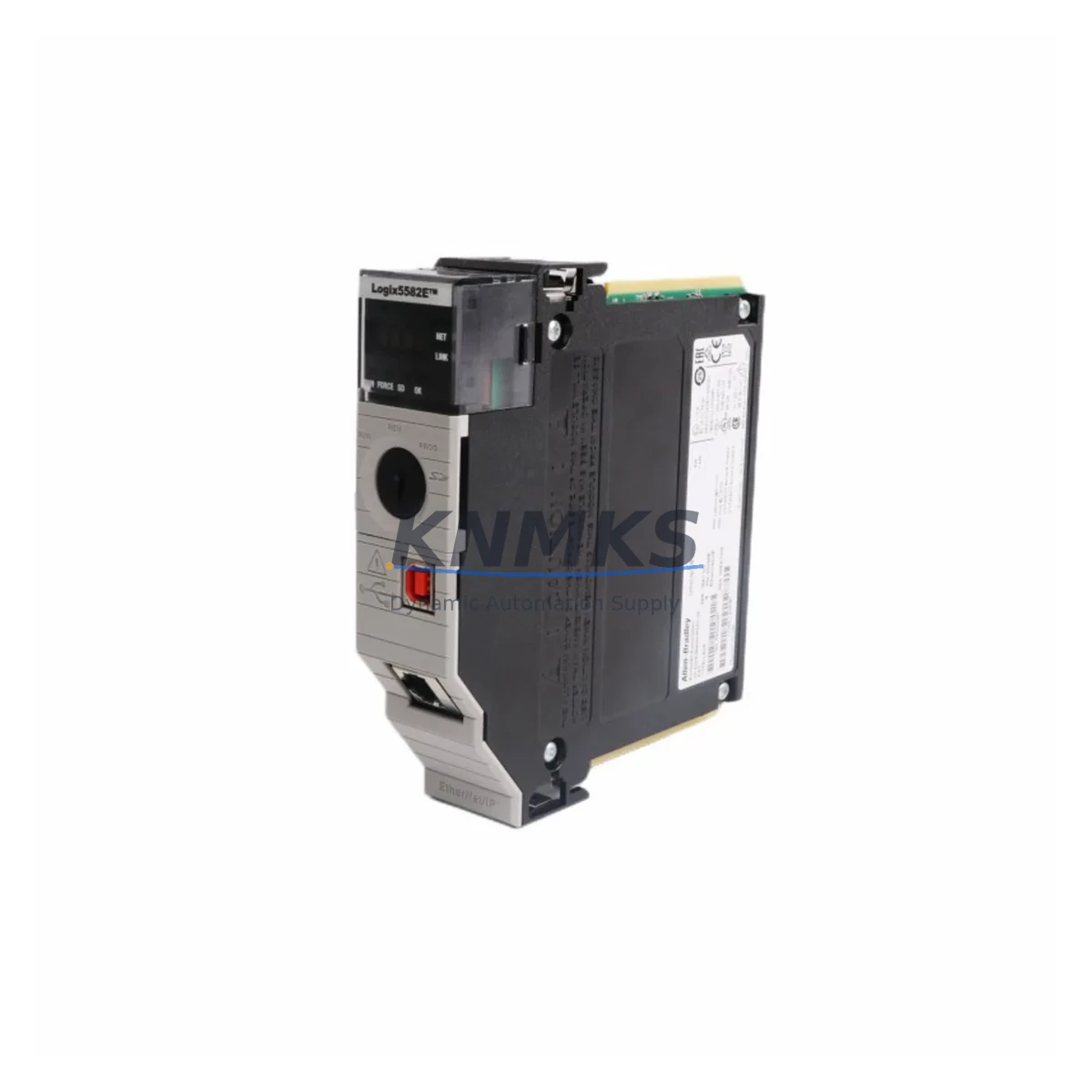
Allen-Bradley 1756-L82E Maintenance-Proven Spare Part for Factory Uptime
The Allen-Bradley 1756-L82E is a ControlLogix 5/20 series programmable logic controller featuring 5MB of user memory and an integrated EtherNet/IP communication port. Designed for high-availability industrial environments, this controller is a critical component in distributed control architectures across automotive, oil & gas, food & beverage, water treatment, and discrete manufacturing facilities. Maintaining a verified spare of the 1756-L82E in your parts inventory is one of the most effective strategies for reducing unplanned downtime and protecting production continuity.
For maintenance engineers managing aging ControlLogix systems, the 1756-L82E represents a direct, drop-in replacement for failed or end-of-life L8x series controllers. Its compatibility with the standard 1756 chassis backplane means no rack modification is required during emergency swap-out. The integrated EtherNet/IP port eliminates the need for a separate 1756-ENBT communication module in many single-network topologies, simplifying both the spare parts list and the replacement workflow.
Procurement engineers sourcing this part should verify the firmware revision compatibility with the existing project file before deployment. Units supplied by KNMKS are tested prior to shipment and covered by a support terms confirmed by quotation, providing a reliable supply chain alternative to OEM lead times that can extend beyond 16–26 weeks for discontinued or allocated Rockwell Automation inventory.
Spare Maintenance Table
| Parameter | Specification |
|---|---|
| SKU / Part Number | 1756-L82E |
| Brand | Allen-Bradley (Rockwell Automation) |
| Series | ControlLogix 5/20 (1756 Series) |
| Product Type | PLC Controller |
| User Memory | 5MB |
| Communication Port | EtherNet/IP (integrated, dual-port) |
| Chassis Compatibility | 1756 ControlLogix Chassis (any slot) |
| Power Supply Compatibility | 1756-PA72, 1756-PB72, 1756-PA75, 1756-PB75 |
| Operating Temperature | 0°C to 60°C (32°F to 140°F) |
| Relative Humidity | 5% to 95% non-condensing |
| Origin | United States |
| Replacement Scope | Drop-in for 1756-L81E, 1756-L83E, 1756-L84E (verify firmware) |
| Support terms | 12 Months — Tested Before Shipment |
| Condition | Original Spare / Surplus New |
Maintenance Planning for Continuous Operation
A structured maintenance plan for any ControlLogix system anchored by the 1756-L82E must account for the full electrical ecosystem within the control cabinet. During scheduled annual inspections or fault-isolation procedures, maintenance teams should simultaneously evaluate the condition and firmware status of the following components:
The 1756-PA72 or 1756-PB72 power supply module is the first component to inspect when a 1756-L82E exhibits erratic behavior or fails to boot. Power supply degradation is a leading cause of controller faults in systems operating beyond seven years. Keeping a spare power supply alongside the controller spare is standard practice in high-uptime facilities.
The 1756-EN2T or 1756-ENBT EtherNet/IP communication module should be reviewed if the system uses a multi-port network topology where the controller’s integrated port is supplemented. Verify that IP addressing and network configuration are documented before any controller swap to avoid communication loss on the SCADA or historian layer.
For systems with extensive I/O, the 1756-IB16 digital input modules and 1756-OB16E digital output modules should be inspected for contact wear, blown fuses on output circuits, and terminal block torque. These modules share the backplane with the 1756-L82E and can generate false fault codes that are misattributed to the controller itself.
The 1756-RM or 1756-RM2 redundancy module, where installed, must be checked for firmware synchronization with the primary controller. A mismatched redundancy module firmware version is a common cause of switchover failures during planned maintenance windows.
Terminal blocks, particularly 1492-series wiring systems connected to analog and digital I/O modules, should be inspected for corrosion, loose terminations, and insulation degradation — especially in high-vibration or high-humidity environments. Poor termination quality at the field wiring level frequently generates intermittent faults that are incorrectly diagnosed as controller failures.
Finally, the 1756 chassis backplane itself should be visually inspected for burn marks, debris, or connector damage. A damaged backplane slot can cause a replacement 1756-L82E to exhibit the same fault symptoms as the original failed unit, leading to unnecessary additional parts expenditure.
Site Replacement Workflow
Step 1 — Pre-Replacement Documentation: Before removing the failed 1756-L82E, record the controller’s slot position, IP address, subnet mask, gateway, and any motion or safety task configurations. If the controller is still partially responsive, use RSLogix 5000 or Studio 5000 to upload and save the current project file. Confirm the firmware revision of the failed unit.
Step 2 — Firmware Matching: Flash the replacement 1756-L82E to the same firmware revision as the failed unit using ControlFLASH or ControlFLASH Plus before installation. Installing a controller with a mismatched firmware version will prevent the project file from downloading and may require additional engineering time on-site.
Step 3 — Physical Swap: Power down the 1756 chassis using the appropriate 1756-PA72 or 1756-PB72 power supply switch. Remove the failed controller by pressing the top and bottom locking tabs and sliding the module out. Insert the replacement 1756-L82E into the same slot and confirm the locking tabs engage fully.
Step 4 — Network Reconfiguration: Restore power and assign the correct IP address to the replacement controller via BOOTP/DHCP server or the integrated web interface. Verify EtherNet/IP connectivity from the engineering workstation before downloading the project file.
Step 5 — Project Download and Verification: Download the saved project file and place the controller in Run mode. Verify all I/O modules are communicating, all motion axes are homed, and all HMI tags are resolving correctly. Document the replacement date, firmware version, and unit serial number in the maintenance log.
This workflow is designed to minimize mean time to repair (MTTR) and restore production within a single maintenance shift. KNMKS supplies the 1756-L82E with pre-shipment functional testing documentation to support rapid deployment confidence.
Spare Parts Support FAQ
Q1: Is the 1756-L82E still in production, and how long can I expect supply availability?
The 1756-L82E has reached end-of-life status with Rockwell Automation. However, KNMKS maintains a managed inventory of original surplus units to support facilities operating legacy ControlLogix systems. Long-term supply agreements are available for customers requiring guaranteed stock over a 12–36 month horizon. All units are sourced from verified channels and tested before shipment.
Q2: Can the 1756-L82E replace a 1756-L81E or 1756-L83E directly?
In most cases, yes — the 1756-L82E is physically and electrically compatible with any slot in a standard 1756 chassis. The primary consideration is memory capacity: the L82E provides 5MB of user memory, which is greater than the L81E (2MB) and less than the L83E (8MB). If the existing project file is within 5MB, the L82E is a valid replacement. Firmware must be matched before project download.
Q3: What testing is performed before shipment, and what does the support terms confirmed by quotation cover?
Each 1756-L82E unit supplied by KNMKS undergoes power-on functional verification, communication port testing, and visual inspection for physical damage. The support terms confirmed by quotation cover defects in materials and workmanship under normal operating conditions. Units that fail within the confirmed support period are replaced or refunded. Support requests are processed through admin@knmks.com.
Q4: How should I store a spare 1756-L82E to maximize its shelf life?
Store the unit in its original anti-static packaging in a climate-controlled environment between 0°C and 40°C with relative humidity below 85% non-condensing. Avoid storage near strong magnetic fields or in environments with conductive dust. Inspect the unit annually and power it on for a brief functional check to verify capacitor health. Rotate stock on a first-in, first-out basis if maintaining multiple spares.
© 2026 KNMKS. All rights reserved.
Original Source: https://knmks.com
Contact: admin@knmks.com | +86 18359268345
Product Identification
- Brand / Ecosystem
-
Allen-Bradley
Allen-Bradley - Model / Series
-
1756-L82E
ControlLogix Series - Product Family
- PLCs & Controllers
- Availability Status
- Available on request after model and quantity confirmation
- Inquiry Type
- B2B RFQ, replacement inquiry and project spare-part request
- Pre-Quote Check
- Exact SKU, brand, series, quantity, nameplate photos and destination country are checked before quotation
System Path
Where this product fits in the KNMKS automation structure.
Specification & Inquiry Focus
- Control platform
- PLC, PAC and modular controllers
- Common needs
- CPU, rack, power and I/O expansion
- Project support
- Replacement, cabinet build and maintenance
Buyer Confirmation
Information KNMKS checks before replying.
- Exact model
- 1756-L82E
- Brand / ecosystem
- Allen-Bradley
- Product family
- PLCs & Controllers
- Application note
- Replacement, maintenance, project build or spare-part list
- Useful photos
- Nameplate, installed unit, cabinet layout or connector side
- Delivery details
- Quantity, destination country and target schedule
Document Support
Files and notes can be confirmed during quotation.
- Product photos or nameplate confirmation when available
- Packing and delivery notes before quotation confirmation
- Support scope and delivery terms confirmed per inquiry
- Export document coordination for qualified B2B requests
Inquiry Support
- Model cross-checking before quotation
- CPU, power, rack and expansion module matching
- Support for replacement and project inquiry
What to Send Us
- Brand and exact model number: Allen-Bradley 1756-L82E
- Quantity and required delivery time
- Application, replacement requirement or nameplate photo
- Destination country and shipping preference
RFQ Preparation
This is a product inquiry page built for RFQ communication.
Fast Model Check
Send this model to KNMKS for confirmation.
Include quantity, destination country and photos if this is a maintenance replacement. The inquiry will be saved with a reference number after submission.
Brand & Compatibility Note
KNMKS displays automation product information for well-known industrial brand ecosystems and compatible replacement references. Brand names are used for product identification and compatibility reference only; final availability and commercial terms are confirmed per quotation.
 Manufacturing
 Machine Tools
 Packaging
 Energy & Power



 HMI & Displays
 Servo Systems
 Variable Frequency Drives
 Sensors