
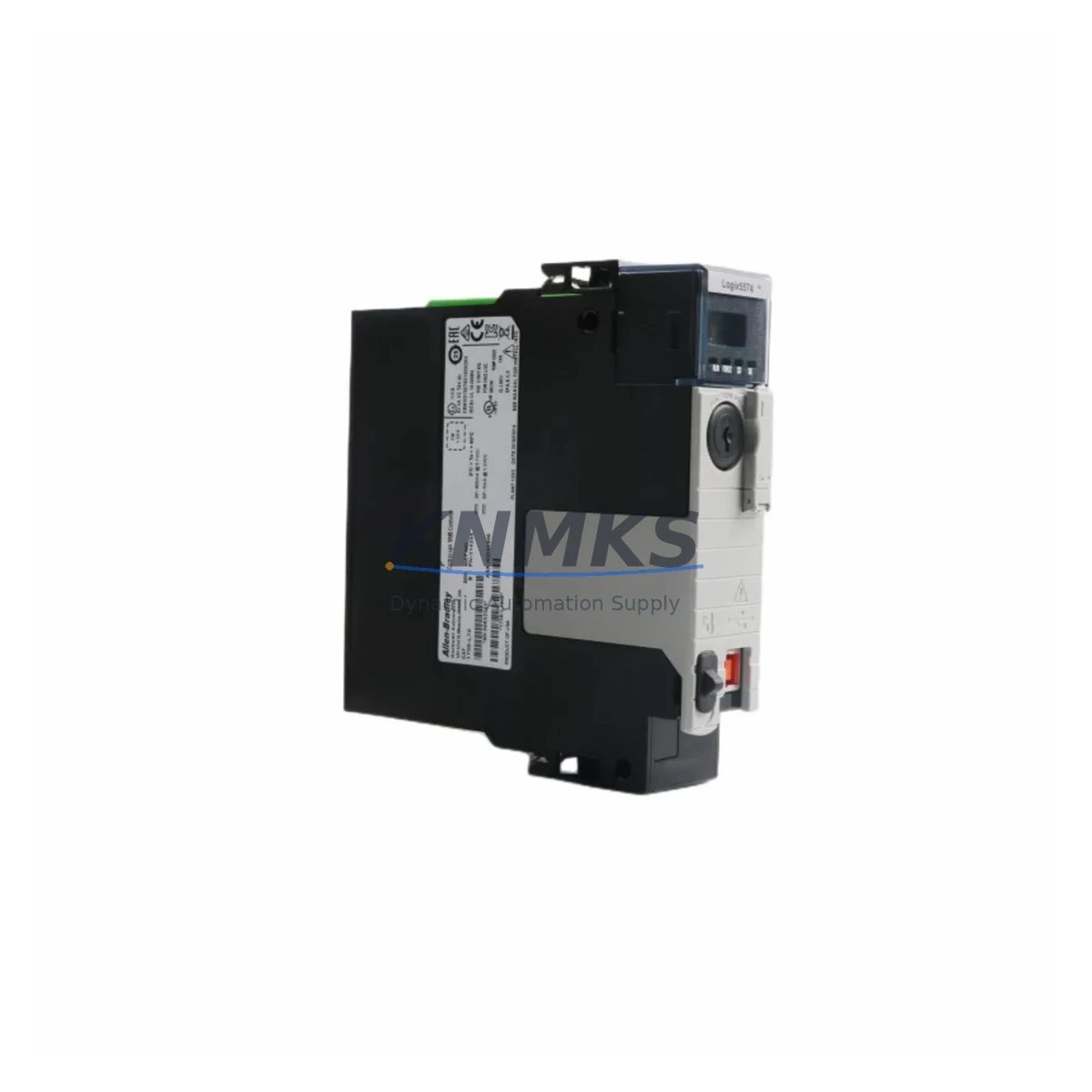
Overview
Allen-Bradley 1756-L74 Maintenance-Proven Spare Part for Factory Uptime
The Allen-Bradley 1756-L74 is a ControlLogix L7x series programmable logic controller (PLC) processor, widely deployed across discrete manufacturing, process control, and hybrid automation environments. As a maintenance-proven spare part, the 1756-L74 supports factory uptime by enabling rapid processor replacement during unplanned outages, scheduled shutdowns, and annual overhaul cycles. With 8 MB of user memory, EtherNet/IP native connectivity, and full compatibility with the 1756 ControlLogix chassis platform, this processor is a cornerstone component in long-running industrial control cabinets worldwide.
For maintenance engineers managing aging ControlLogix systems, holding a pre-tested 1756-L74 in the spare parts inventory is a proven strategy to reduce mean time to repair (MTTR) and protect production continuity. For procurement engineers, sourcing an original, support terms-backed unit from a reliable supplier eliminates the risk of counterfeit components and ensures compatibility with existing 1756 backplanes, I/O modules, and communication infrastructure.
Spare Maintenance Table
| SKU / Part Number | 1756-L74 |
| Brand / Manufacturer | Allen-Bradley (Rockwell Automation) |
| Series | ControlLogix L7x |
| Product Type | PLC Processor / Controller Module |
| User Memory | 8 MB |
| I/O Capacity | Up to 128,000 I/O points |
| Communication | EtherNet/IP (native), ControlNet, DeviceNet via add-on modules |
| Chassis Compatibility | 1756 ControlLogix chassis (4, 7, 10, 13, 17-slot) |
| Power Supply Compatibility | 1756-PA72, 1756-PB72, 1756-PA75, 1756-PB75 series |
| Operating Temperature | 0°C to 60°C (32°F to 140°F) |
| Relative Humidity | 5% to 95% non-condensing |
| Mounting | Chassis slot-mount (no tools required) |
| Origin | United States |
| Pre-Shipment Testing | Yes — power-on and functional verification |
| Support terms | 12 Months |
| Condition | Original / New Surplus / Refurbished (as specified at order) |
| Lead Time | In-stock — ships within 1–3 business days |
Maintenance Planning for Continuous Operation
When replacing or inspecting the 1756-L74 processor in a ControlLogix cabinet, a thorough site assessment of the surrounding electrical environment is essential to prevent repeat failures and ensure a clean restoration of control. Maintenance engineers should treat a processor replacement as an opportunity to audit the full control cabinet, not just the failed module.
Begin with the 1756 chassis backplane: inspect for physical damage, corrosion on the backplane connector, and verify that all module slots are properly seated. A damaged backplane can cause intermittent processor faults even after a new 1756-L74 is installed. Next, verify the 1756-PA72 or 1756-PB72 power supply module — check output voltage stability under load, inspect the capacitors for swelling, and confirm the power supply fan is operational. An aging power supply is a common root cause of processor resets and memory corruption events.
Review all 1756 digital and analog I/O modules in the chassis. Confirm that field wiring terminations are tight, that no I/O module is reporting a fault LED, and that the I/O tree in Studio 5000 / RSLogix 5000 matches the physical configuration. Pay particular attention to 1756-EN2T or 1756-EN2TR EtherNet/IP communication modules — verify firmware revision compatibility with the replacement 1756-L74 processor firmware, as mismatched firmware can prevent the controller from going online.
For systems using ControlNet (1756-CNB or 1756-CNBR) or DeviceNet (1756-DNB) communication modules, confirm that network node addresses and baud rates are correctly configured after processor replacement. If the system uses a 1756-RM or 1756-RM2 redundancy module, the redundancy pair must be re-synchronized following any processor swap.
On the field side, inspect terminal blocks and wiring harnesses connected to I/O modules for signs of heat damage, loose terminations, or insulation degradation — particularly in high-vibration or high-temperature environments. Check any signal isolators or signal conditioners in the analog I/O loops, as these components can drift over time and introduce measurement errors that appear as process anomalies after a processor replacement.
Finally, confirm that the CompactFlash or SD memory card used for program backup in the 1756-L74 is readable and contains the current, verified program version. A corrupted or outdated backup card is a common source of extended downtime during emergency replacements.
Site Replacement Workflow
Step 1 — Pre-Replacement Preparation: Back up the current program from the existing 1756-L74 using RSLogix 5000 or Studio 5000. Save the project file to a secure network location and to the CompactFlash card. Document the current firmware revision of the processor and all communication modules in the chassis.
Step 2 — Safe Isolation: Place the controller in Program mode. Notify all operators and SCADA/DCS systems of the planned maintenance window. De-energize the 1756 chassis power supply following site lockout/tagout (LOTO) procedures. Allow capacitors to discharge before handling modules.
Step 3 — Module Removal: Press the release latch on the 1756-L74 and slide the module out of the chassis slot. Inspect the backplane connector on both the module and the chassis for damage or contamination.
Step 4 — Replacement Installation: Insert the pre-tested replacement 1756-L74 into the same chassis slot. Ensure the module is fully seated and the latch is engaged. Re-energize the power supply and observe the processor status LEDs — the RUN LED should cycle through the startup sequence without fault indicators.
Step 5 — Program Restore and Verification: Download the verified program from the CompactFlash card or from the engineering workstation. Confirm the I/O tree is fully online with no faulted modules. Perform a controlled test of critical outputs before returning the system to automatic operation.
Step 6 — Documentation: Record the replacement date, new module serial number, firmware revision, and any observations in the site maintenance log. Update the spare parts inventory to reflect the consumed unit and initiate a replenishment order to maintain minimum stock levels.
This workflow is applicable to direct replacement of legacy 1756-L71, 1756-L72, and 1756-L73 processors with the 1756-L74, as the L7x series maintains backward compatibility within the ControlLogix platform, reducing re-engineering effort and minimizing downtime during system upgrades.
Spare Parts Support FAQ
Q1: Is the 1756-L74 compatible with existing 1756 chassis and I/O modules from earlier ControlLogix generations?
Yes. The 1756-L74 is fully compatible with all standard 1756 ControlLogix chassis sizes and is backward compatible with 1756 I/O modules used in earlier L6x and L7x deployments. Firmware compatibility between the processor and communication modules (such as 1756-EN2T) should be verified using the Rockwell Automation Product Compatibility and Download Center (PCDC) prior to installation.
Q2: What pre-shipment testing is performed on the 1756-L74 before delivery?
Each unit undergoes power-on verification and functional testing prior to shipment. This includes processor startup cycle confirmation, memory integrity check, and LED status verification. A support terms confirmed by quotation is provided from the date of shipment, covering defects in materials and workmanship under normal operating conditions.
Q3: How should the 1756-L74 be stored as a long-term spare part?
Store the unit in its original anti-static packaging in a climate-controlled environment: temperature 0°C to 40°C, relative humidity below 85% non-condensing, away from direct sunlight and electromagnetic interference sources. Inspect the unit annually and perform a power-on test every 12–18 months to confirm readiness. Long-term supply commitments are available for customers requiring guaranteed stock over multi-year maintenance contracts.
Q4: Can the 1756-L74 be used to replace a 1756-L72 or 1756-L73 without reprogramming?
In most cases, yes. The 1756-L74 offers a larger memory capacity (8 MB vs. 4 MB for the L72 and 2 MB for the L71), which means existing programs from lower-memory processors will load without modification. The program must be saved in a compatible Studio 5000 / RSLogix 5000 version. No hardware re-wiring is required, as the module occupies the same chassis slot form factor. Always verify firmware revision compatibility before going online.
© 2026 KNMKS. All rights reserved.
Original Source: https://knmks.com
Contact: admin@knmks.com | +86 18359268345
Product Identification
- Brand / Ecosystem
-
Allen-Bradley
Allen-Bradley - Model / Series
-
1756-L74
ControlLogix Series - Product Family
- PLCs & Controllers
- Availability Status
- Available on request after model and quantity confirmation
- Inquiry Type
- B2B RFQ, replacement inquiry and project spare-part request
- Pre-Quote Check
- Exact SKU, brand, series, quantity, nameplate photos and destination country are checked before quotation
System Path
Where this product fits in the KNMKS automation structure.
Specification & Inquiry Focus
- Control platform
- PLC, PAC and modular controllers
- Common needs
- CPU, rack, power and I/O expansion
- Project support
- Replacement, cabinet build and maintenance
Buyer Confirmation
Information KNMKS checks before replying.
- Exact model
- 1756-L74
- Brand / ecosystem
- Allen-Bradley
- Product family
- PLCs & Controllers
- Application note
- Replacement, maintenance, project build or spare-part list
- Useful photos
- Nameplate, installed unit, cabinet layout or connector side
- Delivery details
- Quantity, destination country and target schedule
Document Support
Files and notes can be confirmed during quotation.
- Product photos or nameplate confirmation when available
- Packing and delivery notes before quotation confirmation
- Support scope and delivery terms confirmed per inquiry
- Export document coordination for qualified B2B requests
Inquiry Support
- Model cross-checking before quotation
- CPU, power, rack and expansion module matching
- Support for replacement and project inquiry
What to Send Us
- Brand and exact model number: Allen-Bradley 1756-L74
- Quantity and required delivery time
- Application, replacement requirement or nameplate photo
- Destination country and shipping preference
RFQ Preparation
This is a product inquiry page built for RFQ communication.
Fast Model Check
Send this model to KNMKS for confirmation.
Include quantity, destination country and photos if this is a maintenance replacement. The inquiry will be saved with a reference number after submission.
Brand & Compatibility Note
KNMKS displays automation product information for well-known industrial brand ecosystems and compatible replacement references. Brand names are used for product identification and compatibility reference only; final availability and commercial terms are confirmed per quotation.
 Manufacturing
 Machine Tools
 Packaging
 Energy & Power



 HMI & Displays
 Servo Systems
 Variable Frequency Drives
 Sensors