
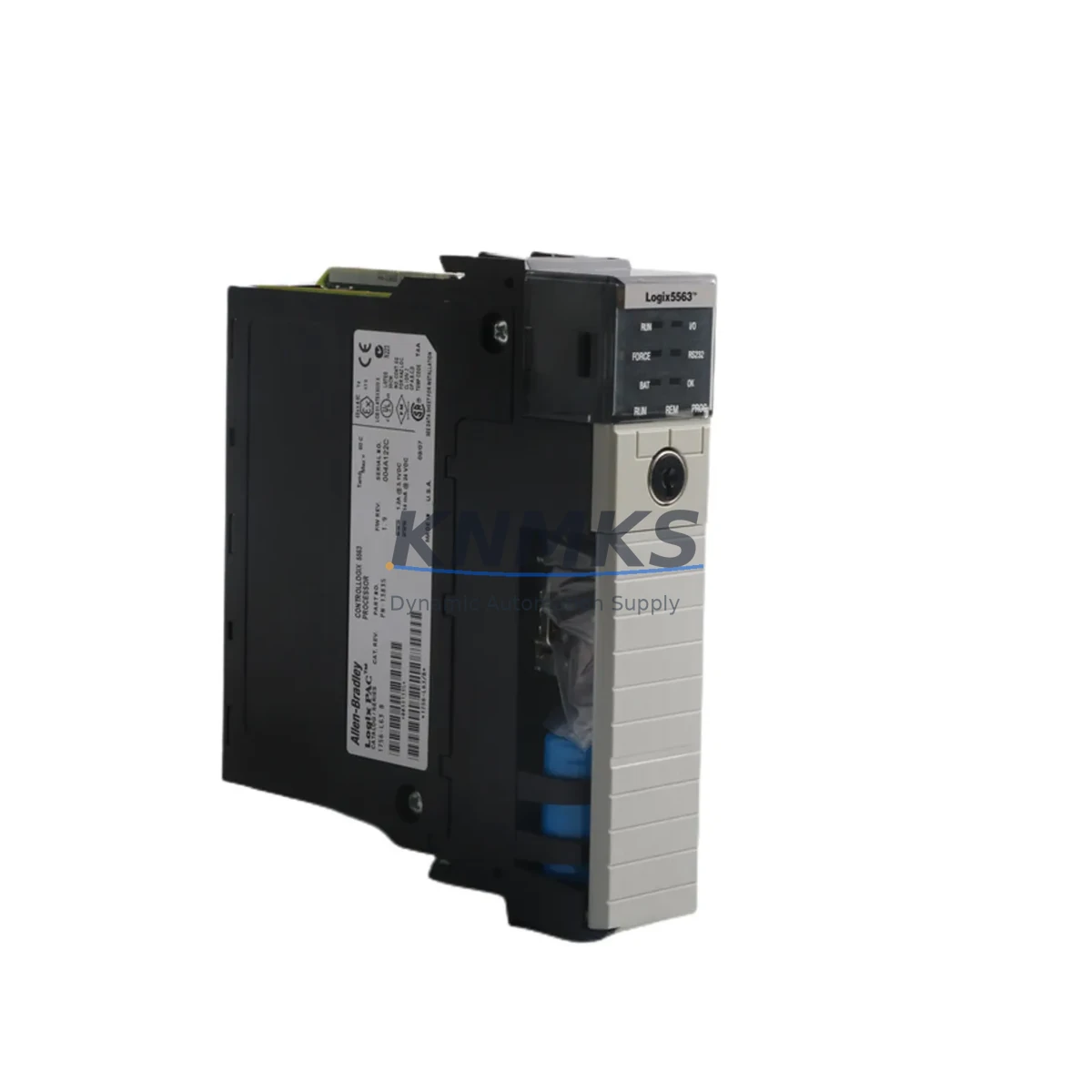
Overview
Allen-Bradley 1756-L63 Maintenance-Proven Spare Part: Keeping Your ControlLogix System Running
The Allen-Bradley 1756-L63 is a high-performance ControlLogix programmable logic controller (PLC) processor, widely deployed across discrete manufacturing, process control, and critical infrastructure applications. As a maintenance-proven spare part, the 1756-L63 is the cornerstone of any responsible spare parts strategy for facilities running Rockwell Automation’s 1756 ControlLogix platform. Whether you are managing a planned annual shutdown, responding to an unscheduled fault, or building a resilient spare parts inventory for aging control systems, having a verified, original 1756-L63 on the shelf is the single most effective way to minimize unplanned downtime and protect production continuity.
The 1756-L63 processor features 8 MB of user memory and is fully compatible with the 1756 ControlLogix chassis and backplane ecosystem. It supports Logix5563 firmware and integrates seamlessly with Studio 5000 Logix Designer for program upload, download, and online diagnostics. For maintenance engineers, this means a replacement unit can be brought online rapidly — firmware matched, program restored from backup, and system verified — without requiring specialized tooling or extended commissioning time.
Spare Maintenance Table
| Parameter | Specification |
|---|---|
| Part Number / SKU | 1756-L63 |
| Brand | Allen-Bradley (Rockwell Automation) |
| Series | ControlLogix 1756 |
| Product Type | PLC Processor Module |
| User Memory | 8 MB |
| Processor Family | Logix5563 |
| Backplane Compatibility | 1756 ControlLogix Chassis (all slot counts) |
| Communication Ports | USB (programming), EtherNet/IP via 1756-ENBT/EN2T modules |
| Power Supply Compatibility | 1756-PA72, 1756-PB72, 1756-PA75, 1756-PB75 series |
| Operating Temperature | 0°C to 60°C (32°F to 140°F) |
| Mounting | 1756 ControlLogix chassis slot (any position) |
| Origin | United States |
| Condition | Original Spare / New Surplus |
| Firmware | Upgradeable via ControlFLASH |
| Support terms | 12 Months from date of shipment |
| Pre-shipment Testing | Power-on functional verification performed |
| Typical Application | Discrete manufacturing, batch process, utilities, automotive, oil & gas |
Maintenance Planning for Continuous Operation
When a 1756-L63 processor fault occurs, the failure rarely exists in isolation. Experienced maintenance engineers know that a processor replacement is the starting point of a broader system health check, not the end. Before returning the control cabinet to service, it is essential to inspect and verify the condition of all components that interact directly with the processor.
Begin with the 1756 chassis backplane — a damaged or corroded backplane connector can cause intermittent faults that mimic processor failure. Inspect the 1756-PA72 or 1756-PB72 power supply module for output voltage stability; an under-voltage condition during startup is a common root cause of processor resets and memory corruption. If the cabinet has been in service for more than five years, proactive replacement of the power supply alongside the processor is a sound investment.
Next, audit the 1756-ENBT or 1756-EN2T EtherNet/IP communication module — verify that IP addressing, subnet configuration, and firmware revision are compatible with the replacement 1756-L63. Communication module firmware mismatches are a frequent source of post-replacement network faults. Similarly, inspect any installed 1756-DNB DeviceNet bridge modules or 1756-CN2 ControlNet modules for physical damage and confirm their configuration files are backed up.
For I/O integrity, walk through each 1756-series digital and analog I/O module installed in the chassis. Check terminal block torque, wiring insulation condition, and LED fault indicators. Pay particular attention to 1756-IB16 digital input modules and 1756-OB16E digital output modules — these are high-cycle components that accumulate wear in high-frequency switching applications. If the system includes 1756-IF16 analog input modules, verify calibration records and signal integrity against field transmitters.
Finally, confirm that the HMI terminal — whether a PanelView Plus 6 or PanelView 5500 — is communicating correctly with the new processor over EtherNet/IP, and that the application runtime version is compatible with the restored Logix program. Document all findings in the maintenance log before closing the cabinet.
Site Replacement Workflow
Replacing a 1756-L63 in a live production environment requires a structured approach to minimize exposure time and eliminate re-work. Follow this field-proven workflow:
Step 1 — Backup: Before powering down, use Studio 5000 Logix Designer to upload and save the current program, including all tag values, force tables, and motion configuration. Store the backup on a secure network drive and a local USB drive simultaneously.
Step 2 — Power Down & Isolate: Follow your site’s lockout/tagout (LOTO) procedure. Remove the 1756-L63 from the chassis slot. Inspect the slot connector and backplane for debris or damage.
Step 3 — Firmware Match: Before installing the replacement 1756-L63, use ControlFLASH to update the firmware revision to match the version recorded in your backup file. Firmware mismatch is the leading cause of failed program downloads during emergency replacements.
Step 4 — Install & Restore: Seat the replacement processor, restore power, and download the saved program. Verify all I/O modules come online, check communication module status LEDs, and confirm HMI connectivity.
Step 5 — Functional Test: Run a controlled functional test sequence before returning the system to automatic mode. Confirm all interlocks, safety circuits, and process setpoints are operating within specification.
This workflow is compatible with both like-for-like 1756-L63 replacements and cross-series migrations from older 1756-L55 or 1756-L61 processors, making it a versatile procedure for facilities managing mixed-generation ControlLogix fleets.
Spare Parts Support FAQ
Q1: Is this 1756-L63 compatible with my existing 1756 ControlLogix chassis and I/O modules?
Yes. The 1756-L63 is fully compatible with all standard 1756 ControlLogix chassis (4, 7, 10, 13, and 17-slot) and all 1756-series I/O, communication, and motion modules. Ensure your Studio 5000 project firmware revision matches the processor firmware prior to download.
Q2: What is included in the support terms confirmed by quotation and pre-shipment testing?
Every 1756-L63 unit undergoes power-on functional verification prior to shipment. The support terms confirmed by quotation cover manufacturing defects and functional failures under normal operating conditions from the date of shipment. Support requests are supported with direct technical assistance and expedited replacement.
Q3: Can you supply the 1756-L63 on a long-term or blanket order basis for our spare parts program?
Yes. We support long-term supply agreements, blanket purchase orders, and consignment stocking arrangements for maintenance teams managing multi-site ControlLogix installations. Contact our sales team to discuss volume pricing and lead time commitments.
Q4: How do I verify the firmware revision of a replacement 1756-L63 before installation?
Connect the processor via USB to a PC running RSLinx Classic or Studio 5000. The firmware revision is displayed in the module properties dialog. Use ControlFLASH to upgrade or downgrade the firmware to match your project file before downloading the application program.
© 2026 KNMKS. All rights reserved.
Original Source: https://knmks.com
Contact: admin@knmks.com | +86 18359268345
Product Identification
- Brand / Ecosystem
-
Allen-Bradley
Allen-Bradley - Model / Series
-
1756-L63
ControlLogix Series - Product Family
- PLCs & Controllers
- Availability Status
- Available on request after model and quantity confirmation
- Inquiry Type
- B2B RFQ, replacement inquiry and project spare-part request
- Pre-Quote Check
- Exact SKU, brand, series, quantity, nameplate photos and destination country are checked before quotation
System Path
Where this product fits in the KNMKS automation structure.
Specification & Inquiry Focus
- Control platform
- PLC, PAC and modular controllers
- Common needs
- CPU, rack, power and I/O expansion
- Project support
- Replacement, cabinet build and maintenance
Buyer Confirmation
Information KNMKS checks before replying.
- Exact model
- 1756-L63
- Brand / ecosystem
- Allen-Bradley
- Product family
- PLCs & Controllers
- Application note
- Replacement, maintenance, project build or spare-part list
- Useful photos
- Nameplate, installed unit, cabinet layout or connector side
- Delivery details
- Quantity, destination country and target schedule
Document Support
Files and notes can be confirmed during quotation.
- Product photos or nameplate confirmation when available
- Packing and delivery notes before quotation confirmation
- Support scope and delivery terms confirmed per inquiry
- Export document coordination for qualified B2B requests
Inquiry Support
- Model cross-checking before quotation
- CPU, power, rack and expansion module matching
- Support for replacement and project inquiry
What to Send Us
- Brand and exact model number: Allen-Bradley 1756-L63
- Quantity and required delivery time
- Application, replacement requirement or nameplate photo
- Destination country and shipping preference
RFQ Preparation
This is a product inquiry page built for RFQ communication.
Fast Model Check
Send this model to KNMKS for confirmation.
Include quantity, destination country and photos if this is a maintenance replacement. The inquiry will be saved with a reference number after submission.
Brand & Compatibility Note
KNMKS displays automation product information for well-known industrial brand ecosystems and compatible replacement references. Brand names are used for product identification and compatibility reference only; final availability and commercial terms are confirmed per quotation.
 Manufacturing
 Machine Tools
 Packaging
 Energy & Power



 HMI & Displays
 Servo Systems
 Variable Frequency Drives
 Sensors