
Overview
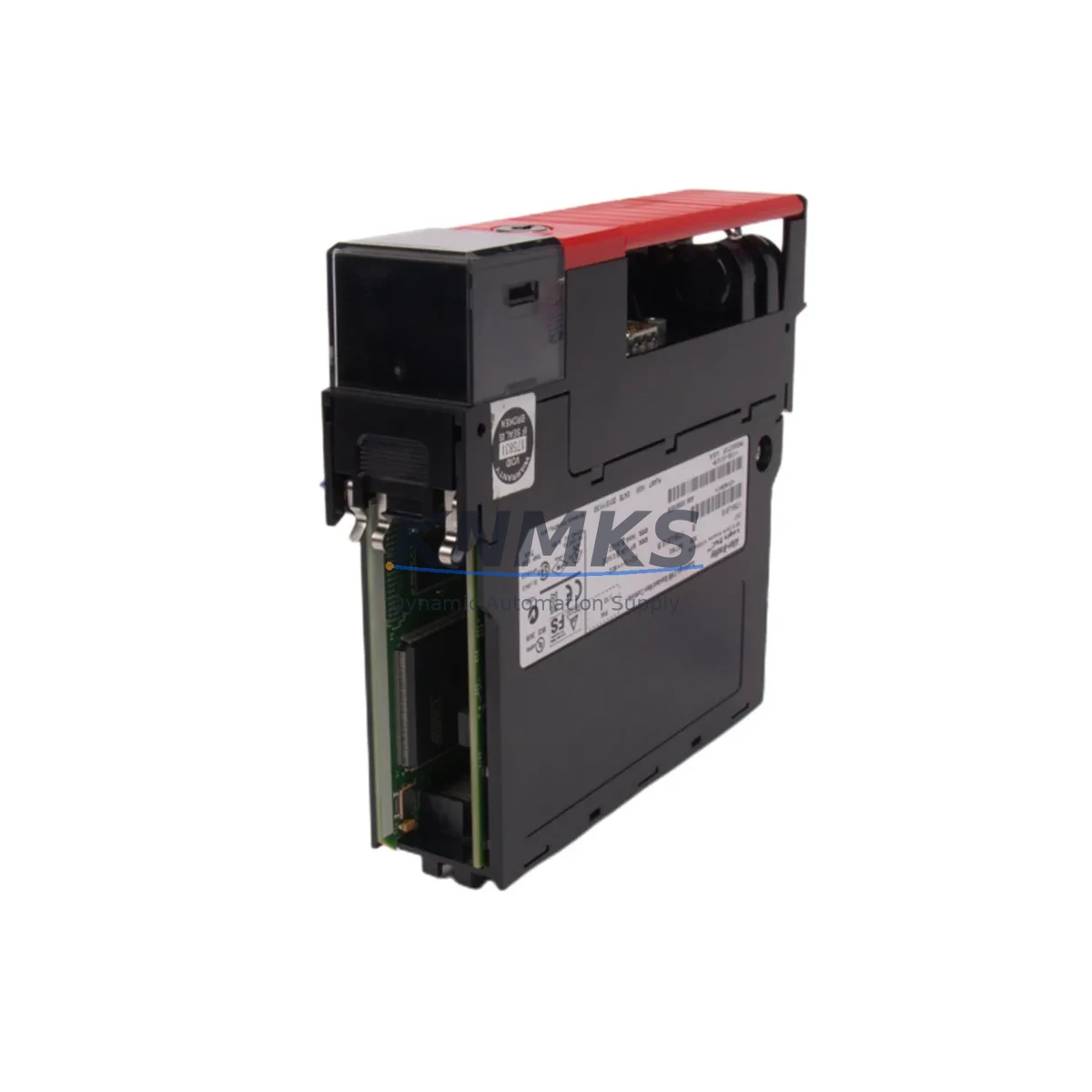
Allen-Bradley 1756-L61S Maintenance-Proven Spare Part for Factory Uptime
The Allen-Bradley 1756-L61S is a GuardLogix Safety PLC controller designed for integrated safety and standard control within the ControlLogix platform. As a critical node in safety-rated automation architectures, this module governs SIL 2 and SIL 3 safety functions while simultaneously executing standard ladder logic, function block, and structured text programs. For maintenance engineers managing aging ControlLogix cabinets, holding a verified 1756-L61S spare is not optional — it is a fundamental element of any credible plant uptime strategy.
The 1756-L61S operates with 2MB of user memory and communicates natively over the ControlLogix backplane, supporting seamless integration with existing 1756-series I/O modules, communication adapters, and power supplies. Its dual-processor architecture separates safety and standard tasks, ensuring that a fault in the standard control path does not compromise the safety function — a design requirement in chemical, oil and gas, pharmaceutical, and heavy manufacturing environments where SIL-rated shutdowns are mandatory.
When a 1756-L61S fails in service, the impact extends beyond a single controller. The entire safety zone it governs — including all associated safety I/O, interlocks, and emergency stop circuits — goes offline. Rapid replacement with a pre-tested, original spare is the only path to controlled restart. Our stock is sourced from authorized channels, individually tested prior to dispatch, and covered by a support terms confirmed by quotation, giving procurement engineers the confidence to commit to long-term spare parts agreements.
Spare Maintenance Table
| Parameter | Specification |
|---|---|
| Part Number | 1756-L61S |
| Brand | Allen-Bradley (Rockwell Automation) |
| Series | GuardLogix / ControlLogix 1756 |
| Controller Type | Safety PLC (Integrated Safety + Standard Control) |
| Safety Rating | SIL 2 / SIL 3 (IEC 61508), PLe (ISO 13849) |
| User Memory | 2 MB |
| Backplane Compatibility | ControlLogix 1756 chassis (all slot counts) |
| Communication | EtherNet/IP via 1756-ENBT / 1756-EN2T adapters |
| Programming Software | Studio 5000 Logix Designer v21+ |
| Power Supply Compatibility | 1756-PA72, 1756-PB72, 1756-PA75, 1756-PB75 |
| Operating Temperature | 0°C to 60°C |
| Certifications | UL, CE, TÜV Rheinland |
| Origin | USA |
| Support terms | 12 Months |
| Condition | Original, Pre-tested before dispatch |
| Maintenance Recommendation | Inspect firmware version on replacement; verify safety task configuration matches plant SIS documentation |
Maintenance Planning for Continuous Operation
Replacing a 1756-L61S in a live ControlLogix cabinet is rarely an isolated task. Maintenance engineers who have performed this procedure in the field consistently report that adjacent components require simultaneous inspection to prevent repeat failures and ensure a clean restart.
Begin with the 1756-PA72 or 1756-PB72 chassis power supply. A degraded power supply is one of the most common root causes of unexpected PLC controller faults. Measure output voltage under load before installing the replacement controller. If ripple or voltage sag is detected, replace the power supply concurrently — installing a new 1756-L61S into a failing power environment will shorten its service life immediately.
Next, audit the 1756-EN2T EtherNet/IP communication module. The 1756-L61S relies on this adapter for all network-based I/O, HMI polling, and remote programming access. A faulty EN2T will cause the replacement controller to appear unresponsive on the network, leading to misdiagnosis and extended downtime. Confirm link status, IP assignment, and firmware revision before declaring the controller swap complete.
Safety I/O modules — particularly the 1791DS-IB8XOBV4 or 1734-IB8S safety I/O modules — must be verified for correct configuration after a controller replacement. Safety I/O retains its own safety signature, and a mismatch between the new controller’s safety task and the I/O safety signature will prevent the safety system from entering run mode. Always compare the safety signature in Studio 5000 against the plant’s validated SIS configuration document.
For cabinets with operator interface panels, inspect the PanelView Plus 7 HMI connection to the replacement controller. HMI applications referencing the controller by IP address or tag path may require a connection reset or path update after the swap. Confirm that all alarm displays and status indicators are functioning correctly before releasing the line.
Finally, check terminal block wiring and field device connections on all I/O modules in the chassis. Loose terminations are frequently disturbed during controller removal and reinsertion. A systematic torque check of all terminal screws takes less than 20 minutes and eliminates a common source of intermittent faults in the days following a controller replacement.
Procurement engineers building annual spare parts budgets for ControlLogix-based safety systems should consider stocking the 1756-L61S alongside the 1756-EN2T communication adapter and at least one chassis power supply as a minimum viable spare set. This combination covers the three most failure-prone components in a GuardLogix cabinet and supports a complete cold-start recovery without waiting for emergency procurement.
Site Replacement Workflow
Step 1 — Pre-replacement documentation: Export the current project from Studio 5000 and save a timestamped backup to a secure network location. Record the firmware revision of the outgoing 1756-L61S. Confirm that the replacement unit carries the same or a compatible firmware version before proceeding.
Step 2 — Safety system isolation: Follow the plant’s Lockout/Tagout (LOTO) procedure for the affected safety zone. Notify the control room and obtain a permit to work. Do not attempt a hot-swap of the 1756-L61S — this controller does not support live insertion under safety task execution.
Step 3 — Physical replacement: Remove the faulty controller from the chassis slot. Insert the replacement 1756-L61S and secure the latch. Restore chassis power and confirm that the controller enters the correct boot state (STATUS LED cycling through initialization sequence).
Step 4 — Program download and safety signature verification: Connect via Studio 5000, download the validated project, and verify that the safety task signature matches the plant’s approved SIS documentation. Do not modify the safety task during this procedure — any change requires a full safety validation cycle.
Step 5 — Functional test and handover: Execute the site acceptance test checklist for the affected safety zone. Confirm all safety I/O, interlocks, and emergency stop circuits respond correctly. Document the replacement in the plant’s maintenance management system (CMMS) and update the spare parts inventory record.
This workflow is applicable to legacy 1756-L61S installations being replaced by the same model. For sites considering migration to the 1756-L71S or 1756-L83ES, consult the Rockwell Automation migration guide and engage your system integrator before proceeding — safety system migrations require re-validation under IEC 61508 or ISO 13849.
Spare Parts Support FAQ
Q: Is the 1756-L61S still available as a new original part, or only as refurbished stock?
A: We supply original Allen-Bradley 1756-L61S units sourced from authorized distribution channels. Each unit is individually tested and verified before dispatch. Refurbished or remanufactured units are not offered. If original new stock is unavailable for a specific firmware revision, we will advise you in advance and confirm compatibility before shipment.
Q: How do I verify compatibility between the replacement 1756-L61S and my existing ControlLogix chassis and I/O configuration?
A: The 1756-L61S is compatible with all standard ControlLogix 1756-series chassis. Compatibility is primarily governed by firmware revision and Studio 5000 project version. Provide your current firmware revision and Studio 5000 version when ordering, and our technical team will confirm compatibility before the unit is dispatched.
Q: What does the support terms confirmed by quotation cover, and what is the claims process?
A: The support terms confirmed by quotation cover manufacturing defects and functional failures under normal operating conditions. It does not cover damage resulting from incorrect installation, overvoltage events, or unauthorized modification. To initiate a support terms claim, contact admin@knmks.com with the order reference, fault description, and site installation details. Replacement units are dispatched after fault verification.
Q: Can you support long-term supply agreements for the 1756-L61S as part of an annual maintenance contract?
A: Yes. We support long-term supply agreements for critical spare parts including the 1756-L61S. Annual contracts include reserved stock allocation, priority dispatch, fixed pricing, and dedicated technical support. Contact our team at admin@knmks.com or +86 18359268345 to discuss your site’s annual maintenance spare parts requirements.
© 2026 KNMKS. All rights reserved. Original Source: https://knmks.com | Contact: admin@knmks.com | +86 18359268345
Product Identification
- Brand / Ecosystem
-
Allen-Bradley
Allen-Bradley - Model / Series
-
1756-L61S
ControlLogix Series - Product Family
- PLCs & Controllers
- Availability Status
- Available on request after model and quantity confirmation
- Inquiry Type
- B2B RFQ, replacement inquiry and project spare-part request
- Pre-Quote Check
- Exact SKU, brand, series, quantity, nameplate photos and destination country are checked before quotation
System Path
Where this product fits in the KNMKS automation structure.
Specification & Inquiry Focus
- Control platform
- PLC, PAC and modular controllers
- Common needs
- CPU, rack, power and I/O expansion
- Project support
- Replacement, cabinet build and maintenance
Buyer Confirmation
Information KNMKS checks before replying.
- Exact model
- 1756-L61S
- Brand / ecosystem
- Allen-Bradley
- Product family
- PLCs & Controllers
- Application note
- Replacement, maintenance, project build or spare-part list
- Useful photos
- Nameplate, installed unit, cabinet layout or connector side
- Delivery details
- Quantity, destination country and target schedule
Document Support
Files and notes can be confirmed during quotation.
- Product photos or nameplate confirmation when available
- Packing and delivery notes before quotation confirmation
- Support scope and delivery terms confirmed per inquiry
- Export document coordination for qualified B2B requests
Inquiry Support
- Model cross-checking before quotation
- CPU, power, rack and expansion module matching
- Support for replacement and project inquiry
What to Send Us
- Brand and exact model number: Allen-Bradley 1756-L61S
- Quantity and required delivery time
- Application, replacement requirement or nameplate photo
- Destination country and shipping preference
RFQ Preparation
This is a product inquiry page built for RFQ communication.
Fast Model Check
Send this model to KNMKS for confirmation.
Include quantity, destination country and photos if this is a maintenance replacement. The inquiry will be saved with a reference number after submission.
Brand & Compatibility Note
KNMKS displays automation product information for well-known industrial brand ecosystems and compatible replacement references. Brand names are used for product identification and compatibility reference only; final availability and commercial terms are confirmed per quotation.
 Manufacturing
 Machine Tools
 Packaging
 Energy & Power



 HMI & Displays
 Servo Systems
 Variable Frequency Drives
 Sensors