
Overview
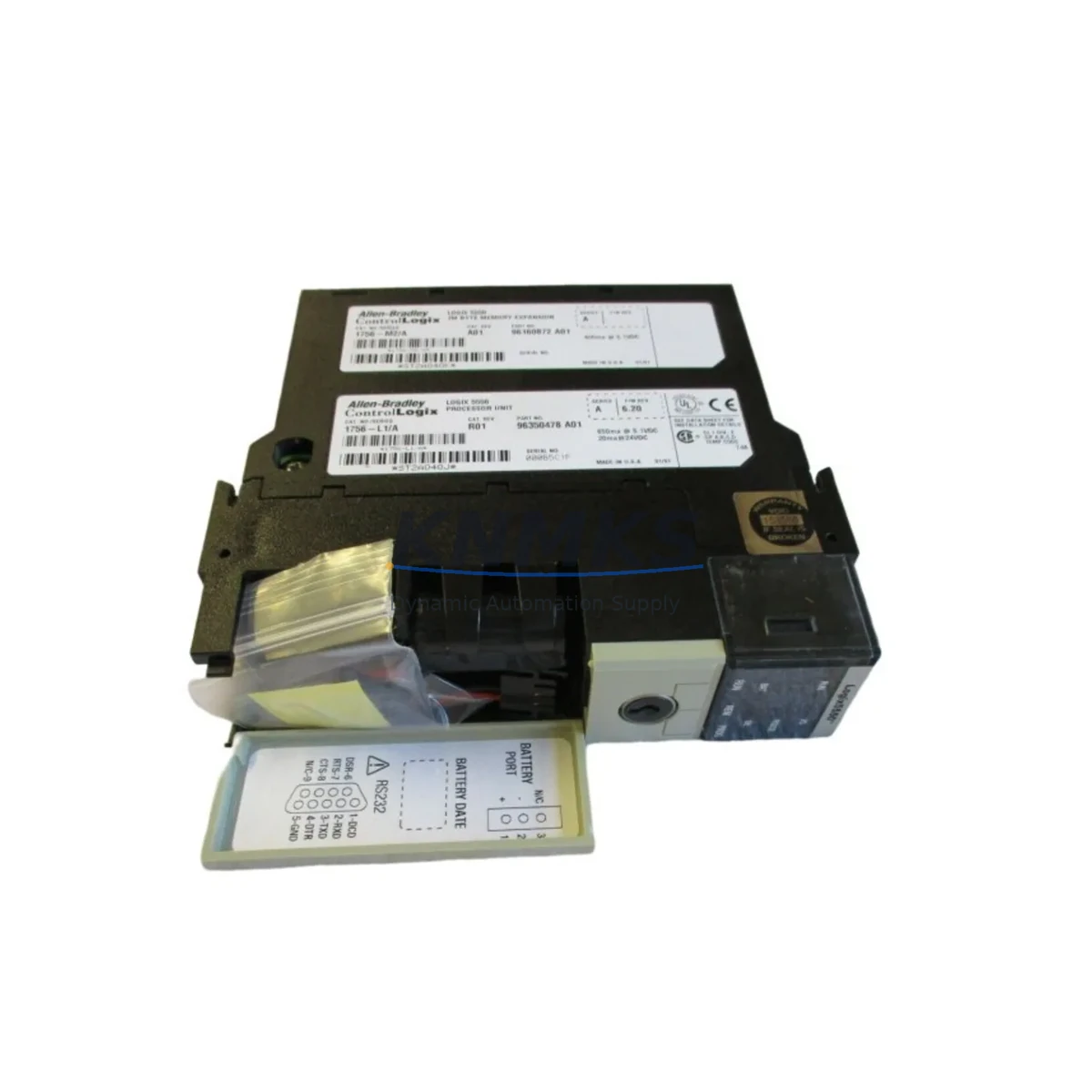
Allen-Bradley 1756-L1M2 Migration-Ready Processor for Legacy Control Systems
The Allen-Bradley 1756-L1M2 is a ControlLogix series programmable logic controller processor designed for industrial automation environments where legacy system continuity, retrofit compatibility, and long-term parts availability are critical operational priorities. As a migration-ready replacement unit, the 1756-L1M2 addresses the growing demand from plant engineers and maintenance teams who must modernize aging control infrastructure without triggering full-system shutdowns or rewriting established ladder logic programs.
The 1756-L1M2 slots directly into the 1756 ControlLogix chassis backplane, maintaining physical and electrical compatibility with existing rack configurations. Engineers migrating from earlier ControlLogix processor variants — including the 1756-L1 and 1756-L55 families — will find that the 1756-L1M2 preserves the standard 1756 backplane interface, eliminating the need for chassis replacement in most retrofit scenarios. Before installation, technicians should verify available backplane slot positions, confirm that the chassis power supply (such as the 1756-PA72 or 1756-PB72) provides sufficient current capacity for the new processor, and document all existing module addresses to prevent address conflicts during commissioning.
Program migration is a central concern in any ControlLogix processor swap. The 1756-L1M2 supports RSLogix 5000 and Studio 5000 Logix Designer project files, allowing engineers to upload existing programs from the outgoing processor prior to removal. It is strongly recommended to perform a full program backup, verify firmware revision compatibility between the project file and the replacement processor, and confirm that any Add-On Instructions (AOIs) or User-Defined Data Types (UDTs) are preserved intact. Firmware upgrades should be applied using ControlFLASH before the processor is placed into service to ensure compatibility with the existing project revision.
Communication link continuity is another key consideration. The 1756-L1M2 supports EtherNet/IP connectivity through a separately installed 1756-ENBT or 1756-EN2T communication module mounted in the same chassis. If the existing system relies on ControlNet or DeviceNet, the corresponding 1756-CN2 or 1756-DNB bridge modules must remain in place and their network parameters re-verified after processor replacement. I/O module addressing, particularly for 1756-series analog and digital I/O modules already installed in the rack, should be confirmed against the program’s I/O tree before the system is returned to automatic mode.
For HMI integration, existing FactoryTalk View SE or ME panel configurations linked to the outgoing processor should be tested against the replacement unit using offline simulation before live cutover. Tag database exports from the original processor project can be imported into the HMI configuration to minimize screen rebuild time. Signal isolators installed between field devices and I/O modules — particularly in high-noise environments — should be inspected and re-calibrated as part of the retrofit procedure to ensure signal integrity is maintained post-migration.
Physical installation space within the control cabinet should be confirmed prior to ordering. The 1756-L1M2 occupies a single slot in the 1756 chassis and does not require additional mounting hardware beyond the standard backplane connector. Cabinet thermal management, including existing cooling fans and ventilation clearances, should be reviewed if the replacement processor operates at a different power dissipation rating than the outgoing unit.
All units supplied by KNMKS are subject to pre-shipment functional testing, including power-on verification and backplane interface checks, before dispatch. Each 1756-L1M2 is covered by a support terms confirmed by quotation against manufacturing defects and operational failure under normal industrial service conditions. Inventory is maintained availability confirmed by RFQ for prompt dispatch to minimize plant downtime during unplanned processor failures.
Migration Compatibility Table
| Parameter | Details |
|---|---|
| SKU | 1756-L1M2 |
| Series | Allen-Bradley ControlLogix 1756 |
| Backplane Interface | 1756 ControlLogix standard backplane — compatible with all 1756-series chassis |
| Chassis Compatibility | 1756-A4, 1756-A7, 1756-A10, 1756-A13, 1756-A17 and equivalent |
| Communication Modules | Works with 1756-ENBT, 1756-EN2T (EtherNet/IP); 1756-CN2 (ControlNet); 1756-DNB (DeviceNet) |
| Programming Software | RSLogix 5000 / Studio 5000 Logix Designer |
| Firmware Upgrade Tool | ControlFLASH — must be applied before commissioning |
| Common Replacement For | 1756-L1, 1756-L55, earlier 1756-L1Mx variants |
| Installation Footprint | Single backplane slot, standard 1756 form factor |
| Commissioning Notes | Verify I/O addresses, HMI tag links, and communication node IDs before returning to auto |
| Support terms | 12 months from date of shipment |
Retrofit Planning for Existing Automation Systems
A successful ControlLogix retrofit begins well before the replacement processor arrives on site. The engineering team should compile a full inventory of all modules installed in the affected chassis, including digital and analog I/O modules such as the 1756-IB16 and 1756-OB16, communication modules, and any specialty function modules. The chassis power supply — typically a 1756-PA72 for 120/240 VAC applications — must be load-checked to confirm it can support the current draw of the 1756-L1M2 alongside all co-installed modules.
Terminal wiring documentation is essential. Field wiring connected to I/O modules should be photographed and labeled before any module is disturbed. If the retrofit involves replacing I/O modules alongside the processor, terminal block wiring diagrams must be updated to reflect any pin-out differences between old and new modules. Signal isolators between field transmitters and analog input modules should be verified for correct range and output signal type.
The programming cable — typically a 1784-U2DHP USB-to-DH+ adapter or a standard Ethernet patch cable for EtherNet/IP-connected processors — should be prepared and tested before the maintenance window begins. A laptop with the correct version of Studio 5000 Logix Designer installed and licensed must be available on site. The existing program should be uploaded from the outgoing processor and saved to at least two separate storage locations before the processor is removed from the chassis.
If the system includes a remote I/O rack connected via a 1756-CN2 ControlNet module, the ControlNet network schedule must be re-verified after the processor swap, as the new processor may require a network reschedule using RSNetWorx for ControlNet. DeviceNet devices connected through a 1756-DNB bridge module should be confirmed online and fault-free before the system is returned to production.
Downtime Control During System Migration
Minimizing unplanned downtime during a processor migration requires a structured pre-outage preparation protocol. The maintenance team should schedule the processor swap during a planned production break and prepare a rollback plan — retaining the outgoing processor in a known-good state until the replacement unit has been verified in service for a defined stabilization period.
Before powering down the chassis, the existing program should be uploaded and verified against the last known-good backup. All I/O module force conditions should be cleared and documented. The processor keyswitch should be moved to PROG mode before removal to prevent inadvertent output activation during the swap procedure.
After installing the 1756-L1M2 and applying the correct firmware revision via ControlFLASH, the program should be downloaded and the I/O tree verified online before switching to RUN mode. Communication links to HMI panels, SCADA systems, and remote I/O racks should be confirmed active and fault-free. A controlled test of critical output circuits — using the force function in Studio 5000 — is recommended before returning the system to automatic operation.
KNMKS provides pre-shipment tested units with documented power-on results, reducing the risk of receiving a non-functional replacement during a time-critical outage. Express dispatch options are available for emergency breakdown situations to further reduce total downtime exposure.
Retrofit Support FAQ
Q: Is the 1756-L1M2 a direct drop-in replacement for the 1756-L1?
A: The 1756-L1M2 is physically and electrically compatible with the 1756 ControlLogix backplane and occupies the same single-slot footprint as the 1756-L1. Program compatibility depends on the firmware revision of the project file; a firmware upgrade via ControlFLASH may be required before downloading the existing program to the replacement processor.
Q: What pre-shipment testing does KNMKS perform on the 1756-L1M2?
A: Each unit undergoes power-on verification and backplane interface functional testing before dispatch. Test results are documented and available upon request. All units are covered by a support terms confirmed by quotation from the date of shipment.
Q: Do I need to replace the chassis or power supply when installing the 1756-L1M2?
A: In most cases, no. The 1756-L1M2 is compatible with all standard 1756-series chassis and existing 1756-PA72 or 1756-PB72 power supplies, provided the power supply has sufficient current capacity for the installed module set. A load calculation should be performed before installation.
Q: How quickly can KNMKS supply the 1756-L1M2 for an emergency breakdown?
A: KNMKS maintains stock inventory of the 1756-L1M2 for prompt dispatch. Contact admin@knmks.com or call +86 18359268345 to confirm current availability and arrange expedited shipping for breakdown situations.
© 2026 KNMKS. All rights reserved.
Original Source: https://knmks.com
Contact: admin@knmks.com | +86 18359268345
Product Identification
- Brand / Ecosystem
-
Allen-Bradley
Allen-Bradley - Model / Series
-
1756-L1M2
ControlLogix Series - Product Family
- PLCs & Controllers
- Availability Status
- Available on request after model and quantity confirmation
- Inquiry Type
- B2B RFQ, replacement inquiry and project spare-part request
- Pre-Quote Check
- Exact SKU, brand, series, quantity, nameplate photos and destination country are checked before quotation
System Path
Where this product fits in the KNMKS automation structure.
Specification & Inquiry Focus
- Control platform
- PLC, PAC and modular controllers
- Common needs
- CPU, rack, power and I/O expansion
- Project support
- Replacement, cabinet build and maintenance
Buyer Confirmation
Information KNMKS checks before replying.
- Exact model
- 1756-L1M2
- Brand / ecosystem
- Allen-Bradley
- Product family
- PLCs & Controllers
- Application note
- Replacement, maintenance, project build or spare-part list
- Useful photos
- Nameplate, installed unit, cabinet layout or connector side
- Delivery details
- Quantity, destination country and target schedule
Document Support
Files and notes can be confirmed during quotation.
- Product photos or nameplate confirmation when available
- Packing and delivery notes before quotation confirmation
- Support scope and delivery terms confirmed per inquiry
- Export document coordination for qualified B2B requests
Inquiry Support
- Model cross-checking before quotation
- CPU, power, rack and expansion module matching
- Support for replacement and project inquiry
What to Send Us
- Brand and exact model number: Allen-Bradley 1756-L1M2
- Quantity and required delivery time
- Application, replacement requirement or nameplate photo
- Destination country and shipping preference
RFQ Preparation
This is a product inquiry page built for RFQ communication.
Fast Model Check
Send this model to KNMKS for confirmation.
Include quantity, destination country and photos if this is a maintenance replacement. The inquiry will be saved with a reference number after submission.
Brand & Compatibility Note
KNMKS displays automation product information for well-known industrial brand ecosystems and compatible replacement references. Brand names are used for product identification and compatibility reference only; final availability and commercial terms are confirmed per quotation.
 Manufacturing
 Machine Tools
 Packaging
 Energy & Power



 HMI & Displays
 Servo Systems
 Variable Frequency Drives
 Sensors