
Overview
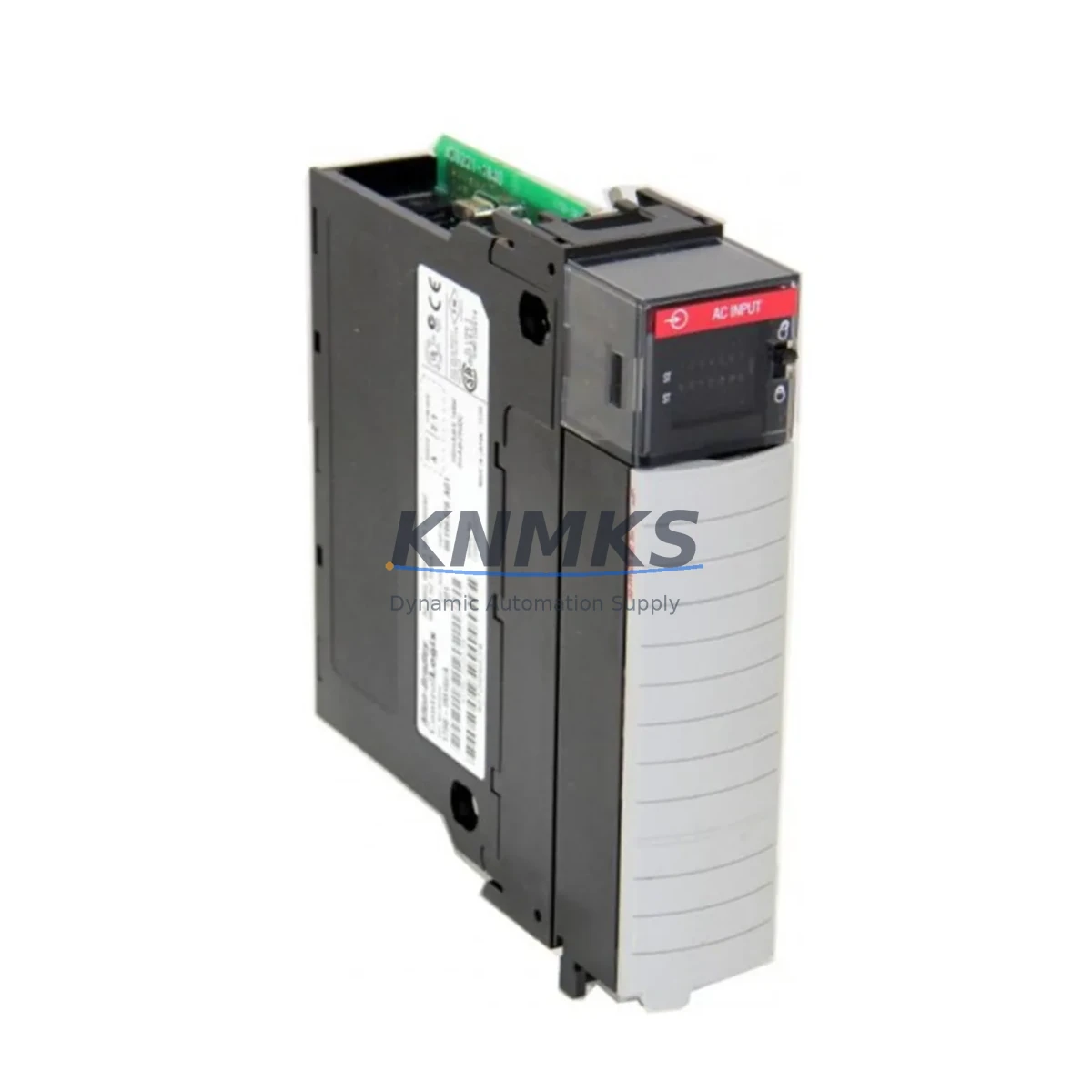
Allen-Bradley 1756-IM16I Maintenance-Proven Spare Part for Factory Uptime
The Allen-Bradley 1756-IM16I is a 16-point isolated AC digital input module designed for the ControlLogix 1756 Series platform — one of the most widely deployed programmable automation controller (PAC) architectures in discrete manufacturing, process control, and critical infrastructure environments. As a maintenance-proven spare, the 1756-IM16I supports 100–120V AC field-side inputs with full channel-to-channel isolation, making it the preferred choice for high-noise industrial environments where signal integrity is non-negotiable.
For maintenance engineers managing aging ControlLogix racks, the 1756-IM16I is a direct replacement for failed or degraded AC input modules without requiring firmware changes, rack reconfiguration, or I/O tree remapping — provided the replacement module matches the original catalog number and revision. Procurement engineers sourcing this module for MRO inventory should verify the firmware revision compatibility with the installed 1756-L series controller (e.g., 1756-L71, 1756-L73, 1756-L83E) to ensure seamless hot-swap capability in redundant or simplex configurations.
Stocking the 1756-IM16I as a critical spare reduces unplanned downtime risk in facilities where AC field devices — limit switches, proximity sensors, push-button stations, and motor starter auxiliary contacts — feed directly into the ControlLogix rack. A single failed input module can mask multiple field signals simultaneously, triggering nuisance shutdowns or, worse, silent loss of process visibility. Maintaining at least one verified spare on-site is a standard recommendation in IEC 62443-aligned maintenance programs for industrial control systems.
Spare Maintenance Table
| Parameter | Specification |
|---|---|
| Catalog Number | 1756-IM16I |
| Brand / Manufacturer | Allen-Bradley (Rockwell Automation) |
| Series | ControlLogix 1756 |
| Module Type | 16-Point Isolated AC Digital Input |
| Input Voltage Range | 74–132V AC (Nominal 100–120V AC) |
| Input Frequency | 47–63 Hz |
| Isolation | Channel-to-channel and channel-to-backplane isolated |
| Backplane Compatibility | 1756 ControlLogix chassis (all slot counts) |
| Controller Compatibility | 1756-L Series (L55, L61, L62, L63, L71, L72, L73, L83E, L85E) |
| Hot-Swap Support | Yes — module can be inserted/removed under power |
| Indicators | Per-channel LED status + module OK indicator |
| Operating Temperature | 0–60°C (32–140°F) |
| Relative Humidity | 5–95% non-condensing |
| Weight | Approx. 260 g |
| Country of Origin | United States |
| Support terms | 12 Months — tested before shipment |
| Maintenance Recommendation | Inspect wiring harness, terminal block torque, and backplane connector on replacement; verify I/O tree tag mapping in Studio 5000 before going live |
Maintenance Planning for Continuous Operation
When replacing the 1756-IM16I in a live ControlLogix cabinet, a disciplined maintenance workflow extends beyond the module swap itself. Experienced field engineers treat the replacement event as an opportunity to inspect the surrounding electrical environment and reduce the probability of repeat failures.
Begin with the 1756-PA72 or 1756-PB72 power supply feeding the chassis. AC input module failures are sometimes symptomatic of power supply ripple or voltage sag rather than module-level defects. Measure output voltage under load before condemning the 1756-IM16I. If the chassis power supply is approaching its rated service life (typically 5–7 years in continuous-duty environments), consider scheduling a proactive replacement alongside the input module.
Inspect the 1756-TBCH or 1756-TBS6H removable terminal blocks connected to the 1756-IM16I. Loose terminations, oxidized contacts, or undersized wire ferrules are common root causes of intermittent input faults that are misdiagnosed as module failures. Re-torque all terminals to the manufacturer’s specification and verify wire insulation integrity before reinstalling the wiring harness on the new module.
If the ControlLogix rack includes a 1756-EN2T or 1756-EN3TR EtherNet/IP communication module, confirm that the I/O connection to the 1756-IM16I is re-established in RSLogix 5000 or Studio 5000 after the module swap. Orphaned I/O connections can generate controller faults that delay production restart. In redundant controller configurations using the 1756-RM2 redundancy module, synchronize the primary and secondary controllers after the replacement to restore full redundancy status.
For facilities running mixed AC/DC I/O architectures, cross-check adjacent 1756-OA16I AC output modules and 1756-IB16 DC input modules in the same rack. A wiring fault on the AC input side can induce transients that stress neighboring modules. Signal isolation barriers or 1756-IF16 analog input modules sharing the same chassis should also be verified for correct operation after any AC-side maintenance activity.
Finally, update the site’s spare parts register and CMMS (Computerized Maintenance Management System) to reflect the module replacement, including the new module’s serial number, firmware revision, and installation date. This record supports support requests, future failure trend analysis, and audit readiness under ISO 55001 asset management frameworks.
Site Replacement Workflow
Step 1 — Pre-Replacement Verification: Confirm the replacement 1756-IM16I catalog number and firmware revision match the installed module. Download the existing module configuration from the controller using Studio 5000 or RSLogix 5000 and save a backup. Note the slot number and chassis address.
Step 2 — Safe Isolation: Where process conditions permit, place the controller in Program mode to inhibit output commands before removing the module. For hot-swap operations in running systems, coordinate with the process operator to acknowledge the temporary loss of input signals on the affected channels.
Step 3 — Module Removal: Disconnect the removable terminal block (RTB) from the module face. Release the module locking tab and slide the 1756-IM16I out of the chassis slot. Inspect the backplane connector on both the module and the chassis for bent pins or contamination.
Step 4 — Module Installation: Insert the replacement 1756-IM16I into the same chassis slot. The module will auto-configure from the controller’s I/O tree if the catalog number matches. Reconnect the RTB and verify terminal torque. Restore the controller to Run mode.
Step 5 — Functional Verification: Confirm all 16 input channel LEDs reflect the correct field device states. Cross-check the HMI (e.g., PanelView Plus 7 or FactoryTalk View SE) for correct signal display. Clear any controller faults generated during the swap and document the replacement in the site maintenance log.
This workflow minimizes mean time to repair (MTTR) and ensures the replacement module is fully validated before returning the system to automatic operation — a critical discipline in facilities where unplanned downtime carries significant production and safety consequences.
Spare Parts Support FAQ
Q1: Is the 1756-IM16I compatible with all ControlLogix chassis sizes?
Yes. The 1756-IM16I is compatible with all 1756 ControlLogix chassis variants — 4-slot (1756-A4), 7-slot (1756-A7), 10-slot (1756-A10), 13-slot (1756-A13), and 17-slot (1756-A17) — as well as GuardLogix and SoftLogix configurations that support standard 1756 I/O modules. No chassis-specific configuration is required; the module auto-identifies to the controller via the backplane.
Q2: How is the 1756-IM16I tested before shipment?
Each unit undergoes functional power-on testing to verify backplane communication, per-channel input detection, and LED indicator operation. Modules sourced from decommissioned systems are inspected for physical damage, connector integrity, and firmware revision before being listed as available stock. A support terms confirmed by quotation cover defects in materials and workmanship from the date of shipment.
Q3: What is the recommended inventory strategy for the 1756-IM16I in a multi-rack facility?
For facilities operating three or more ControlLogix racks with 1756-IM16I modules installed, maintaining a minimum of one spare per five installed modules is a common MRO benchmark. High-criticality lines — where a single rack failure triggers a full production stop — warrant a 1:3 or higher spare ratio. Coordinate with your procurement team to establish a replenishment trigger based on consumption history and supplier lead time.
Q4: Can the 1756-IM16I replace older discontinued AC input modules in the same series?
The 1756-IM16I is the current catalog designation for the 16-point isolated AC input function in the ControlLogix platform. It is the direct successor to earlier revisions of the same catalog number. For legacy systems using modules that predate the current revision, verify the firmware compatibility note in the module’s release notes (available from Rockwell Automation’s product compatibility and download center) before deploying the replacement in a production environment.
—
© 2026 KNMKS. All rights reserved.
Original Source: https://knmks.com
Contact: admin@knmks.com | +86 18359268345
Product Identification
- Brand / Ecosystem
-
Allen-Bradley
Allen-Bradley - Model / Series
-
1756-IM16I
ControlLogix Series - Product Family
- PLCs & Controllers
- Availability Status
- Available on request after model and quantity confirmation
- Inquiry Type
- B2B RFQ, replacement inquiry and project spare-part request
- Pre-Quote Check
- Exact SKU, brand, series, quantity, nameplate photos and destination country are checked before quotation
System Path
Where this product fits in the KNMKS automation structure.
Specification & Inquiry Focus
- Control platform
- PLC, PAC and modular controllers
- Common needs
- CPU, rack, power and I/O expansion
- Project support
- Replacement, cabinet build and maintenance
Buyer Confirmation
Information KNMKS checks before replying.
- Exact model
- 1756-IM16I
- Brand / ecosystem
- Allen-Bradley
- Product family
- PLCs & Controllers
- Application note
- Replacement, maintenance, project build or spare-part list
- Useful photos
- Nameplate, installed unit, cabinet layout or connector side
- Delivery details
- Quantity, destination country and target schedule
Document Support
Files and notes can be confirmed during quotation.
- Product photos or nameplate confirmation when available
- Packing and delivery notes before quotation confirmation
- Support scope and delivery terms confirmed per inquiry
- Export document coordination for qualified B2B requests
Inquiry Support
- Model cross-checking before quotation
- CPU, power, rack and expansion module matching
- Support for replacement and project inquiry
What to Send Us
- Brand and exact model number: Allen-Bradley 1756-IM16I
- Quantity and required delivery time
- Application, replacement requirement or nameplate photo
- Destination country and shipping preference
RFQ Preparation
This is a product inquiry page built for RFQ communication.
Fast Model Check
Send this model to KNMKS for confirmation.
Include quantity, destination country and photos if this is a maintenance replacement. The inquiry will be saved with a reference number after submission.
Brand & Compatibility Note
KNMKS displays automation product information for well-known industrial brand ecosystems and compatible replacement references. Brand names are used for product identification and compatibility reference only; final availability and commercial terms are confirmed per quotation.
 Manufacturing
 Machine Tools
 Packaging
 Energy & Power



 HMI & Displays
 Servo Systems
 Variable Frequency Drives
 Sensors