
Overview
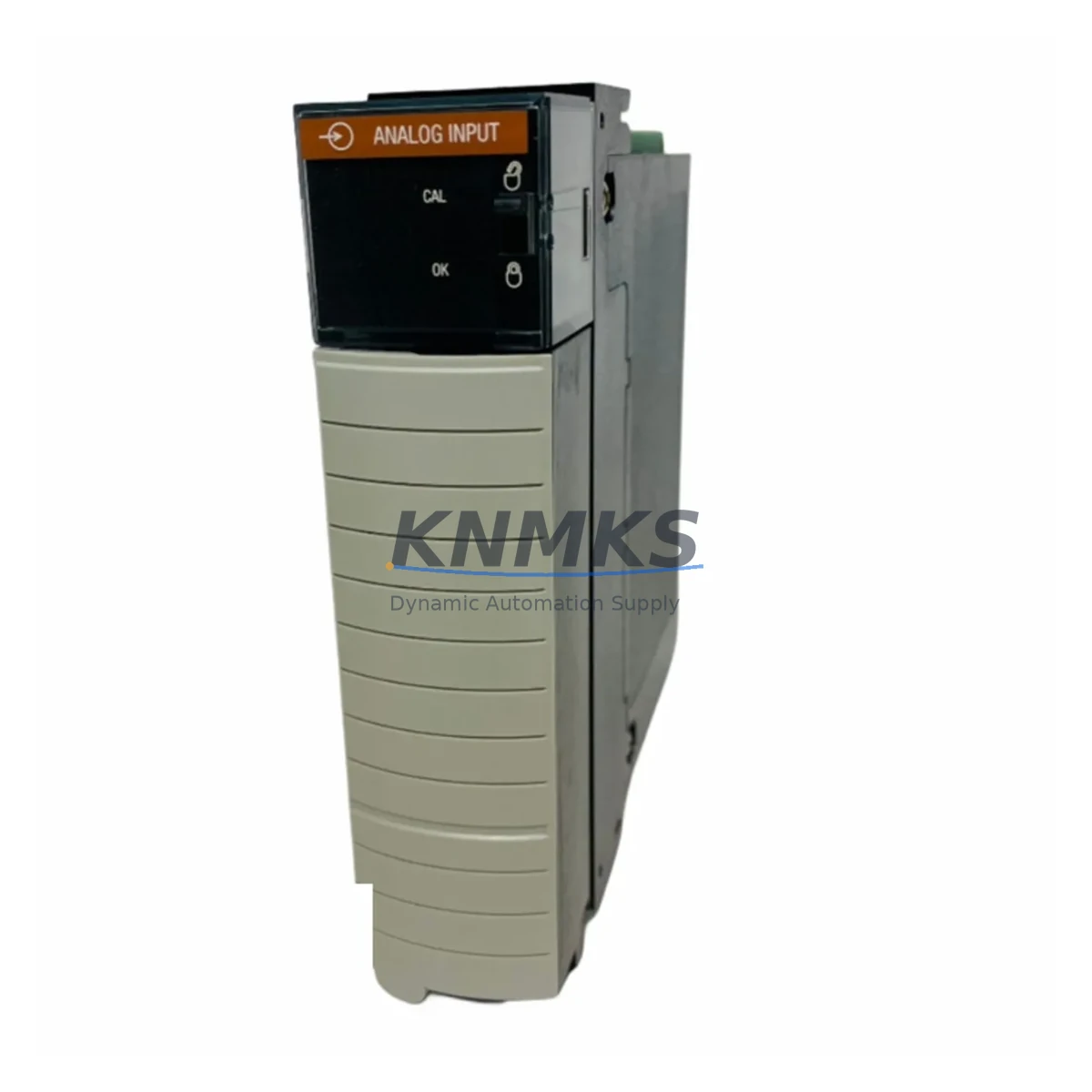
Allen-Bradley 1756-IF8 Maintenance-Proven Spare Part for Factory Uptime
The Allen-Bradley 1756-IF8 is an 8-channel analog input module designed for the ControlLogix 1756 backplane platform. As a critical signal acquisition component in process control and discrete manufacturing environments, the 1756-IF8 converts field-level analog signals (voltage or current) into digital values processed by the ControlLogix CPU. Maintaining a verified spare of the 1756-IF8 is a foundational element of any industrial maintenance strategy aimed at minimizing unplanned downtime and protecting continuous production.
For maintenance engineers managing aging ControlLogix systems, the 1756-IF8 represents one of the highest-priority modules to stock. Its role in acquiring process variables — temperature, pressure, flow, and level — means that a single module failure can halt an entire production line or trigger a process safety shutdown. Procurement engineers sourcing replacement units must verify firmware revision compatibility, backplane slot assignment, and I/O configuration files before committing to a purchase. Our units are sourced, inspected, and shipped with a support terms confirmed by quotation to support both emergency replacement and planned annual maintenance cycles.
Spare Maintenance Table
| Part Number | 1756-IF8 |
| Brand | Allen-Bradley (Rockwell Automation) |
| Series | ControlLogix 1756 |
| Module Type | 8-Channel Analog Input Module |
| Input Signal Range | ±10 V DC / 0–20 mA / 4–20 mA (configurable per channel) |
| Resolution | 16-bit |
| Backplane Compatibility | 1756 ControlLogix Chassis (all standard slot widths) |
| Communication | ControlLogix backplane (1756 series) |
| Power Consumption | Backplane-powered; no external 24 VDC required |
| Operating Temperature | 0 °C to 60 °C |
| Certifications | UL, CE, cUL |
| Origin | United States |
| Support terms | 12 Months — Tested, inspected, and ready to ship |
| Maintenance Recommendation | Inspect annually; verify channel calibration and wiring integrity during scheduled shutdowns |
Maintenance Planning for Continuous Operation
When planning a replacement or inspection of the 1756-IF8, maintenance engineers should treat the module as part of a broader analog signal chain. A fault in the 1756-IF8 rarely occurs in isolation — field wiring degradation, sensor drift, or power supply instability often contribute to module stress or premature failure. During any scheduled replacement, the following components in the same control cabinet or electrical loop should be inspected simultaneously:
The 1756-PA75 or 1756-PB75 ControlLogix power supply module should be tested for output voltage stability, as undervoltage conditions on the backplane can cause analog input modules to report erratic readings or fail entirely. Alongside the power supply, the 1756-A13 or equivalent ControlLogix chassis backplane should be inspected for slot connector wear, especially in high-vibration environments.
Field-side wiring connected to the 1756-IF8’s terminal block should be checked for insulation integrity, shield grounding continuity, and correct shielding termination at the panel earth bar. In 4–20 mA loop configurations, the loop power supply — typically a dedicated 24 VDC rail — must be verified for ripple and load regulation. A degraded loop supply is a common root cause of intermittent analog input faults that are incorrectly attributed to the module itself.
For systems using signal isolators between field transmitters and the 1756-IF8, components such as the MTL5541 or equivalent DIN-rail signal isolators should be tested for output accuracy and isolation resistance. In legacy installations, aging isolators can introduce offset errors that appear as module calibration drift. Additionally, the 1756-L71 or current ControlLogix L-series CPU should be checked for firmware revision compatibility with the 1756-IF8’s module definition file (AOP) to prevent configuration mismatch after replacement.
Terminal blocks and field wiring ferrules connected to the 1756-IF8 should be re-torqued to specification during any planned maintenance window. Loose terminations in analog signal circuits are a leading cause of noise-induced measurement errors. Where fused terminal blocks are used in the analog input circuit, fuse continuity should be verified and fuses replaced as part of the annual maintenance cycle.
Site Replacement Workflow
Step 1 — Pre-Replacement Verification: Before removing the 1756-IF8, export the current module configuration from Studio 5000 Logix Designer, including all channel scaling, filter settings, and alarm thresholds. Confirm the replacement unit’s catalog number and series letter match the installed module. Verify that the replacement unit has been tested and that its firmware is compatible with the installed CPU firmware revision.
Step 2 — Safe Isolation: Place the ControlLogix controller in Program mode via the keyswitch or RSLogix/Studio 5000. Notify the process control team and DCS operators of the planned module swap. De-energize field instruments connected to the affected channels where process safety permits. Do not remove the module under live backplane power unless the chassis supports hot-swap for this module type.
Step 3 — Module Swap: Remove the 1756-IF8 by pressing the top and bottom locking tabs and sliding the module out of the chassis slot. Insert the replacement 1756-IF8 into the same slot. The ControlLogix backplane will automatically detect the new module. If the controller is in Run mode with inhibit disabled, the module will be configured automatically from the stored project file.
Step 4 — Post-Replacement Validation: Return the controller to Run mode and verify that all 8 analog input channels are reporting expected process values. Compare live readings against field instrument local indicators to confirm calibration accuracy. Check the controller’s fault log for any module-related diagnostic faults. Document the replacement in the site maintenance log, including the replaced module’s serial number and the date of installation.
Step 5 — Spare Parts Replenishment: After consuming a spare 1756-IF8 from inventory, initiate a replenishment order immediately to maintain minimum stock levels. For facilities operating multiple ControlLogix chassis, a minimum of one spare 1756-IF8 per five installed units is a widely adopted industry benchmark for analog input modules in continuous process environments.
Spare Parts Support FAQ
Q1: Is this 1756-IF8 an original Allen-Bradley unit, and how is it tested before shipment?
Yes. All 1756-IF8 units supplied by KNMKS are original Allen-Bradley components sourced through verified industrial supply channels. Each unit undergoes functional testing prior to shipment, including backplane communication verification and analog channel signal integrity checks. A support terms confirmed by quotation is provided from the date of shipment, covering manufacturing defects and functional failures under normal operating conditions.
Q2: What ControlLogix chassis and CPU revisions is the 1756-IF8 compatible with?
The 1756-IF8 is compatible with all standard 1756 ControlLogix chassis, including the 1756-A4, 1756-A7, 1756-A10, 1756-A13, and 1756-A17. It is supported by ControlLogix L-series CPUs from the 1756-L55 through the current 1756-L8x generation when the correct Add-On Profile (AOP) is installed in Studio 5000. Customers should confirm the AOP version compatibility with their installed CPU firmware before deployment.
Q3: Can KNMKS support long-term supply of the 1756-IF8 for multi-year maintenance contracts?
Yes. KNMKS maintains ongoing inventory of the 1756-IF8 and can support blanket purchase orders and scheduled delivery programs for facilities requiring guaranteed spare parts availability over 12–36 month horizons. Long-term supply agreements include fixed pricing, priority allocation, and dedicated account support to eliminate procurement risk for critical spare parts.
Q4: What is the recommended inventory strategy for the 1756-IF8 in a multi-chassis ControlLogix installation?
For facilities with three or more ControlLogix chassis using the 1756-IF8, maintaining a minimum of two spare units on-site is recommended. For critical process applications where analog input failure triggers a safety shutdown, a hot-standby spare stored in the control room is advisable. Annual inventory audits should verify that stored spares have not exceeded their recommended storage life and that their firmware remains compatible with the installed system.
© 2026 KNMKS. All rights reserved.
Original Source: https://knmks.com
Contact: admin@knmks.com | +86 18359268345
Product Identification
- Brand / Ecosystem
-
Allen-Bradley
Allen-Bradley - Model / Series
-
1756-IF8
ControlLogix Series - Product Family
- PLCs & Controllers
- Availability Status
- Available on request after model and quantity confirmation
- Inquiry Type
- B2B RFQ, replacement inquiry and project spare-part request
- Pre-Quote Check
- Exact SKU, brand, series, quantity, nameplate photos and destination country are checked before quotation
System Path
Where this product fits in the KNMKS automation structure.
Specification & Inquiry Focus
- Control platform
- PLC, PAC and modular controllers
- Common needs
- CPU, rack, power and I/O expansion
- Project support
- Replacement, cabinet build and maintenance
Buyer Confirmation
Information KNMKS checks before replying.
- Exact model
- 1756-IF8
- Brand / ecosystem
- Allen-Bradley
- Product family
- PLCs & Controllers
- Application note
- Replacement, maintenance, project build or spare-part list
- Useful photos
- Nameplate, installed unit, cabinet layout or connector side
- Delivery details
- Quantity, destination country and target schedule
Document Support
Files and notes can be confirmed during quotation.
- Product photos or nameplate confirmation when available
- Packing and delivery notes before quotation confirmation
- Support scope and delivery terms confirmed per inquiry
- Export document coordination for qualified B2B requests
Inquiry Support
- Model cross-checking before quotation
- CPU, power, rack and expansion module matching
- Support for replacement and project inquiry
What to Send Us
- Brand and exact model number: Allen-Bradley 1756-IF8
- Quantity and required delivery time
- Application, replacement requirement or nameplate photo
- Destination country and shipping preference
RFQ Preparation
This is a product inquiry page built for RFQ communication.
Fast Model Check
Send this model to KNMKS for confirmation.
Include quantity, destination country and photos if this is a maintenance replacement. The inquiry will be saved with a reference number after submission.
Brand & Compatibility Note
KNMKS displays automation product information for well-known industrial brand ecosystems and compatible replacement references. Brand names are used for product identification and compatibility reference only; final availability and commercial terms are confirmed per quotation.
 Manufacturing
 Machine Tools
 Packaging
 Energy & Power



 HMI & Displays
 Servo Systems
 Variable Frequency Drives
 Sensors